TrustRadius: an HG Insights company

Save this comparison

Save this comparison

Add Product

Recommended Comparisons

    Overview
    ProductRatingMost Used ByProduct SummaryStarting Price

    Lightning Tools Data Viewer

    Score9.1 out of 10
    Mid-Size Companies (51-1,000 employees)
    The Data Viewer provides data visualization in the form of reports or charts that can be created and customized to suit a business's needs. Silos of data exist in most organizations and yet contain valuable insights into how well the organization is performing and where action is needed. Those silos often include Microsoft Excel workbooks, Microsoft SQL Azure databases, On-Premises data sources accessible through OData or Business Connectivity Services and even SharePoint Lists. These data…

    $2,200

    per year per installation

    Planful

    Score8.4 out of 10
    Enterprise companies (1,001+ employees)
    Planful is a cloud-based enterprise performance management (EPM) suite. It includes financial applications for modeling, planning, consolidation, reporting and analytics.N/A
    Pricing
    Lightning Tools Data ViewerPlanful
    Editions & Modules
    Data Viewer OnPrem
    $1,000
    per year Per installation, 1 x WFE
    Data Viewer Online
    $2,200
    per year per installation
    Data Viewer OnPrem Enterprise Edition
    POA
    per year Per installation, 4+ WFE
    Data Viewer Online Enterprise Edition
    POA
    per year per installation
    No answers on this topic
    Offerings
    Pricing Offerings
    Lightning Tools Data ViewerPlanful
    Free Trial
    YesNo
    Free/Freemium Version
    NoNo
    Premium Consulting/Integration Services
    YesYes
    Entry-level Setup FeeNo setup feeRequired
    Additional DetailsPrices stated are minimum per installation for "stock" products. $2.20 per user / year on top of base price. Enterprise editions can be amended to suit business needs if deemed necessary, additional costs incurred and TBD. All packages include free technical support. Free upgrades available to latest versions of tool as they are released. (online version)Pricing is highly dependent on the complexity and scope of the implementation.
    More Pricing Information
    Community Pulse
    Lightning Tools Data ViewerPlanful
    Considered Both Products
    Lightning Tools
    No answer on this topic
    Planful
    No answer on this topic
    Key User Insights
    Would buy again
    No answers on this topic
    97%
    Would buy again
    101 Answers
    Delivers good value for the price
    No answers on this topic
    99%
    Delivers good value for the price
    90 Answers
    Happy with the feature set
    No answers on this topic
    98%
    Happy with the feature set
    102 Answers
    Lived up to sales and marketing promises
    No answers on this topic
    90%
    Lived up to sales and marketing promises
    60 Answers
    Implementation went as expected
    No answers on this topic
    84%
    Implementation went as expected
    67 Answers
    Features
    Lightning Tools Data ViewerPlanful
    BI Standard Reporting
    Comparison of BI Standard Reporting features of Lightning Tools Data Viewer and Planful
    Feature
    Lightning Tools Data Viewer
    9.1
    1 Ratings
    12% above category average
    Planful
    6.1
    64 Ratings
    21% below category average
    Customizable dashboards9.11 Ratings5.057 Ratings
    Report Formatting Templates9.11 Ratings6.555 Ratings
    Pixel Perfect reports00 Ratings6.933 Ratings
    Ad-hoc Reporting
    Comparison of Ad-hoc Reporting features of Lightning Tools Data Viewer and Planful
    Feature
    Lightning Tools Data Viewer
    8.2
    1 Ratings
    5% above category average
    Planful
    7.5
    104 Ratings
    3% below category average
    Drill-down analysis6.41 Ratings8.4103 Ratings
    Formatting capabilities9.11 Ratings7.0104 Ratings
    Report sharing and collaboration9.11 Ratings7.197 Ratings
    Data Discovery and Visualization
    Comparison of Data Discovery and Visualization features of Lightning Tools Data Viewer and Planful
    Feature
    Lightning Tools Data Viewer
    3.6
    1 Ratings
    73% below category average
    Planful
    6.1
    51 Ratings
    19% below category average
    Pre-built visualization formats (heatmaps, scatter plots etc.)3.61 Ratings5.040 Ratings
    Location Analytics / Geographic Visualization00 Ratings6.42 Ratings
    Predictive Analytics00 Ratings6.044 Ratings
    Pattern Recognition and Data Mining00 Ratings7.33 Ratings
    Report Output and Scheduling
    Comparison of Report Output and Scheduling features of Lightning Tools Data Viewer and Planful
    Feature
    Lightning Tools Data Viewer
    -
    Ratings
    Planful
    7.4
    86 Ratings
    7% below category average
    Publish to Web00 Ratings8.433 Ratings
    Publish to PDF00 Ratings6.477 Ratings
    Report Versioning00 Ratings6.555 Ratings
    Report Delivery Scheduling00 Ratings8.566 Ratings
    Access Control and Security
    Comparison of Access Control and Security features of Lightning Tools Data Viewer and Planful
    Feature
    Lightning Tools Data Viewer
    -
    Ratings
    Planful
    8.9
    103 Ratings
    6% above category average
    Multi-User Support (named login)00 Ratings8.496 Ratings
    Role-Based Security Model00 Ratings8.894 Ratings
    Multiple Access Permission Levels (Create, Read, Delete)00 Ratings8.595 Ratings
    Report-Level Access Control00 Ratings8.855 Ratings
    Single Sign-On (SSO)00 Ratings9.778 Ratings
    Mobile Capabilities
    Comparison of Mobile Capabilities features of Lightning Tools Data Viewer and Planful
    Feature
    Lightning Tools Data Viewer
    -
    Ratings
    Planful
    2.3
    42 Ratings
    104% below category average
    Responsive Design for Web Access00 Ratings2.540 Ratings
    Dashboard / Report / Visualization Interactivity on Mobile00 Ratings2.230 Ratings
    Budgeting, Planning, and Forecasting
    Comparison of Budgeting, Planning, and Forecasting features of Lightning Tools Data Viewer and Planful
    Feature
    Lightning Tools Data Viewer
    -
    Ratings
    Planful
    8.7
    156 Ratings
    8% above category average
    Long-term financial planning00 Ratings8.7139 Ratings
    Financial budgeting00 Ratings9.0155 Ratings
    Forecasting00 Ratings9.0146 Ratings
    Scenario modeling00 Ratings7.8131 Ratings
    Management reporting00 Ratings9.0149 Ratings
    Consolidation and Close
    Comparison of Consolidation and Close features of Lightning Tools Data Viewer and Planful
    Feature
    Lightning Tools Data Viewer
    -
    Ratings
    Planful
    8.0
    118 Ratings
    3% above category average
    Financial data consolidation00 Ratings9.3107 Ratings
    Journal entries and reports00 Ratings7.886 Ratings
    Multi-currency management00 Ratings7.470 Ratings
    Intercompany Eliminations00 Ratings7.773 Ratings
    Minority Ownership00 Ratings6.939 Ratings
    Local and consolidated reporting00 Ratings7.789 Ratings
    Detailed Audit Trails00 Ratings9.187 Ratings
    Financial Reporting and Compliance
    Comparison of Financial Reporting and Compliance features of Lightning Tools Data Viewer and Planful
    Feature
    Lightning Tools Data Viewer
    -
    Ratings
    Planful
    7.6
    152 Ratings
    7% below category average
    Financial Statement Reporting00 Ratings8.8133 Ratings
    Management Reporting00 Ratings8.8143 Ratings
    Excel-based Reporting00 Ratings7.0141 Ratings
    Automated board and financial reporting00 Ratings6.5114 Ratings
    XBRL support for regulatory filing00 Ratings7.13 Ratings
    Analytics and Reporting
    Comparison of Analytics and Reporting features of Lightning Tools Data Viewer and Planful
    Feature
    Lightning Tools Data Viewer
    -
    Ratings
    Planful
    5.9
    104 Ratings
    24% below category average
    Personalized dashboards00 Ratings5.191 Ratings
    Color-coded scorecards00 Ratings2.555 Ratings
    KPIs00 Ratings7.476 Ratings
    Cost and profitability analysis00 Ratings6.975 Ratings
    Key Performance Indicator setting00 Ratings6.963 Ratings
    Benchmarking with external data00 Ratings6.410 Ratings
    Integration
    Comparison of Integration features of Lightning Tools Data Viewer and Planful
    Feature
    Lightning Tools Data Viewer
    -
    Ratings
    Planful
    8.9
    140 Ratings
    10% above category average
    Flat file integration00 Ratings9.5105 Ratings
    Excel data integration00 Ratings7.8130 Ratings
    Direct links to 3rd-party data sources00 Ratings9.596 Ratings
    Best Alternatives
    Lightning Tools Data ViewerPlanful
    Small Businesses
    Chartio (discontinued)
    Score7.5 out of 10
    No answers on this topic
    Medium-sized Companies
    Jet Reports
    Score9.5 out of 10
    IBM Planning Analytics
    Score8.5 out of 10
    Enterprises
    Kibana
    Score8.4 out of 10
    Oracle Fusion Cloud Enterprise Performance Management
    Score7.2 out of 10
    All AlternativesView all alternativesView all alternatives
    User Ratings
    Lightning Tools Data ViewerPlanful
    Likelihood to Recommend
    9.1
    (1 ratings)
    8.8
    (164 ratings)
    Likelihood to Renew
    -
    (0 ratings)
    8.7
    (23 ratings)
    Usability
    -
    (0 ratings)
    8.2
    (21 ratings)
    Availability
    -
    (0 ratings)
    8.2
    (4 ratings)
    Performance
    -
    (0 ratings)
    9.1
    (3 ratings)
    Support Rating
    -
    (0 ratings)
    9.0
    (22 ratings)
    In-Person Training
    -
    (0 ratings)
    9.1
    (3 ratings)
    Online Training
    -
    (0 ratings)
    9.1
    (3 ratings)
    Implementation Rating
    -
    (0 ratings)
    7.3
    (9 ratings)
    Configurability
    -
    (0 ratings)
    8.2
    (2 ratings)
    CPA Rating
    -
    (0 ratings)
    9.1
    (1 ratings)
    Ease of integration
    -
    (0 ratings)
    5.3
    (4 ratings)
    Product Scalability
    -
    (0 ratings)
    8.2
    (2 ratings)
    Vendor post-sale
    -
    (0 ratings)
    7.4
    (4 ratings)
    Vendor pre-sale
    -
    (0 ratings)
    9.1
    (2 ratings)
    User Testimonials
    Lightning Tools Data ViewerPlanful
    Likelihood to Recommend
    Lightning Tools
    Lightning Tools Data Viewer is well suited for re-surfacing data and customizing its look and feel.
    Read full review
    Planful
    Planful is initially easy to setup and if a company is already using a mid layer to transform and standardise GL data, management reports can be set up in days, not weeks or months. Budgeting template setup does get some getting used to but the training provided by Planful is sufficient to get going and learn along the way. Building custom reports is straightforward and the interface is user-friendly, therefore the accounting team can get going without the need for technical specialists getting involved. Budget and forecasting is flexible and drivers of revenue and cost can be created in Planful and customised by Unit or Geography.
    Read full review
    Pros
    Lightning Tools
    • Shows Lists created on different sites to be seen and controlled on another site in a Tenant
    • Allows selection of layouts and coloring way beyond what other programs do.
    • Easy to learn and very functional.
    Read full review
    Planful
    • It aggregates data from different sources well, allowing me to report on a wide variety of metrics that interrelate.
    • I can build detailed reports so that my monthly and weekly reporting is done more efficiently
    • I like the tools that I am using to create dedicated models for forecasting and budgeting purposes
    Incentivized
    Read full review
    Cons
    Lightning Tools
    • Data Viewer has a graph feature that is old school flat design. We loved the In House real 3D graph Lightning Tools program.
    Read full review
    Planful
    • Dashboarding could be more flexible and easier to use.
    • Dynamic Reporting has room for flexibility with nesting, dimension names showing up instead of “All,” and overall flexibility.
    • Make Analyze view in Spotlight more intuitive.
    • A high-level onboarding guide to understanding the different components of Planful, data flows, and tips & tricks.
    Incentivized
    Read full review
    Likelihood to Renew
    Lightning Tools
    No answers on this topic
    Planful
    Our new Comptroller understands the value of Planful, and we plan to utilize it further in the organization to enhance external reporting. Strangely enough, Planful had not previously been embraced by the former CFO, who argued that we were running two sets of books (of course, we were not). Fortunately, the before mentioned reconciliation of EBITDA to Net Income demonstrated that to the banks.
    Incentivized
    Read full review
    Usability
    Lightning Tools
    No answers on this topic
    Planful
    The tool is extremely adaptable, and it enables very quick querying to give us opportunity to gain live insights into the business. Given its adaptability, we are also able to create scenario analyses very quickly in rapidly changing environments. The formatting also enables us to provide this information in a very consumable manner.
    Incentivized
    Read full review
    Reliability and Availability
    Lightning Tools
    No answers on this topic
    Planful
    I only give a 9 rating rather than a 10 rating because it seems that every day around 2pm we see a slowdown in the use of Planful. I have requested our internal IT department verify that it is not an internal issue and have been assured it is the tool. We have not yet reached out to Planful to do extensive research to solve this issue.
    Read full review
    Performance
    Lightning Tools
    No answers on this topic
    Planful
    Again, the system is very reliable and, for the most part, runs very quick and smooth. When running larger queries, it does take some time, and during budgeting season our users experienced slower loading times, but nothing that raises concerns outside of normal network issues. Occasionally, as with any software we use, it will crash and you have to restart, but that does not happen very often.
    Read full review
    Support Rating
    Lightning Tools
    No answers on this topic
    Planful
    Sometimes we get great help when using Planful's support team and other times we don't. In particular, there is one person that often responds to our support tickets who is less than helpful, hence the reason for the 5 out of 10 rating. As a result, most of the time we reach out to our Planful consulting group as they provide faster and better support
    Read full review
    In-Person Training
    Lightning Tools
    No answers on this topic
    Planful
    My team has attended training offered several times before/during the Planful Perform conference. This training has been extremely useful and we always learn something we didn't know prior to the training. The trainers are always very knowledgeable and more than willing to help each and every user after the training with specific questions regarding their environment. Planful also offers training and certifications on their training hub. I have completed a couple of the certifications. The courses are easy to follow along with and very informative. Additionally, Planful schedules webinars pretty regularly. They'll email their customers and allow you to register to participate live. They also record these sessions so you can refer back to them at a later date or if you are unable to attend at the time the webinar is offered, you can register anyway and get access to the recording. Their training has improved year over year!
    Incentivized
    Read full review
    Online Training
    Lightning Tools
    No answers on this topic
    Planful
    Planful provides a lot of online training support. There's so many options for training. Admin Learning Courses, User Learning Courses. Plus they have several webinars devoted to the tool and the new features they release. New Releases can be practiced in a Sandbox Environment prior to going live in Production
    Incentivized
    Read full review
    Implementation Rating
    Lightning Tools
    No answers on this topic
    Planful
    After going through the initial implementation with Host Analytics and a re-implementation with Cervello (due to an ERP change, not due to a poor initial implementation), I've learned that you really must rely on your internal staff to bear most of the implementation burden. Use the vendor or partners for ideas and best-practice suggestions, and some of the easy-but-time-consuming work. Since you will ultimately be using and maintaining the application, you should be able to do most of it yourself.
    Incentivized
    Read full review
    Alternatives Considered
    Lightning Tools
    Lightning Tools Data Viewer is much easier and more powerful than Infowise similar viewer in their lineup. In this case, we use Data Viewer over the one offered by Infowise.
    Read full review
    Planful
    Prior to joining the company, we tried to implement Vena but were unsuccessful. There we're a few reasons it didn't work out, but a lot of it related to the implementation team they provided. In just the first week with Planful, we achieved more progress than we did in several months with Vena.
    Incentivized
    Read full review
    Scalability
    Lightning Tools
    No answers on this topic
    Planful
    From our experience, Planful is only used in 2 overhead departments in our organization. We easily added another overhead department, but they decided against using Planful for their workforce and financial planning. Removing them from our environment was extremely easy.
    Incentivized
    Read full review
    Return on Investment
    Lightning Tools
    • It allows us to do things that would take a great deal more time to duplicate in SharePoint
    • It cuts down on ugly looking built in SP list layouts
    • Users find it easy to access, thus this product is more productive
    Read full review
    Planful
    • Has allowed users to view a real-time P&L in a way they weren't able to do with Qlik.
    • Budget to Actual analysis has become much more streamlined and actionable
    • Long-range plan process has been significantly streamlined and a lot of time has been cut out of the process.
    Incentivized
    Read full review
    ScreenShots

    Lightning Tools Data Viewer Screenshots
    Screenshot of DISPLAYING EXTERNAL DATA WITHIN SHAREPOINT OR MICROSOFT TEAMS
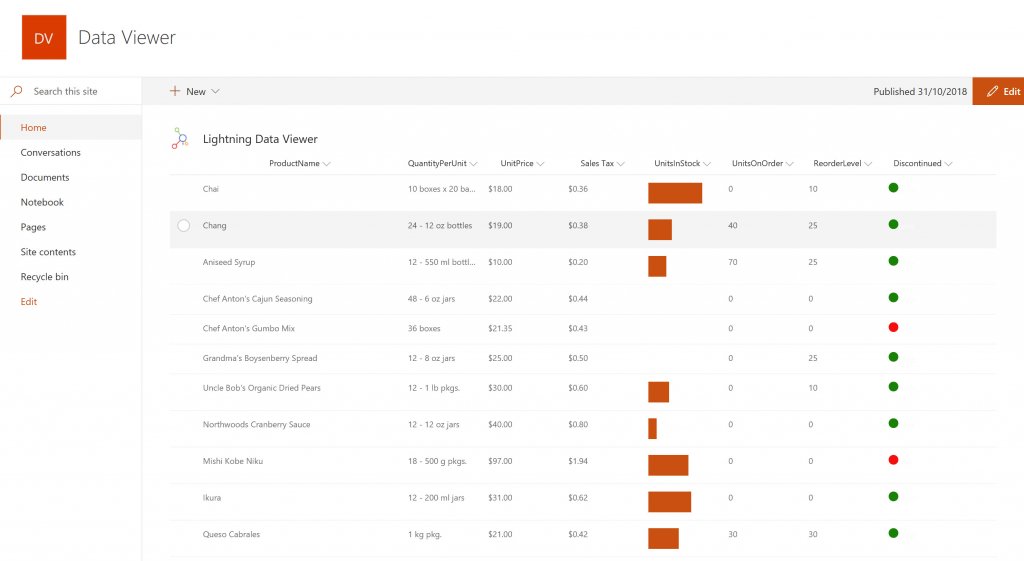
The Data Viewer Client Side Web Part can be configured by Business Users within a few minutes to display Line of Business Data from Data Sources such as Excel,  SQL Azure, Business Connectivity Services, OData and SharePoint Lists.  Connections to an organizations data such as Customer Relationship Management Systems, Accounting Systems, or Custom Databases can be connected, giving business users a live up-to-date view of business information within the context of their SharePoint Team Sites or Microsoft Teams Tabs.Screenshot of HIGHLIGHTING KEY BUSINESS DATA (NO CODE)
Conditional formatting can be used to highlight key business data. Overdue Tasks, Low Stock, Currency Exchange Rates, Sales Revenue are examples of data to highlight visually allowing for a quick reaction time. Key Financial Indicators and Key Performance Indicators can be configured with a simple dialog and no need to write any code. Choose colours, icons or data bars to highlight key data.Screenshot of SELECTING AND STYLING ICONS
Icons can be chosen as part of the conditional formatting to make data stand out. The Office 365 Fabric icons can be selected and styled and applied to cell values. Pepper pots, Smileys, Envelopes and more icons are available. There are hundreds of options to choose from to highlight data that needs to be acted upon.Screenshot of DATA VIEWER CAN BE A GRID OF DATA OR A CHART IN SHAREPOINT OR MICROSOFT TEAMS
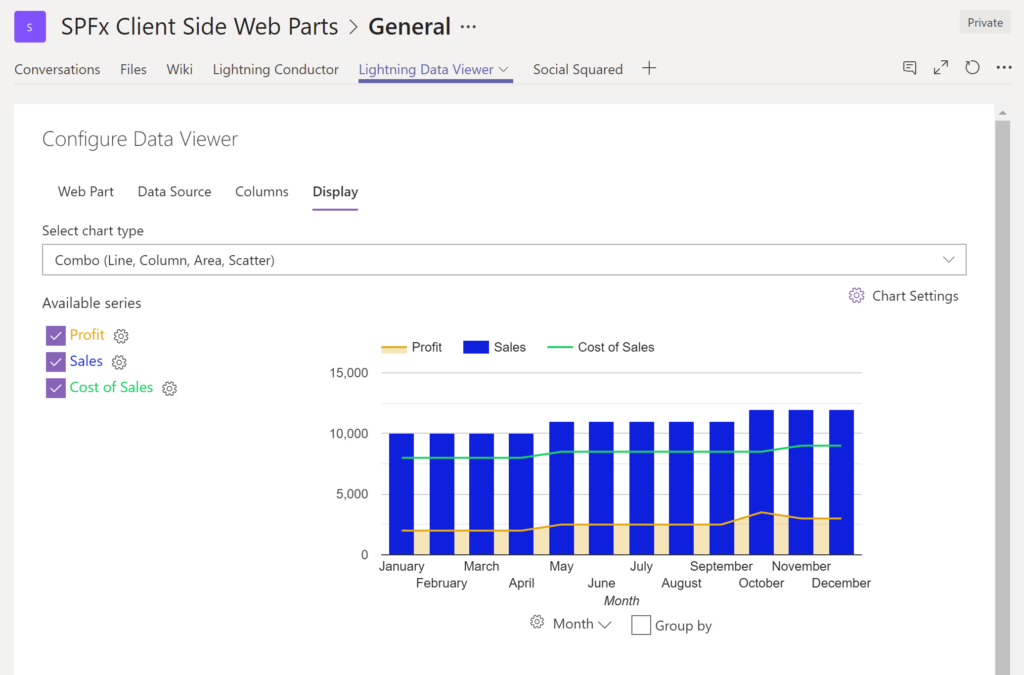
The Data Viewer can be used within Microsoft SharePoint Modern Sites or Microsoft Teams Tabs as a Grid of Data with styling or as a Chart which can be configured. The Charting Feature allows for Pie, Donut, Column, Line, Area, and Scatter Charts which can all be configured and displayed in 2D or 3D.Screenshot of TREEMAPS
summary information can be displayed within a TreeMap next to the detail. Users will be able to see trends, and how the business is performing  using the TreeMap view of data.Screenshot of CHARTS AND GAUGES
The Data Viewer is used to represent data in multiple ways using Gauges, TreeMaps, Multiple Series Charts, and Pie Charts.

    Planful Screenshots

    Screenshot of the Planful Planform DashboardScreenshot of Planful for FinanceScreenshot of Planful for MarketingScreenshot of ReportsScreenshot of a Capacity Planning TemplateScreenshot of Integrations