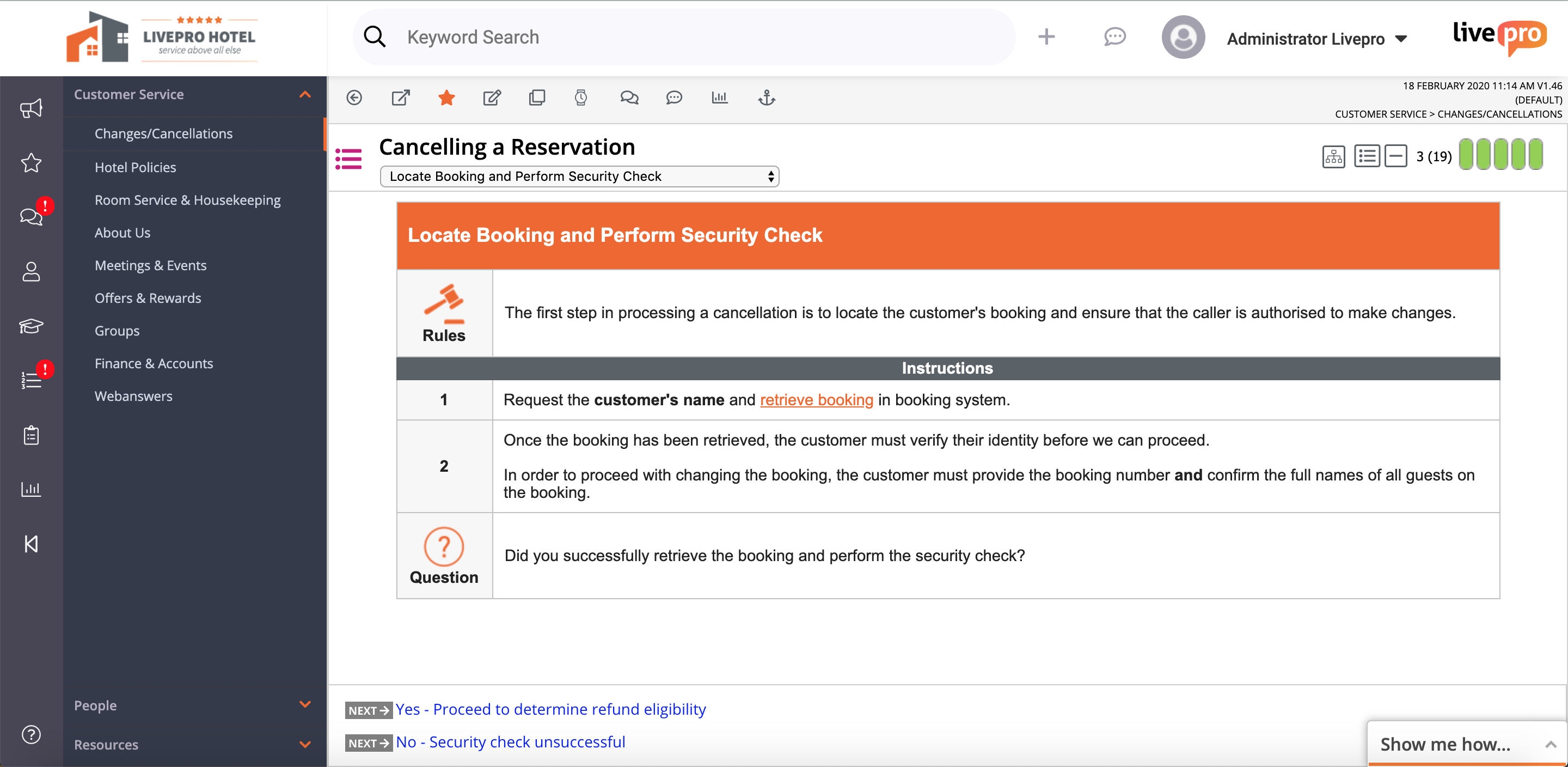
livepro headquartered in North Sydney aims to help users provide improved customer service quality and delivery through their simple knowledge management system.
N/A
Quip
Score8.4 out of 10
N/A
Quip is a collaboration tool, from Salesforce, that helps sales teams accelerate business in real-time with embedded documents, live Salesforce data, and other built-in collaboration features.
$120
per year per user
Pricing
livepro
Quip
Editions & Modules
No answers on this topic
Enterprise
$25
per user per month
Starter
$120
per year per user
Plus
$300
per year per user
Advanced
$1,200
per year per user
Offerings
Pricing Offerings
livepro
Quip
Free Trial
Yes
No
Free/Freemium Version
No
No
Premium Consulting/Integration Services
Yes
No
Entry-level Setup Fee
No setup fee
No setup fee
Additional Details
Products and plans are priced per user and only when that user accesses knowledge in that monthly period.
All editions include unlimited personal documents and folders and a custom subdomain. Paid versions include unlimited document revision history, message archive and group sharing.
The great thing about livepro is you can structure your content the way that suits your organisation. livepro are there to support you in deciding what may work best for your team, it is not a one size fits all solution. The system allows you to write complex processes in a simplified view so staff can easily navigate to the solution they need. The 'rocket' knowledge object allows your processes that have a lot of variation to be written up in a simple decision tree setup, taking your staff to the right outcome every time.
I think collaboration is probably the best use case for it allows really good drafts of documents. I think it's really good use case if you want to go track edits to documents as well. It's probably not really good for versioning control, but it's definitely, it's very, very lightweight and so you can use it on a mobile device, you can use it in any web browser. So it's very easy to use, very easily accessible. I probably wouldn't use it from a spreadsheet perspective. Well I think some of the primary functions of data sheets are there. It doesn't have some of the more complex formulas that you would typically get from Excel or something like that
A de minimis incentive was given to thank the reviewer for their time. The incentive was not used to bias or drive a particular response, nor was the incentive contingent on a positive endorsement. More Info
Easy to use--livepro is used by our casuals (who have never used the system before) and also our more knowledgeable and experienced staff, all in the same capacity.
Positive and engaging training--before implementing livepro, we had on-the-ground training with the livepro team and they have provided us with ongoing support ever since.
Anything is possible--livepro encourages users to experiment and to create a system that is unique to their organization/department and to always think outside the box.
A de minimis incentive was given to thank the reviewer for their time. The incentive was not used to bias or drive a particular response, nor was the incentive contingent on a positive endorsement. More Info
Feedback module. I'm scratching for things to record in cons here. The feedback module could be improved by having further display options - being able to preview feedback without clicking into it. However, livepro have taken this feedback on board and are already looking at ways to improve.
Admin/roles. The current way to set up the roles/permissions is clunky however this is not a space you need to use often. I'm looking forward to the new and improved version that is being worked on.
When using Quip Desktop, it can be slow to update with content from other users
I think it would be cool to have a PDF proofing system integrated into Quip. Once copy has gone to design, we are basically done using Quip - I'd like to bring that all together within Quip
Multi -select and group export of documents would be helpful
A de minimis incentive was given to thank the reviewer for their time. The incentive was not used to bias or drive a particular response, nor was the incentive contingent on a positive endorsement. More Info
It is the best collaboration tool in my company. Through it, the organization has achieved better connectivity and efficiency in its communication. Primarily, the docs feature of this software is the most utilized in the company. Slowly, dash-boarding and project management features have also been utilized. Generally, it is the best tool, very easy and fairly streamlined
A de minimis incentive was given to thank the reviewer for their time. The incentive was not used to bias or drive a particular response, nor was the incentive contingent on a positive endorsement. More Info
I have never used Quip's support. To be fair, we hired someone who used to work for Quip before working at our company, and he implemented it and pushed it with the team. He was very biased toward the product, and yes it was better than Google Drive, but by how much?
A de minimis incentive was given to thank the reviewer for their time. The incentive was not used to bias or drive a particular response, nor was the incentive contingent on a positive endorsement. More Info
Google Drive is an obvious choice for a collaboration suite, but it still has this old-fashioned Windows 95 feel to it, with the standard file system hierarchy and spread-sheet like lists of files. Quip has a fresh take on the user interface, and the comments and discussion on a given file or line within a file seems more integrated and seamless, rather than a bunch of boxes out in the margin away from where you're actually reading and working. Having everything just to the left of a list or paragraph makes it easier to focus and maintain context while you're working or discussing a certain point.
A de minimis incentive was given to thank the reviewer for their time. The incentive was not used to bias or drive a particular response, nor was the incentive contingent on a positive endorsement. More Info
livepro has improved our right first time response for our customer contact center. In the first six months of going live, our RFT response increased to the 60th percentile from 50 percent.
One source of truth--our customer service team is confident in the answers they are providing and that they can rely on the accuracy and quality of information.
Providing a superior level of customer service--as the team becomes more efficient in using the system, they are processing more calls and creating more meaningful outcomes for our customers. The teams percentage of missed (abandoned) calls has dropped from 4.26 percent to 3 percent since implementation of livepro.
It is a tool that allows work teams to move forward in a centralized way and meet their objectives as efficiently as possible; this has allowed us to meet our customers and brought more work to the organization, therefore more revenue; I would say that the ROI was fast enough, as expected.