TrustRadius: an HG Insights company

Save this comparison

Save this comparison

Add Product

Recommended Comparisons

    Overview
    ProductRatingMost Used ByProduct SummaryStarting Price

    Microsoft To Do

    Score7.9 out of 10
    N/AMicrosoft To Do replaces the former Wunderlist task management tool.N/A

    Roadmunk

    Score4.8 out of 10
    N/ARoadmunk is a roadmap visualization platform that is designed to enable product managers and their teams to communicate the strategic roadmap throughout their organization. The vendor says product leaders can easily input milestones, roadmap data and create unlimited pivots in real time. The vendor says it has differentiated itself through intuitive user-centric design, seamless manipulation of roadmap views and enterprise data security. Since late 2021, Roadmunk is part of Tempo.

    $19

    per seat

    Pricing
    Microsoft To DoRoadmunk
    Editions & Modules
    No answers on this topic
    Starter
    $19
    per seat
    Business
    $49
    per seat
    Professional
    $99
    per seat
    Enterprise
    Custom
    per seat
    Offerings
    Pricing Offerings
    Microsoft To DoRoadmunk
    Free Trial
    NoYes
    Free/Freemium Version
    NoNo
    Premium Consulting/Integration Services
    NoNo
    Entry-level Setup FeeNo setup feeNo setup fee
    Additional Details—Ready to roadmap? All our plans start with a free 14-day trial.
    More Pricing Information
    Community Pulse
    Microsoft To DoRoadmunk
    Considered Both Products
    Microsoft
    No answer on this topic
    Tempo
    No answer on this topic
    Key User Insights
    Would buy again
    92%
    Would buy again
    34 Answers
    100%
    Would buy again
    8 Answers
    Delivers good value for the price
    100%
    Delivers good value for the price
    37 Answers
    100%
    Delivers good value for the price
    7 Answers
    Happy with the feature set
    95%
    Happy with the feature set
    35 Answers
    100%
    Happy with the feature set
    8 Answers
    Lived up to sales and marketing promises
    88%
    Lived up to sales and marketing promises
    21 Answers
    100%
    Lived up to sales and marketing promises
    5 Answers
    Implementation went as expected
    93%
    Implementation went as expected
    28 Answers
    100%
    Implementation went as expected
    6 Answers
    Features
    Microsoft To DoRoadmunk
    Project Management
    Comparison of Project Management features of Microsoft To Do and Roadmunk
    Feature
    Microsoft To Do
    5.6
    76 Ratings
    31% below category average
    Roadmunk
    -
    Ratings
    Task Management8.076 Ratings00 Ratings
    Resource Management6.141 Ratings00 Ratings
    Gantt Charts4.58 Ratings00 Ratings
    Scheduling8.458 Ratings00 Ratings
    Workflow Automation3.033 Ratings00 Ratings
    Team Collaboration5.067 Ratings00 Ratings
    Support for Agile Methodology6.017 Ratings00 Ratings
    Support for Waterfall Methodology7.017 Ratings00 Ratings
    Document Management3.038 Ratings00 Ratings
    Email integration6.342 Ratings00 Ratings
    Mobile Access7.371 Ratings00 Ratings
    Timesheet Tracking3.012 Ratings00 Ratings
    Change request and Case Management5.39 Ratings00 Ratings
    Budget and Expense Management4.95 Ratings00 Ratings
    Professional Services Automation
    Comparison of Professional Services Automation features of Microsoft To Do and Roadmunk
    Feature
    Microsoft To Do
    6.5
    7 Ratings
    17% below category average
    Roadmunk
    -
    Ratings
    Quotes/estimates5.04 Ratings00 Ratings
    Invoicing7.04 Ratings00 Ratings
    Project & financial reporting7.96 Ratings00 Ratings
    Integration with accounting software6.02 Ratings00 Ratings
    Best Alternatives
    Microsoft To DoRoadmunk
    Small Businesses
    Any.do
    Score8 out of 10
    Craft.io
    Score10 out of 10
    Medium-sized Companies
    KanbanFlow
    Score7.3 out of 10
    ProductPlan
    Score9.5 out of 10
    Enterprises
    Workzone
    Score9.1 out of 10
    Atlassian Product Collection, with Jira Product Discovery
    Score8 out of 10
    All AlternativesView all alternativesView all alternatives
    User Ratings
    Microsoft To DoRoadmunk
    Likelihood to Recommend
    8.5
    (76 ratings)
    9.0
    (9 ratings)
    Likelihood to Renew
    8.0
    (4 ratings)
    -
    (0 ratings)
    Usability
    7.4
    (12 ratings)
    8.0
    (2 ratings)
    Support Rating
    7.6
    (30 ratings)
    10.0
    (3 ratings)
    Implementation Rating
    10.0
    (3 ratings)
    -
    (0 ratings)
    User Testimonials
    Microsoft To DoRoadmunk
    Likelihood to Recommend
    Microsoft
    I think Microsoft To Do is helpful for people who don't need a lot of customization in a task manager. I prefer using 3rd party task managers that allow me to create projects with tasks and subtasks. But for a team that already uses Microsoft products and doesn't want to learn or invest capital in another task manager, Microsoft To Do covers the basics and syncs with your calendar.
    Incentivized
    Read full review
    Tempo
    We replaced Trello with Roadmunk for our Roadmapping purposes. For the poor Product Manager and Product Team that is incessantly asked "where is the product roadmap" by Sales and Management, this is the tool for you! Easy, simple, and makes pretty pictures for those constituents. It is less useful for full Requirements documentation. "Ideas" is OK, but too hard to get submissions from non-Roadmunk users, and clunky integration back to the primary road mapping function. Needs an improved editing environment to fully express Reqs using this tool, but it's not that far off!
    Incentivized
    Read full review
    Pros
    Microsoft
    • Wunderlist is what you need for your to do lists. It's really simple to use.
    • Allows you to set due date to your lists, share them with your team and/or create a folder to divide and organize all your list set
    • Also, Wunderlist is compatible with all platform and devices. So you can always be updated on your list or work on them from wherever you are and with all the devices you have.
    Incentivized
    Read full review
    Tempo
    • Allows us to easily customize swimlanes based on audience and task
    • Provides a visualization of resource load "weight" in a particular swimlane
    • Gives us a visual vocabulary to explain our agile process and its impact to customers
    Incentivized
    Read full review
    Cons
    Microsoft
    • Viewing more than one task at a time.
    • Email forwarding tasks - sometimes can be buggy and not always smooth.
    • Option to show more detail on a task without clicking task - example: being able to see attachment without clicking on task to view.
    Incentivized
    Read full review
    Tempo
    • The fact that you have to add a date to everything; dates stick to people’s minds.
    • Connecting bars to milestones; unclear which to use when.
    • Collaboration isn’t great; can’t track changes, add comments, etc.
    Incentivized
    Read full review
    Likelihood to Renew
    Microsoft
    It's working, and doing precisely what we selected it for. The only hesitation is if Microsoft suddenly drops the platform.
    Incentivized
    Read full review
    Tempo
    No answers on this topic
    Usability
    Microsoft
    User friendly, easy to configure, and VERY simplistic. I particularly use heavily the phone app feature. While others in the room are on social media, I am reviewing my tasks and this triggers other tasks I know I need to get done. I like the sense of accomplishment of moving things to the completed pile as well.
    Incentivized
    Read full review
    Tempo
    Performance has improved meaningfully over the last 12 months or so, especially in our views that contain many roadmap items. Some challenges remain, however, particularly when changing the timeline and in scenarios of multiple users interacting with the roadmap simultaneously.
    Incentivized
    Read full review
    Support Rating
    Microsoft
    I have not had an issue where I needed to reach out to Wunderlist, but I know their contact and online chat is easy to access and feel confident that they would be helpful. My only worry is Wunderlist is becoming Microsoft to-do in May 2020, and I believe the app will become worse after that.
    Incentivized
    Read full review
    Tempo
    We never really had to go back to Roadmunk for support, but they do provide a wealth of informative updates that can be consumed at the individual user's own pace.
    Incentivized
    Read full review
    Implementation Rating
    Microsoft
    Wunderlist giving 100% work satisfaction for me and my organization
    Incentivized
    Read full review
    Tempo
    No answers on this topic
    Alternatives Considered
    Microsoft
    It's a small tool compared to bigger project management software, but we found that they work perfectly together. It helps you declutter the larger PM tools, keep your smaller tasks in-line and make sure they get completed. When you're working in a creative agency, ideas and tasks are flying around, so having a tool like this that keeps you accountable and reminds you of your tasks is a must!
    Incentivized
    Read full review
    Tempo
    We've used Google Calendar, Microsoft Office products, Trello, and others. Roadmunk seems to combine the best of all of those, and then offers a little more.
    Incentivized
    Read full review
    Return on Investment
    Microsoft
    • Its affordable enough that the limited set of problems it solves are worth the investment.
    • If you already have Office 365 it doesn't really make sense unless you hate the task app.
    • With Microsoft acquiring Wunderlist I wouldn't start investing in this product. I would either choose Office 365 and go with TO-DO or use a free app.
    Incentivized
    Read full review
    Tempo
    • Def saves us HOURS per quarter probably 50 man-hours per year re: automated visualizations vs. yoga poses trying to use Excel, JIRA, PowerPoint, Visio, etc.
    Incentivized
    Read full review
    ScreenShots

    Roadmunk Screenshots

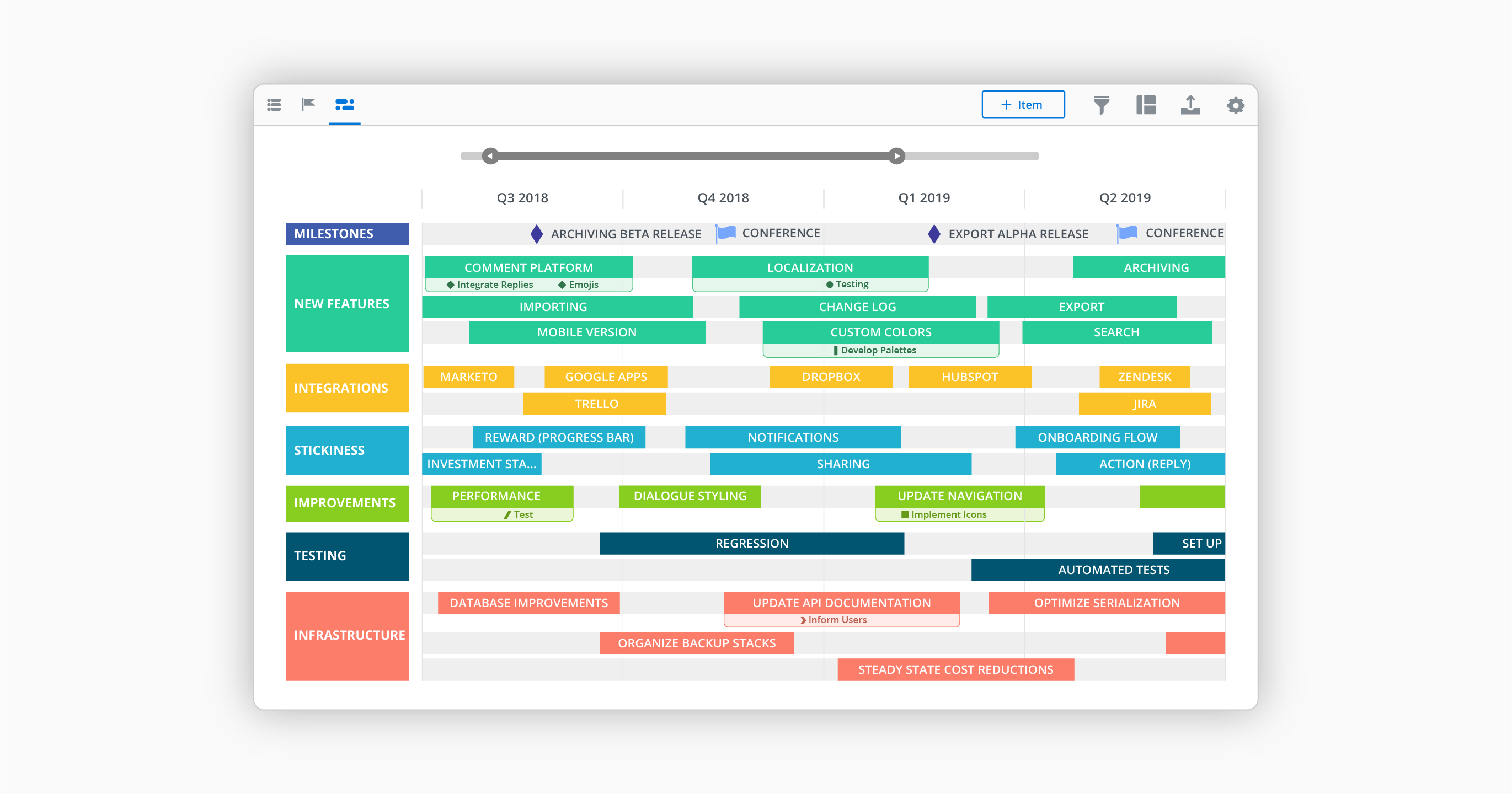
    Screenshot of IT roadmap UIScreenshot of Timeline View - Create alignment around initiatives, objectives and milestones by visualizing your strategy on a timeline.Screenshot of Roadmap Example - Find a roadmap template, then make it your own. All our roadmap templates can be accessed and edited within Roadmunk. No more gymnastics in Excel and PPT.Screenshot of Swimlane view - Flexible teams need flexible roadmaps. Swimlane is the roadmap of choice for agile teams and beyond.Screenshot of Master Roadmapping - Teams build their own roadmaps, which can be rolled into a high-level Master view.Screenshot of Pre-designed templates - Over 35 roadmap templates to map your journey.