I think Microsoft To Do is helpful for people who don't need a lot of customization in a task manager. I prefer using 3rd party task managers that allow me to create projects with tasks and subtasks. But for a team that already uses Microsoft products and doesn't want to learn or invest capital in another task manager, Microsoft To Do covers the basics and syncs with your calendar.
A de minimis incentive was given to thank the reviewer for their time. The incentive was not used to bias or drive a particular response, nor was the incentive contingent on a positive endorsement. More Info
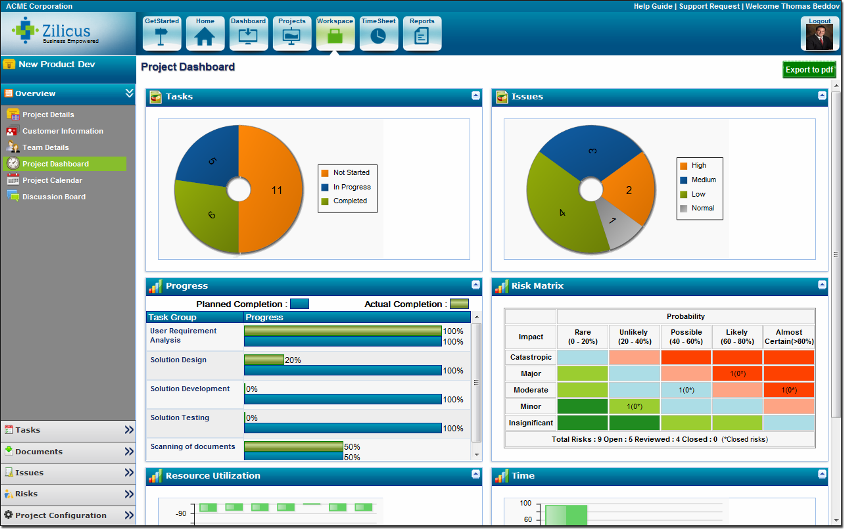
ZilicusPM is suited for any business that has difficulty managing and keeping track of office related work as well as project management. Its an efficient way to manage just about anything necessary. It is well-suited for our office, as structural/civil engineers - we are able to keep track of our projects as well as office/human resources related work.
A de minimis incentive was given to thank the reviewer for their time. The incentive was not used to bias or drive a particular response, nor was the incentive contingent on a positive endorsement. More Info
Wunderlist is what you need for your to do lists. It's really simple to use.
Allows you to set due date to your lists, share them with your team and/or create a folder to divide and organize all your list set
Also, Wunderlist is compatible with all platform and devices. So you can always be updated on your list or work on them from wherever you are and with all the devices you have.
A de minimis incentive was given to thank the reviewer for their time. The incentive was not used to bias or drive a particular response, nor was the incentive contingent on a positive endorsement. More Info
ZilicusPM is great for an office regarding meetings and site visits. It's hard to keep track manually of where everyone is at. By sharing our calendars through ZilicusPM, we are able to access where someone is within a few seconds!! It is very convenient and less of a hassle.
This a great tool to use to manage all documents that enter in and out of our office for certain projects. It is hard to keep track of everything through our office, so this programs helps us manage things very efficiently.
This is great for prioritizing! I know many people in our office have an issue to do so. With the Project Issue Management feature, we are able to do this more effectively without causing any stress to our employees!
A de minimis incentive was given to thank the reviewer for their time. The incentive was not used to bias or drive a particular response, nor was the incentive contingent on a positive endorsement. More Info
A de minimis incentive was given to thank the reviewer for their time. The incentive was not used to bias or drive a particular response, nor was the incentive contingent on a positive endorsement. More Info
The only thing I would suggest that needs room for improvement is that you should break down Zilicus PM into different sectors. What I mean by this is that you branch off this program into different areas of expertise like accounting, engineering, etc. Every business is managed differently, so other options should be provided to accommodate each field.
Other than that, I am very pleased with this program. It was WELL worth the investment. Saving a lot of time and money spent per worker by using this!
A de minimis incentive was given to thank the reviewer for their time. The incentive was not used to bias or drive a particular response, nor was the incentive contingent on a positive endorsement. More Info
A de minimis incentive was given to thank the reviewer for their time. The incentive was not used to bias or drive a particular response, nor was the incentive contingent on a positive endorsement. More Info
User friendly, easy to configure, and VERY simplistic. I particularly use heavily the phone app feature. While others in the room are on social media, I am reviewing my tasks and this triggers other tasks I know I need to get done. I like the sense of accomplishment of moving things to the completed pile as well.
A de minimis incentive was given to thank the reviewer for their time. The incentive was not used to bias or drive a particular response, nor was the incentive contingent on a positive endorsement. More Info
I have not had an issue where I needed to reach out to Wunderlist, but I know their contact and online chat is easy to access and feel confident that they would be helpful. My only worry is Wunderlist is becoming Microsoft to-do in May 2020, and I believe the app will become worse after that.
A de minimis incentive was given to thank the reviewer for their time. The incentive was not used to bias or drive a particular response, nor was the incentive contingent on a positive endorsement. More Info
A de minimis incentive was given to thank the reviewer for their time. The incentive was not used to bias or drive a particular response, nor was the incentive contingent on a positive endorsement. More Info
It's a small tool compared to bigger project management software, but we found that they work perfectly together. It helps you declutter the larger PM tools, keep your smaller tasks in-line and make sure they get completed. When you're working in a creative agency, ideas and tasks are flying around, so having a tool like this that keeps you accountable and reminds you of your tasks is a must!
A de minimis incentive was given to thank the reviewer for their time. The incentive was not used to bias or drive a particular response, nor was the incentive contingent on a positive endorsement. More Info
We have used Microsoft Project for years. We loved it until we found ZilicusPM. ZilicusPM is more efficient and directive in our field. Microsoft Project does not provide as many features as ZilicusPM does. I am extremely grateful for having found ZilicusPM. It was recommended to us by an architectural firm that swore by this software.
A de minimis incentive was given to thank the reviewer for their time. The incentive was not used to bias or drive a particular response, nor was the incentive contingent on a positive endorsement. More Info
A de minimis incentive was given to thank the reviewer for their time. The incentive was not used to bias or drive a particular response, nor was the incentive contingent on a positive endorsement. More Info
A positive impact that ZilicusPM has made is we are able to work more efficiently and prioritize what needs to be sent out, what invoices need to be sent out to clients, where are project engineers at certain time of day, etc.
We also have a higher ROI. I am able to manage what invoices need to be sent out without having to track people down for a summary of the work , which is extremely time consuming. I am able to get more invoices out while returning a higher investment for the company.
A negative impact it has made is we had to hire someone to manage this software entirely. It is very time-consuming for myself to manage and make sure everything is entered in correctly. We hired someone who is familiar with ZilicusPM and is able to certify all work.
A de minimis incentive was given to thank the reviewer for their time. The incentive was not used to bias or drive a particular response, nor was the incentive contingent on a positive endorsement. More Info