Miro vs. Rillsoft Cloud

Overview
ProductRatingMost Used ByProduct SummaryStarting Price
Miro
Score 9.1 out of 10
N/A
Miro empowers cross-functional teams to flow from early discovery through final delivery on a shared, AI-first canvas. With the canvas as the prompt, Miro’s AI capabilities keep teams in the flow of work, and scale shifts in ways of working.
$10
per month per user
Rillsoft Cloud
Score 0.0 out of 10
N/A
Rillsoft Cloud is a project management and resource planning software solution that can be utilized both on-premises and in a hosted cloud environment. It integrates with Rillsoft Project, enhancing centralized control and synchronization of project data, resources, and schedules. This integration allows full utilization of Rillsoft Project's capabilities such as detailed resource planning and project controlling within a cloud infrastructure. Rillsoft Cloud caters primarily to businesses…
$530
per month per user
Pricing
MiroRillsoft Cloud
Editions & Modules
1. Free - To discover what Miro can do. Always free
$0
2. Starter - Unlimited and private boards with essential features
$8
per month (billed annually) per user
3. Business - Scales collaboration with advanced features and security
$16
per month (billed annually) per user
4. Enterprise - For work across the entire organization, with support, security and control, to scale
contact sales
annual billing per user
Standard
5 $, from 30 user
per month per user
Starter
7 $, from 10 user
per month per user
Offerings
Pricing Offerings
MiroRillsoft Cloud
Free Trial
YesYes
Free/Freemium Version
YesNo
Premium Consulting/Integration Services
NoYes
Entry-level Setup FeeOptional$165 on demand on demand
Additional DetailsMonthly billing also available at $10 per month for the Starter plan, or $20 for the Business plan.Rillsoft Cloud solution via a client application Rillsoft Project provides customer support for project management with the planning functions.
More Pricing Information
Community Pulse
MiroRillsoft Cloud
Best Alternatives
MiroRillsoft Cloud
Small Businesses
Lucid Visual Collaboration Suite
Score 8.9 out of 10
Stackby
Stackby
Score 9.0 out of 10
Medium-sized Companies
Lucid Visual Collaboration Suite
Score 8.9 out of 10
InEight
InEight
Score 9.5 out of 10
Enterprises
Lucid Visual Collaboration Suite
Score 8.9 out of 10
InEight
InEight
Score 9.5 out of 10
All AlternativesView all alternativesView all alternatives
User Ratings
MiroRillsoft Cloud
Likelihood to Recommend
9.1
(6080 ratings)
-
(0 ratings)
Likelihood to Renew
9.4
(185 ratings)
-
(0 ratings)
Usability
8.6
(452 ratings)
-
(0 ratings)
Availability
9.4
(20 ratings)
-
(0 ratings)
Performance
9.0
(19 ratings)
-
(0 ratings)
Support Rating
7.7
(63 ratings)
-
(0 ratings)
In-Person Training
1.0
(1 ratings)
-
(0 ratings)
Online Training
9.1
(7 ratings)
-
(0 ratings)
Implementation Rating
9.0
(3659 ratings)
-
(0 ratings)
Configurability
8.5
(14 ratings)
-
(0 ratings)
Ease of integration
8.1
(4002 ratings)
-
(0 ratings)
Product Scalability
8.6
(19 ratings)
-
(0 ratings)
Vendor post-sale
6.8
(7 ratings)
-
(0 ratings)
Vendor pre-sale
6.0
(8 ratings)
-
(0 ratings)
User Testimonials
MiroRillsoft Cloud
Likelihood to Recommend
Miro
Miro software ensures inclusive and productive meetings. The product ensures secure and centralized communication by providing interactive online tools. Use of the software allows easy collection and organization of ideas. Implementation of the software is easy and straightforward. Availability of exceptional customer support services.
Read full review
Rillsoft GmbH
No answers on this topic
Pros
Miro
  • Makes internal coordination between admin team and tutors extremely painless. It's like a single place where everyone can drop ideas, get updates and notes without loss of context which usually happens in long email threads.
  • Versioning and board history are handled very well, which drastically reduces the workload. They help me track how a policy or math guideline has evolved, and also make it easy to revert changes if something doesn't work.
  • Comments stick exactly where they are meant to, making internal reviews much clearer. Admins don't have to guess which note refers to which rule or section.
  • Exports are clean, so even non-Miro teammates get it instantly.
Read full review
Rillsoft GmbH
No answers on this topic
Cons
Miro
  • Sticky notes cannot be easily resized. It would often be useful for them to transform into workspaces, because they become actual text content rather than just notes.
  • Perhaps there is no option to sort the work boards according to specific criteria (such as alphabetical order or date).
  • The various functions available should perhaps be explained clearly with a tooltip or something similar while you are working with the various tools. I often don't realise that certain things can be done.
Read full review
Rillsoft GmbH
No answers on this topic
Likelihood to Renew
Miro
I have advocate for the renew of Miro quite few times, however, it is not under my control as the decision is made in another team with their own budget. I would buy for my own entrepreneur projects (1-2 members) as I do know the value and work there 100%. So, I would pay out of my own pocket to get the value. However, If I wouldn't know the value it provides, it would be hard to decide with the current freemium features
Read full review
Rillsoft GmbH
No answers on this topic
Usability
Miro
I would rate Miro an 8 out of 10 for overall usability. It's easy to use and has lots of features for making the work easier. I can drag nodes, connect ideas and comment in real time without explaining much to anyone because every member of all the teams have access. For labelling schema design and maths concept mapping, it is incredibly perfect. However, issues related to lag when many nodes introduced and absence of LaTeX making complex equation writing hectic, are of great concern. If those issues were resolved, it's an easy 10.
Read full review
Rillsoft GmbH
No answers on this topic
Reliability and Availability
Miro
I only give a 9/10 because of the speed at which it loads. I have never experienced issues with Miro logging me out early, or some other technical issue causing the program to crash, or even it just loading in perpetuity without ever actually coming up (unlike other programs such as SFDC). It take a minute for all of my boards to come up after I click on it in my favorites, but besides that, it's all good.
Read full review
Rillsoft GmbH
No answers on this topic
Performance
Miro
Sometimes it gets quite slow and there is a correlation between this and the size of the board. Hence we are trying to segment the boards based on product stages or projects so that the size doesn't go big. When you go from discovery to delivery on a simple board, it will get large and difficult to load, even crash or go white screen
Read full review
Rillsoft GmbH
No answers on this topic
Support Rating
Miro
We have never reached out to or contacted support because Miro's platform has been incredibly intuitive and user-friendly. The comprehensive resources available, such as tutorials, documentation, and community forums, have provided all the guidance we needed. The seamless integration with our existing tools and the reliability of the platform have ensured that we rarely encounter issues that require external assistance. This self-sufficiency has allowed us to focus more on our projects and collaboration without interruptions. Overall, our experience with Miro has been smooth and efficient, eliminating the need for additional support
Read full review
Rillsoft GmbH
No answers on this topic
Online Training
Miro
There was a series of webinars which Miro hosted with our organization that went over the basics, then progressively became more advanced with additional sections. The instructors were knowledgeable, and provided examples throughout the sessions, as well as answered peoples' questions. There was ample time and experience on the calls to cover a range of topics. The instructors were also very friendly and sociable, as well as honest. Of course Miro isn't a "God-tool" that does absolutely everything, but the instructors were aware and emphasized the strengths where Miro had them and sincerely accepted feedback.
Read full review
Rillsoft GmbH
No answers on this topic
Implementation Rating
Miro
Easy to learn, Miro has a series of videos on YouTube that effectively taught this program to my team members and me. The program is drag-and-drop and works excellently. People pick up on how to use it efficiently, and it's great for organizing ideas more freely. This product is more challenging for some older audiences who are not accustomed to using a touchpad, but for most, it was very easy to use.
Read full review
Rillsoft GmbH
No answers on this topic
Alternatives Considered
Miro
I would say on par, but a better value than Mural, hence why our company changed contracts. And, at this time, much better than Microsoft Whiteboard. With that being said, Microsoft has a lot of money to throw at it to add more features and obviously syncs with other office programs. It may be something from a feature standpoint to look at.
Read full review
Rillsoft GmbH
No answers on this topic
Scalability
Miro
Maybe is possible now so... Could be useful to manage in some way source code for the projects? not to edit so when we make solutions with different components in MIro, maybe each component could redirect to the source code of this component
Read full review
Rillsoft GmbH
No answers on this topic
Return on Investment
Miro
  • I currently save around two to three hours a week now doing administrative tasks. It has saved the need for sending some emails and holding meetings.
  • I trust that I won't miss anything from my team now that we are all in sync with this tool. No more pouring over document comments in Office 365, Emails, Jira tasks, etc. It's all in one place, and can combine all of those other tools there as well with its elegant linking approach.
  • Starting projects and leading others is easy with these persistent and real time updates during meetings. No more "circling back on that point" because it is addressed right now!
Read full review
Rillsoft GmbH
No answers on this topic
ScreenShots

Miro Screenshots

Screenshot of Miro's design sprint templates, used to solve big challenges, create new products or improve existing ones.Screenshot of the Sprint Planning features in Miro, that assists Development Teams in creating a transparent understanding of what can be built and how. Users can run sprints and turn a team into creative and active participants. Today, many organizations use Agile tools to manage software development and other non-IT projects.Screenshot of the PI Planning Template that brings teams toward one vision of what stories to develop. Used to manage a backlog, increase productivity, and build the foundation for a successful PI Planning event. Miro’s PI Planning Template helps to get an overview of any PI Planning event, with step-by-step frames to guide the process.Screenshot of diagrams, concept maps, and system mapping templates used to communicate complex flows and create a shared understanding. Users can check off all the essential steps of the diagramming process and gain a complete overview of operations with Miro's diagramming templates collection.

Rillsoft Cloud Screenshots

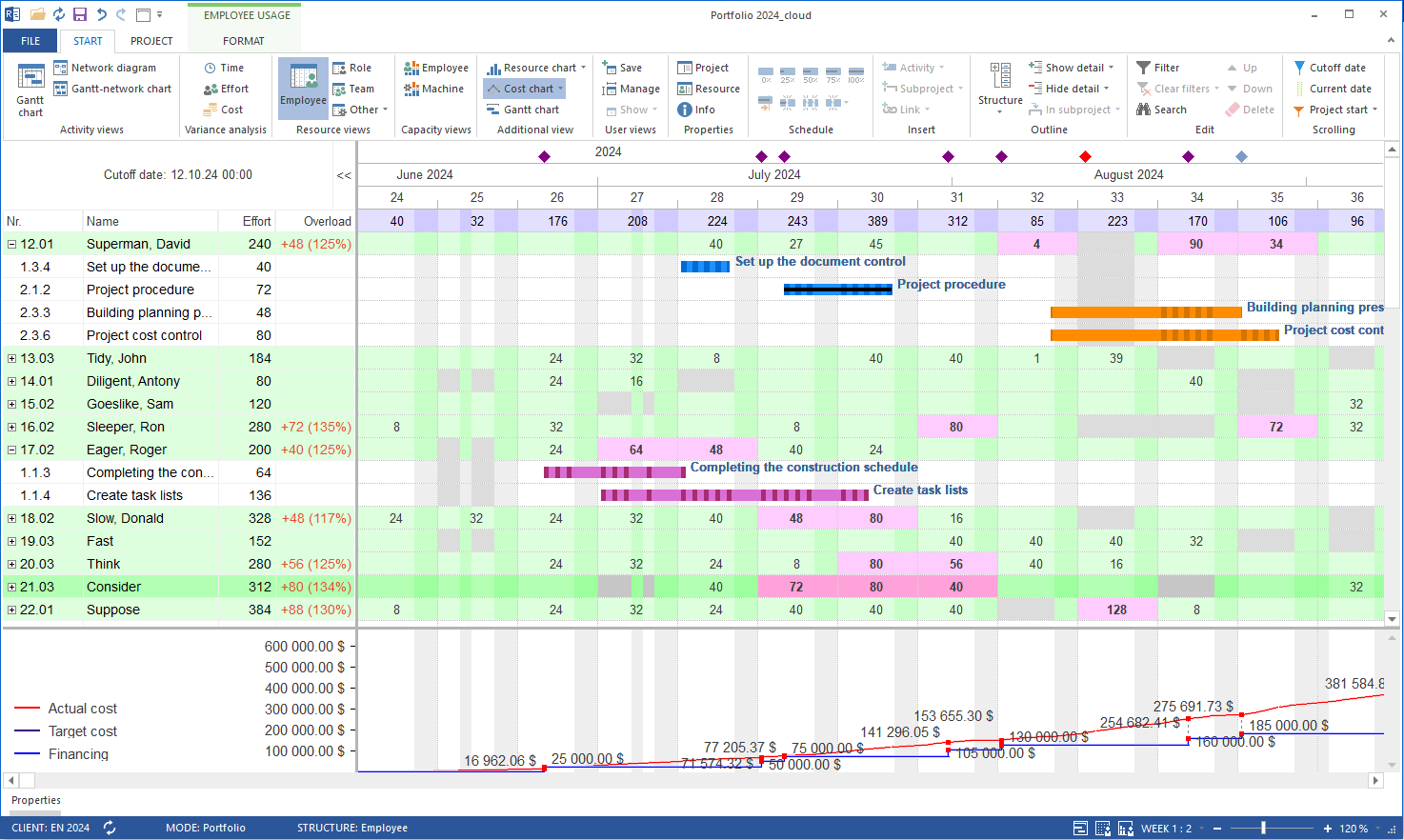
Screenshot of Time scheduling in Rillsoft Project, which involves creating timelines for tasks and projects to ensure they are completed within the set deadlines. It includes defining task durations, dependencies, and constraints to develop a comprehensive project schedule. The software provides tools for tracking progress and making adjustments to the schedule as needed to account for delays or changes in project scope. The timeline module allows users to view tasks and schedules across multiple projects and portfolios, offering insights into task completion statuses. Rillsoft Cloud also features Gantt chart scheduling and additional views, giving users the flexibility to visualize and manage their projects in a format that best suits their needs.Screenshot of Capacity levelling in Rillsoft Cloud. This involves the optimization of resource allocation to ensure that resources are used efficiently without overloading them. It helps in adjusting the start and finish dates of tasks to match the resource availability, ensuring that resources are not over-allocated. The tool provides features to automatically adjust schedules and distribute workloads evenly across available resources, considering both current and future demands.Screenshot of Resource management. Rillsoft Cloud offers advanced personnel planning and resource management functionalities. It enables real-time tracking of employee assignments, automatically detecting and managing workload imbalances. Key features include support for vacation, training, and business trip schedules, skill-based employee assignments, and dynamic prioritization of projects. The platform provides visual insights into staff availability, project updates, and resource bottlenecks. It also facilitates effective communication through automatic notifications and email reminders, ensuring deadlines are met and personnel are optimally allocated.Screenshot of what it looks like to achieve the best resource utilization, with the project portfolio