Mural vs. CELUM Creative Collaboration

Overview
ProductRatingMost Used ByProduct SummaryStarting Price
Mural
Score 7.5 out of 10
N/A
MURAL (formerly Mural.ly) from Tactivos (DBA MURAL) in San Francisco is described by the vendor as a digital workspace and visual collaboration tool, designed for creative teams to make the process of design more efficient for distributed teams, working remotely.
$12
per month
CELUM Creative Collaboration
Score 7.7 out of 10
N/A
WorkRooms blends agile task management with file organization. Users get a visual overview of projects, reviews and approvals and can share files with anyone. Built with a content-centric approach, WorkRooms focuses on the production, management and approval of content such as photos and graphics, audio or video material. Kanban-style boards are enhanced by clearly defined processes, smart access…N/A
Pricing
MuralCELUM Creative Collaboration
Editions & Modules
Starter
$12
per month
Plus
$20
per month
Enterprise
Contact sales team
No answers on this topic
Offerings
Pricing Offerings
MuralCELUM Creative Collaboration
Free Trial
YesYes
Free/Freemium Version
NoNo
Premium Consulting/Integration Services
NoNo
Entry-level Setup FeeNo setup feeNo setup fee
Additional DetailsPlans are billed annually.
More Pricing Information
Community Pulse
MuralCELUM Creative Collaboration
Considered Both Products
Mural
Chose Mural
Very similar to Miro
I used Trello at the beginning of the pandemic but completely dropped it when I discover tools like Mural
Survey Tools have more capabilities that are required sometimes but asking client to vote directly on the board in different ways serves me well most …
Chose Mural
We used Miro as well and it was not as intuitive and easy to use as Mural is. Most take much longer to understand how to operate Miro , whereas this is not the case for Mural. It is very intuitive and offers a cleaner layout
Chose Mural
I like it better than Miro because MURAL's more informal feel makes it encourage conversation and use. Miro also let's you bury too much information "inside" the notes making it really easy to lose sight of important data. I like MURAL better than LucidSpark because of how …
Chose Mural
Mural has a User Interface that is easier to understand, which allows us to bring newcomers to brainstorm and design sessions without investing time in learning. Mural has more dinamic objects that impact on the presentation and visibility of the work, like having Post it notes …
Chose Mural
Mural has [a] more fun, [user-friendly], and easy to understand [design]. Other [applications] are a little faster.
Chose Mural
MURAL has an extensive number of features and shapes and sticky notes to differentiate between the collaborators. The chat feature is amazing on MURAL itself for amazing discussions. Having a Scenario map, empathy map, Persona grid, Team, or opportunity canvas are some of the …
Chose Mural
We selected MURAL for ease of use, templates, guest access, price point and support.
Chose Mural
Mural has many more features PLUS it is so much easier to invite guests and get them engaged right away - 100% better experience overall. I felt like Mural had many more features and felt much more like the in-person experience vs. Jamboard. It is well worth the investment in …
Chose Mural
I have tested a number of project management, workflow, and whiteboarding tools. All of them have their drawbacks. Some are too prescriptive and too process orientated, whilst others lack the simplicity of MURAL (formerly Mural.ly).
Chose Mural
A couple of features I particularly appreciate are the content library (even though it should be improved) and the possibility to use multiple templates from different companies. Also the call feature looks interesting, even though I never used it so far. Overall, MURAL …
Chose Mural
Mural was easier to use and share compared with Whiteboard. Whiteboard's functionality is limited. It is also integrated into Teams in an odd way that makes it difficult for team members to refer to old whiteboards. Mural as a stand alone web app is better.
Chose Mural
Similar from perspective of what I've used them for as of this date.
Chose Mural
I have had an experience of working with all the three above mentioned tools--Miro, InVision, and Lucidchart--and I can confidently say that MURAL (formerly Mural.ly) beats all these three tools when it comes to performing any kind of online collaboration activities, which …
CELUM Creative Collaboration
Chose CELUM Creative Collaboration
WorkRooms is way easier to use, has a cleaner interface and is more easy to access by your sysadmins. This causes WorkRooms to be better for most companies that are looking for a solution in this area. Also the pricing of WorkRooms is more sharp thus its more likely to be …
Features
MuralCELUM Creative Collaboration
Project Management
Comparison of Project Management features of Product A and Product B
Mural
-
Ratings
CELUM Creative Collaboration
6.8
Ratings
13% below category average
Task Management00 Ratings7.00 Ratings
Scheduling00 Ratings9.00 Ratings
Mobile Access00 Ratings1.00 Ratings
Search00 Ratings7.00 Ratings
Visual planning tools00 Ratings10.00 Ratings
Communication
Comparison of Communication features of Product A and Product B
Mural
-
Ratings
CELUM Creative Collaboration
5.3
Ratings
40% below category average
Chat00 Ratings3.00 Ratings
Notifications00 Ratings6.00 Ratings
Discussions00 Ratings6.00 Ratings
Internal knowledgebase00 Ratings6.00 Ratings
File Sharing & Management
Comparison of File Sharing & Management features of Product A and Product B
Mural
-
Ratings
CELUM Creative Collaboration
6.9
Ratings
15% below category average
Versioning00 Ratings7.00 Ratings
Video files00 Ratings6.00 Ratings
Audio files00 Ratings4.00 Ratings
Document collaboration00 Ratings6.00 Ratings
Access control00 Ratings9.00 Ratings
Advanced security features00 Ratings8.00 Ratings
Device sync00 Ratings8.00 Ratings
Best Alternatives
MuralCELUM Creative Collaboration
Small Businesses
Canva
Canva
Score 9.1 out of 10
Stackby
Stackby
Score 8.9 out of 10
Medium-sized Companies
Canva
Canva
Score 9.1 out of 10
Troop Messenger
Troop Messenger
Score 9.8 out of 10
Enterprises
Whimsical
Whimsical
Score 9.3 out of 10
HCL Connections
HCL Connections
Score 9.0 out of 10
All AlternativesView all alternativesView all alternatives
User Ratings
MuralCELUM Creative Collaboration
Likelihood to Recommend
8.2
(0 ratings)
7.0
(0 ratings)
Usability
7.0
(0 ratings)
-
(0 ratings)
Support Rating
9.0
(0 ratings)
-
(0 ratings)
User Testimonials
MuralCELUM Creative Collaboration
Likelihood to Recommend
Remote Collaboration: In a remote or distributed work environment, Mural shines. It enables teams to collaborate effectively in real-time, bridging geographical gaps and facilitating virtual meetings, workshops, and brainstorming sessions. Workshop Facilitation: For facilitators leading workshops or team-building activities, Mural provides interactive templates and tools for engaging participants and achieving specific objectives.
Read full review
It's good for small, agile projects.
Read full review
Pros
  • Ability to follow other users' cursors makes it easy for a group to understand what a particular person is explaining
  • Drag-and-drop components for ease of use
  • Quick and easy way to provide access to internal/external users as MURAL (formerly Mural.ly) is a SaaS product
Read full review
  • Task management
  • File management using tags and simple search
  • Adding external users for a restricted set of information
Read full review
Cons
  • It'd be nice that the zoom regulation could be easier to manage
  • The advanced features are a little bit easy to adopt. Why not adding some agile trainings, or some other tools to facilitate their adoption
  • A faster and easier way to Integrate with ms office
Read full review
  • Finding it online
  • Downloading it
  • Subscribing/buying
Read full review
Usability
Overall, MURAL is really easy to use, but there are a couple downsides. It's really easy to make areas of the board consistent because double clicking adds stickies that match those around the current one. It's really easy to connect the elements. And it's really easy to organize elements. Inconsistent controls, Panning, Line Connections, and latency are the only issues I had. My biggest issue is that the MURAL mouse buttons are very different from
most similar software. This always causes me problems switching to a
graphics software or 3D modelling software. Because MURAL uses the same button to pan and move elements, it's really easy to move things when panning around. The lines can also be a (sometimes huge) problem because thew will occasionally disappear or connect to things incorrectly. I think this is tied to latency issues which, in addition to causing phantom lines, can sometimes cause confusion to your team.
Read full review
No answers on this topic
Support Rating
Chat support tends to get back to you within a few hours and are always helpful.
Read full review
No answers on this topic
Alternatives Considered
I like it better than Miro because MURAL's more informal feel makes it encourage conversation and use. Miro also let's you bury too much information "inside" the notes making it really easy to lose sight of important data. I like MURAL better than Lucidspark because of how fast the pages load, especially links within the board. Any app is better than Microsoft whiteboard which is appalling unusable and feature incomplete.
Read full review
WorkRooms is way easier to use, has a cleaner interface and is more easy to access by your sysadmins. This causes WorkRooms to be better for most companies that are looking for a solution in this area. Also the pricing of WorkRooms is more sharp thus its more likely to be chosen by management.
Read full review
Return on Investment
  • Mural allows us to draft communications for clients that aim to increase the NPS of the organization
  • Mural allows us to keep up with the agile framework, which reduces Time to Market of our products and initiatives
  • Mural allows us to identify blockers in our day to day tasks, which reduces the Cicle Time of our Kanban cards
Read full review
  • More productivity
  • More spare time
  • Not accessible on phones
Read full review
ScreenShots

Mural Screenshots

Screenshot of the brainstorming templates that brings more minds to the table and helps turn good ideas into extraordinary work.Screenshot of energizers and icebreakers that help teams feel connected and open-minded so they can tackle big problems.Screenshot of strategic plan sharing, to improve people's sense of safety and expectation, leaving more brain space for creativity and innovation.Screenshot of retrospectives, which help teams get better and happier over time.

CELUM Creative Collaboration Screenshots
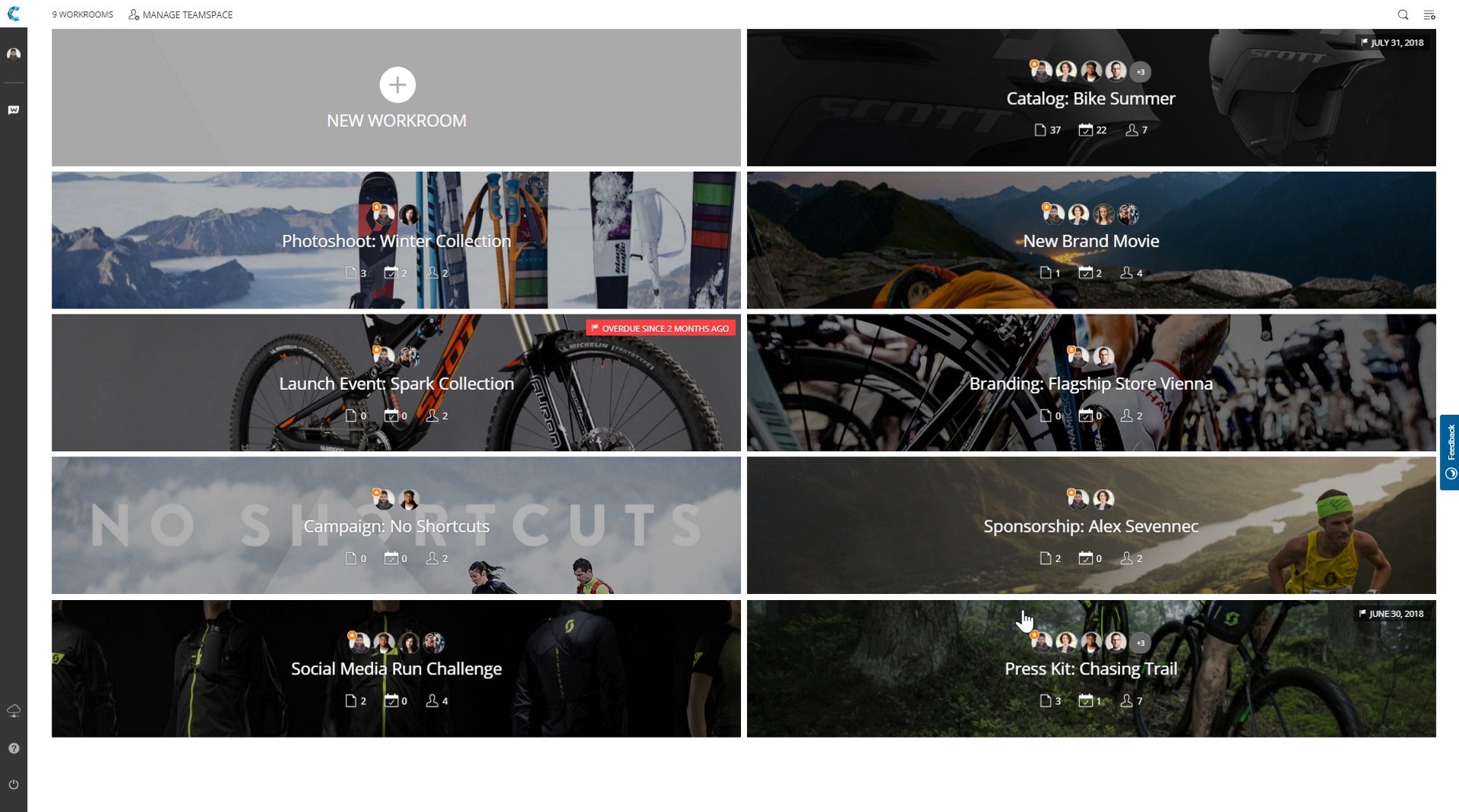
Screenshot of Screenshot of Screenshot of Screenshot of