OpenText Business Process Monitor vs. Retrace

Overview
ProductRatingMost Used ByProduct SummaryStarting Price
OpenText Business Process Monitor
Score 10.0 out of 10
N/A
OpenText Business Process Monitor, formerly from Micro Focus, is a synthetic application monitoring tool.N/A
Retrace
Score 8.0 out of 10
N/A
Retrace (formerly APM+) is a lightweight Application Performance Management solution. Retrace gives developers continuous, real-time analysis through a combination of code-level visibility with in-line log and error data. Retrace helps identify top performance offenders by analyzing top page requests, top SQL queries, and top external web services.
$99
up to 3 servers, 500,000 traces, and 1,000,000 logs
Pricing
OpenText Business Process MonitorRetrace
Editions & Modules
No answers on this topic
Essentials
$99
up to 3 servers, 500,000 traces, and 1,000,000 logs
Standard
249+
2,000,000+ traces and 5,000,000+ logs
Enterprise
Custom
Customer number of traces and logs
Offerings
Pricing Offerings
OpenText Business Process MonitorRetrace
Free Trial
NoYes
Free/Freemium Version
NoNo
Premium Consulting/Integration Services
NoNo
Entry-level Setup FeeNo setup feeNo setup fee
Additional DetailsPricing is based on trace and log usage.
More Pricing Information
Community Pulse
OpenText Business Process MonitorRetrace
Features
OpenText Business Process MonitorRetrace
Application Performance Management
Comparison of Application Performance Management features of Product A and Product B
OpenText Business Process Monitor
9.0
1 Ratings
15% above category average
Retrace
-
Ratings
Application monitoring9.01 Ratings00 Ratings
Database monitoring9.01 Ratings00 Ratings
Threshold alerts9.01 Ratings00 Ratings
Predictive capabilities8.01 Ratings00 Ratings
Application performance management console10.01 Ratings00 Ratings
Out-of-the box templates to monitor applications8.01 Ratings00 Ratings
Application dependency mapping and thresholding8.01 Ratings00 Ratings
Virtualization monitoring9.01 Ratings00 Ratings
Server availability and performance monitoring10.01 Ratings00 Ratings
Server usage monitoring and capacity forecasting10.01 Ratings00 Ratings
Best Alternatives
OpenText Business Process MonitorRetrace
Small Businesses
GitLab
GitLab
Score 8.8 out of 10
InfluxDB
InfluxDB
Score 8.8 out of 10
Medium-sized Companies
ManageEngine Site24x7
Score 9.5 out of 10
Sumo Logic
Sumo Logic
Score 8.8 out of 10
Enterprises
ManageEngine Site24x7
Score 9.5 out of 10
NetBrain Technologies
Score 9.2 out of 10
All AlternativesView all alternativesView all alternatives
User Ratings
OpenText Business Process MonitorRetrace
Likelihood to Recommend
9.0
(1 ratings)
8.0
(2 ratings)
User Testimonials
OpenText Business Process MonitorRetrace
Likelihood to Recommend
OpenText
It is really good to have Business Process Monitor for being proactive with monitoring critical business services. And it is even more recommended along with APM. However, you will still need some training in order to configure them as they are sophisticated tools.
Read full review
Stackify
If I need to change a logo design on the invoice, the new logo is slightly larger or smaller so the type below the logo is in a different area than before. In this case, you would need to load the new version of the document into APM Plus and redo the mapping of the field areas to properly grab the information needed to process the document. Without doing this, the document could fail or go to the wrong archive based on the fields.
Read full review
Pros
OpenText
  • Being proactive in monitoring critical business services.
  • Uses pre-saved scripts using Vugen.
  • Almost all protocols are supported by it.
Read full review
Stackify
  • Integration of performance management with log management so you get the parameters sent
  • In-line log and error data in trace
  • Integration of error and log data, so in one click you can see all the logs recorded when an error was thrown
  • Very reasonably priced
Read full review
Cons
OpenText
  • It depends heavily on Vugen so it would be great to give more courses on writing scripts in the Business Process Monitor trainings.
  • When issues arise, we don't have insights into if the issue is from the script itself or if it is a real issue. Here you lose trust in determining which is right until you interfere personally. As an example, one day I got an alert from a business server and the issue was that the script didn't finish successfully and thus it kept the session opened. So the next schedule of the script will fail, not because there is a real issue on the business service, but because you need to go yourself open the application, close all pages, then log out so that the script will continue to monitor.
Read full review
Stackify
  • To set up the fields that APM Plus monitors, you need to map each field area on each document.
  • APM Plus could use a way to link the documents back into the finance or business software so you can find the document under the PO, Sales Order, Invoice, etc.
  • APM Plus setup is only for the professionals. There are many areas that need tweaking on setup, having a better default setup would lessen the learning curve to set it up for use.
Read full review
Alternatives Considered
OpenText
We didn't try anything else as we are satisfied with Business Process Monitor.
Read full review
Stackify
It is a very impressive tool which doesn't overwhelm you with unnecessary data. They have combination of tools that haven't seen by any other company which makes it a very powerful tool
Read full review
Return on Investment
OpenText
  • Proactive.
  • Monitors critical services by simulating every step you could use and get alerts for performance issues and availability issues.
  • Has almost all the needed protocols to write a script.
Read full review
Stackify
  • APM Plus has freed up users from having to manually attach documents to each place they are sending it. APM Plus will do it automatically.
  • APM Plus provides a searchable archive to re-visit sent documents with customers and vendors. Having to reprint a document you risk the potential that something has changed since it was last printed.
  • APM Plus does need IT staff for adjustments and to review sending problems. Not for an average user.
Read full review
ScreenShots

Retrace Screenshots

Screenshot of Detailed stack trace with inline error and logsScreenshot of Web Apps Dashboard:
The Apps Page gives you a high-level overview of all applications found and monitored across all servers in each environment. Click on any app to take you to the App Dashboard to view more information for a particular app.Screenshot of Apps Dashboard:
The App Dashboard is a powerful monitoring and troubleshooting perspective that gives you a view of application health across one or more environments.Screenshot of Performance (APM+) Dashboard:
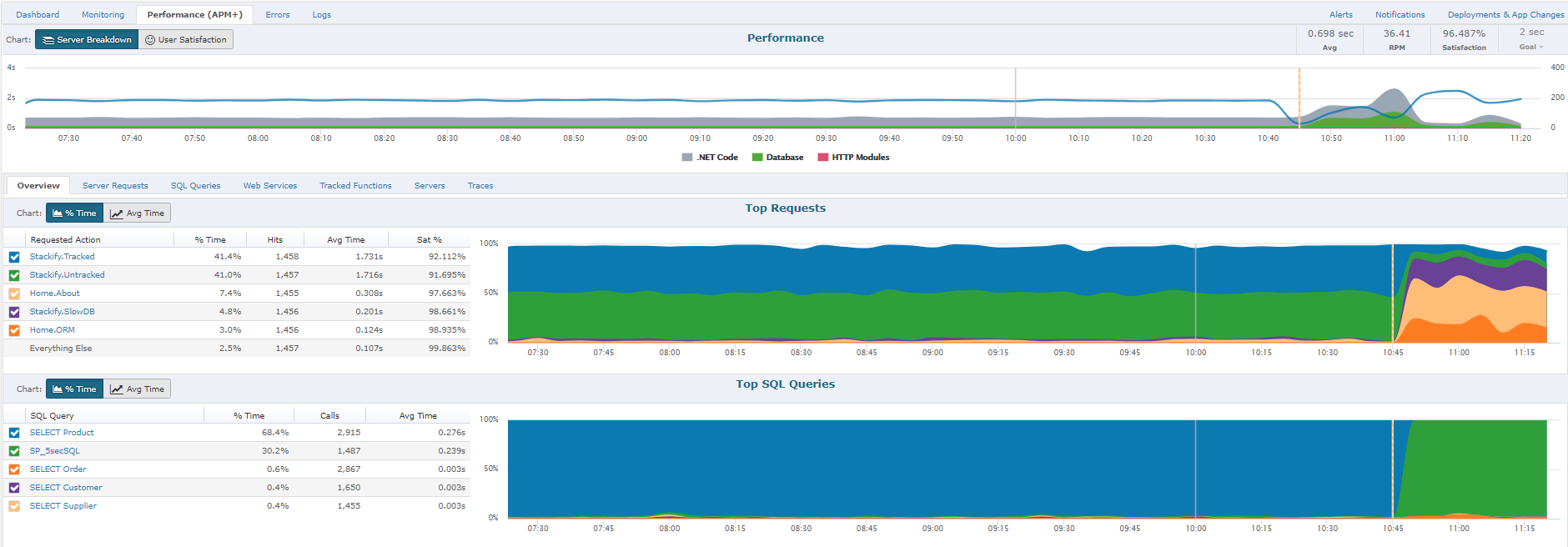
The Performance section will give you a report of how well the application is performing overall, as perceived by your users.  A graph will allow you to view all requests by Satisfaction by viewing "Fast", "Sluggish", "Too Slow", or "Failed" types of requests.  Another report includes graphs of HTTP Error%, Satisfaction Score%, and Page Load Time.  Lastly, you will have the ability to sort each page request of your App by different categories: Satisfaction, Slowest page, Failed pages, pages hit, and total load time.  By clicking on an individual page a Performance Details page with further information about that specific page's health, performance, and errors will be displayed.Screenshot of Performance Traces:
One of the ways we strive to deliver relevant insights is to only collect traces around interesting requests. Some examples of these request types that are interesting would be faster than normal, slower than normal, new web requests, requests introducing new SQL, requests introducing new exceptions, or abnormal satisfaction scores. Under performing requests will be profiled more often than fast requests. As long as the app is getting steady traffic Retrace should be saving a trace every 5 to 15 minutes.Screenshot of Errors Dashboard:
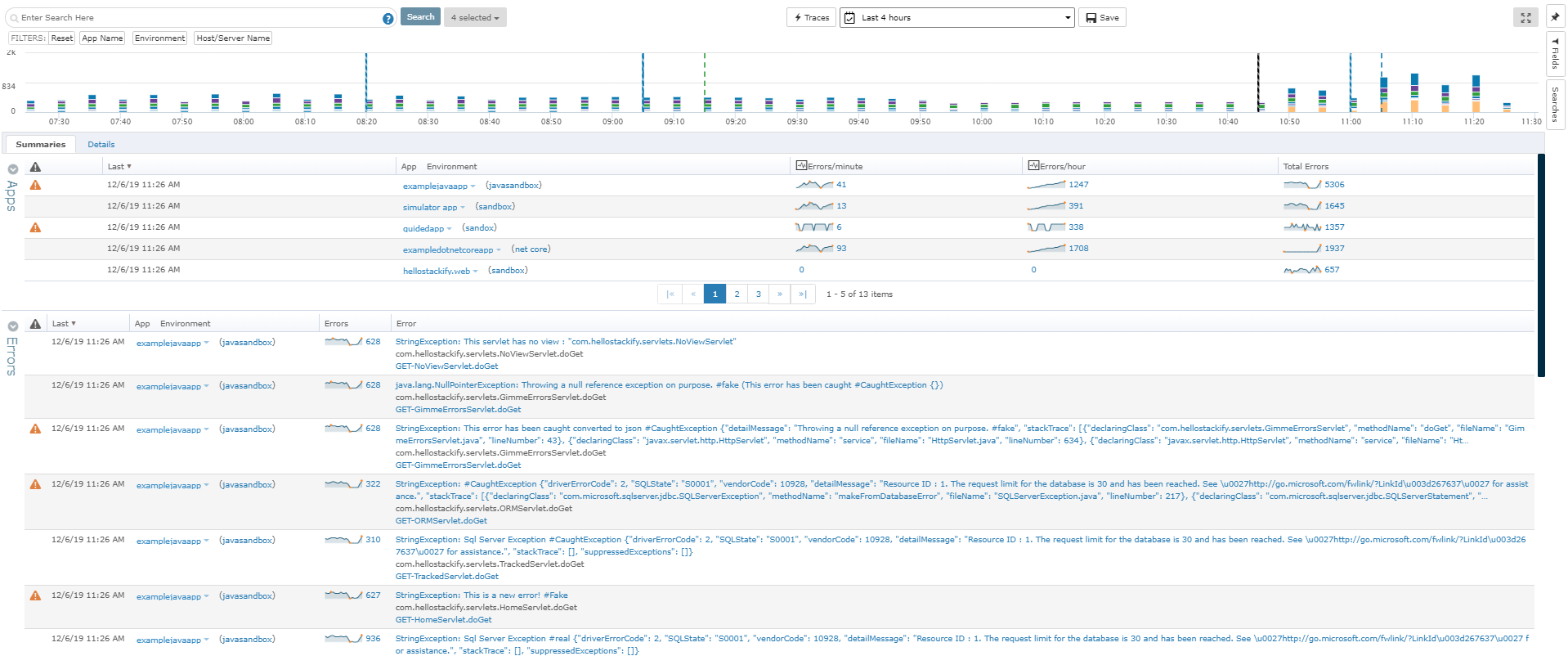
From the Errors Dashboard, you can get an overview of all the exceptions of all your applications across different environments. It gives you a central location to view details about your errors.