OpenText Network Node Manager i (NNMi) vs. SolarWinds Database Performance Monitor

Overview
ProductRatingMost Used ByProduct SummaryStarting Price
OpenText Network Node Manager i (NNMi)
Score 8.1 out of 10
N/A
OpenText Network Node Manager i is a network management platform acquired by Micro Focus from Hewlett-Packard Enterprise, and now supported by OpenText.N/A
SolarWinds Database Performance Monitor
Score 8.9 out of 10
N/A
VividCortex, acquired by SolarWinds in December 2019, provides database performance monitoring designed to increase system performance, team efficiency, and infrastructure cost savings. The GDPR- and SOC 2-compliant platform offers visibility into major open-source databases—MySQL, PostgreSQL, Amazon Aurora, MongoDB, and Redis—for the engineering team at scale. Industry leaders like Etsy, GitHub, SendGrid, and Yelp rely on Database Performance Monitor for all-query monitoring and drill…N/A
Pricing
OpenText Network Node Manager i (NNMi)SolarWinds Database Performance Monitor
Editions & Modules
No answers on this topic
Offerings
Pricing Offerings
OpenText Network Node Manager i (NNMi)SolarWinds Database Performance Monitor
Free Trial
NoYes
Free/Freemium Version
NoNo
Premium Consulting/Integration Services
NoYes
Entry-level Setup FeeNo setup feeNo setup fee
Additional Details
More Pricing Information
Community Pulse
OpenText Network Node Manager i (NNMi)SolarWinds Database Performance Monitor
Best Alternatives
OpenText Network Node Manager i (NNMi)SolarWinds Database Performance Monitor
Small Businesses
NinjaOne
NinjaOne
Score 9.1 out of 10

No answers on this topic

Medium-sized Companies
Intermapper
Intermapper
Score 8.4 out of 10
LogicMonitor
LogicMonitor
Score 9.0 out of 10
Enterprises
Cisco Meraki Dashboard
Score 9.0 out of 10
LogicMonitor
LogicMonitor
Score 9.0 out of 10
All AlternativesView all alternativesView all alternatives
User Ratings
OpenText Network Node Manager i (NNMi)SolarWinds Database Performance Monitor
Likelihood to Recommend
8.0
(5 ratings)
8.0
(1 ratings)
Usability
8.0
(1 ratings)
-
(0 ratings)
Support Rating
1.0
(1 ratings)
-
(0 ratings)
User Testimonials
OpenText Network Node Manager i (NNMi)SolarWinds Database Performance Monitor
Likelihood to Recommend
OpenText
Well-suited for large-scale deployment without needing more servers. Linux installation is quite stable, and Polling of a large number of devices is well managed. Less suited to Network Observability scenarios or cloud network monitoring.
Read full review
SolarWinds
Computing resources consumed by the DB instance, DPA queries & wait time, deadlock conditions, virtual infrastructure resources. The addition of NPM & DPA integration as well as cross-correlation in the identification of issues with the network or server or DB is all stupid-proof. Monitoring is more than just health and resource consumption, it's also performance. DB performance analysis is key to maintaining healthy DB instances.
Read full review
Pros
OpenText
  • Fault and Performance Monitoring
  • Performance Reporting
  • Alerting and Flexible threhsolds
  • Product stability
Read full review
SolarWinds
  • Simple to use and very easy to learn.
  • The execution engines run in parallel, can execute any syntax or query.
  • DPN can run all queries for both Oracle and SQL with no additional support.
Read full review
Cons
OpenText
  • More out of the box monitoring parameters features
  • Improved GUI
  • Independent reporting functionality within NNMi
Read full review
SolarWinds
  • The Reporting feature currently doesn't allow customization.
Read full review
Usability
OpenText
NNMi's user interface is described as well-designed and intuitive, making it easy for users to navigate and perform tasks quickly, thereby enhancing the overall user experience. The system offers a powerful network discovery mechanism that maps out your network's physical and virtual topology, enabling you to visualize connections between devices and identify potential issues. Fault monitoring is at its best. NNMi provides a unified environment for viewing faults, availability, and performance data, consolidating essential information into a single platform.
Read full review
SolarWinds
No answers on this topic
Support Rating
OpenText
Support is long and arduous and often are unable to help resolve the issue. We often have to do escalations or duty manager to get things moved. Even with a technical account manager, we do not see much improvement from a support point of view. This is an area where Micro Focus has a lot of improvement to do.
Read full review
SolarWinds
No answers on this topic
Alternatives Considered
OpenText
Even though there are many products in the market such as from Solarwinds, CA Spectrum (no DX Spectrum), PRTG that offers similar or even with more flexibility the fault and performance monitoring still Micro Focus is a very nice tool when it comes to Scalability and Stability with all necessary monitoring coverage. There is no external database required and hence less issues with integration.
Read full review
SolarWinds
DPM is less expensive and more feature-rich. Also, Oracle tech support is garbage, unless you can afford to spend a day getting assistance.
Read full review
Return on Investment
OpenText
  • HP NNM is very good at producing root cause analysis. MTTR is reduced with NNM.
Read full review
SolarWinds
  • What is the cost of a downed DB instance? That's your ROI. DPM lets you see issues before they become critical.
Read full review
ScreenShots

SolarWinds Database Performance Monitor Screenshots

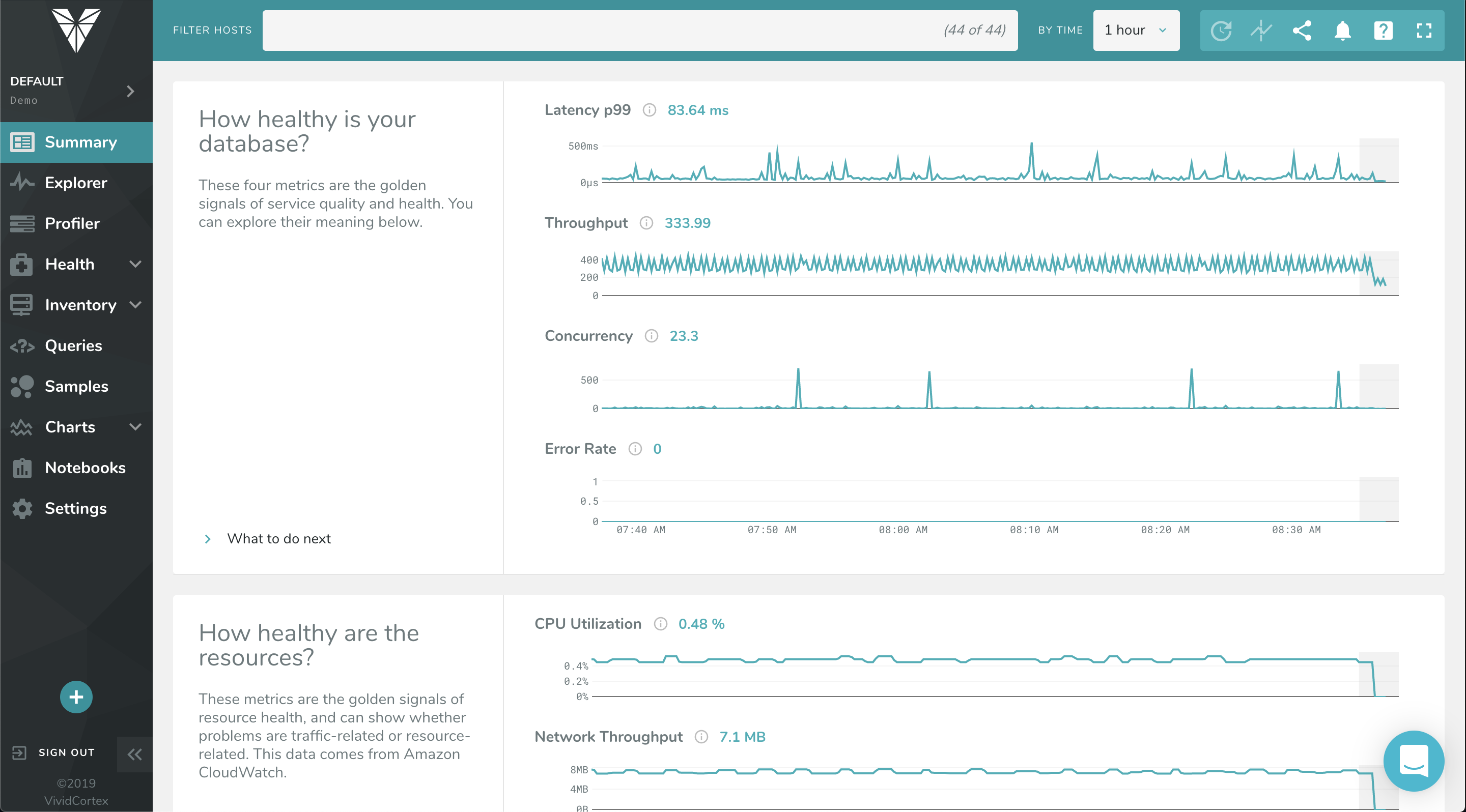
Screenshot of The Profiler Dashboard is a powerful, dynamic dashboard for ranking and filtering activity on your servers: It can instantly show you what needs attention and it provides a unified view of all your database types that VividCortex monitors. It enables you to view and understand your system by profiling it according to its most significant attributes—customized and selected by you.Screenshot of This dashboard displays a list of queries and allows you to filter them with powerful specificity. Filters can be set according to query text, host, and timeframe when the query was first seen / last active.Screenshot of VividCortex captures an enormous amount of data, and the Summary Dashboard helps users make sense of it, reducing their time-to-insight. It features widgets with automatic displays for Top 5 Queries by Total Time, Top 5 Queries by User CPU, Application Overview, Critical Events, and more.Screenshot of VividCortex monitors thousands of metrics in your system, and the Charts and Dashboard’s navigation pane allows you to toggle, customize, and enable various categories of generated charts. You can then easily navigate and examine the charts’ metrics with mouseover and zoom capabilities.