TrustRadius: an HG Insights company

Save this comparison

Save this comparison

Add Product

Recommended Comparisons

    Overview
    ProductRatingMost Used ByProduct SummaryStarting Price

    OpenText SiteScope

    Score6.5 out of 10
    N/AOpenText's SiteScope is an agentless application performance monitoring tool with hybrid support across a variety of systems and vendors. Sitescope also offers automated workflow and incident identification and remediation capabilities, and rapid installation-to-monitoring processes.N/A

    Retrace (legacy)

    Score8 out of 10
    N/AStackify Retrace provides application performance management across the entire stack. Coupled with aggregated logs from common logging frameworks, find every exception in code. Retrace code with lightweight code profiling and track and monitor all key application and server metrics. The vendor states that with coverage for full lifecycle development, the Stackify Retrace software offering is tailored to be inclusive for multiple role types, and presents everything your team needs to know about…

    $99

    up to 3 servers, 500,000 traces, and 1,000,000 logs

    Pricing
    OpenText SiteScopeRetrace (legacy)
    Editions & Modules
    No answers on this topic
    Essentials
    $99
    up to 3 servers, 500,000 traces, and 1,000,000 logs
    Standard
    249+
    2,000,000+ traces and 5,000,000+ logs
    Enterprise
    Custom
    Customer number of traces and logs
    Offerings
    Pricing Offerings
    OpenText SiteScopeRetrace (legacy)
    Free Trial
    NoYes
    Free/Freemium Version
    NoNo
    Premium Consulting/Integration Services
    NoNo
    Entry-level Setup FeeNo setup feeNo setup fee
    Additional Details—Pricing is based on trace and log usage.
    More Pricing Information
    Features
    OpenText SiteScopeRetrace (legacy)
    Application Performance Management
    Comparison of Application Performance Management features of OpenText SiteScope and Retrace (legacy)
    Feature
    OpenText SiteScope
    8.1
    6 Ratings
    3% above category average
    Retrace (legacy)
    6.4
    1 Ratings
    20% below category average
    Application monitoring6.16 Ratings7.01 Ratings
    Database monitoring8.25 Ratings6.01 Ratings
    Threshold alerts8.96 Ratings00 Ratings
    Predictive capabilities7.94 Ratings00 Ratings
    Application performance management console8.04 Ratings00 Ratings
    Collaboration tools7.34 Ratings00 Ratings
    Out-of-the box templates to monitor applications8.76 Ratings6.01 Ratings
    Application dependency mapping and thresholding8.86 Ratings7.01 Ratings
    Virtualization monitoring9.15 Ratings00 Ratings
    Server availability and performance monitoring8.86 Ratings6.01 Ratings
    Server usage monitoring and capacity forecasting8.95 Ratings00 Ratings
    IT Asset Discovery6.65 Ratings00 Ratings
    Best Alternatives
    OpenText SiteScopeRetrace (legacy)
    Small Businesses
    No answers on this topic
    No answers on this topic
    Medium-sized Companies
    SolarWinds AppOptics
    Score7.6 out of 10
    SolarWinds AppOptics
    Score7.6 out of 10
    Enterprises
    Splunk AppDynamics
    Score8.5 out of 10
    Splunk AppDynamics
    Score8.5 out of 10
    All AlternativesView all alternativesView all alternatives
    User Ratings
    OpenText SiteScopeRetrace (legacy)
    Likelihood to Recommend
    6.9
    (6 ratings)
    8.0
    (2 ratings)
    Usability
    8.0
    (1 ratings)
    -
    (0 ratings)
    Support Rating
    6.0
    (1 ratings)
    -
    (0 ratings)
    User Testimonials
    OpenText SiteScopeRetrace (legacy)
    Likelihood to Recommend
    OpenText
    SiteScope is definitely well suited in an HP server environment. It is also well suited for virtual server environments. It is also well suited for those who are happy with email and text based message alerting. It may not be appropriate in other environments where monitoring physical components is critical. Because HP SiteScope does not monitor certain physical components, it does fall short of being able to be a "one stop shop solution" in regard to monitoring. It is not well suited for those looking for logic in how alerts are sent and cascade to other people or groups.
    Incentivized
    Read full review
    Discontinued Products
    If I need to change a logo design on the invoice, the new logo is slightly larger or smaller so the type below the logo is in a different area than before. In this case, you would need to load the new version of the document into APM Plus and redo the mapping of the field areas to properly grab the information needed to process the document. Without doing this, the document could fail or go to the wrong archive based on the fields.
    Incentivized
    Read full review
    Pros
    OpenText
    • Alerts can be configured as per business requirement.
    • It can take remedial action, when defined for a particular situation.
    • Severity, priority of tickets which are created upon a trigger can be well defined.
    • The teams which need to be alerted can be configured in the tool itself, in case of any event.
    Incentivized
    Read full review
    Discontinued Products
    • Integration of performance management with log management so you get the parameters sent
    • In-line log and error data in trace
    • Integration of error and log data, so in one click you can see all the logs recorded when an error was thrown
    • Very reasonably priced
    Read full review
    Cons
    OpenText
    • Sitescope is particularly used for infrastructure monitoring. Other kinds of monitors cannot be set using HP sitescope.
    • Sitescope cannot have graphs like splunk which is why we have splunk as well which is an additional cost for the company.
    • We can't have a direct regex operations on data inside HP sitescope. We need to have the logs placed as a single log and then do that.
    Incentivized
    Read full review
    Discontinued Products
    • To set up the fields that APM Plus monitors, you need to map each field area on each document.
    • APM Plus could use a way to link the documents back into the finance or business software so you can find the document under the PO, Sales Order, Invoice, etc.
    • APM Plus setup is only for the professionals. There are many areas that need tweaking on setup, having a better default setup would lessen the learning curve to set it up for use.
    Incentivized
    Read full review
    Usability
    OpenText
    Very straightforward and easy to use once you get past the short learning curve.
    Incentivized
    Read full review
    Discontinued Products
    No answers on this topic
    Support Rating
    OpenText
    Can't really answer this. Setup was easy and no support has really been used at this point.
    Incentivized
    Read full review
    Discontinued Products
    No answers on this topic
    Alternatives Considered
    OpenText
    SiteScope unified console is a powerful tool for operators to easily detect warnings and alerts grouped by its hierarchical organization with real-time status displaying continuously the whole health map.
    Incentivized
    Read full review
    Discontinued Products
    It is a very impressive tool which doesn't overwhelm you with unnecessary data. They have combination of tools that haven't seen by any other company which makes it a very powerful tool
    Read full review
    Return on Investment
    OpenText
    • Sitescope does exactly what it was purchased for. It may take some time to set it up but once its set up it is a rock solid product.
    Incentivized
    Read full review
    Discontinued Products
    • APM Plus has freed up users from having to manually attach documents to each place they are sending it. APM Plus will do it automatically.
    • APM Plus provides a searchable archive to re-visit sent documents with customers and vendors. Having to reprint a document you risk the potential that something has changed since it was last printed.
    • APM Plus does need IT staff for adjustments and to review sending problems. Not for an average user.
    Incentivized
    Read full review
    ScreenShots

    Retrace (legacy) Screenshots

    Screenshot of Detailed stack trace with inline error and logsScreenshot of Web Apps Dashboard:
The Apps Page gives you a high-level overview of all applications found and monitored across all servers in each environment. Click on any app to take you to the App Dashboard to view more information for a particular app.Screenshot of Apps Dashboard:
The App Dashboard is a powerful monitoring and troubleshooting perspective that gives you a view of application health across one or more environments.Screenshot of Performance (APM+) Dashboard:
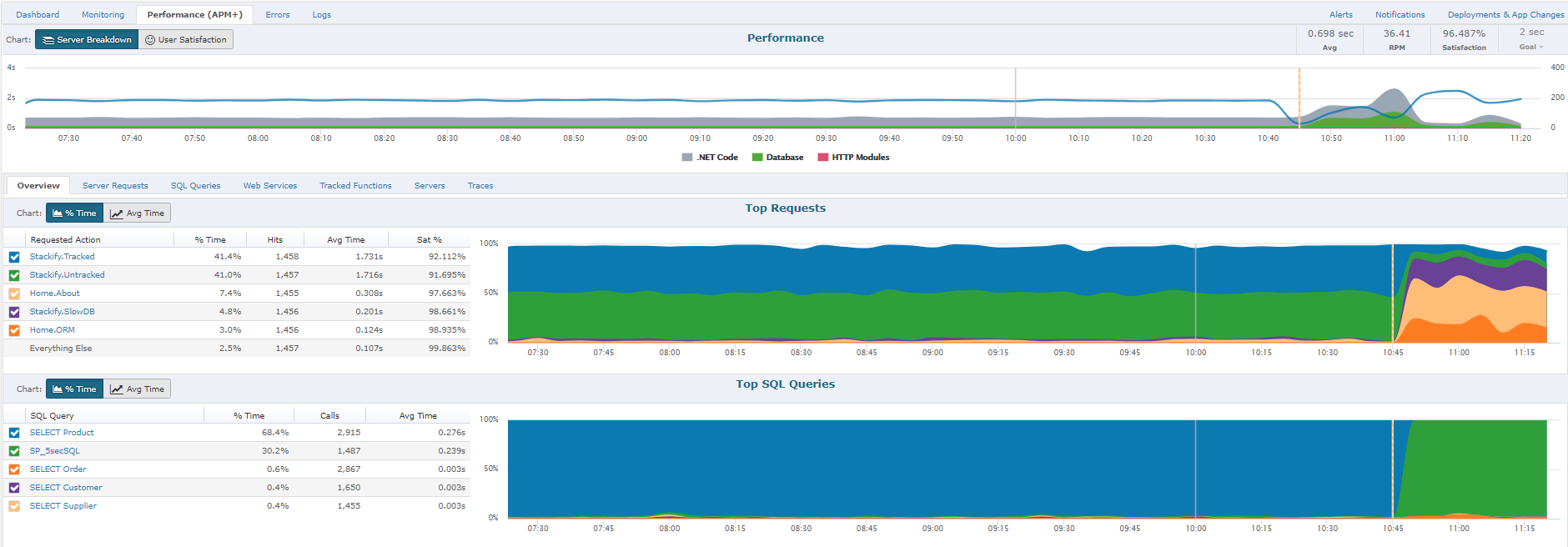
The Performance section will give you a report of how well the application is performing overall, as perceived by your users.  A graph will allow you to view all requests by Satisfaction by viewing "Fast", "Sluggish", "Too Slow", or "Failed" types of requests.  Another report includes graphs of HTTP Error%, Satisfaction Score%, and Page Load Time.  Lastly, you will have the ability to sort each page request of your App by different categories: Satisfaction, Slowest page, Failed pages, pages hit, and total load time.  By clicking on an individual page a Performance Details page with further information about that specific page's health, performance, and errors will be displayed.Screenshot of Performance Traces:
One of the ways we strive to deliver relevant insights is to only collect traces around interesting requests. Some examples of these request types that are interesting would be faster than normal, slower than normal, new web requests, requests introducing new SQL, requests introducing new exceptions, or abnormal satisfaction scores. Under performing requests will be profiled more often than fast requests. As long as the app is getting steady traffic Retrace should be saving a trace every 5 to 15 minutes.Screenshot of Errors Dashboard:
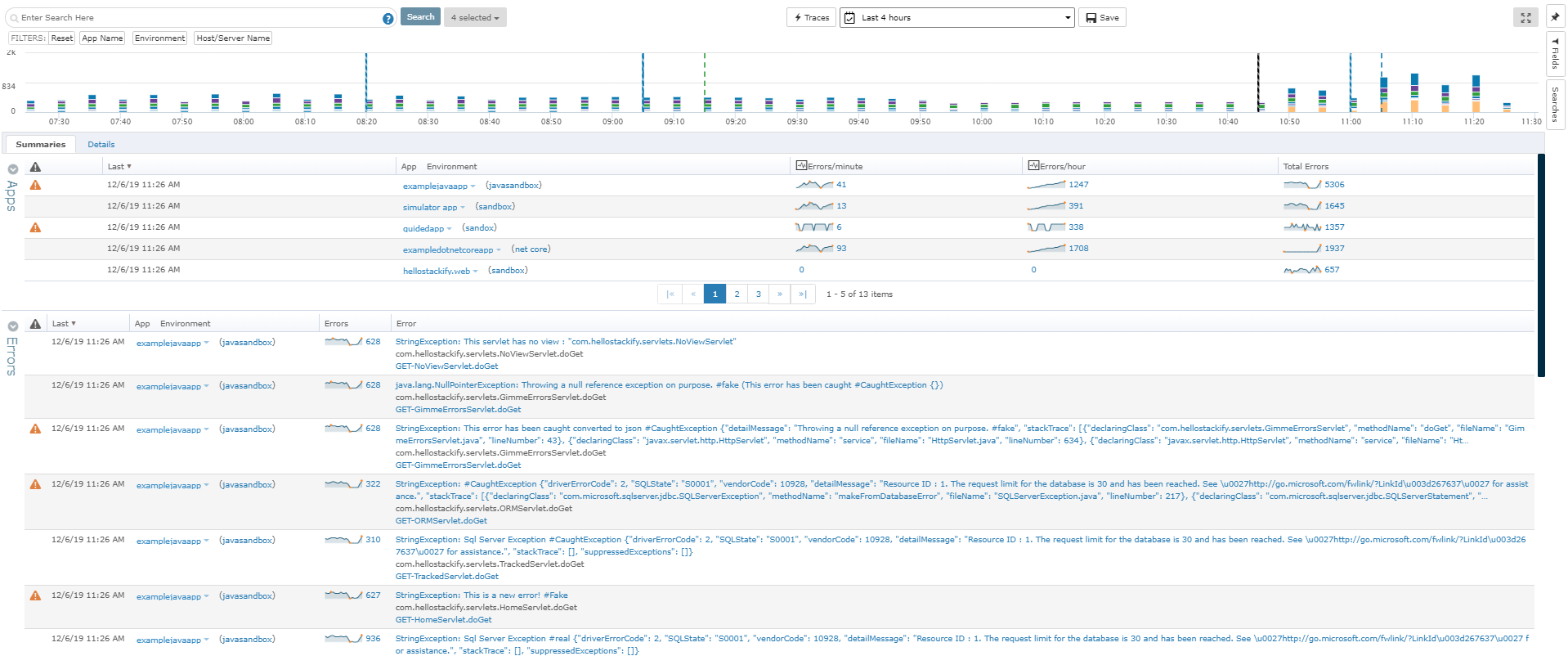
From the Errors Dashboard, you can get an overview of all the exceptions of all your applications across different environments. It gives you a central location to view details about your errors.