Oracle Enterprise Manager vs. VMware Tanzu CloudHealth

Overview
ProductRatingMost Used ByProduct SummaryStarting Price
Oracle Enterprise Manager
Score 7.0 out of 10
N/A
Oracle’s Enterprise Manager is an on-premises monitoring and management tool. The console is designed primarily to manage other Oracle products, it but can integrate to manage non-Oracle components as well.N/A
VMware Tanzu CloudHealth
Score 7.9 out of 10
N/A
Tanzu CloudHealth (formerly VMware Aria Cost Powered by CloudHealth) simplifies financial management, streamlines operations, and improves organizational collaboration across your multi-cloud environment.N/A
Pricing
Oracle Enterprise ManagerVMware Tanzu CloudHealth
Editions & Modules
No answers on this topic
Offerings
Pricing Offerings
Oracle Enterprise ManagerVMware Tanzu CloudHealth
Free Trial
NoYes
Free/Freemium Version
NoYes
Premium Consulting/Integration Services
NoYes
Entry-level Setup FeeNo setup feeNo setup fee
Additional Details
More Pricing Information
Community Pulse
Oracle Enterprise ManagerVMware Tanzu CloudHealth
Best Alternatives
Oracle Enterprise ManagerVMware Tanzu CloudHealth
Small Businesses
DBeaver
DBeaver
Score 8.4 out of 10
VMware Cloud Director
Score 8.5 out of 10
Medium-sized Companies
DBeaver
DBeaver
Score 8.4 out of 10
IBM Turbonomic
IBM Turbonomic
Score 9.0 out of 10
Enterprises
DBeaver
DBeaver
Score 8.4 out of 10
VMware Cloud Director
Score 8.5 out of 10
All AlternativesView all alternativesView all alternatives
User Ratings
Oracle Enterprise ManagerVMware Tanzu CloudHealth
Likelihood to Recommend
7.1
(26 ratings)
-
(0 ratings)
Usability
7.3
(3 ratings)
-
(0 ratings)
Support Rating
7.3
(1 ratings)
-
(0 ratings)
User Testimonials
Oracle Enterprise ManagerVMware Tanzu CloudHealth
Likelihood to Recommend
Oracle
OEM is very well suited for all Oracle products, especially Oracle databases and Exadata machines; even not Oracle hardware, it is very good and displaying high level details. OEM is not well suited for older hardware vendors like AIX, HP-UX, DEC/Digital, Microsoft (sql server). This is a big negative as most large companies have a heterogeneous environment with many different vendor hardware and (database) software products.
Read full review
VMware by Broadcom
No answers on this topic
Pros
Oracle
  • Monitoring Templates: There are out of box monitoring templates for each target types, you can customize them or use them as it is.
  • Administrative Groups: This is a relatively new feature in OEM Cloud Control. This lets you create and manage your targets and monitoring templates smarter and with less re-work.
  • DB Monitoring: There are so many cool DB monitoring features and visual graphics, that it can be used by both DBA and functional people to see what's going on in the database.
Read full review
VMware by Broadcom
No answers on this topic
Cons
Oracle
  • Bugs. Every version we upgrade to has a number of bugs. Some stop us from rolling to production OEM (we have a sandbox OEM), some are simply annoying. If I could improve on one thing, it would be for better QA from oracle before releasing each version.
  • Flash. I'm told that they are moving from Flash to Jet in version 13.3 and beyond (we are on 13.2 currently). That change cannot come soon enough. The OEM pages load SO slowly due to Flash.
  • Hierarchy Groups. OEM allows five Hierarchy groups. A Hierarchy group allows a top down metric/rule roll out. However, they limit you to five. I'd like to see them open that up, so that we can have any number of custom groups.
Read full review
VMware by Broadcom
No answers on this topic
Usability
Oracle
It's great! It does everything and anything you would want it to do. It can monitor things which doesn't comes out of the box by adding plug ins to it, for example, you can even monitor Oracle GoldenGate Replication by adding a plug-in to OEM Cloud Control.
Read full review
VMware by Broadcom
No answers on this topic
Support Rating
Oracle
I still rate OEM as a must-have tool for central management of Oracle fleet. The pros and cons of the product is prominent. Meanwhile, I also acknowledge that OEM was design about a decade ago. At that time, it did not have the landscape we have today, such as cloud, DEVOPS, machine learning, etc. I hope in future releases, the design will incorporate those features.
Read full review
VMware by Broadcom
No answers on this topic
Alternatives Considered
Oracle
Being an Oracle shop using Oracle Database and MySQL, management console from Oracle was a better choice than IBM or Microsoft even though we do use Microsoft Azure and storage/servers from IBM (on-prem).
Read full review
VMware by Broadcom
No answers on this topic
Professional Services
Oracle
I work with OEM SCP team. They are great.
Read full review
VMware by Broadcom
No answers on this topic
Return on Investment
Oracle
  • We are a 7x24 shop. Oracle Enterprise Manager Cloud Control helps us meet that objective by proactively warning us before issues cause down time. Things like disk space, archive log issues or temporary table space issues.
  • Spreading the use of this tool outside of the DBA group has allowed us to not hire additional personnel for those teams. Over time, as folks have retired from our operations team, we are not replacing them. Instead we have used OEM Cloud Control to automate tasks.
  • We also now have the tools to measure up-time by using specific measurements inside of OEM. This allows us to report real numbers to management.
Read full review
VMware by Broadcom
No answers on this topic
ScreenShots

VMware Tanzu CloudHealth Screenshots

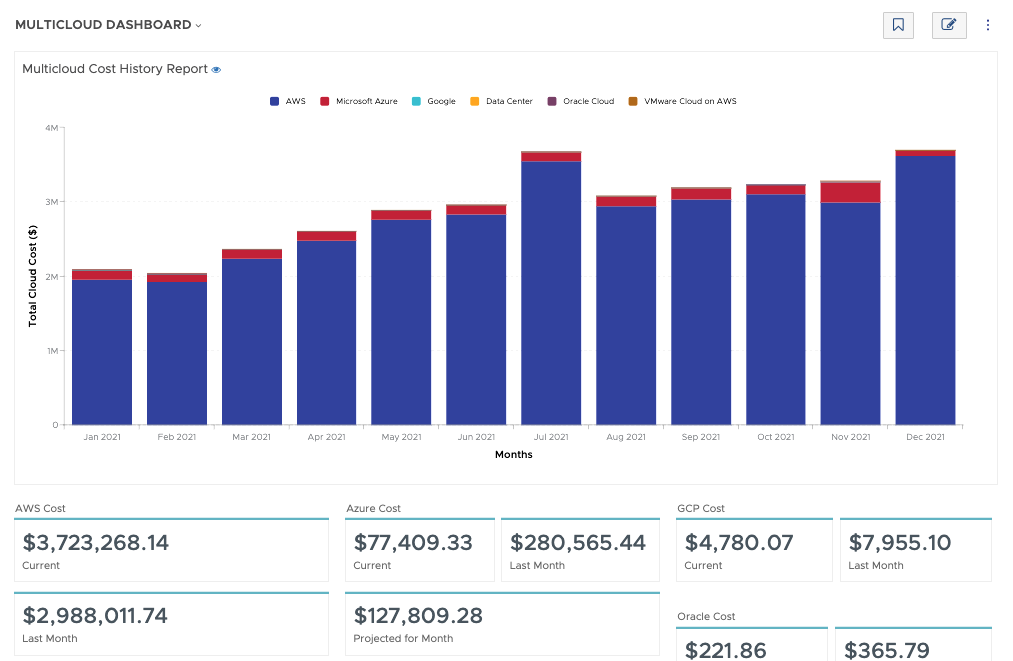
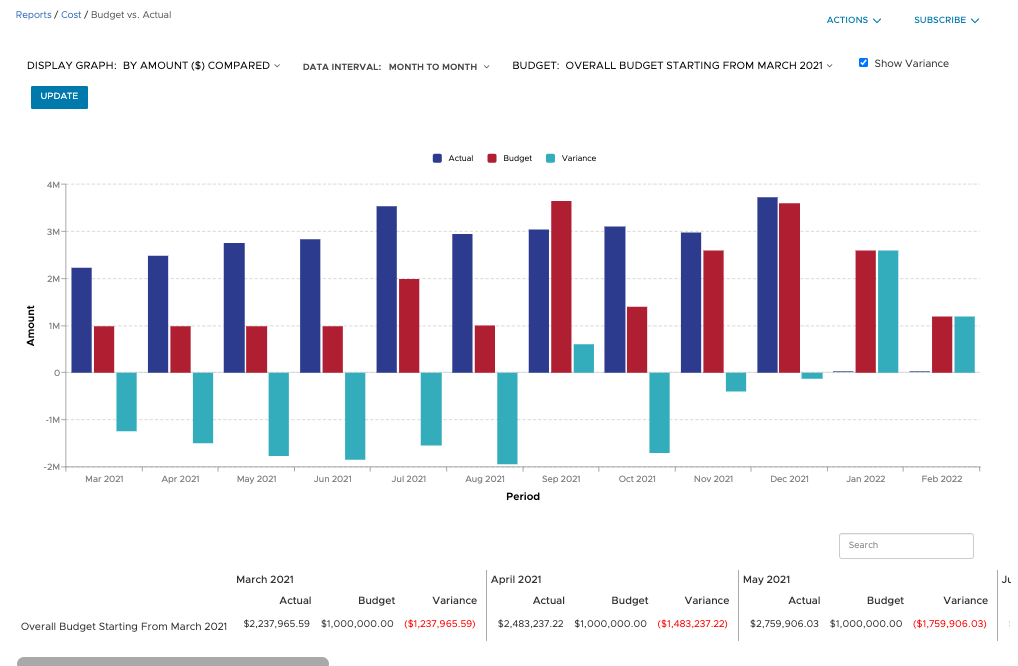
Screenshot of Filter and refine out-of-the-box graphical and tabular reports to correlate datasets for analysis against your business objectives. Create custom dashboards across clouds and easily build detailed reports from scratch, known as CloudHealth FlexReports, across various dimensions to perform more granular analysis on cost, usage, and asset data.Screenshot of Configure budgets to visualize your expected costs for the year in advance and compare it with actual spend as the year progresses. Create as many overall and categorized budgets as you need to run your business, aligned to your company’s fiscal year. Proactively alert stakeholders when costs are forecasted to exceed pre-defined budgets. Toggle on forecasting for reports to predict future values based on historical data for the interval you define.Screenshot of Use CloudHealth’s dynamic policy engine to drive consistent operations and continuously monitor your environment. Quickly identify opportunities to proactively reduce spend, remediate risks, and streamline configuration. Get alerted when conditions deviate from your desired state and enable automated actions to execute changes in your environment—stop, start, resize, or terminate infrastructure—all at the frequency you define.Screenshot of Align cloud data to your business with CloudHealth FlexOrgs and benefit from greater control over user access, sharing, and delegation across multiple levels of organizational hierarchy. Further fine tune the platform by dynamically allocating assets to business groups known as CloudHealth Perspectives. View and analyze your cloud environment by project, application, line of business, cost center, and more, to drive accountability for cost and usage.