OwnID vs. PingOne from Ping Identity

Overview
ProductRatingMost Used ByProduct SummaryStarting Price
OwnID
Score 9.0 out of 10
Enterprise companies (1,001+ employees)
OwnID is a passwordless authentication add-on for websites and apps. It takes passwords out of registration and login for customers and aims to make authentication more secure. OwnID can be added to existing registration and login forms. The low code solution adds a minimalistic button to forms and lets visitors go passwordless while preserving the rest of the user experience. How it works: When browsing on a mobile device, tapping the passwordless button will prompt the…
$0
per month per user
PingOne from Ping Identity
Score 8.9 out of 10
N/A
The PingOne Cloud Platform from Ping Identity in Denver, Colorado is an identity management and access solution (IAM) for enterprises. Features of the products include single sign-on, multi-factor authentication, user management with directory, provisioning and deprovisioning. The solution is presented as a comprehensive, standards-based platform that allows users and devices to securely access any service, application or API from any device. Designed for hybrid IT…
$20,000
per year
Pricing
OwnIDPingOne from Ping Identity
Editions & Modules
Free
$0
per month per user
Professional
$0.01
per month per user
Enterprise
Contact Us
per year
Essential
$20,000
per year
Plus
$40,000
per year
Premium
Contact Sales
Offerings
Pricing Offerings
OwnIDPingOne from Ping Identity
Free Trial
NoYes
Free/Freemium Version
YesNo
Premium Consulting/Integration Services
NoNo
Entry-level Setup FeeNo setup feeNo setup fee
Additional DetailsOwnID is FREE for 10,000 monthly site visitors who use OwnID passwordless to sign up or sign in to their accounts. After that, it's $0.01 per user per month, but you're only charged when a user signs up or logs in using OwnID. Enterprise pricing is case-dependent, as you might be able to take advantage of volume discounts. Please contact us to discuss your case.Try PingOne for Customers for free. Sign up for a free 30-day trial of PingOne for customers.
More Pricing Information
Community Pulse
OwnIDPingOne from Ping Identity
Considered Both Products
OwnID

No answer on this topic

PingOne from Ping Identity
Chose PingOne from Ping Identity
The Ping products work. They can integrate with any application. They are significantly more reliable. The vendor is responsive and works with us. Other solutions are unreliable, the vendors are inflexible, their solutions are inflexible, and their support is inflexible. These …
Chose PingOne from Ping Identity
PingOne from Ping Identity is the clear winner here. I can say this because the cost of their service is very worth it, and their service offers more than their competitors. In addition to that, this software is still improving daily, which only means that there is still more …
Chose PingOne from Ping Identity
This solution is selected before my time so, not much influence ,but product allow to customized and require decent ping skills to configure the solution. Okta and Other solutions are well suited in this category with some positive and some negative capabilities. it must say …
Chose PingOne from Ping Identity
We tested PingOne but our security team was not happy with it (because of cloud exposure).
We tested PingId as well but our security team was not happy with it (because of cloud exposure).
We [spent] some time on PingDataGovernance but so far we don't have any use case for this …
Chose PingOne from Ping Identity
All contenders were capable, but we had scale concerns with NetIQ's architecture. In the end, what set Ping apart from the others was their level of engagement in understanding our use cases up front during the RFP stage and how they were focused on what we needed more than …
Chose PingOne from Ping Identity
I found both platforms compelling from an ease of use and user experience perspective. The decider for me was cost driven as I had already used Ping to drive a self-service transformation in a prior organization, and I intended to do the same at this one. Okta had issues with …
Chose PingOne from Ping Identity
Two-way authentication and ease of use. I've used several applications that just email a link but never ask for a verification code. By entering the verification code you are sure that the site is safe, secured, and reliable. Using Ping, we can ensure no one other than you will …
Features
OwnIDPingOne from Ping Identity
Identity Management
Comparison of Identity Management features of Product A and Product B
OwnID
-
Ratings
PingOne from Ping Identity
9.3
Ratings
12% above category average
ID-Management Access Control00 Ratings10.00 Ratings
ID Management Single-Sign On (SSO)00 Ratings10.00 Ratings
Multi-Factor Authentication00 Ratings9.50 Ratings
Password Management00 Ratings10.00 Ratings
Account Provisioning and De-provisioning00 Ratings8.00 Ratings
ID Management Workflow Automation00 Ratings9.00 Ratings
ID Risk Management00 Ratings8.50 Ratings
Best Alternatives
OwnIDPingOne from Ping Identity
Small Businesses
Auth0
Auth0
Score 8.0 out of 10
Dashlane Password Manager
Score 9.1 out of 10
Medium-sized Companies
OneLogin by One Identity
Score 9.5 out of 10
RSA Access Manager (Discontinued)
Score 10.0 out of 10
Enterprises
OneLogin by One Identity
Score 9.5 out of 10
RSA Access Manager (Discontinued)
Score 10.0 out of 10
All AlternativesView all alternativesView all alternatives
User Ratings
OwnIDPingOne from Ping Identity
Likelihood to Recommend
-
(0 ratings)
9.5
(0 ratings)
Usability
-
(0 ratings)
9.0
(0 ratings)
Support Rating
-
(0 ratings)
8.6
(0 ratings)
User Testimonials
OwnIDPingOne from Ping Identity
Likelihood to Recommend
No answers on this topic
The products we're using work well and are reliable. We've had very few outages, and when we have, their support team has been highly responsive and addressed the issues quickly. They are very customer focused and have been great partners throughout the relationship. I'm looking to adopt more of their technologies over the coming year.
Read full review
Pros
No answers on this topic
  • It is very simple to onboard the application
  • It provide lot of flexibility with SSO functions
  • It helped reducing the cost.
Read full review
Cons
No answers on this topic
  • There are times that the response time is quite slow.
  • Since this is built on Google Cloud, there are moments when we encounter errors when logging in or looping in Google.
  • UI could be improved.
Read full review
Usability
No answers on this topic
Easy to use; all UI's are user friendly and easy to learn.[The] possibility to use API is [a] big value as well. We really like integration with CyberArk; with it we can manage privileged accounts according to company standards without breaking any rules, and we can be 100% sure that only approved persons will have administrative access.
Read full review
Support Rating
No answers on this topic
Ping's support is willing and attentive, but if I am in a position to engage them I am often at a point where most of the usual support engineers would not be in a position to answer the questions I have. However, Ping has been more than willing to engage their product and development teams with our organization as we take advanced deployment and use case challenges to them.
Read full review
Alternatives Considered
No answers on this topic
We tested PingOne but our security team was not happy with it (because of cloud exposure). We tested PingId as well but our security team was not happy with it (because of cloud exposure). We [spent] some time on PingDataGovernance but so far we don't have any use case for this product. We started exploration for PingDataSync (to synchronize two different LDAP directories), [and] so far it looks promising.
Read full review
Return on Investment
No answers on this topic
  • Flexibility is key, we can integrate with any solution.
  • Single control plane for all authentication.
  • A single provider for all authentication needs simplifies the stack and solution, and therefore the maintenance experience for users.
Read full review
ScreenShots

OwnID Screenshots

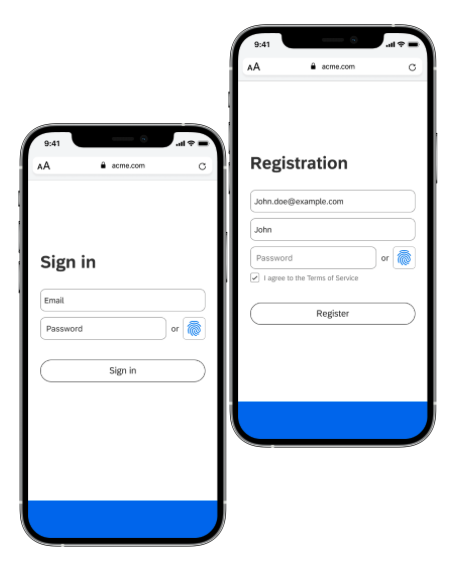
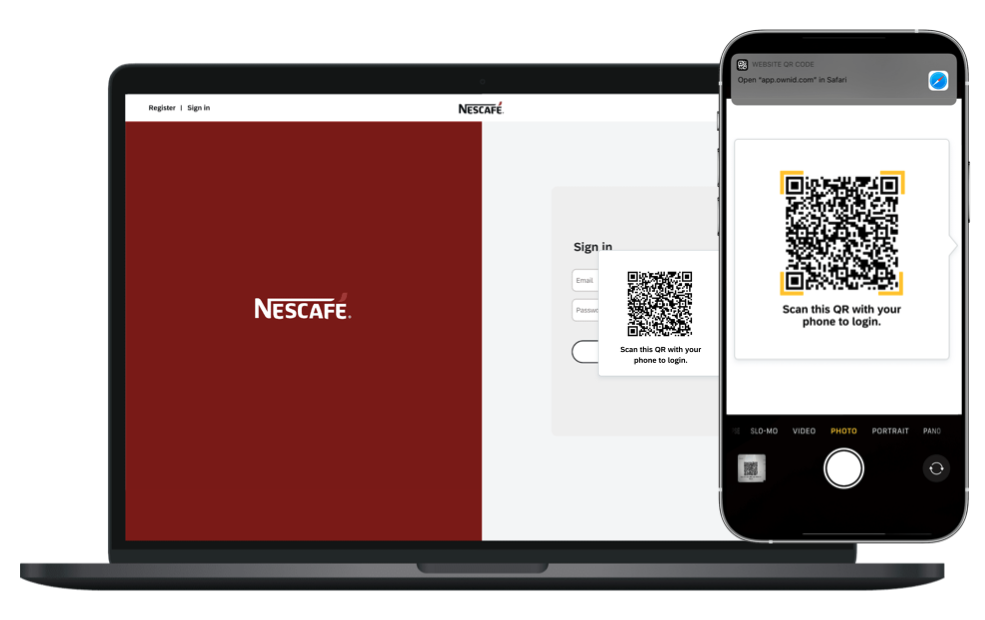
Screenshot of While browsing on mobile devices, your users can sign-in or register without a password using the OwnID passwordless button that blends seamlessly into your forms. Pressing this button will initiate authentication via biometric scan.Screenshot of When browsing on any device that isn't a phone, such as a desktop or smart TV, clicking the passwordless button will automatically prompt Apple users to authenticate with their phone’s FaceID/TouchID. Non-Apple users will be presented a QR code that they will scan with their phone and then authenticate via biometrics. No app is needed.Screenshot of Add passwordless to your website in minutes with our multitude of integration options!