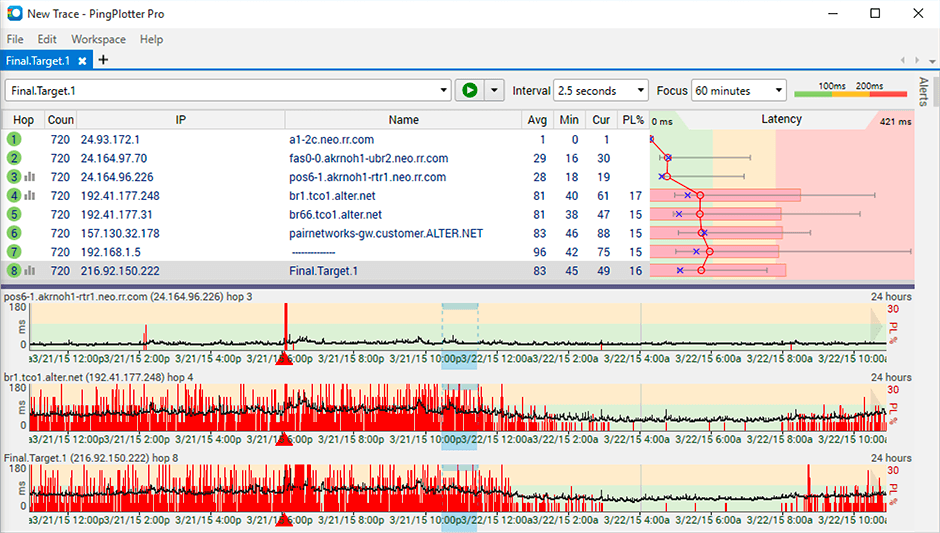
PingPlotter is a graphical traceroute and ping tool that visualizes network performance in a way that makes identifying the source of problems quicker and easier for everyone from online gamers and video streamers to VoIP admins and IT pros. Features for remote deployment, network monitoring, scripting, and a web interface are included along with several additional capabilities.
$0
per user
Prometheus
Score8 out of 10
N/A
Prometheus is a service monitoring and time series database, which is open source.
This tool is best suited to get a quick read on basic network access across multiple hops. It provides immediate, very valuable feedback. If you know your stuff, there are other tools that handle the rest you need: packet capture, port scans, etc. We are all looking for that multi-tool, but this is perfect for the basic need of knowing where in the network a problem might be.
This program works from the roots of the problem and creates a professional matrix for each of its users. This will give them more skills and resources to carry out tasks and reduce the difficulties of operating each of the processes of my work, as well as being An ally for the manipulation and operability of all your master data; Prometheus is very easy to recommend since it is a program that fulfills its mission.
A de minimis incentive was given to thank the reviewer for their time. The incentive was not used to bias or drive a particular response, nor was the incentive contingent on a positive endorsement. More Info
A de minimis incentive was given to thank the reviewer for their time. The incentive was not used to bias or drive a particular response, nor was the incentive contingent on a positive endorsement. More Info
Being able to export data would have been helpful for a larger analysis.
It is a robust program and probably more than we needed for a small business; some options that were better aligned with our budget would have been good.
As a non-technical person in the networking space, I found the data helpful for communicating, but not always easy to understand.
Customer Service: since this is an open-source tool, customer service is not that great. Generally, you get all answers to your problems in online forums, but in case you got stuck, nobody will assist you in a channelised manner. You will have to find the way out on your own, and it may become frustrating at times.
More metrics for dashboards shall be added per the application being monitored. Standards metrics will work in most cases but may not in specific applications. Therefore, customised metrics shall be created for some of the industry-standard niche applications.
A de minimis incentive was given to thank the reviewer for their time. The incentive was not used to bias or drive a particular response, nor was the incentive contingent on a positive endorsement. More Info
I installed it and it just started working. I realized I could then tweak it to show what I needed but didn't have to spend a long time configuring it before use, editing YAML files etc. Maybe that's fine for a network professional, but I only need this software if something goes wrong, and then need it to work quickly out of the box.
A de minimis incentive was given to thank the reviewer for their time. The incentive was not used to bias or drive a particular response, nor was the incentive contingent on a positive endorsement. More Info
It is usable and one can learn if few people in the team are already using it. It can be difficult to understand at the beginning because of non intuitive UI and syntax of the rules. So, I've gone for 7 points as there is some room for improvement in user interface and rules syntax.
A de minimis incentive was given to thank the reviewer for their time. The incentive was not used to bias or drive a particular response, nor was the incentive contingent on a positive endorsement. More Info
I have not had much contact with the PingPlotter support, only one time have I went to them and it was a positive experience. The questions I had were answered quickly and professionally. I have no issue with the experience I had with the Support team. This was from before and after the purchase of the product.
A de minimis incentive was given to thank the reviewer for their time. The incentive was not used to bias or drive a particular response, nor was the incentive contingent on a positive endorsement. More Info
A de minimis incentive was given to thank the reviewer for their time. The incentive was not used to bias or drive a particular response, nor was the incentive contingent on a positive endorsement. More Info
I used Ping.app and UptimeLog.app on the Mac. These both provided different aspects. These two had a menubar to show me green or red for multiple connections. UptimeLog showed me very clearly when my connectivity was on or off and for exactly how long
Highly customized pricing plans to choose from. Lower pricing for the same features compared to competitors. Easy to reach the support team, which provided detailed documentation and helped set up the Prometheus. Monitoring metrics gets very easy after the integration with Grafana. It also has a sophisticated alert setting mechanism to ensure we don't miss anything critical.
A de minimis incentive was given to thank the reviewer for their time. The incentive was not used to bias or drive a particular response, nor was the incentive contingent on a positive endorsement. More Info
A de minimis incentive was given to thank the reviewer for their time. The incentive was not used to bias or drive a particular response, nor was the incentive contingent on a positive endorsement. More Info
The ROI mentioned during the purchase has not been achieved, however this could be due to lack of data from our side. 2 years of implementation is too early to calculate and confirm the ROI.
A de minimis incentive was given to thank the reviewer for their time. The incentive was not used to bias or drive a particular response, nor was the incentive contingent on a positive endorsement. More Info