Pinnacle Studio vs. UiPath Task Capture

Overview
ProductRatingMost Used ByProduct SummaryStarting Price
Pinnacle Studio
Score 7.8 out of 10
N/A
Corel Corporation offers the Pinnacle Studio video editing, containing a wide range of features and tools supporting HD and 3D video, split screen, stop motion, and other kinds of video.
$54.95
UiPath Task Capture
Score 9.5 out of 10
N/A
UiPath Task Capture (formerly StepShot, acquired October 2019) is a tool designed for quick and easy step-by-step documentation. During a recording mode, the software creates a separate screenshot on every click, groups them into a manual with automatically added metadata. Users can annotate captured images and structure documents in the way they want them to look.N/A
Pricing
Pinnacle StudioUiPath Task Capture
Editions & Modules
Studio
$54.95
Studio Plus
$89.95
Studio Ultimate
$109.95
No answers on this topic
Offerings
Pricing Offerings
Pinnacle StudioUiPath Task Capture
Free Trial
NoYes
Free/Freemium Version
NoYes
Premium Consulting/Integration Services
NoYes
Entry-level Setup FeeNo setup feeNo setup fee
Additional DetailsWe have some discounts available all the time depending on the amount of ordered licenses.
More Pricing Information
Community Pulse
Pinnacle StudioUiPath Task Capture
Best Alternatives
Pinnacle StudioUiPath Task Capture
Small Businesses
iMovie
iMovie
Score 10.0 out of 10
Sendspark
Sendspark
Score 10.0 out of 10
Medium-sized Companies
iMovie
iMovie
Score 10.0 out of 10
Snagit
Snagit
Score 9.6 out of 10
Enterprises
Adobe Express
Adobe Express
Score 8.8 out of 10
Snagit
Snagit
Score 9.6 out of 10
All AlternativesView all alternativesView all alternatives
User Ratings
Pinnacle StudioUiPath Task Capture
Likelihood to Recommend
10.0
(1 ratings)
8.0
(6 ratings)
Usability
9.0
(1 ratings)
-
(0 ratings)
Support Rating
10.0
(1 ratings)
10.0
(1 ratings)
User Testimonials
Pinnacle StudioUiPath Task Capture
Likelihood to Recommend
Alludo
It is easy to use with very little explanation. It seems well suited for a creative individual looking to make a professional video.
Read full review
UiPath
StepShot is perfect for showing your audience how they are supposed to navigate a new system you have implemented. You can take them from a login screen all the way through any technical process you want them to follow. The product is not ideal, however, for documenting a process that does not have tangible steps. For example, a process we have created includes some reflective thinking about alignment or outcomes in order to work, this can be articulated in the text area of the screen captures but doesn't really capture our message.
Read full review
Pros
Alludo
  • Allows for quick and easy "commercials" for our announcements..
  • Used to create pre and post worship service videos to help people begin and end worship.
  • Used to create special videos for special music.
Read full review
UiPath
  • Easily capture process as you're going through it
  • Easily edit the captured process
  • Add new steps/slides into the process as needed after it's captured
Read full review
Cons
Alludo
  • Importing files is easy but sometimes difficult to locate.
  • This might be user error but making folders within the imported files would be nice to have.
  • I don't use special effects that often but sometimes they are difficult to find again.
Read full review
UiPath
  • The "export & publish" button is kind of tiny and tucked away. It should be more prominent. After not using it for a couple weeks, I always forget where it is.
  • Updates aren't as frequent. Which is fine, since I haven't come across many bugs, it would just be cool to see some added features/functionality a bit more often.
  • The blur looks fine in the preview mode, but when exported, it's not the best.
Read full review
Usability
Alludo
It could use slight improvements. But overall a wonderful product.
Read full review
UiPath
No answers on this topic
Support Rating
Alludo
I've only had to call one time in several years and they were supportive and helpful.
Read full review
UiPath
I have only run into an issue once, which I believe was due to a newly released feature (cloud storage). I was running into issues with the functionality on my Mac. The team was incredibly helpful in both troubleshooting the issue by jumping on screen sharing sessions, as well as providing multiple releases for me to test to fix the problem!
Read full review
Alternatives Considered
Alludo
I have not used other products like Pinnacle Studio.
Read full review
UiPath
  • UiPath Task capture helped me in my requirement gathering in a project.
  • Helped to record the process
  • Capture the Screen
  • Process recording for future reference while developing the tasks
Read full review
Return on Investment
Alludo
  • I believe using Pinnacle Studio and what I produced from it aided in doubling our worship attendance.
  • No negative impacts.
Read full review
UiPath
  • This has saved us MANY HOURS in either walking clients through processes in person or having to create a one-off guide through taking screenshots and creating our own documents with the screenshots hand placed.
  • Client satisfaction is high when they receive these guides. It is documentation that they can refer to at anytime that is personalized to their use or individual needs.
Read full review
ScreenShots

UiPath Task Capture Screenshots

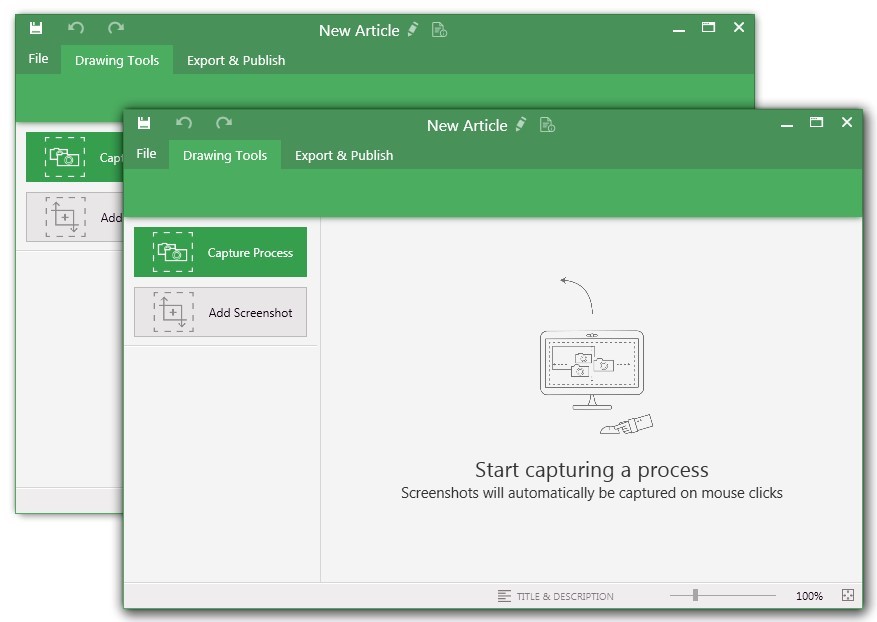
Screenshot of You may record the needed area of take a separate screenshotScreenshot of Open menu (1) to be able to save this document to another location, share or publish it somewhere on your computer or remote service.
To create your documentation, use recording buttons (2) (discussed in "Recording" article later). All recorded steps and single screenshots are displayed in the outline panel (3). To group steps into sections, right click on empty space inside the outline panel and click on "Add section" option.
Annotate the selected step image (5) with drawings (7). Then update step title and description (6) to tell the user what he/she needs to do.Screenshot of Create manuals that contain guidesScreenshot of Exporting options. Choose the template (1) and set export settings such as quality and image size (2). Then export the document (3) to a specific location. 
Export settings are the same for all export formats.