Predicte.com vs. Sage CRM

Overview
ProductRatingMost Used ByProduct SummaryStarting Price
Predicte.com
Score 0.0 out of 10
Small Businesses (1-50 employees)
Predicte offers real-time predicive insights from product, sales, and client data. By unifying disparate data sources within its Data Platform (Analytics), Predicte empowers distributors, wholesalers and manufacturers to forecast sales with greater accuracy, detect churn risks before they escalate, and deliver tailored recommendations. The platform’s analytics framework helps teams optimize product usage, enhance sales performance, and continuously improve client outcomes through its…N/A
Sage CRM
Score 8.9 out of 10
Mid-Size Companies (51-1,000 employees)
Sage CRM is an SMB-oriented CRM platform offered in both SaaS and on-premise editions. Unlike the Sage SalesLogix product, the SaaS version is a true multi-tenant offering. The platform offers excellent integration with Sage ERP and accounting products. It is also a good global solution and is available in many languages and is used by over 12,000 customers worldwide, with many customers in Europe.
$33
per month
Pricing
Predicte.comSage CRM
Editions & Modules
No answers on this topic
Sage CRM (cloud)
$45
Per User per Month
Sage CRM (on premise)
Lifetime License per Seat
Offerings
Pricing Offerings
Predicte.comSage CRM
Free Trial
NoYes
Free/Freemium Version
NoNo
Premium Consulting/Integration Services
NoYes
Entry-level Setup FeeRequiredNo setup fee
Additional DetailsTiered pricing is available for multiple users.
More Pricing Information
Community Pulse
Predicte.comSage CRM
Features
Predicte.comSage CRM
Sales Force Automation
Comparison of Sales Force Automation features of Product A and Product B
Predicte.com
-
Ratings
Sage CRM
8.8
17 Ratings
12% above category average
Customer data management / contact management00 Ratings9.017 Ratings
Workflow management00 Ratings8.616 Ratings
Territory management00 Ratings8.517 Ratings
Opportunity management00 Ratings8.917 Ratings
Integration with email client (e.g., Outlook or Gmail)00 Ratings9.016 Ratings
Contract management00 Ratings8.614 Ratings
Quote & order management00 Ratings9.016 Ratings
Interaction tracking00 Ratings9.216 Ratings
Channel / partner relationship management00 Ratings8.716 Ratings
Customer Service & Support
Comparison of Customer Service & Support features of Product A and Product B
Predicte.com
-
Ratings
Sage CRM
8.1
16 Ratings
6% above category average
Case management00 Ratings8.016 Ratings
Call center management00 Ratings8.215 Ratings
Help desk management00 Ratings8.214 Ratings
Marketing Automation
Comparison of Marketing Automation features of Product A and Product B
Predicte.com
-
Ratings
Sage CRM
8.7
16 Ratings
12% above category average
Lead management00 Ratings8.816 Ratings
Email marketing00 Ratings8.715 Ratings
CRM Project Management
Comparison of CRM Project Management features of Product A and Product B
Predicte.com
-
Ratings
Sage CRM
9.0
17 Ratings
16% above category average
Task management00 Ratings9.016 Ratings
Billing and invoicing management00 Ratings9.015 Ratings
Reporting00 Ratings9.113 Ratings
CRM Reporting & Analytics
Comparison of CRM Reporting & Analytics features of Product A and Product B
Predicte.com
-
Ratings
Sage CRM
8.6
17 Ratings
12% above category average
Forecasting00 Ratings8.716 Ratings
Pipeline visualization00 Ratings8.416 Ratings
Customizable reports00 Ratings8.717 Ratings
Customization
Comparison of Customization features of Product A and Product B
Predicte.com
-
Ratings
Sage CRM
8.6
17 Ratings
12% above category average
Custom fields00 Ratings8.517 Ratings
Custom objects00 Ratings8.516 Ratings
Scripting environment00 Ratings9.016 Ratings
API for custom integration00 Ratings8.314 Ratings
Security
Comparison of Security features of Product A and Product B
Predicte.com
-
Ratings
Sage CRM
8.7
17 Ratings
4% above category average
Single sign-on capability00 Ratings8.717 Ratings
Role-based user permissions00 Ratings8.813 Ratings
Social CRM
Comparison of Social CRM features of Product A and Product B
Predicte.com
-
Ratings
Sage CRM
9.4
13 Ratings
24% above category average
Social data00 Ratings9.513 Ratings
Social engagement00 Ratings9.313 Ratings
Integrations with 3rd-party Software
Comparison of Integrations with 3rd-party Software features of Product A and Product B
Predicte.com
-
Ratings
Sage CRM
9.0
14 Ratings
19% above category average
Marketing automation00 Ratings9.114 Ratings
Compensation management00 Ratings8.912 Ratings
Platform
Comparison of Platform features of Product A and Product B
Predicte.com
-
Ratings
Sage CRM
7.8
16 Ratings
3% above category average
Mobile access00 Ratings7.816 Ratings
Best Alternatives
Predicte.comSage CRM
Small Businesses
Mediafly
Mediafly
Score 7.7 out of 10
Salesmate
Salesmate
Score 10.0 out of 10
Medium-sized Companies
Clari
Clari
Score 8.7 out of 10
Creatio
Creatio
Score 9.1 out of 10
Enterprises
Clari
Clari
Score 8.7 out of 10
Creatio
Creatio
Score 9.1 out of 10
All AlternativesView all alternativesView all alternatives
User Ratings
Predicte.comSage CRM
Likelihood to Recommend
-
(0 ratings)
8.9
(28 ratings)
Likelihood to Renew
-
(0 ratings)
5.1
(11 ratings)
Usability
-
(0 ratings)
8.9
(11 ratings)
Performance
-
(0 ratings)
8.2
(1 ratings)
Support Rating
-
(0 ratings)
7.9
(8 ratings)
In-Person Training
-
(0 ratings)
7.0
(1 ratings)
Implementation Rating
-
(0 ratings)
8.0
(1 ratings)
User Testimonials
Predicte.comSage CRM
Likelihood to Recommend
Predicte.com
No answers on this topic
Sage
as it is a very flexible software that can be adapted to any business model, other functions human resource management, manufacturing and supply chain planning, all these functions are housed in a highly technological interface. I liked this system because it made automating accounts payable so much easier.the control of the basic accounting of any type of company
Read full review
Pros
Predicte.com
No answers on this topic
Sage
  • When in client profile, it is very intuitive, allowing you to easily transcribe notes in the clients profile.
  • Sage allows 3rd party plugins, so if you utilize a particular phone services or would like to import something as simple as google drive, its compatible.
Read full review
Cons
Predicte.com
No answers on this topic
Sage
  • Reliance on Apache Tomcat causes a lot of headaches. There are common issues trying to start up the server, resulting from Apache Tomcat misconfigurations, or Java. Some forum posts on Sage City address common issues, but digging into server logs seems to be an often occurrence.
  • Support is somewhat lacking, less user install base means error messages are sometimes hard to find quick answers for. Most of the knowledge found on the internet is in the Sage City forum.
  • Integration with Microsoft 365 causes you to have to turn off some security features. This will result in your 365 tenants running lower security standards than recommended, it may put you at risk for targeted attacks.
Read full review
Likelihood to Renew
Predicte.com
No answers on this topic
Sage
There are really no other words to say, it is a very easy to use application that is more straightforward and has provided better results with the bulk of features that appeal to a very broad amount of users. There may be other CRM platforms out there that are more prevalent, but I have found them to be much more clunky and less intuitive than Sage CRM.
Read full review
Usability
Predicte.com
No answers on this topic
Sage
Excellent integration with the most important social networks (LinkedIn, Facebook and Twitter) to get leads. The mobile app is quite useful for speeding up the tasks at hand and not relying on the computer or being in the office to get them done.
Read full review
Performance
Predicte.com
No answers on this topic
Sage
Sage works very quickly based on the network you are using it on. It is internet based so if your network is slow, it will perform slowly. Reports seem to run reasonably fast, if there is too much information it is trying to populate that could slow it down a little. When Sage CRM is integrated with a Sage ERP product it doesn't tend to slow down either system at all
Read full review
Support Rating
Predicte.com
No answers on this topic
Sage
Support team is really slow and they need to work on this really. Sometimes it takes days to resolve a simple query and there is no way to get it expedited. Rest the product is is amazing but the team should look into the costumer support and get it working
Read full review
In-Person Training
Predicte.com
No answers on this topic
Sage
Most training would come after a upgrade. Otherwise we would self teach new employees. Training was with a Sage Software partner SWK technologies.
Read full review
Implementation Rating
Predicte.com
No answers on this topic
Sage
The implementation and upgrades were rather quick and straight forward. Attempting to link Sage CRM with Sage 100 ERP however was a nightmare and will be avoided by us in the future due to numerous issues.
Read full review
Alternatives Considered
Predicte.com
No answers on this topic
Sage
Whilst SAGE CRM was selected around 10 years ago and we became a partner, the main contenders would have been at the time Sales Logix and MS CRM 4.0. However, we had extensive experience of the mid-market CRM's and decided on SAGE CRM since it had a clean, easy to understand interface and importantly offered both workflow automation and Self Service capability, all of which across both the Case and Sales and Marketing functionality was seamless and saved time. As it was pure browser based, access was from anywhere we wanted. In my view, SAGE CRM still stacks up well against all the other mid-market CRM systems and offers good value for money, but more importantly, it is an easy to operate and customisable solution which user like. Again, we can teach administration users very quickly to support and customise themselves since the admin. function are clear as well.
Read full review
Return on Investment
Predicte.com
No answers on this topic
Sage
  • It is very affordable in pricing, compared to competitors
  • Lead management and convertion into prospects is also a very easy process
  • Lead capture from web pages should be available, and better ways to capture leads from tradeshows by uploading directly from scanned business cards
Read full review
ScreenShots

Predicte.com Screenshots

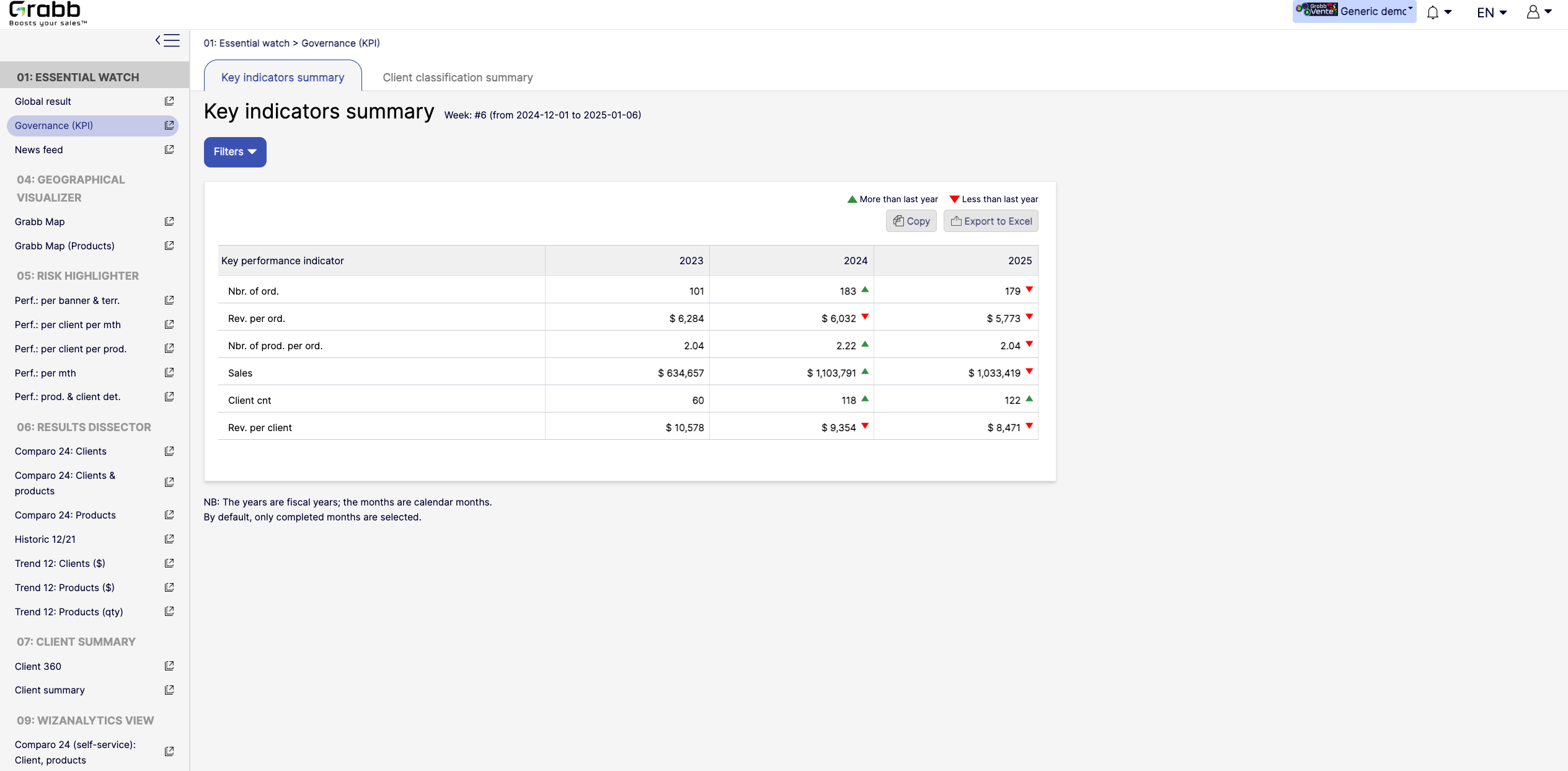
Screenshot of the dashboard for executives and managers, with various performance metrics:

High‐Level KPIs: Summarizes top metrics (e.g., total sales, revenue per client, average products per order) all in one table, making it easier to spot whether the company is trending up or down.
Year‐to‐Year Comparison: Displays data for each fiscal year, with green/red arrows to show improvement or decline since the previous year.
Immediate Visibility of Trends: Simplifies strategic decision‐making by illustrating whether overall performance is improving or if corrective measures are needed.
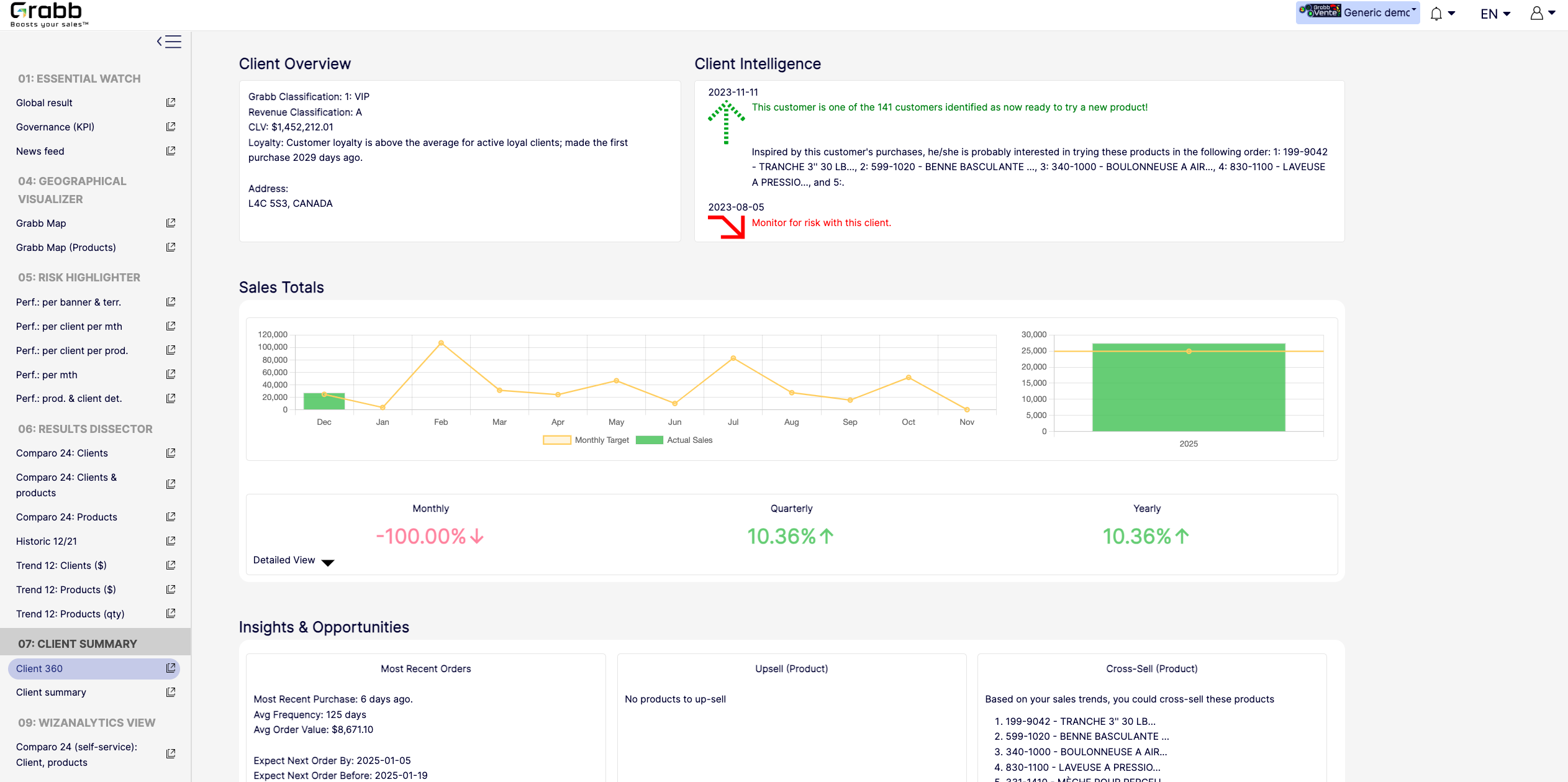
It’s a quick, executive‐friendly scoreboard of the organization’s health, ensuring leaders have the clarity to plan next steps.Screenshot of an at‐a‐glance understanding of a single client’s status, loyalty level, buying behavior, and next best actions that includes data about up‐selling, cross‐selling, and churn risk is often siloed or not immediately visible. This provides:

A Centralized Client Snapshot: Shows the client’s classification (e.g., VIP), revenue category, and CLV, ensuring everyone quickly sees the client’s overall value.
Predictive Intelligence: Highlights whether the client is “ready to try a new product,” or if there’s any “monitor for risk” alert, taking the guesswork out of deciding the next sales move.
Sales Trend & Graphs: Displays monthly, quarterly, and yearly sales to pinpoint performance patterns and quickly identify dips/spikes.
Upsell/Cross‐Sell Suggestions: Automatically suggests which products the client is most likely to buy next, helping reps act on potential revenue opportunities immediately.
Insights & Opportunities: Offers quick reference points such as “Most Recent Purchase,” average order value, frequency, and predicted next order date so you can plan proactive outreach.
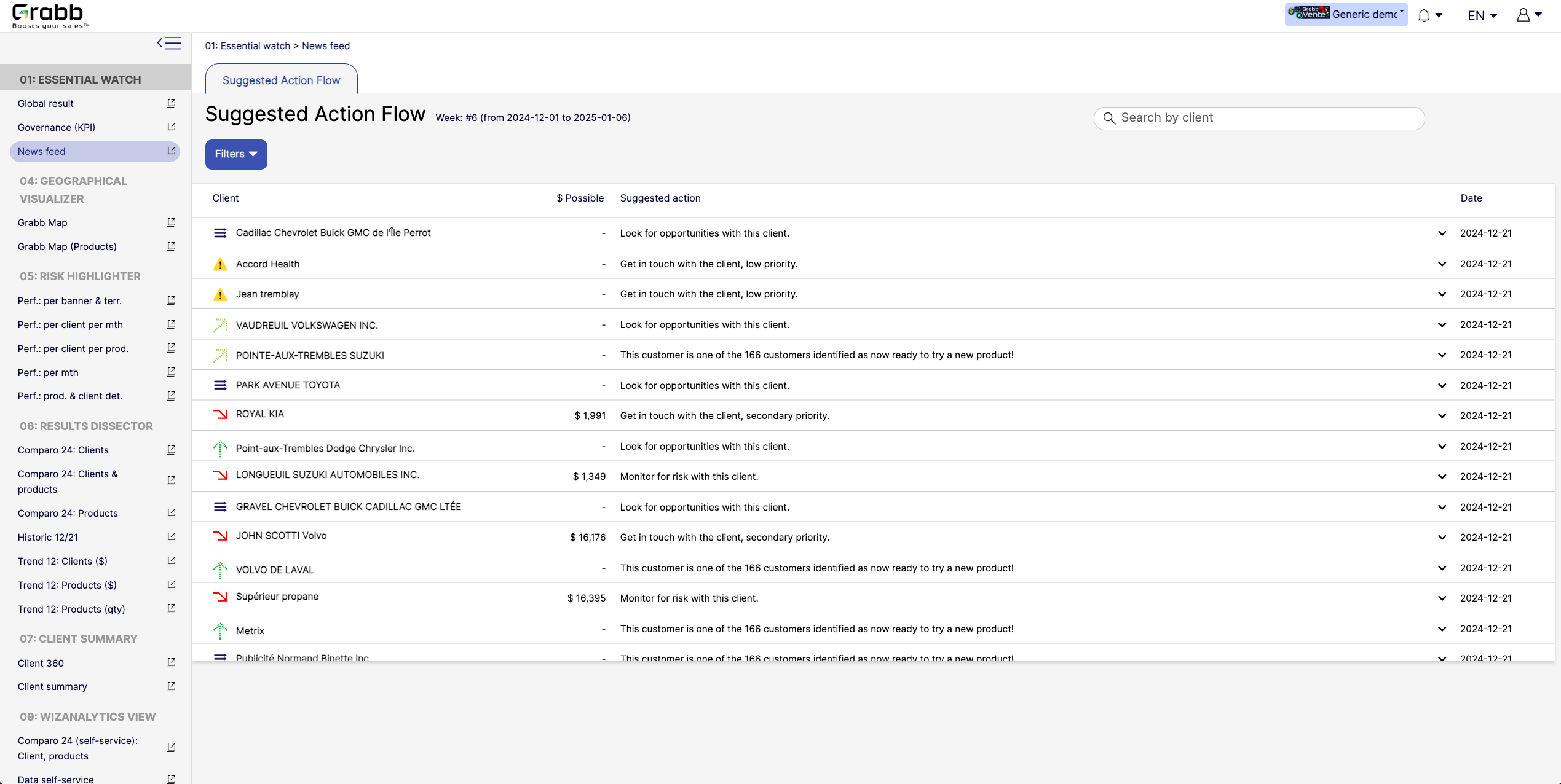
This holistic view enables data‐driven decisions—whether to focus on strengthening loyalty, pitching new products, or preventing churn.Screenshot of A visualization for sales reps and managers, providing:

Prioritized Recommandations: Provides a dynamic feed of next best actions—whether it’s “Look for opportunities with this client” or “Monitor for risk,” ensuring no lead or account slips through the cracks.
Opportunity & Risk Indicators: Quickly flags which clients are “ready to try a new product” versus those at higher risk, so teams can focus their energy where it matters most.
Estimated Upside ($ Possible): In some cases, the screen shows potential revenue if successful, helping reps evaluate the ROI of their outreach efforts.
Search & Filter Capabilities: Salespeople can easily locate a specific client in the list and see suggested actions, which speeds up daily planning and follow‐ups.
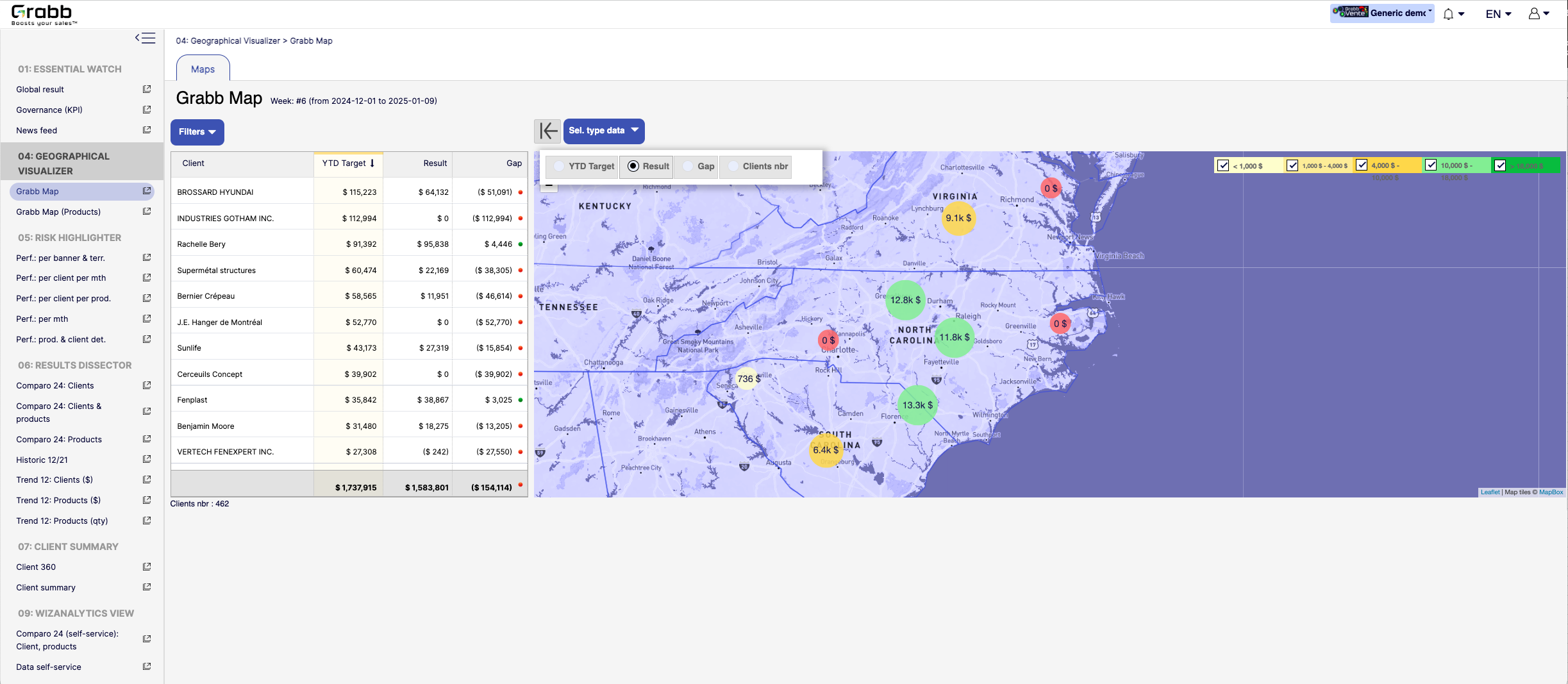
By centralizing these recommended “next steps,” the Suggested Action Flow turns raw data into a practical to‐do list—making each sales call or client interaction more purposeful and timely.Screenshot of a visualization for sales teams that helps them understand how their performance is distributed across different territories or locations. Without geographic context, managers can overlook local trends, regional opportunities, or problem areas.

Solution Provided:

Interactive Territory Overview: Displays each client’s Year‐to‐Date (YTD) target, actual results, and any gap in a color‐coded map, quickly revealing where the biggest mismatches lie.
Client‐Level Details: The list alongside the map allows you to see real‐time data—such as current gap amount or sales performance—sorted by region or client.
Visual Clustering: Bubbles on the map show consolidated sales amounts or gaps for clusters of clients, making it easier to spot hot‐spots or underperforming zones.
Target & Result Comparison: By toggling between metrics (e.g., “YTD Target,” “Result,” “Gap,” “Clients nbr”), managers can instantly pivot the view to see how the team is tracking.
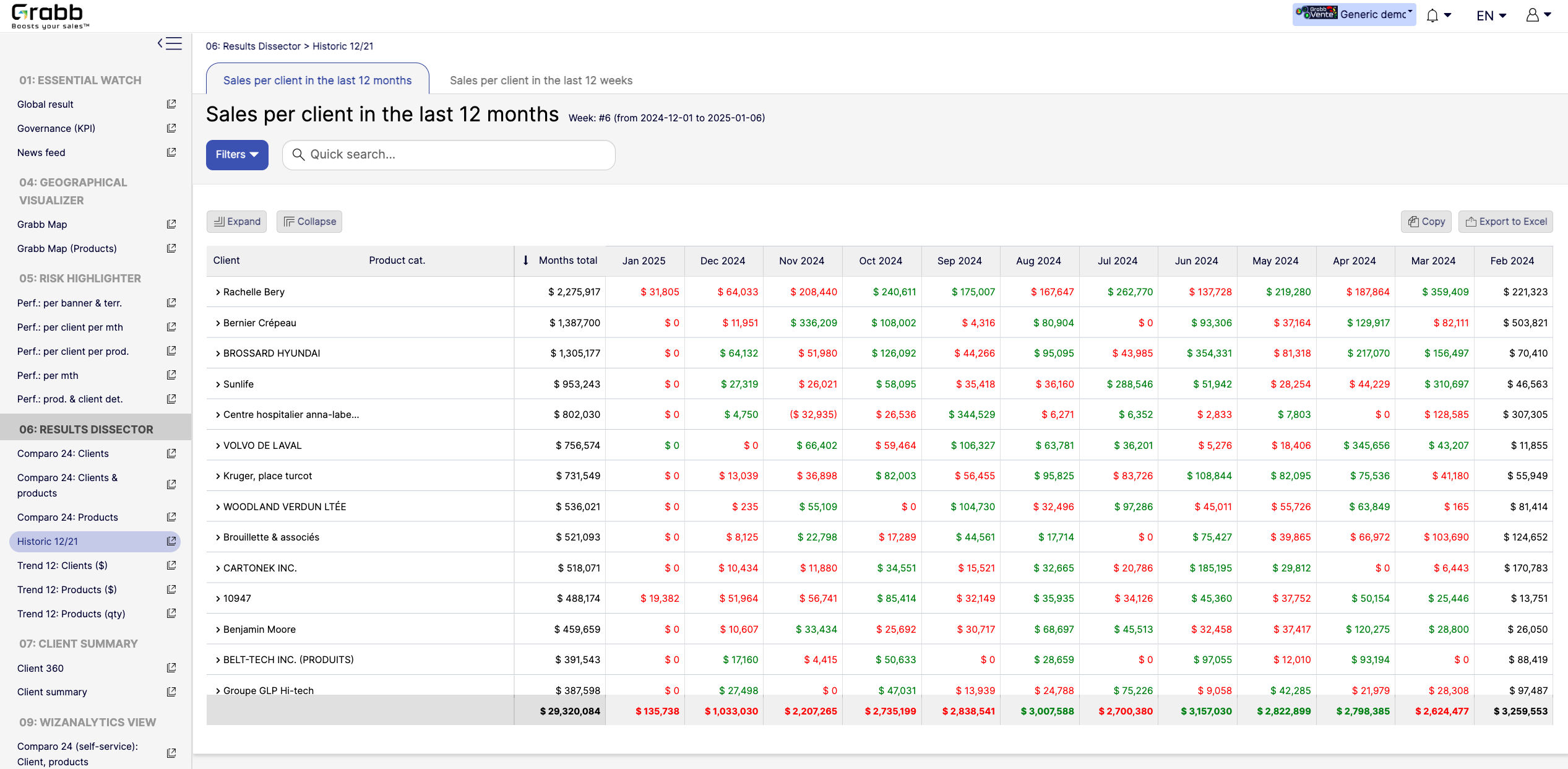
With this map‐based dashboard, leaders can optimize travel routes, allocate resources effectively, and prioritize outreach in areas where the potential impact is greatest.Screenshot of monthly sales trends at the individual‐client level. The visualization provides:

Month‐by‐Month Breakdown: Lists each client with color‐coded monthly sales (green and red), allowing you to see exactly when sales surge or drop off.
Total and Monthly Views: A “Months total” column plus each month’s figure helps you quickly gauge each client’s cumulative performance versus their monthly fluctuations.
Trend Spotting & Seasonality: By laying out 12 consecutive months, it becomes easier to see recurring patterns—helpful for forecasting, inventory planning, and targeted campaigns.
Actionable Insights: Identify which clients need re‐engagement (red cells or big drops) and which clients might be ready for expansion (consistently green or strong increases).
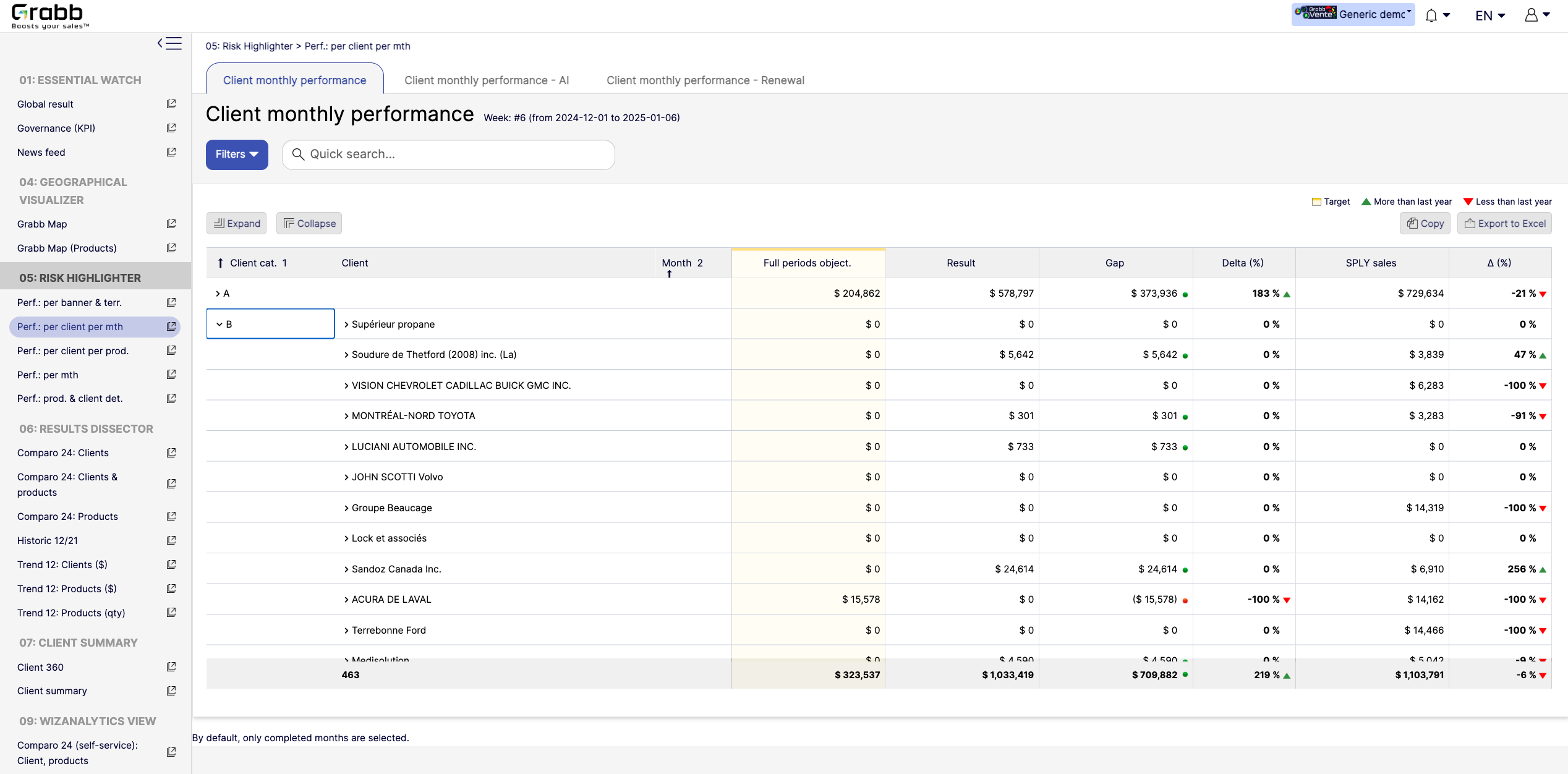
By visualizing an entire year in detail, sales teams can preemptively address potential downturns and capitalize on positive trends.Screenshot of a visualization tracking how each client performs on a month‐to‐month basis, and across accounts. This information provides:

Side‐by‐Side Comparisons: Displays each client’s monthly objectives versus actual results, so sales teams see immediately whether targets are met or missed.
Delta & Gap Analysis: Automatically calculates the variance between the goal and real outcomes—highlighting where shortfalls or over‐performance exist.
Year‐Over‐Year Comparison: “More than last year” or “Less than last year” labels provide quick trend context, guiding strategy for retention or growth.
Easy Filtering & Sorting: Users can filter by client category or name, then expand or collapse details to focus only on accounts that need attention.
With this screen, managers can prioritize which clients need immediate support and which are on track—using precise data rather than guesswork.