TrustRadius: an HG Insights company

Save this comparison

Save this comparison

Add Product

Recommended Comparisons

    Overview
    ProductRatingMost Used ByProduct SummaryStarting Price

    Projectworks

    Score9 out of 10
    N/AProjectworks is Professional Services Automation (PSA) software suite designed for consulting and professional services organizations. The platform consolidates resource scheduling, time tracking, expense management, project accounting, and financial forecasting to streamline the service delivery lifecycle. Key Capabilities Resource Management: Provides real-time visibility into staff Availability, Resource Utilization, and Capacity…

    $190

    per month for 10 users (minimum)

    WorkflowMax

    Score8 out of 10
    Small Businesses (1-50 employees)
    WorkflowMax is a web-based project management solution.The platform offers end-to-end functionality standard to project management software, including time tracking, lead management, collaboration with external stakeholders, invoicing, integrations, and customizable reporting.

    $20

    per month

    Pricing
    ProjectworksWorkflowMax
    Editions & Modules
    Build
    $19
    per month per user
    Standard
    $20
    per month
    Standard
    $35
    per month
    Premium
    $70
    per month
    Offerings
    Pricing Offerings
    ProjectworksWorkflowMax
    Free Trial
    YesYes
    Free/Freemium Version
    NoNo
    Premium Consulting/Integration Services
    YesNo
    Entry-level Setup Fee$1,000 one-time fee (starting cost for implementation)No setup fee
    Additional DetailsThe minimum number of users is 10. There is a 10% discount for annual pricing.—
    More Pricing Information
    Best Alternatives
    ProjectworksWorkflowMax
    Small Businesses
    Autotask PSA
    Score7.7 out of 10
    Autotask PSA
    Score7.7 out of 10
    Medium-sized Companies
    Workday Professional Services Automation
    Score8.2 out of 10
    Workday Professional Services Automation
    Score8.2 out of 10
    Enterprises
    Planview AdaptiveWork
    Score8.9 out of 10
    Planview AdaptiveWork
    Score8.9 out of 10
    All AlternativesView all alternativesView all alternatives
    User Ratings
    ProjectworksWorkflowMax
    Likelihood to Recommend
    -
    (0 ratings)
    8.8
    (28 ratings)
    Likelihood to Renew
    -
    (0 ratings)
    9.0
    (1 ratings)
    Usability
    -
    (0 ratings)
    9.0
    (2 ratings)
    Support Rating
    -
    (0 ratings)
    7.0
    (2 ratings)
    Implementation Rating
    -
    (0 ratings)
    9.1
    (1 ratings)
    User Testimonials
    ProjectworksWorkflowMax
    Likelihood to Recommend
    Spiderworks
    No answers on this topic
    WorkflowMax
    WorkflowMax is very well suited for a business that wants to track time billed by project, to have an easy way to generate invoices for those projects, and to keep track of overall productivity and invoice status. I imagine it can also be adapted to different types of businesses that deal in goods rather than services and time. I am not sure for which scenarios or businesses the program is not appropriate.
    Incentivized
    Read full review
    Pros
    Spiderworks
    No answers on this topic
    WorkflowMax
    • You can customize the notifications and this has helped us enormously to schedule dates that we overlooked. Also the templates are customizable which gives the company its own branding on its reports.
    • It is integrated with the Xero platform which makes it very useful to streamline the processes of billing, accounts payable, accounts receivable, petty cash flow and all the accounting and administrative area.
    • It also has a very complete mobile version, where we can be present and monitor the progress of projects in real time, no matter where we are.
    Incentivized
    Read full review
    Cons
    Spiderworks
    No answers on this topic
    WorkflowMax
    • Currently the timesheet function allows staff to input time for overlapping periods which can cause some headaches when it comes to payroll and invoicing. We understand this is being addressed.
    • The amount of flexibility in the product can create some challenges when setting up the jobs database at the onset. It is a daunting challenge but worthwhile when completed correctly and rolled out across the firm. Adding new jobs is much easier.
    • No search function to find a specific job, you have to scroll through all jobs allocated to you.
    Incentivized
    Read full review
    Likelihood to Renew
    Spiderworks
    No answers on this topic
    WorkflowMax
    Because we can't imagine being without it!
    Incentivized
    Read full review
    Usability
    Spiderworks
    No answers on this topic
    WorkflowMax
    It's easy to use and provides me with instant online access to the management of my business whether I am at my desk or overseas
    Incentivized
    Read full review
    Support Rating
    Spiderworks
    No answers on this topic
    WorkflowMax
    The support team are excellent. The only downside is that you can't phone them!
    Incentivized
    Read full review
    Implementation Rating
    Spiderworks
    No answers on this topic
    WorkflowMax
    Decide how to breakdown your ongoing jobs - are they monthly recurring or annual broken into chunks? What are you going to give clients i.e. how will your proposals and invoices look?
    Incentivized
    Read full review
    Alternatives Considered
    Spiderworks
    No answers on this topic
    WorkflowMax
    WorkflowMax is much much easier than Streamtime, much more affordable and easier to try out and see if it meets your needs. Streamtime is a great comprehensive product but we lost a year's subscription in investment because we couldn't get answers to the support questions we needed and they had a no refund policy!
    Incentivized
    Read full review
    Return on Investment
    Spiderworks
    No answers on this topic
    WorkflowMax
    • Max enables Loan Assistant to invoice very quickly and easily and integration with Xero for card payments brings our cashflow forward.
    • Max enables the Loan Assistant team to manage their workflow in an efficient and productive way. The team all work from home. It is the centre of our Loan Assistant universe.
    Incentivized
    Read full review
    ScreenShots

    Projectworks Screenshots

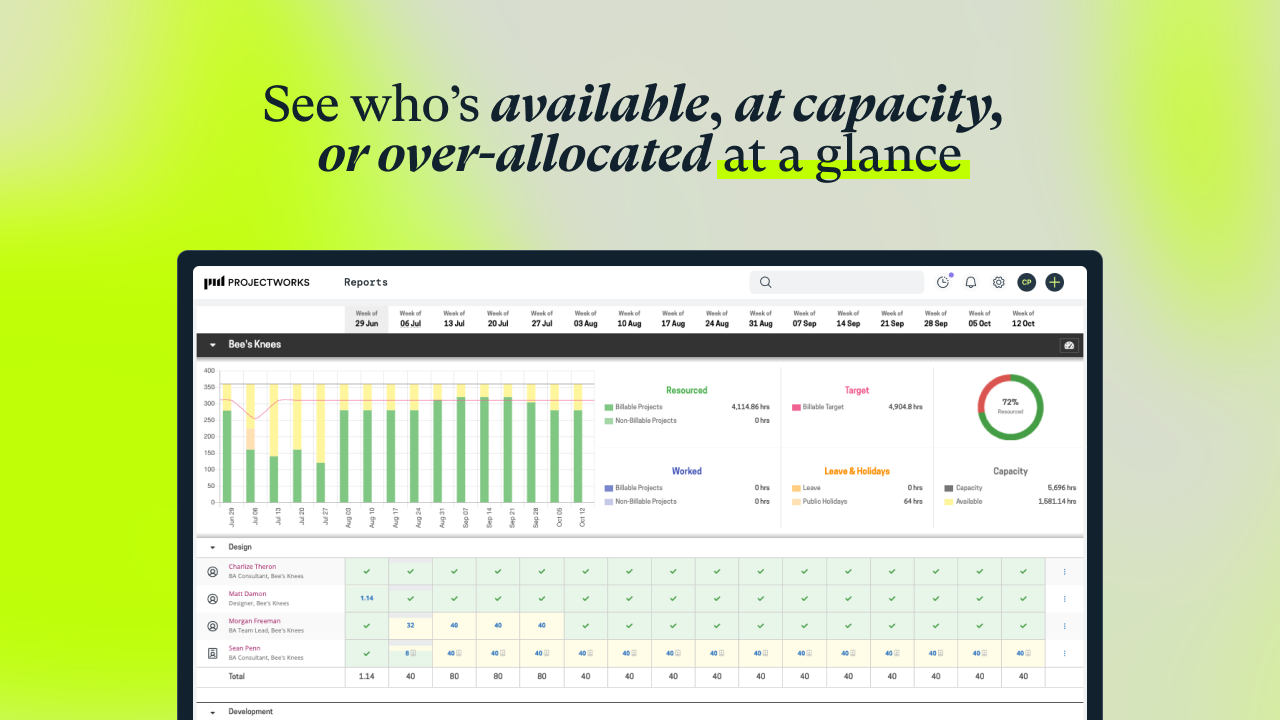
    Screenshot of visualization that helps to understand capacity, who is available, and when more staff will be needed for work coming down the pipeline. Tag and filter staff by skills and certifications to help make the right staffing decisions.Screenshot of workforce utilization metrics.Screenshot of an example timesheet built for professional services firms. The timecode setup is flexible, to enable users to track how time is spent on projects at any level of detail.Screenshot of a display showing how much of the budget has been burned through actual time spent, as well as what is planned. This lets users know when a project is going over budget. These forecasts can be used to set a billing schedule for fixed-price projects, and a percentage mode to support percentage-based billing. Invoicing runs can be started from the forecasts screen.Screenshot of where to track actuals and see where a project will land against the project budget.Screenshot of an example invoice, which can be based on a timesheet (time and material / T&M), fixed price engagements, or percentage-based billing. It integrates with accounting systems.

    WorkflowMax Screenshots

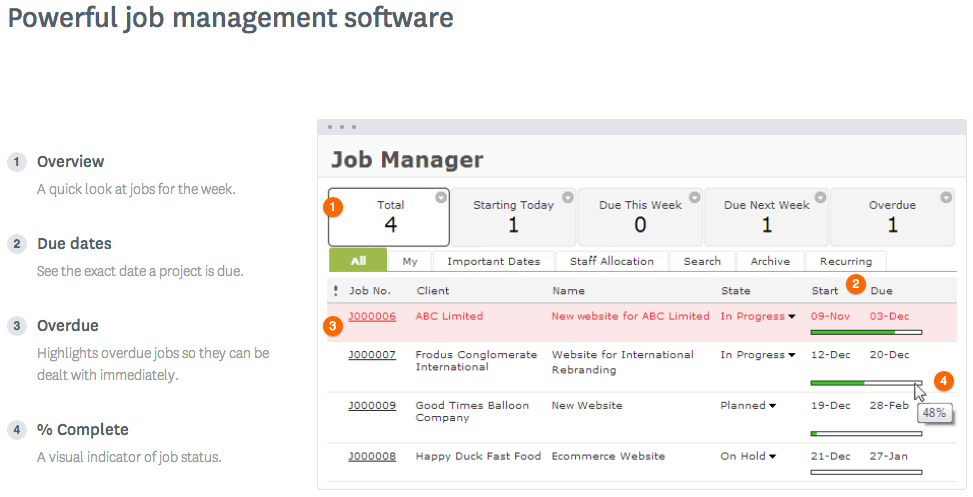
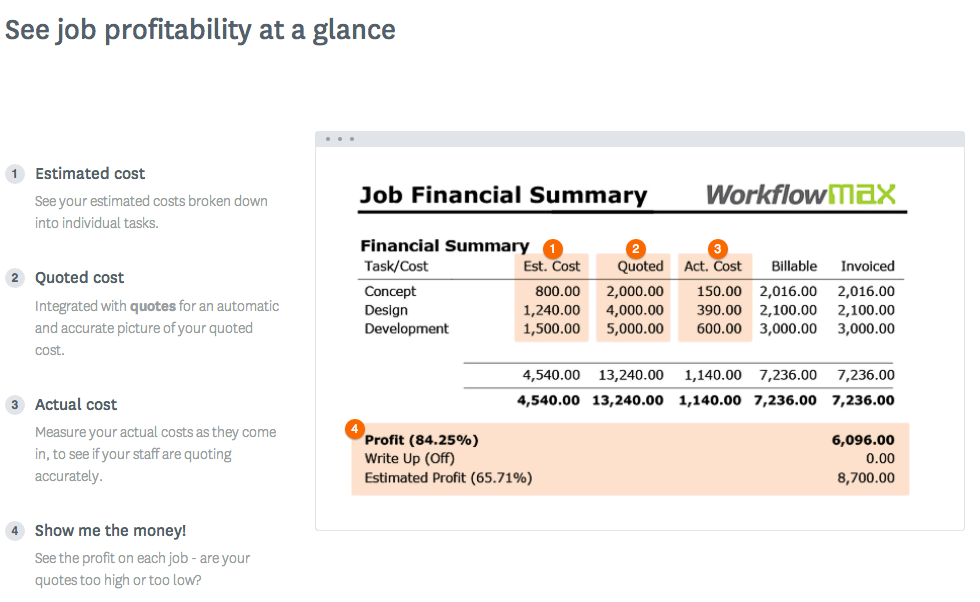
    Screenshot of WorkflowMax Quoting SoftwareScreenshot of WorkflowMax CRM SoftwareScreenshot of WorkflowMax Project Management SoftwareScreenshot of WorkflowMax Mobile SiteScreenshot of Job Costing | WorkflowMaxScreenshot of Powerful Custom Reporting | WorkflowMax