LivePerson Conversational Cloud vs. Quiq

Overview
ProductRatingMost Used ByProduct SummaryStarting Price
LivePerson Conversational Cloud
Score 8.8 out of 10
N/A
The LivePerson Conversational Cloud is a contact center solution used to create personalized, connected customer experiences across voice and messaging. The solution balances human agents, intelligent automations, and Conversational AI, across voice and messaging.N/A
Quiq
Score 0.0 out of 10
Mid-Size Companies (51-1,000 employees)
Quiq is an agentic customer journey platform used to support customer support agents' resolution efforts. Quiq works across channels—voice, chat, SMS, WhatsApp, Apple Messages for Business, email, and social—keeping every interaction connected and true to the brand's voice.N/A
Pricing
LivePerson Conversational CloudQuiq
Editions & Modules
No answers on this topic
Offerings
Pricing Offerings
LivePerson Conversational CloudQuiq
Free Trial
NoYes
Free/Freemium Version
NoNo
Premium Consulting/Integration Services
NoYes
Entry-level Setup FeeNo setup feeNo setup fee
Additional DetailsPricing is based on conversations, not by seat. Number of users is unlimited.
More Pricing Information
Community Pulse
LivePerson Conversational CloudQuiq
Features
LivePerson Conversational CloudQuiq
Contact Center Software
Comparison of Contact Center Software features of Product A and Product B
LivePerson Conversational Cloud
6.9
1 Ratings
20% below category average
Quiq
-
Ratings
Agent dashboard8.01 Ratings00 Ratings
Validate callers8.01 Ratings00 Ratings
Outbound response8.01 Ratings00 Ratings
Click-to-call (CTC)7.01 Ratings00 Ratings
Warm transfer7.01 Ratings00 Ratings
Call scripts6.01 Ratings00 Ratings
Call tracking8.01 Ratings00 Ratings
Multichannel integration5.01 Ratings00 Ratings
CRM software integration5.01 Ratings00 Ratings
Workforce Optimization (WFO)
Comparison of Workforce Optimization (WFO) features of Product A and Product B
LivePerson Conversational Cloud
8.0
1 Ratings
4% below category average
Quiq
-
Ratings
Quality management8.01 Ratings00 Ratings
Call analytics8.01 Ratings00 Ratings
Historical reporting8.01 Ratings00 Ratings
Live reporting8.01 Ratings00 Ratings
Customer surveys8.01 Ratings00 Ratings
Customer interaction analytics8.01 Ratings00 Ratings
Best Alternatives
LivePerson Conversational CloudQuiq
Small Businesses
CloudTalk
CloudTalk
Score 7.5 out of 10
Gorgias
Gorgias
Score 8.4 out of 10
Medium-sized Companies
CloudTalk
CloudTalk
Score 7.5 out of 10
Dialpad Support
Dialpad Support
Score 9.1 out of 10
Enterprises
Google Cloud Contact Center AI
Score 5.2 out of 10
Genesys Cloud CX
Genesys Cloud CX
Score 8.9 out of 10
All AlternativesView all alternativesView all alternatives
User Ratings
LivePerson Conversational CloudQuiq
Likelihood to Recommend
9.0
(78 ratings)
-
(0 ratings)
Likelihood to Renew
10.0
(10 ratings)
-
(0 ratings)
User Testimonials
LivePerson Conversational CloudQuiq
Likelihood to Recommend
LivePerson
Liveperson LiveEngage is good for larger deployments with lots of agents, and where the rollout plan is broad with respect to the visitors who you will be targeting. It allows you to manipulate more of the data for reporting than many other platforms. The premium cost and some drawbacks with configuring smaller groups might make it lose some appeal for smaller companies or deployments.
Read full review
Quiq
No answers on this topic
Pros
LivePerson
  • Integrates very well with Salesforce, our CRM software. As we disposition calls, the notes automatically generate on my customer's accounts, saving me valuable steps in documentation.
  • Call metrics gathered in Tenfold are used for measuring productivity across all of the sales team. Reporting is done through Salesforce, once again speaking volumes of the integration capabilities.
  • The clarity and consistency of quality of calls are outstanding! Very little delay, static or feedback.
Read full review
Quiq
No answers on this topic
Cons
LivePerson
  • There is no ability to customize the popup. It is stuck in one place (bottom right) and can't be moved. Just adding something as simple as being able to move it up and down would make a world of a difference. I don't know how many times the popup got in the way of other information I was trying to look at.
  • It would, of course, be a much better product if the popup were it's own app that could be docked anywhere on the screen. Tying the popup to Chrome really keeps this software from being the best it could be.
  • There are no skins, color options, customize options, or anything like that for the popup window. There is nothing you can do to affect how it looks, what information is on it, and where it is docked. Solve those three issues, and you have an amazing tool that is flexible and personable.
Read full review
Quiq
No answers on this topic
Likelihood to Renew
LivePerson
LivePerson has been a great tool for our company and everything is customized. We can customize everything from the canned responses, operator surveys, and customer surveys. We receive a lot of positive information from our customers; and to be able to provide technical support of the website as well as status information for already placed orders is awesome
Read full review
Quiq
No answers on this topic
Alternatives Considered
LivePerson
I find the ease of use of Tenfold to be advantageous to all other platforms. It also appears that as future needs change, Tenfold will allow me to continue to structure my workday around Tenfold but use it in different ways that would scale to any changes in my process.
Read full review
Quiq
No answers on this topic
Return on Investment
LivePerson
  • This has definitely helped me monitor my own call volumes and helped me learn the best times to connect.
  • Tenfold has also saved me significant time using the 'click-to-dial' feature.
  • I still remain frustrated that some of the integration with Salesforce isn't as seamless as it could (or imi should) be; however overall it's still a valuable addition to my business tools.
Read full review
Quiq
No answers on this topic
ScreenShots

Quiq Screenshots

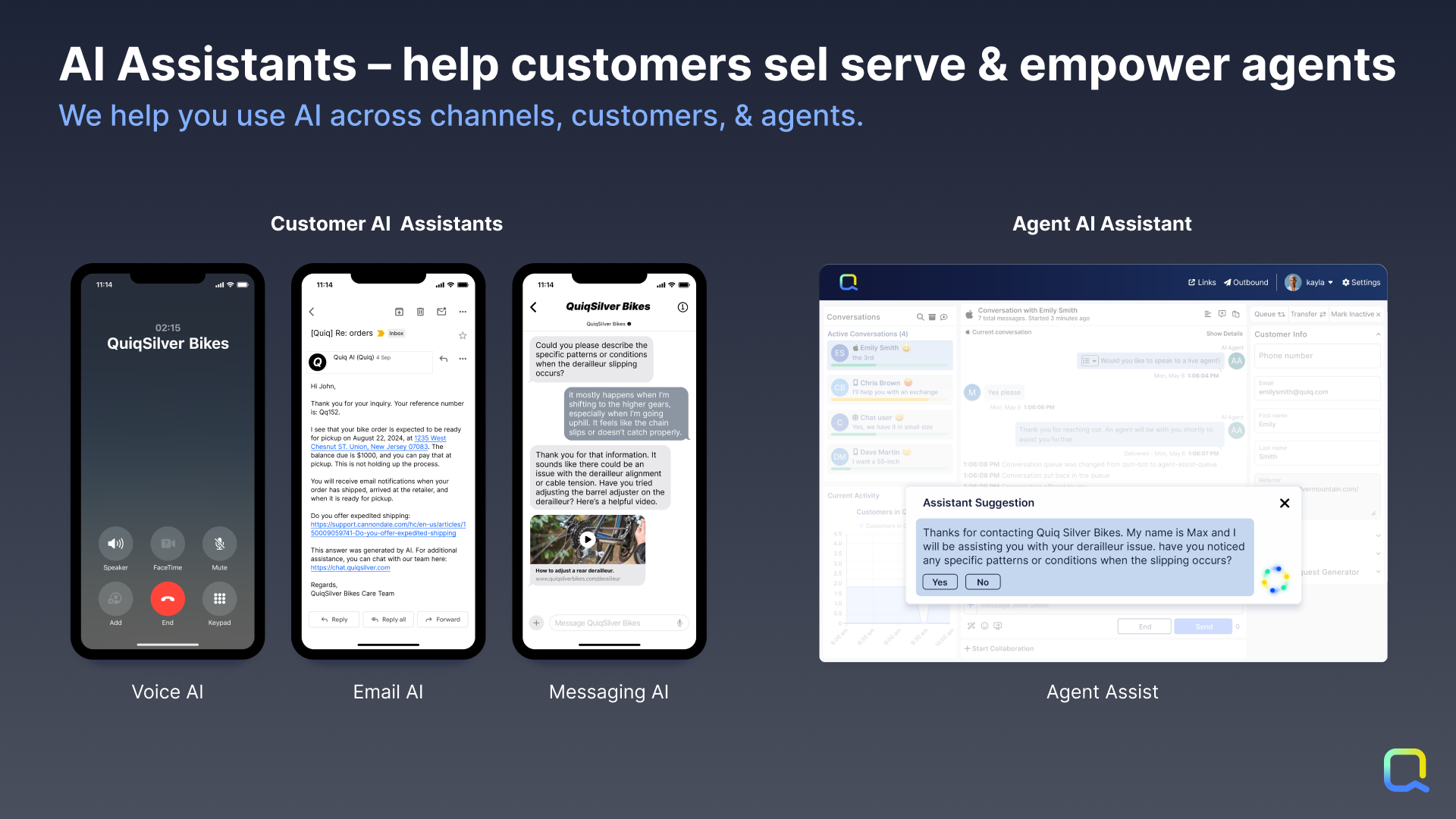
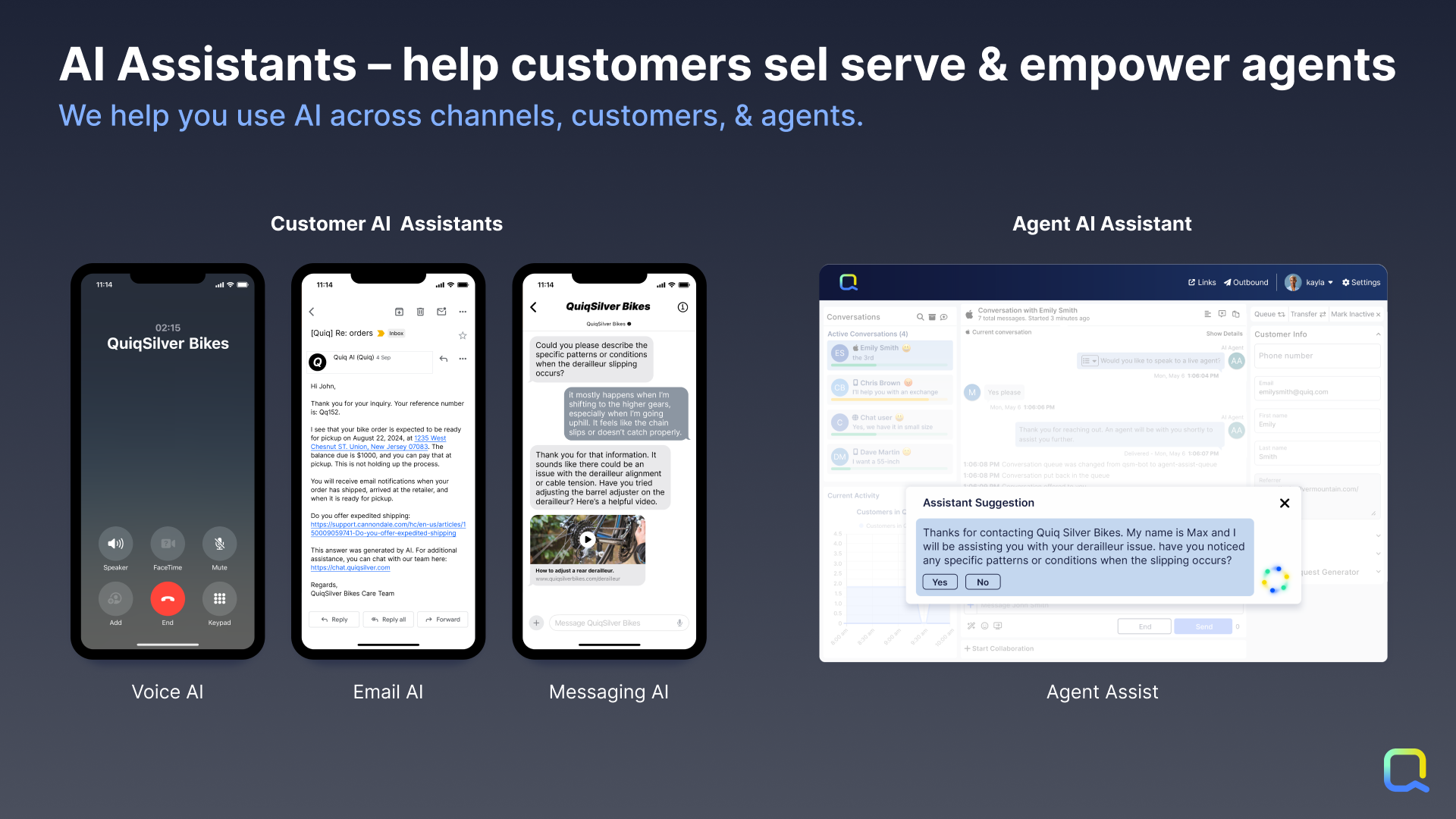
Screenshot of Customer AI Assistants: By leveraging Generative AI combined with company knowledge and data, customers get answers created directly from data as if they had a human agent helping them.

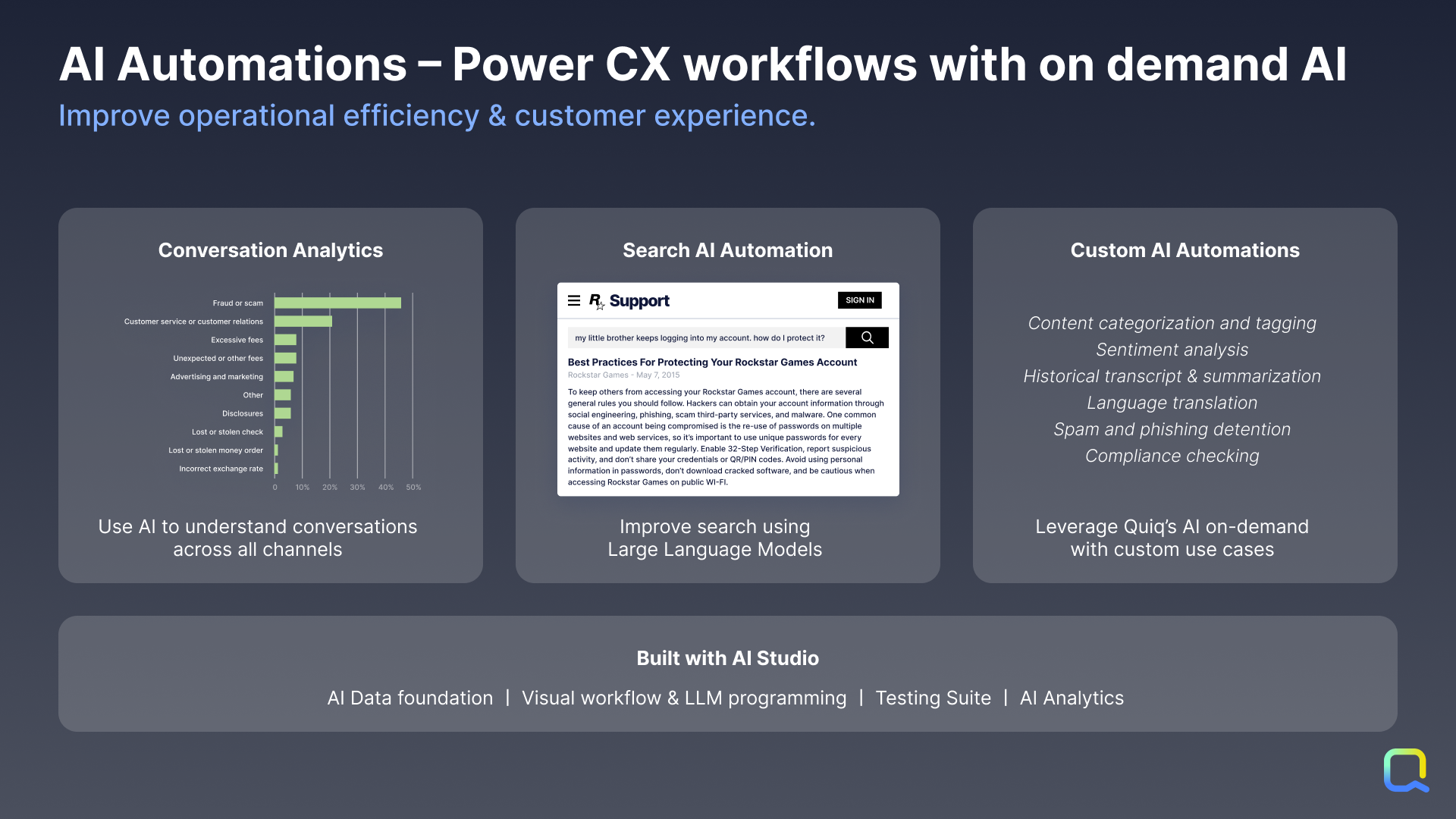
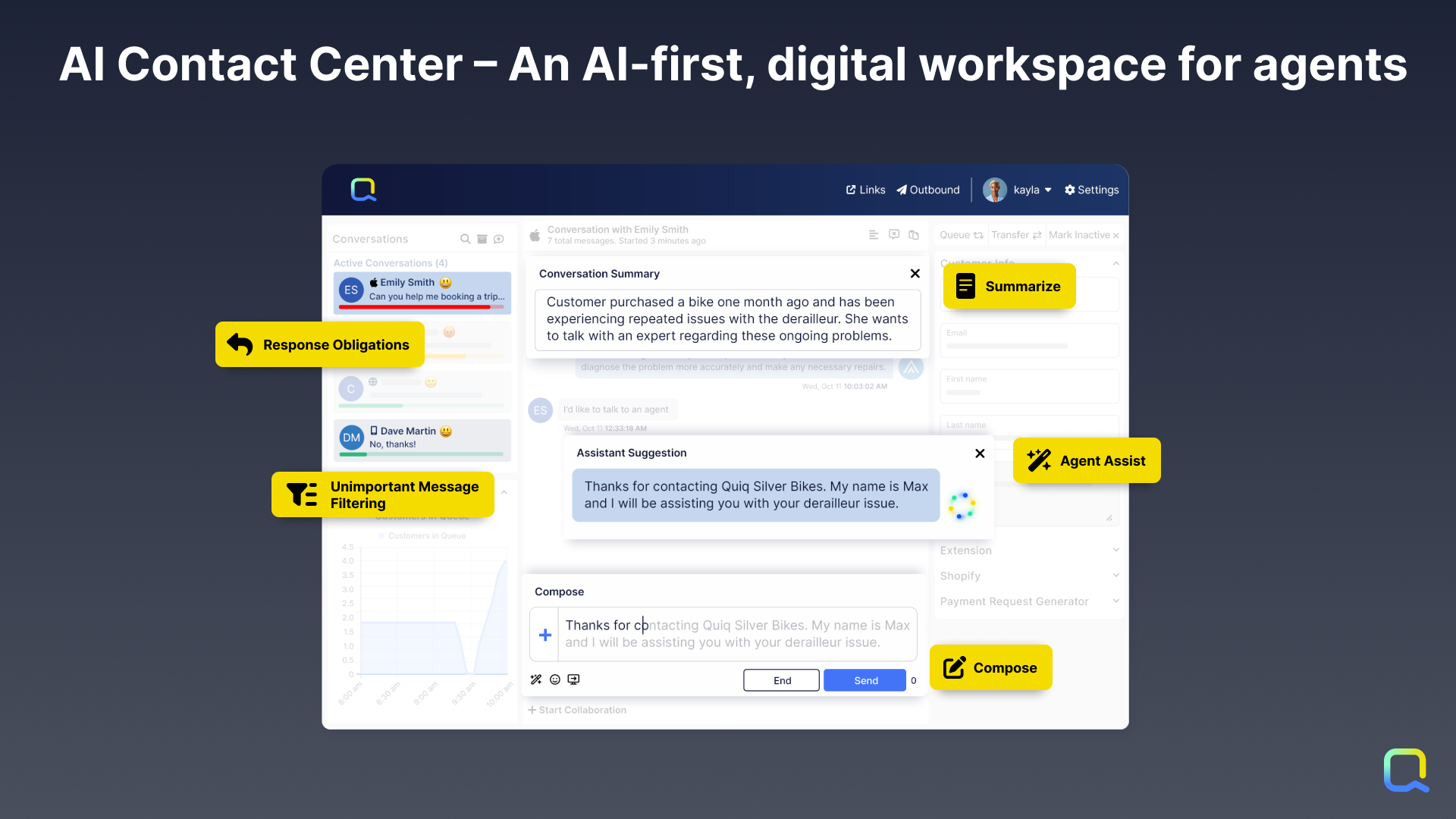
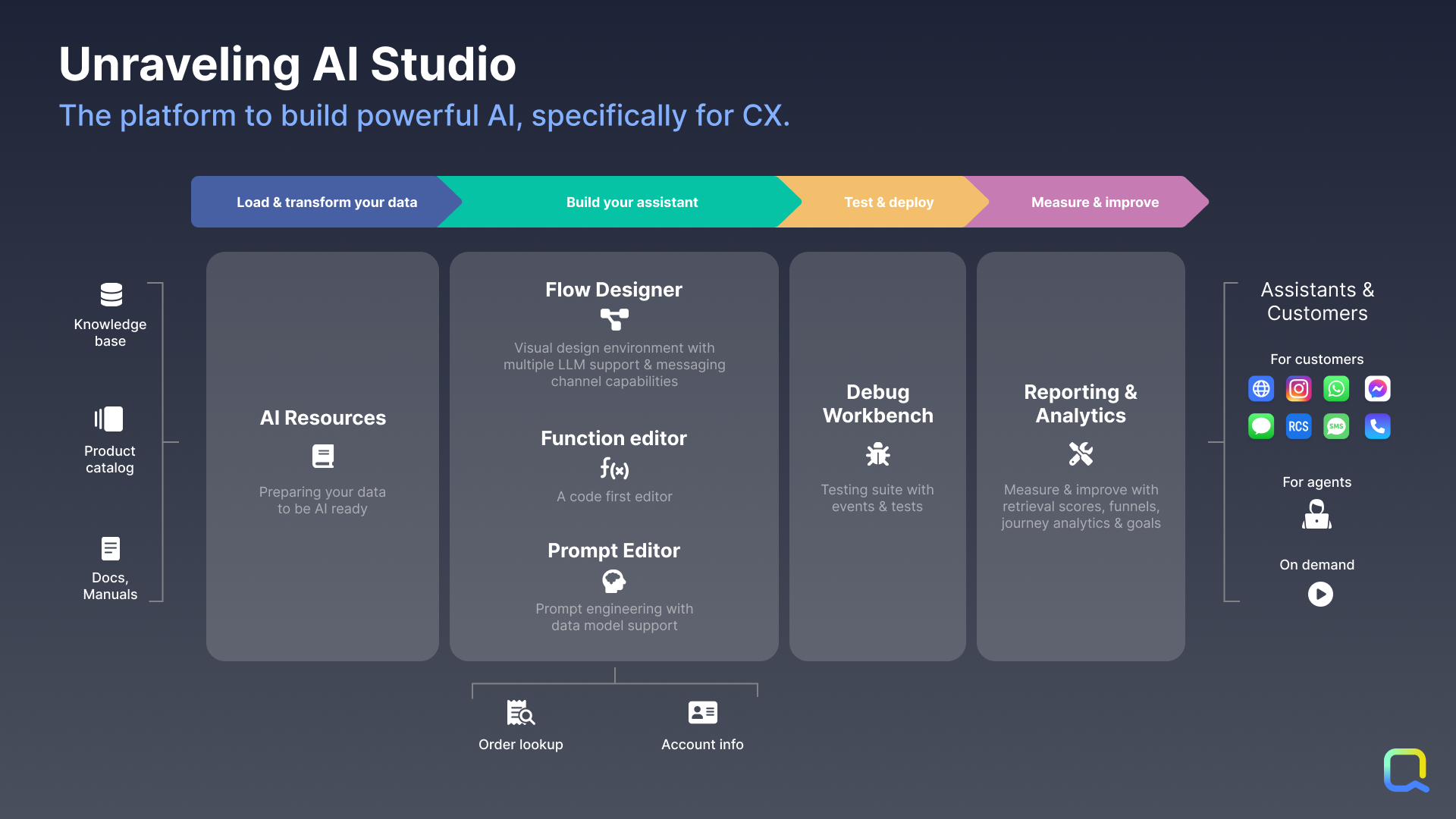
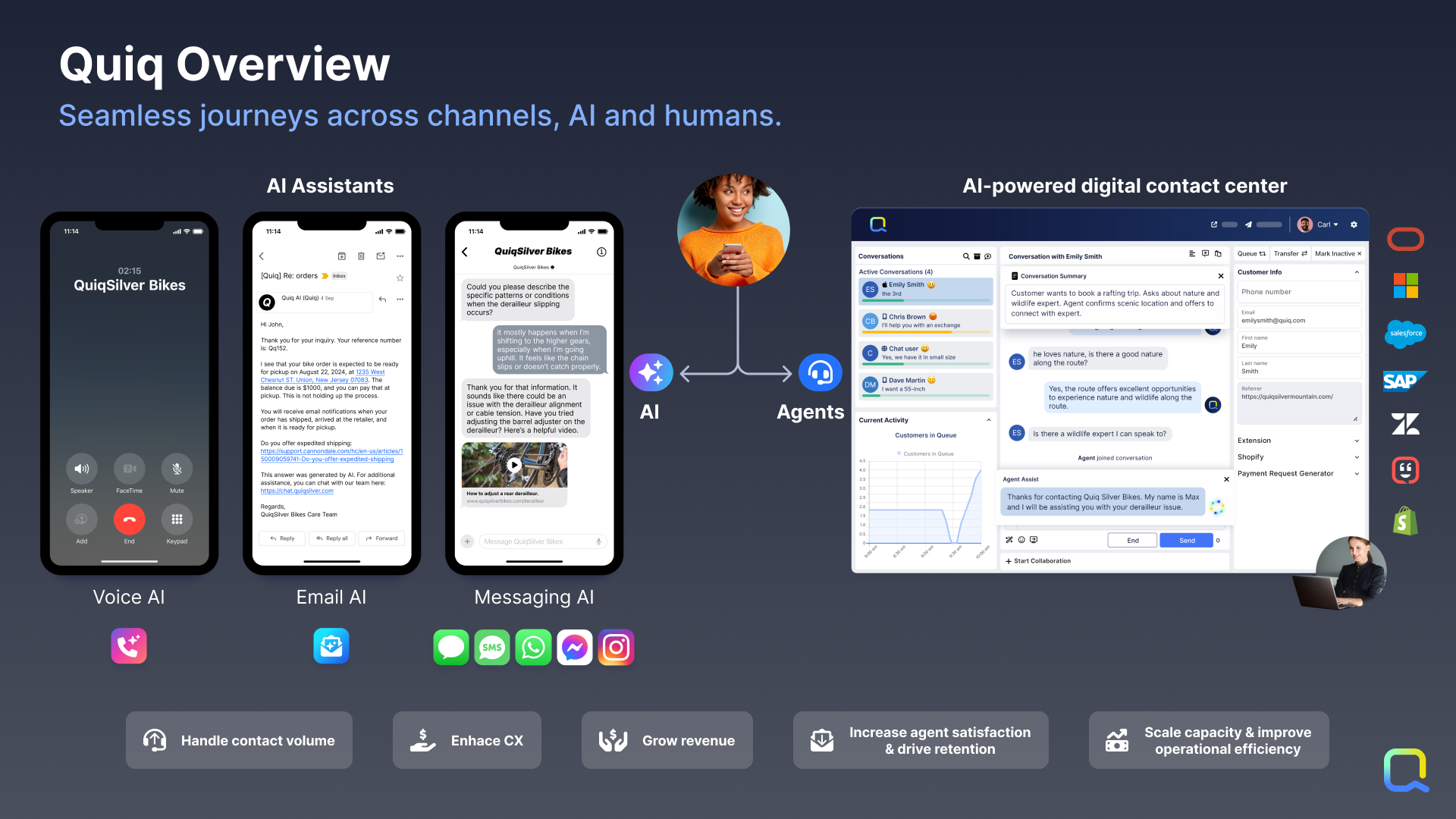
Agent AI Assistants: Not every question can be answered by AI, so Quiq’s AI-assisted contact center empowers human agents to handle many simultaneous asynchronous conversations across all popular messaging channels.Screenshot of AI Automations: Quiq’s platform can be used to apply AI on demand to any business workflow, such as analyzing incoming emails and routing it more accurately to human agents.Screenshot of Quiq’s AI-powered, multi-channel agent workspace, which is designed for CX leaders and Contact Center Managers. Those who manage agents and the agent experience at enterprise businesses need a robust console for modern channels that will drive speed, efficiency, and agent retention.Screenshot of Quiq’s AI Studio, which is a suite of infrastructure and tools that empowers developers, conversational designers, and CX leaders to create conversational experiences together across the development lifecycle.Screenshot of Integrations: AI Assistants based upon internal knowledge and data integrated can be built through Quiq’s AI Studio. Quiq conversations can be automated with native Quiq Assistants or third-party bots integrated with the Bot API. Through workspace extensions, users can augment agents' workflow with internal data to enable them to execute faster and do their jobs better. Internal systems and business intelligence can be kept up to date with Quiq’s real-time conversation and agent performance data webhooks. Quiq integrates into the largest CRMs.Screenshot of the Quiq AI for CX platform that offers a number of capabilities to drive transformational change in the customer experience.