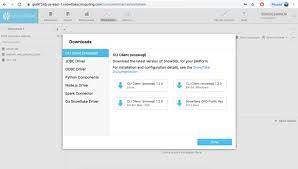
The Snowflake Cloud Data Platform is the eponymous data warehouse with, from the company in San Mateo, a cloud and SQL based DW that aims to allow users to unify, integrate, analyze, and share previously siloed data in secure, governed, and compliant ways. With it, users can securely access the Data Cloud to share live data with customers and business partners, and connect with other organizations doing business as data consumers, data providers, and data service providers.
N/A
SSIS
Score8 out of 10
N/A
Microsoft's SQL Server Integration Services (SSIS) is a data integration solution.
Principal Data Engineer in Engineering at Ad Hoc LLC (Information Technology & Services, 201-500 employees)
Chose SSIS
Fivetran, Stitch, and Etleap are all 1000x more modern than SSIS and 100x less aggravating. While those tools are mainly used to sync data rather than transform it, the ELT model works much better than the ETL model in most situations.
A de minimis incentive was given to thank the reviewer for their time. The incentive was not used to bias or drive a particular response, nor was the incentive contingent on a positive endorsement. More Info
Data Engineer, Product Analytics in Product Management at Carvana (Automotive, 5001-10,000 employees)
Chose SSIS
SSIS is similar to Alteryx and Informatica PowerCenter in a way because these are all drag-and-drop ETL tools with similar functionality. Alteryx is a step ahead because it has some advanced ETL functionalities including statistical calculations etc. and a better ability to set …
A de minimis incentive was given to thank the reviewer for their time. The incentive was not used to bias or drive a particular response, nor was the incentive contingent on a positive endorsement. More Info
Snowflake is well suited when you have to store your data and you want easy scalability and increase or decrease the storage per your requirement. You can also control the computing cost, and if your computing cost is less than or equal to 10% of your storage cost, then you don't have to pay for computing, which makes it cost-effective as well.
A de minimis incentive was given to thank the reviewer for their time. The incentive was not used to bias or drive a particular response, nor was the incentive contingent on a positive endorsement. More Info
As I mentioned earlier SQL Server Integration Services is suitable if you want to manage data from different applications. It really helps in fetching the data and generating reports. Its automation make it very easy and time efficient. It works well with large database as well. But it doesn't work well with real time data, it will take some time to gather the real time data. I would not recommend using it in a real time/fast-paced environment.
A de minimis incentive was given to thank the reviewer for their time. The incentive was not used to bias or drive a particular response, nor was the incentive contingent on a positive endorsement. More Info
Snowflake scales appropriately allowing you to manage expense for peak and off peak times for pulling and data retrieval and data centric processing jobs
Snowflake offers a marketplace solution that allows you to sell and subscribe to different data sources
Snowflake manages concurrency better in our trials than other premium competitors
Snowflake has little to no setup and ramp up time
Snowflake offers online training for various employee types
A de minimis incentive was given to thank the reviewer for their time. The incentive was not used to bias or drive a particular response, nor was the incentive contingent on a positive endorsement. More Info
A de minimis incentive was given to thank the reviewer for their time. The incentive was not used to bias or drive a particular response, nor was the incentive contingent on a positive endorsement. More Info
Do not force customers to renew for same or higher amount to avoid loosing unused credits. Already paid credits should not expire (at least within a reasonable time frame), independent of renewal deal size.
A de minimis incentive was given to thank the reviewer for their time. The incentive was not used to bias or drive a particular response, nor was the incentive contingent on a positive endorsement. More Info
Connection managers for online data sources can be tricky to configure.
Performance tuning is an art form and trialing different data flow task options can be cumbersome. SSIS can do a better job of providing performance data including historical for monitoring.
Mapping destination using OLE DB command is difficult as destination columns are unnamed.
Excel or flat file connections are limited by version and type.
A de minimis incentive was given to thank the reviewer for their time. The incentive was not used to bias or drive a particular response, nor was the incentive contingent on a positive endorsement. More Info
SnowFlake is very cost effective and we also like the fact we can stop, start and spin up additional processing engines as we need to. We also like the fact that it's easy to connect our SQL IDEs to Snowflake and write our queries in the environment that we are used to
A de minimis incentive was given to thank the reviewer for their time. The incentive was not used to bias or drive a particular response, nor was the incentive contingent on a positive endorsement. More Info
Some features should be revised or improved, some tools (using it with Visual Studio) of the toolbox should be less schematic and somewhat more flexible. Using for example, the CSV data import is still very old-fashioned and if the data format changes it requires a bit of manual labor to accept the new data structure
A de minimis incentive was given to thank the reviewer for their time. The incentive was not used to bias or drive a particular response, nor was the incentive contingent on a positive endorsement. More Info
Because the fact that you can query tons of data in a few seconds is incredible, it also gives you a lot of functions to format and transform data right in your query, which is ideal when building data models in BI tools like Power BI, it is available as a connector in the most used BI tools worldwide.
A de minimis incentive was given to thank the reviewer for their time. The incentive was not used to bias or drive a particular response, nor was the incentive contingent on a positive endorsement. More Info
SSIS is a great tool for most ETL needs. It has the 90% (or more) use cases covered and even in many of the use cases where it is not ideal SSIS can be extended via a .NET language to do the job well in a supportable way for almost any performance workload.
A de minimis incentive was given to thank the reviewer for their time. The incentive was not used to bias or drive a particular response, nor was the incentive contingent on a positive endorsement. More Info
SQL Server Integration Services performance is dependent directly upon the resources provided to the system. In our environment, we allocated 6 nodes of 4 CPUs, 64GB each, running in parallel. Unfortunately, we had to ramp-up to such a robust environment to get the performance to where we needed it. Most of the reports are completed in a reasonable timeframe. However, in the case of slow running reports, it is often difficult if not impossible to cancel the report without killing the report instance or stopping the service.
A de minimis incentive was given to thank the reviewer for their time. The incentive was not used to bias or drive a particular response, nor was the incentive contingent on a positive endorsement. More Info
We have had terrific experiences with Snowflake support. They have drilled into queries and given us tremendous detail and helpful answers. In one case they even figured out how a particular product was interacting with Snowflake, via its queries, and gave us detail to go back to that product's vendor because the Snowflake support team identified a fault in its operation. We got it solved without lots of back-and-forth or finger-pointing because the Snowflake team gave such detailed information.
A de minimis incentive was given to thank the reviewer for their time. The incentive was not used to bias or drive a particular response, nor was the incentive contingent on a positive endorsement. More Info
The support, when necessary, is excellent. But beyond that, it is very rarely necessary because the user community is so large, vibrant and knowledgable, a simple Google query or forum question can answer almost everything you want to know. You can also get prewritten script tasks with a variety of functionality that saves a lot of time.
A de minimis incentive was given to thank the reviewer for their time. The incentive was not used to bias or drive a particular response, nor was the incentive contingent on a positive endorsement. More Info
The implementation may be different in each case, it is important to properly analyze all the existing infrastructure to understand the kind of work needed, the type of software used and the compatibility between these, the features that you want to exploit, to understand what is possible and which ones require integration with third-party tools
A de minimis incentive was given to thank the reviewer for their time. The incentive was not used to bias or drive a particular response, nor was the incentive contingent on a positive endorsement. More Info
I have had the experience of using one more database management system at my previous workplace. What Snowflake provides is better user-friendly consoles, suggestions while writing a query, ease of access to connect to various BI platforms to analyze, [and a] more robust system to store a large amount of data. All these functionalities give the better edge to Snowflake.
A de minimis incentive was given to thank the reviewer for their time. The incentive was not used to bias or drive a particular response, nor was the incentive contingent on a positive endorsement. More Info
I think SQL Server Integration Services is better suited for on-premises data movement and ADF is more suited for the cloud. Though ADF has more connectors, SQL Server Integration Services is more robust and has better functionality just because it has been around much longer
A de minimis incentive was given to thank the reviewer for their time. The incentive was not used to bias or drive a particular response, nor was the incentive contingent on a positive endorsement. More Info
A de minimis incentive was given to thank the reviewer for their time. The incentive was not used to bias or drive a particular response, nor was the incentive contingent on a positive endorsement. More Info
Without this, we would have to manually update a spreadsheet of our SQL Server inventory
We would also have poor alerting; if an instance was down we wouldn't know until it was reported by a user
We only have one other person who uses SQL Server Integration Services , he's the expert. It would fall to me without him and I would not enjoy being responsible for it.
A de minimis incentive was given to thank the reviewer for their time. The incentive was not used to bias or drive a particular response, nor was the incentive contingent on a positive endorsement. More Info