SubTrade Software vs. WorkflowMax

Overview
ProductRatingMost Used ByProduct SummaryStarting Price
SubTrade Software
Score 0.0 out of 10
Small Businesses (1-50 employees)
SubTrade is a construction management platform built exclusively for trade subcontractors in electrical, HVAC, plumbing, drywall, and concrete. Unlike general contractor tools, SubTrade is designed around the workflows subcontractors actually use in the field. Core Features SubTrade includes GPS-based time tracking with real job costing, crew scheduling across multiple active projects, digital daily logs with photo…
$299
per month per company
WorkflowMax
Score 8.0 out of 10
Small Businesses (1-50 employees)
WorkflowMax is a web-based project management solution.The platform offers end-to-end functionality standard to project management software, including time tracking, lead management, collaboration with external stakeholders, invoicing, integrations, and customizable reporting.
$20
per month
Pricing
SubTrade SoftwareWorkflowMax
Editions & Modules
SubTrade Pro
$299
per month per company
Standard
$20
per month
Standard
$35
per month
Premium
$70
per month
Offerings
Pricing Offerings
SubTrade SoftwareWorkflowMax
Free Trial
YesYes
Free/Freemium Version
NoNo
Premium Consulting/Integration Services
NoNo
Entry-level Setup FeeNo setup feeNo setup fee
Additional DetailsSubTrade is offered as a single all-inclusive plan at $299/month CAD or $2,870.40/year CAD (20% annual discount). The base plan includes 5 full users with access to all features — time tracking, crew scheduling, daily logs, change orders, safety forms, drawings, and submittals. Additional full users are added at tiered per-user pricing: $25/user/month for users 6–15, $20/user/month for users 16–30, and $15/user/month for 31+ users. A 14-day free trial is available with no credit card required.
More Pricing Information
Community Pulse
SubTrade SoftwareWorkflowMax
Considered Both Products
SubTrade Software

No answer on this topic

WorkflowMax
Chose WorkflowMax
It was overwhelming to configure ConnectWise Manage and was pricey compared to WorkflowMax, which was well embraced by all our employees.
Chose WorkflowMax
I think workflowmax does a little more than Thomson Reuters workflow because they have the additional feature of employee tracking for payroll use. Thomson Reuters does a good job at getting a project from start to finish, but workflowmax gives better reports and allows more …
Chose WorkflowMax
Loan Assistant is a virtual business, entirely operated in the cloud. We do not have an office. Team members are located in diverse locations such as Munich, Canada and Sri Lanka as well as various locations in Australia. WorkflowMax is what ties us together. The fact that the …
Chose WorkflowMax
I'm not sure if it was by Ascentis or not, and it may have been an old version, but we used a program called Timekeeper. It was very outdated, difficult to use, and didn't provide easily producible reports. WorkflowMax is infinitely better to use for our business.
Chose WorkflowMax
I made comparisons with two Legal Practice Management systems, InfinityLaw and OneLaw. These systems were more expensive and had functionality/modules which we did not require. I am experienced with WorkflowMax so that was a key factor, along with pricing. I also felt it was …
Chose WorkflowMax
It's been so many years now I don't remember. I haven't needed to look anywhere else. I'm happy with WorkflowMax.
Chose WorkflowMax
Not as easily configured for the architecture and design field.
Chose WorkflowMax
I chose WorkflowMax because it seamlessly integrated with my accounting system Xero
Chose WorkflowMax
We tried a couple of solutions before settling on WorkflowMax, we chose WorkflowMax for as it did what we needed without being over complicated.

Chose WorkflowMax
WorkflowMax is much much easier than Streamtime, much more affordable and easier to try out and see if it meets your needs. Streamtime is a great comprehensive product but we lost a year's subscription in investment because we couldn't get answers to the support questions we …
Chose WorkflowMax
WorkflowMax was the first program I evaluated and it suited our business from the word go. There was no need to look elsewhere.
Chose WorkflowMax
Archioffice is clunky by comparison and quite regimented in what you can do or not. WorkflowMax offers quite a high degree of flexibility by comparison. Neither offers perfect graphics for invoice presentation (yet) whereas WorkflowMax's is quite acceptable or presentable. AO …
Chose WorkflowMax
I didn't get an option in the menu above for JobBag which was the previous system we used. My IT/production manager heard of WorkflowMax and invited the team to do a presentation. JobBag was not fulfilling our needs and we also wanted to move to a cloud-based system which could …
Chose WorkflowMax
I have only used Synergy and whilst this is good, the cost of Synergy was far too great for my practice.
Chose WorkflowMax
We trialed several time tracking options, WorkflowMax won as it was the most feature rich, allowed us to take up additional users as our business grew and plugs directly into Xero, allowing for a reduction in number of hours spent in the land of accounting.
Chose WorkflowMax
The previous programs I used are not listed. But having had to use two different programs to store client data and one for doing the quoting and invoicing was very time consuming. Client details and job details needed to be recorded in both programs, so multiple entries of data …
Chose WorkflowMax
In terms of CRM I always found Capsule to be clunky and difficult to use. WorkflowMax makes it easy for me to gather all the relevant info about our clients in one place with the document manager and also the custom fields that we can add in. I have been able to analyse where …
Chose WorkflowMax
More comprehensive than both of the above - better reporting, more flexible, better customisation.
Features
SubTrade SoftwareWorkflowMax
Project Management
Comparison of Project Management features of Product A and Product B
SubTrade Software
-
Ratings
WorkflowMax
9.3
Ratings
19% above category average
Task Management00 Ratings9.50 Ratings
Resource Management00 Ratings9.50 Ratings
Gantt Charts00 Ratings9.20 Ratings
Scheduling00 Ratings9.40 Ratings
Workflow Automation00 Ratings9.50 Ratings
Team Collaboration00 Ratings9.50 Ratings
Support for Agile Methodology00 Ratings8.90 Ratings
Support for Waterfall Methodology00 Ratings9.20 Ratings
Document Management00 Ratings9.20 Ratings
Email integration00 Ratings9.40 Ratings
Mobile Access00 Ratings9.20 Ratings
Timesheet Tracking00 Ratings9.60 Ratings
Change request and Case Management00 Ratings9.10 Ratings
Budget and Expense Management00 Ratings9.40 Ratings
Professional Services Automation
Comparison of Professional Services Automation features of Product A and Product B
SubTrade Software
-
Ratings
WorkflowMax
9.5
Ratings
21% above category average
Quotes/estimates00 Ratings9.70 Ratings
Invoicing00 Ratings9.50 Ratings
Project & financial reporting00 Ratings9.70 Ratings
Integration with accounting software00 Ratings9.20 Ratings
Best Alternatives
SubTrade SoftwareWorkflowMax
Small Businesses
FollowUp CRM
FollowUp CRM
Score 1.4 out of 10
Stackby
Stackby
Score 8.8 out of 10
Medium-sized Companies
InEight
InEight
Score 8.2 out of 10
InEight
InEight
Score 8.2 out of 10
Enterprises
InEight
InEight
Score 8.2 out of 10
InEight
InEight
Score 8.2 out of 10
All AlternativesView all alternativesView all alternatives
User Ratings
SubTrade SoftwareWorkflowMax
Likelihood to Recommend
-
(0 ratings)
8.8
(0 ratings)
Likelihood to Renew
-
(0 ratings)
9.0
(0 ratings)
Usability
-
(0 ratings)
9.0
(0 ratings)
Support Rating
-
(0 ratings)
7.0
(0 ratings)
Implementation Rating
-
(0 ratings)
9.1
(0 ratings)
User Testimonials
SubTrade SoftwareWorkflowMax
Likelihood to Recommend
No answers on this topic
WorkflowMax is a good solution for the architecture and design profession in that it allows for multiple ways to track a project, apply time to a project, and invoice against a project. The ability to do staffing forecasting and future planning fills a need that most firms in this profession require.
Read full review
Pros
No answers on this topic
  • Great for managing teams which are not in one spot. Awesome for small or growing businesses with employees who might work from home.
  • Really good for teams to keep up with where a project is at against the time left to achieve the goal
  • Great for keeping all the information for each project in one spot.
Read full review
Cons
No answers on this topic
  • Integration with inventory - there are a lot of companies out there which provide a service which includes selling items either purchased or held in stock or "kitted"
  • User permission levels need to be more flexible and ideally closely tied to Xero
  • Two way integration with Xero - ability to import invoices to specific jobs
  • Ability to save pdfs to purchase orders, invoices (like Xero)
Read full review
Likelihood to Renew
No answers on this topic
Because we can't imagine being without it!
Read full review
Usability
No answers on this topic
It's easy to use and provides me with instant online access to the management of my business whether I am at my desk or overseas
Read full review
Support Rating
No answers on this topic
We have had very few issues with Max
Read full review
Implementation Rating
No answers on this topic
Decide how to breakdown your ongoing jobs - are they monthly recurring or annual broken into chunks? What are you going to give clients i.e. how will your proposals and invoices look?
Read full review
Alternatives Considered
No answers on this topic
I'm not sure if it was by Ascentis or not, and it may have been an old version, but we used a program called Timekeeper. It was very outdated, difficult to use, and didn't provide easily producible reports. WorkflowMax is infinitely better to use for our business.
Read full review
Return on Investment
No answers on this topic
  • The time the company saves by using employees efficiently on each project makes the purchase of this software worthwhile. You can clearly verify how much time the staff spends on each project, with each client, and you can compare whether it is profitable or not the hours invested, thus increasing your profits.
Read full review
ScreenShots

SubTrade Software Screenshots

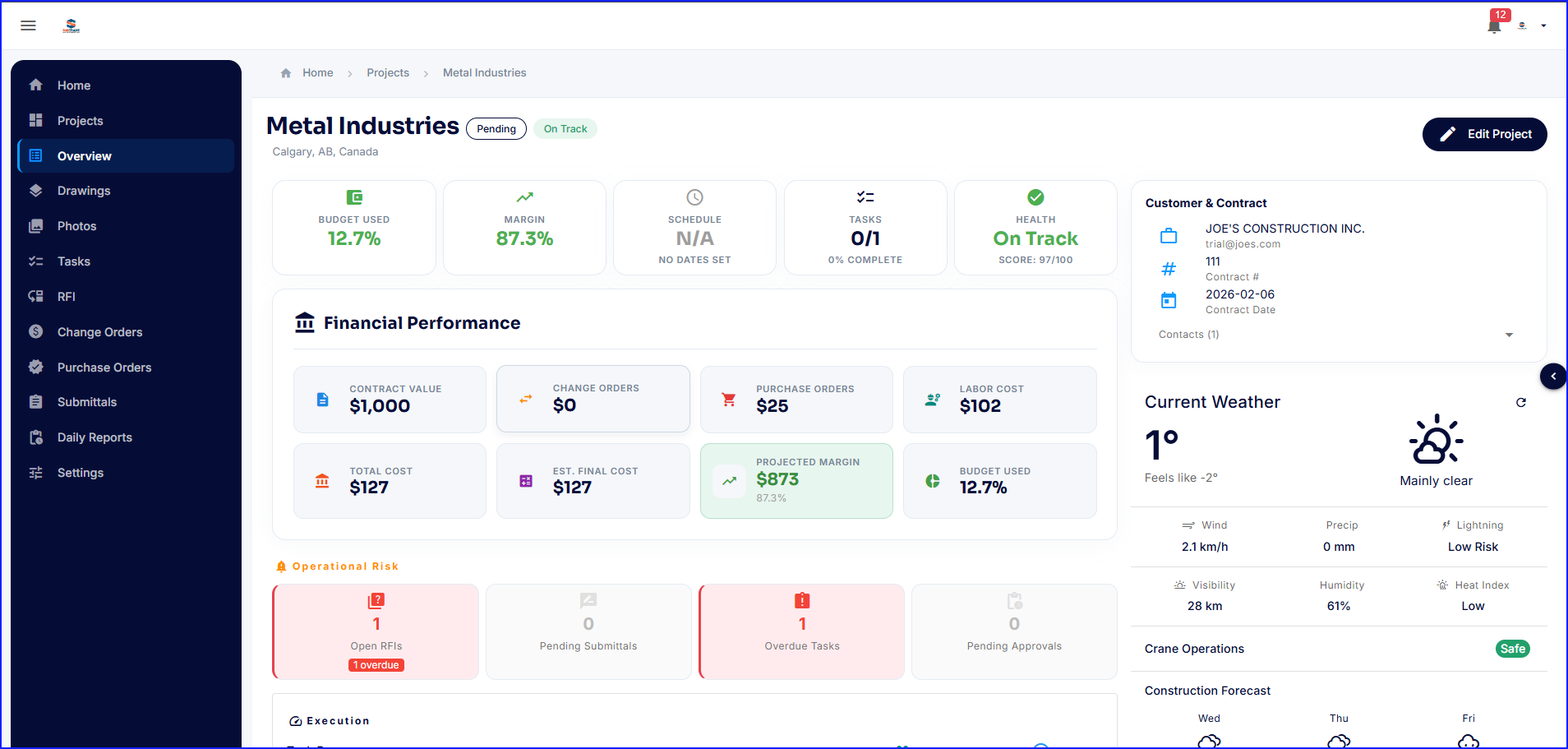
Screenshot of the Project Dashboard. This offers a real-time snapshot of every active job with budgets, margins, schedules, team, and costs.Screenshot of SubTrade Employee Management. User profiles display assigned roles, contact information, and trade certifications. Admins can create and manage field workers, project managers, estimators, and schedulers from one central directory.Screenshot of the interface to schedule crews across multiple projects. SubTrade's weekly scheduling view shows every worker's shifts, project assignments, and total hours at a glance. Filter by employee or project, switch between daily and weekly views, and add shifts in seconds.Screenshot of SubTrade's time tracking dashboard, which shows gross hours, payable hours, break deductions, and total labour cost in real time — across every employee and project. Review and approve pending entries, export to CSV for payroll, and always know labour costs before the invoice comes in.Screenshot of SubTrade's role management, which lets users create custom roles like Estimator, Field Worker, Project Manager, Scheduler, and Labour, then assign crew members in seconds. Control who sees what across every project and keep any operation organized.Screenshot of SubTrade's project dashboard, which shows contract value, change orders, labour cost, projected margin, and budget used in real time. Operational risks like open RFIs and overdue tasks are flagged instantly, and live weather and construction forecast data keeps your crew prepared before they even hit the job site.

WorkflowMax Screenshots

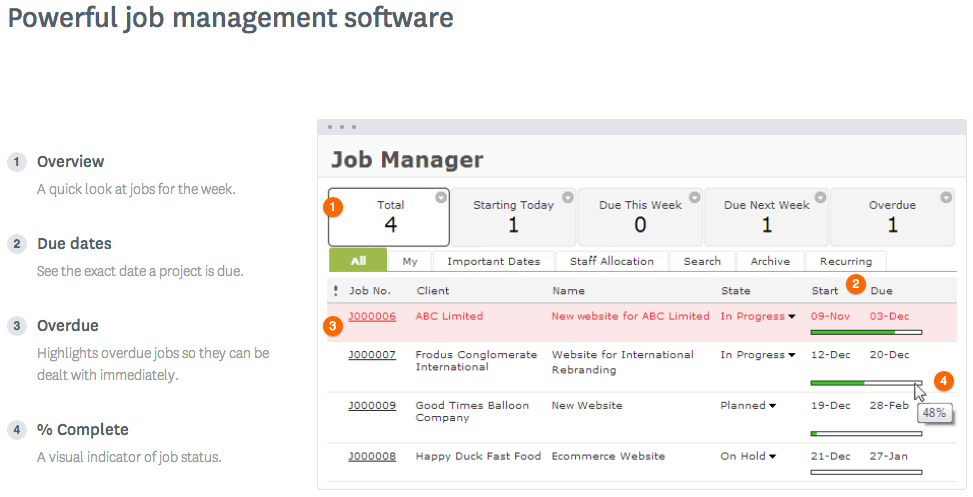
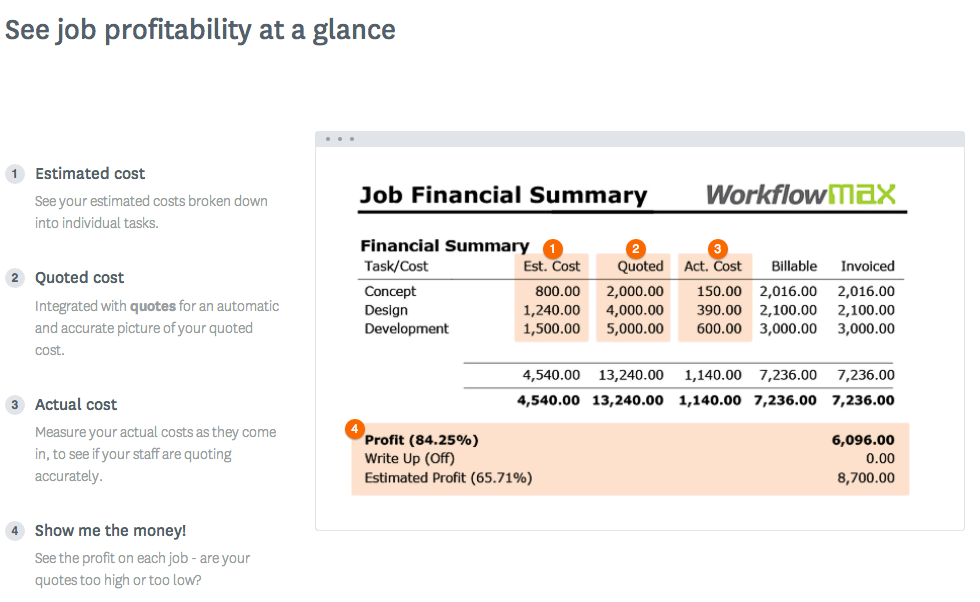
Screenshot of WorkflowMax Quoting SoftwareScreenshot of WorkflowMax CRM SoftwareScreenshot of WorkflowMax Project Management SoftwareScreenshot of WorkflowMax Mobile SiteScreenshot of Job Costing | WorkflowMaxScreenshot of Powerful Custom Reporting | WorkflowMax