TrustRadius: an HG Insights company

Save this comparison

Save this comparison

Add Product

Recommended Comparisons

    Overview
    ProductRatingMost Used ByProduct SummaryStarting Price

    WebEngage

    Score4.1 out of 10
    N/AWebEngage calls itself a multi-channel user engagement platform. It automates communication across a user's lifecycle and helps companies send messages via these channels: Web Messages In-app Messages Push Notifications Web Push Notification Email Marketing SMS Marketing Facebook Remarketing According to the vendor, cross-device tracking helps keep communication coherent and contextual, making the…N/A

    Zoho Desk

    Score8.3 out of 10
    N/AZoho Support is a Saas help desk / ticketing system aimed at SMBs. I competes most often with Zendesk, and Desk.com.

    $9

    per month per user

    Pricing
    WebEngageZoho Desk
    Editions & Modules
    No answers on this topic
    Free
    $0
    Express
    $9
    per month per user
    Standard
    $20
    per month per user
    Professional
    $35
    per month per user
    Enterprise
    $50
    per month per user
    Offerings
    Pricing Offerings
    WebEngageZoho Desk
    Free Trial
    YesYes
    Free/Freemium Version
    YesYes
    Premium Consulting/Integration Services
    YesYes
    Entry-level Setup FeeNo setup feeRequired
    Additional DetailsPricing is customised according to the customer usage and requirement. Contact support@webengage.com to know more about pricing plans.A discount is offered for yearly billing.
    More Pricing Information
    Features
    WebEngageZoho Desk
    Email & Online Marketing
    Comparison of Email & Online Marketing features of WebEngage and Zoho Desk
    Feature
    WebEngage
    7.4
    6 Ratings
    4% below category average
    Zoho Desk
    -
    Ratings
    Dynamic content7.36 Ratings00 Ratings
    Ability to test dynamic content7.76 Ratings00 Ratings
    Mobile optimization6.35 Ratings00 Ratings
    Email deliverability reporting7.16 Ratings00 Ratings
    List management7.86 Ratings00 Ratings
    Triggered drip sequences8.26 Ratings00 Ratings
    Lead Management
    Comparison of Lead Management features of WebEngage and Zoho Desk
    Feature
    WebEngage
    6.1
    5 Ratings
    26% below category average
    Zoho Desk
    -
    Ratings
    Lead nurturing automation6.65 Ratings00 Ratings
    Automated sales alerts and tasks5.65 Ratings00 Ratings
    Campaign Management
    Comparison of Campaign Management features of WebEngage and Zoho Desk
    Feature
    WebEngage
    6.9
    6 Ratings
    9% below category average
    Zoho Desk
    -
    Ratings
    Calendaring8.05 Ratings00 Ratings
    Event/webinar marketing5.74 Ratings00 Ratings
    Reporting & Analytics
    Comparison of Reporting & Analytics features of WebEngage and Zoho Desk
    Feature
    WebEngage
    7.2
    6 Ratings
    4% below category average
    Zoho Desk
    -
    Ratings
    Dashboards7.56 Ratings00 Ratings
    Standard reports7.56 Ratings00 Ratings
    Custom reports6.76 Ratings00 Ratings
    Platform & Infrastructure
    Comparison of Platform & Infrastructure features of WebEngage and Zoho Desk
    Feature
    WebEngage
    7.1
    6 Ratings
    7% below category average
    Zoho Desk
    -
    Ratings
    API8.26 Ratings00 Ratings
    Role-based workflow & approvals7.15 Ratings00 Ratings
    Customizability6.85 Ratings00 Ratings
    Integration with Salesforce.com6.15 Ratings00 Ratings
    Incident and problem management
    Comparison of Incident and problem management features of WebEngage and Zoho Desk
    Feature
    WebEngage
    -
    Ratings
    Zoho Desk
    8.5
    5 Ratings
    4% above category average
    Organize and prioritize service tickets00 Ratings9.05 Ratings
    Expert directory00 Ratings7.14 Ratings
    Subscription-based notifications00 Ratings7.14 Ratings
    ITSM collaboration and documentation00 Ratings10.01 Ratings
    Ticket creation and submission00 Ratings8.95 Ratings
    Ticket response00 Ratings8.95 Ratings
    Self Help Community
    Comparison of Self Help Community features of WebEngage and Zoho Desk
    Feature
    WebEngage
    -
    Ratings
    Zoho Desk
    9.8
    5 Ratings
    20% above category average
    External knowledge base00 Ratings9.85 Ratings
    Internal knowledge base00 Ratings9.85 Ratings
    Multi-Channel Help
    Comparison of Multi-Channel Help features of WebEngage and Zoho Desk
    Feature
    WebEngage
    -
    Ratings
    Zoho Desk
    6.6
    5 Ratings
    19% below category average
    Customer portal00 Ratings8.04 Ratings
    Social integration00 Ratings6.83 Ratings
    Email support00 Ratings6.15 Ratings
    Help Desk CRM integration00 Ratings5.44 Ratings
    Best Alternatives
    WebEngageZoho Desk
    Small Businesses
    Vbout
    Score9.9 out of 10
    Help Scout
    Score9.3 out of 10
    Medium-sized Companies
    Bloomreach
    Score9.2 out of 10
    LiveAgent
    Score8.8 out of 10
    Enterprises
    Iterable
    Score8.2 out of 10
    Front
    Score9.2 out of 10
    All AlternativesView all alternativesView all alternatives
    User Ratings
    WebEngageZoho Desk
    Likelihood to Recommend
    7.3
    (6 ratings)
    8.8
    (23 ratings)
    Usability
    -
    (0 ratings)
    8.0
    (12 ratings)
    Support Rating
    -
    (0 ratings)
    8.8
    (11 ratings)
    User Testimonials
    WebEngageZoho Desk
    Likelihood to Recommend
    WebEngage
    WebEngage can easily reduce turnaround time for product and marketing teams to execute marketing campaigns for specific user segments as well as remove any dependency on internal tech teams for the development and maintenance of automation journeys. Further, A/B tests can be executed to measure the performance of message variants in real-time directly from the panel. But WebEngage lacks a robust Analytics platform. While basic metrics such as open rate and click-through rate for messages being sent can be considered for reporting, attribution is still not the strongest suit in case the marketing team relies on multiple Ad networks for acquisition. Thus, as per experience, it's better to use the automation suite offered by WebEngage with a different data analytics platform.
    Incentivized
    Read full review
    Zoho
    Zoho Desk is a great customer service tool. It is very easy to track the ability to receive tickets and send responses in Zoho Desk. There are lots of options for customization. The knowledge base feature is very extensive and powerful. It makes creating internal and external FAQs easy.
    Incentivized
    Read full review
    Pros
    WebEngage
    • Ease in creating user journeys.
    • Easy implementation of APIs.
    • Good reporting dashboard and scheduling features.
    • Segmentation of the users is easy.
    Incentivized
    Read full review
    Zoho
    • It provides a simple widget code with a few clicks once you decide to integrate it with your website or application.
    • There is a very user friendly dedicated mobile application for Zoho Desk for Android and IOS devices.
    • You can easily track all of your tickets and agents from the dashboard interface.
    • You can insert tags with each ticket to group them into specific categories for analysis and troubleshooting.
    Incentivized
    Read full review
    Cons
    WebEngage
    • Relays
    • Onsite should have more options of templates.
    • Backend support for better reachability of the channels.
    • Cohort studies should be more customizable.
    Incentivized
    Read full review
    Zoho
    • The biggest drawback that I am facing while using the platform is that their ticketing system is not that great [in my opinion]. It does not give us the option to add sales tax and other charges in the invoices which leads to a big problem for us.
    • [I feel] its customer support needs improvement.
    Incentivized
    Read full review
    Usability
    WebEngage
    No answers on this topic
    Zoho
    I give [Zoho Desk] [an] overall usability score of 9. This is partly due to the search functionality needs improvement. There are several times where I am left unable to find a ticket and have to generate a new one. I am hoping in the future that they will make some changes!
    Incentivized
    Read full review
    Support Rating
    WebEngage
    No answers on this topic
    Zoho
    As Zoho Support is based in a different timezone to ours it can be an issue that we cannot get an immediate response to an issue. But I will say that once their Support is in the office they are fairly good to respond. they have resolved almost all issues I have told them about, but Zoho have also made system changes and not communicated these beforehand which means we are faced with something new and cannot get support on this until their support team is in the office
    Incentivized
    Read full review
    Alternatives Considered
    WebEngage
    WebEngage's dashboard is relatively more intuitive and easy to understand. Further in terms of cost as well it is value to money as it delivers excellent ROI. The after-sales support is also better in terms of responsiveness and helps in case of issues with the execution of campaigns. The account managers also ideate and help in the optimization and creation of new user journeys.
    Incentivized
    Read full review
    Zoho
    We selected Zoho Desk as we needed a platform that was going to allow the business to grow through both usage and staffing numbers. We wanted something cost-effective but still offered standard features in an effective cloud-delivered solution but would still allow customization by our internal dev team, to derive better value from the service where it natively didn't do what we needed it to. FreeAgent was okay for a while, but Zoho Desk has allowed a vast improvement in our service offering to end customers.
    Incentivized
    Read full review
    Return on Investment
    WebEngage
    • Helped in lowering cost of marketing.
    • Driving higher volume of Direct Sales.
    • Increasing conversion rate on the website.
    • Increasing lead to sale ratio.
    Incentivized
    Read full review
    Zoho
    • Zoho Desk has created an organised sytem of support which alows me to help my customers more efficiently.
    • By saving resolutions as articles, Zoho Desk has provided a training resource for current customers and support staff as part of solving problems.
    • All new customers become part of a database of customers who continue to receive support and education from forums created by the articles and customer questions.
    Incentivized
    Read full review
    ScreenShots

    WebEngage Screenshots

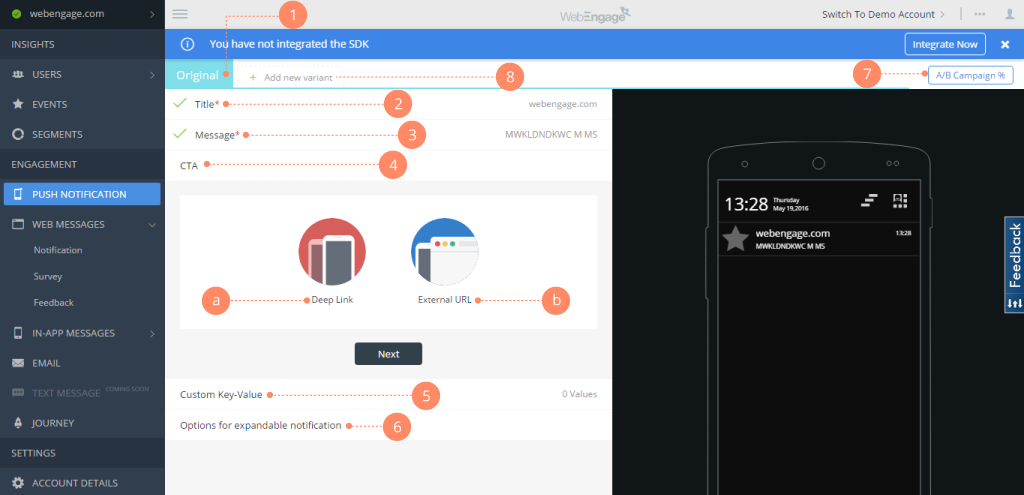
    Screenshot of Webengage dashboard - User AnalyticsScreenshot of Webenagge dashboard - User DetailsScreenshot of Webengage dashboard - Creating Mobile notificationsScreenshot of Webengage dashboard - Creating EmailsScreenshot of Webengage Dashboard - Journey DesignerScreenshot of Webengage Dashboard - Journey Designer (2)

    Zoho Desk Screenshots

    Screenshot of Log and monitor phone conversations, convert them into new tickets, or attach them to existing ones. Convert social media interactions and live chat into tickets at the click of a button.Screenshot of Bring a Help Center directly into a website to strengthen self-service. Chat with Zia, an AI-powered conversation assistant. Customers can chat with Zia right from a mobile app or website. Zia processes their questions and suggests appropriate solutions from the Knowledge Base.Screenshot of With advanced process automation, internal processes can be setup within the help desk, implement them automatically, and make sure that all processes are followed precisely.Screenshot of Instant responses for instant happiness. Respond to customers the minute they reach out with Zoho Desk's embeddable chat widget. Customers can get in touch with agents instantly, right from the Help Center, so agents can respond and help them find answers faster.Screenshot of Monitor a team's performance, customize and schedule reports. Custom dashboards can be created.Screenshot of Zia brings together predictions across anomalies, sentiment, trending ticket tags, and more into a common dashboard for decision-makers to consume. They can drill down further into the details from the same dashboard to investigate further.