TrustRadius: an HG Insights company

Bizagi

Score8.4 out of 10

52 Reviews and Ratings

What is Bizagi?

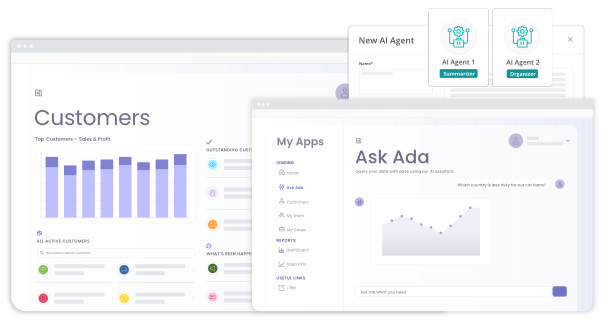
Bizagi is an enterprise orchestration platform designed to make Artificial Intelligence (AI) operational and governable at scale. Utilizing over two decades of enterprise process experience, the platform provides the operational architecture required to integrate AI into critical business workflows. Native AI capabilities—such as AI Agents, AI Workers, and the 'Ask Ada' virtual assistant—run on Microsoft Azure through private OpenAI integrations. These operations run within a secure, governed perimeter of Data Domains and role-based access controls that define what each feature can access and execute. The vendor states that the platform has been deployed in more than 1,000 enterprise implementations globally.

Read more details.

Media

Bizagi

Top Performing Features

  • Model execution

    Ability to execute model and build code without programming skills

    Category average: 7.9

  • Standard reports

    The software offers pre-built reports with metrics standard to the category.

    Category average: 8.4

  • Custom reports

    Users can create custom reports.

    Category average: 7.8

Areas for Improvement

  • Form builder

    Integrated form design tool

    Category average: 7.3

  • Dashboards

    Users can create, customize and share dashboards, which provide an overview of the most important metrics.

    Category average: 8.2

  • Process simulation

    Evaluating model performance with real data, and optimizing

    Category average: 7

A great swiss army tool for process orchestration and automation preparation

Use Cases and Deployment Scope

We are using Bizagi Digital Business Platform Forms and Workflow Processes to streamline and orchestrate input from our HR specialists into the different HR systems. As for any digitalized input, it is decided first whether Bizagi Digital Business Platform can be linked to fuether third-party automation. In case a senseful use case is identified, Bizagi Digital Business Platform handles the input, oechestration and output of our HR processes.

Pros

  • Orchestration
  • Customized Forms
  • Workflow

Cons

  • Developer Interface
  • Multiple Connections
  • Third party custom integrations

Return on Investment

  • Overall better documentation
  • Orchestration between departments has improved by far
  • Quicker throughput time

Usability

Alternatives Considered

Camunda

Other Software Used

UiPath Automation Platform, Splunk Enterprise

Excellent process system

Pros

  • It allows us to perform the digitization process easily and efficiently
  • You can model document processes.
  • Automated processes are more efficient and rapid.

Cons

  • It cannot handle moving several elements at once.
  • The arrows also try to predict that we trying to connect elements to them as we move them, only they never get it right.

Return on Investment

  • Process modeling allows you to focus on just the business requirements without getting bogged down in technical design like other platforms.
  • Their adherence to BPM standards and an open database ensures your investment.

Other Software Used

LogMeIn Central, Lifesize Video Conferencing

Bizagi Modeler perfect and easy drawing

Pros

  • design process
  • enable to collaborate on process with customer
  • enable to generate good world documents
  • has a clear view how the process will looks like
  • enable to design roles in the workflow

Cons

  • export option to other format than Bizagi Engine :-)
  • customization of forms that can be use to design workflow
  • localization of export files

Return on Investment

  • it speeds up very much designing the workflows so we save time and money
  • it helps to accept process with customer so it also safe time and money

Alternatives Considered

Axure, Nintex Workflow Platform and Visual Studio IDE

Other Software Used

Axure, Visual Studio IDE, Microsoft Office 2016, Microsoft Office 365

Bizagi Modeler : The best way to design and document business processes.

Pros

  • Work fast & well : Very easy to use, user friendly and a great look. You can design your process model quickly.
  • Document a publication : At each BPMN symbol you can define and add your own attributes that can be text zones as picture or attached documents. A lot of possibilities. Then you can publish a word document, a pdf file, html page, sharepoint, wiki, .... In this "publication", you'll find pictures of your model, a table of contents and all the attributes you have added and their values.
  • Collaborative : You can use a collaborative mode where you can work on the same model, add comment on what you changed, chat with your colleague about it... Very nice
  • Simulation & test : You can simulate and test your model with a lot of parameters (costs, time, statistics,...)
  • Presentation : There is also a presentation mode. You walk trough the model and you show attributes of what you want.
  • Totally free
  • Tutorials & Community: A lot of videos to learn BPMN and to use Bizagi Modeler. Don't hesitate to sign in Bizagi. You won't be spammed with a lot of emails. 3 years I signed in Bizagi and I think I didn't receive more than 3 emails a year.

Cons

  • Some minor things to improve but works pretty well. If you have an idea to improve Bizagi Modeler, you can post it on the Bizagi forum, and maybe, in a next release, you will find it realized. Yes, it happened to me.

Return on Investment

  • Do better and readable documentation.
  • Ease the communication between IT and business users.
  • Modelize your processes, it is the first step to improve them.
  • Bizagi Modeler and Bizagi Studio are totally free with all functionnalities.