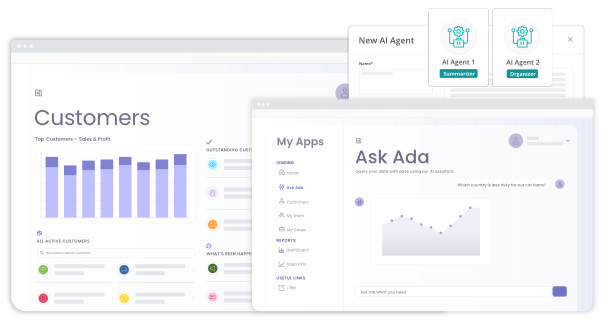
Bizagi is an enterprise orchestration platform designed to make Artificial Intelligence (AI) operational and governable at scale. Utilizing over two decades of enterprise process experience, the platform provides the operational architecture required to integrate AI into critical business workflows. Native AI capabilities—such as AI Agents, AI Workers, and the 'Ask Ada' virtual assistant—run on Microsoft Azure through private OpenAI integrations. These operations run within a secure, governed…
N/A
ProcessMaker
Score8.8 out of 10
N/A
ProcessMaker is a process automation platform that helps organizations optimize and scale their business operations. By combining workflow automation, AI-driven decision-making, and advanced analytics, ProcessMaker empowers businesses to streamline complex processes, improve efficiency, and enhance customer experiences.
Permits dependence reduction on external IT suppliers, maximum value extraction from large/legacy systems, and business and IT collaboration. For big Companies, while an enterprise should expect to face a lot of difficulties, thus increasing the learning curve, while dealing with the platform's rollout the timeline to deploy is extensive.
A de minimis incentive was given to thank the reviewer for their time. The incentive was not used to bias or drive a particular response, nor was the incentive contingent on a positive endorsement. More Info
The task mining component is well suited for processes where there are a lot of steps performed in a variety of systems, particularly by a single individual on a team. It also requires a robust activity ID to be able to track an activity. It is not well suited when trying to track a process where the content is in an email.
A de minimis incentive was given to thank the reviewer for their time. The incentive was not used to bias or drive a particular response, nor was the incentive contingent on a positive endorsement. More Info
A de minimis incentive was given to thank the reviewer for their time. The incentive was not used to bias or drive a particular response, nor was the incentive contingent on a positive endorsement. More Info
User interface. It is clean and easy to understand. You won't get overwhelmed the second you log in.
The workflow maker. With a drag and drop interface, you can easily visualize and implement what you want on the screen. Out of all the programs we tested, this one had the easiest process maker and designer.
Ease of understanding. My biggest recommendation would be that this program is easy to access for anyone. There are complications (see negatives) but this program can be implemented quickly and efficiently, and nearly anyone can learn to use it. You will not feel like you are in the dark with it.
A de minimis incentive was given to thank the reviewer for their time. The incentive was not used to bias or drive a particular response, nor was the incentive contingent on a positive endorsement. More Info
Some minor things to improve but works pretty well. If you have an idea to improve Bizagi Modeler, you can post it on the Bizagi forum, and maybe, in a next release, you will find it realized. Yes, it happened to me.
Complications when you get to the more advanced pieces. When trialing, I found that the more advanced a process got, the more complicated it got for me in coding. When you begin using the more advanced features, you will find that you need to have a basic knowledge of coding - otherwise you won't go any further. This was my sole issue. Unfortunately, it was one that would have brought the school to a grinding halt if they were to ever get more complicated than they were.
A de minimis incentive was given to thank the reviewer for their time. The incentive was not used to bias or drive a particular response, nor was the incentive contingent on a positive endorsement. More Info
A de minimis incentive was given to thank the reviewer for their time. The incentive was not used to bias or drive a particular response, nor was the incentive contingent on a positive endorsement. More Info
It is applicable in any complex process scenario- regardless of company function. Though it is very useful and customizable, it is best to be deployed by a centralized team or experts in BPMN and coding, as all of the customizing options can quickly overwhelm any citizien developer and lead to harmful results
A de minimis incentive was given to thank the reviewer for their time. The incentive was not used to bias or drive a particular response, nor was the incentive contingent on a positive endorsement. More Info
I gave this overall rating for ProcessMaker due to its overall flexibility, design and ease of use for most. Examples of this from us include it being an excellent and trustworthy tool for automating processes, the abilities and capabilities for real-time process tracking and the web-based accessibility and implementation which allows for easy access and management of the tool.
A de minimis incentive was given to thank the reviewer for their time. The incentive was not used to bias or drive a particular response, nor was the incentive contingent on a positive endorsement. More Info
A de minimis incentive was given to thank the reviewer for their time. The incentive was not used to bias or drive a particular response, nor was the incentive contingent on a positive endorsement. More Info
Before making the decision to get ProcessMaker, we assessed different and best options in the market, which are also quite competitive. KiSSFLOW, Blueworks Live, and Bizagi, being the most relevant and ADONIS, to mention the ones we consider the most relevant and capable of meeting our needs. In the end, we went for ProcessMaker because of mainly three things as described before: 1. Real-time process status tracking. 2. Metrics and dashboards. 3. Ease of use for constructing diagrams.
The capability is robust and quite industry agnostic. It would benefit significantly with some out of the box models - e.g. procure to pay on SAP and similar. They could also develop industry specific examples which could kickstart the implementation for organizations.
A de minimis incentive was given to thank the reviewer for their time. The incentive was not used to bias or drive a particular response, nor was the incentive contingent on a positive endorsement. More Info
A de minimis incentive was given to thank the reviewer for their time. The incentive was not used to bias or drive a particular response, nor was the incentive contingent on a positive endorsement. More Info
I'm using Communication edition to introduce BPMN in my organization. I can build the first process in a short time, make my boss more confident with my job.
But, with ProcessMaker, we need more time to design code to handle the process, and without PHP/Javascript Programmer, it seems hard to work with more and more processes online.
However, IE Browser is not well supported, somewhat let the user confuse.
A de minimis incentive was given to thank the reviewer for their time. The incentive was not used to bias or drive a particular response, nor was the incentive contingent on a positive endorsement. More Info