TrustRadius: an HG Insights company

InterMIND

Score10 out of 10

2 Reviews and Ratings

What is InterMIND?

InterMIND is a meeting and team-communication product with translation as a native layer rather than an add-on. In a meeting, each participant speaks and hears their own language; chat messages, shared notes and uploaded documents are translated the same way. After the call, signed-in participants receive a recap in their language, and a meeting can continue as a channel whose full history every member reads in their own language.

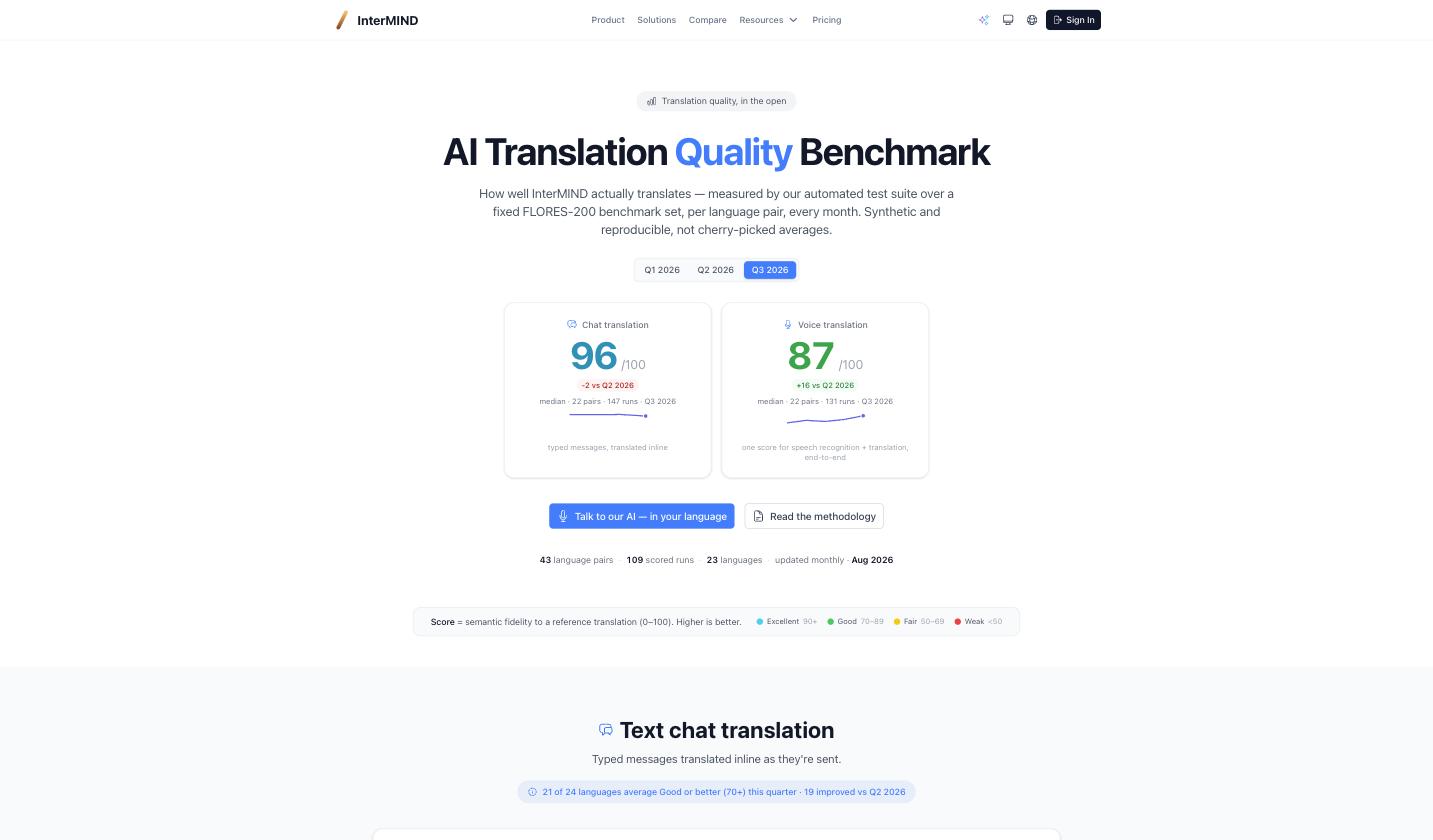
Translation for voice, chat and notes covers 24 languages on InterMIND's own engine; document translation covers 30 languages. The product runs on EU infrastructure (France, Germany, Ireland) with zero data retention on AI features; a DPA, subprocessor list and trust page are public. Translation quality is published as a monthly per-language-pair benchmark on real traffic, so buyers can check it before paying.
Participants join by link without an account; the host's plan covers everyone in the meeting. Plans: free Basic, Pro, Business, Enterprise — flat per-user pricing, 14-day trial. Available on web, Windows, macOS, iOS, Android and as a Chrome extension; integrates with Google Workspace and Microsoft 365 (calendar, directory, Drive/OneDrive, SSO).

Media

Screenshot of Public translation quality benchmark: monthly per-language-pair scores for chat and voice translation on a fixed FLORES-200 set.

Screenshot of Public translation quality benchmark: monthly per-language-pair scores for chat and voice translation on a fixed FLORES-200 set.

Top Performing Features

  • High quality audio

    High quality audio connection is consistently available, with few or no interruptions.

    Category average: 8.5

  • High quality video

    High quality video connection is consistently available, with few or no interruptions.

    Category average: 8.4

  • Desktop sharing

    Presenters can remotely share a view of their desktop with attendees.

    Category average: 8.2

Areas for Improvement

  • Confidential attendee list

    Presenters, moderators, or admins can see a confidential list of attendees that is not visible to all attendees.

    Category average: 7.9

  • Low bandwidth requirements

    Software is optimized so that meetings do not require a huge amount of bandwidth.

    Category average: 7.3

  • Mobile support

    Attendees can access meetings/webinars from mobile devices.

    Category average: 8

I use iMind exclusively to resolve all business difficulties.

Use Cases and Deployment Scope

The last time I attended a meeting at the office, I had already forgotten. I don't see the value of traveling for only one meeting. a highly practical service that provides all of your needs. Both the application and the browser can be used at the same time to access the room. Therefore, it is not essential to determine whether the service is installed on the computer prior to the discussion.

Pros

  • How simple a video call is to make. There was no time limit as on iMind, and I hardly ever experienced connection problems
  • And it provides online self-troubleshooting resources and community forums, high-definition video

Cons

  • Regarding iMind, I have nothing unfavorable to say. However, issues might arise when joining via a smartphone since you cannot join the conference using a phone number.

Return on Investment

  • It makes my business more productive
  • helps to coordinate faster

Alternatives Considered

Zoom

Other Software Used

Zoom

Best Video Conferencing Software

Use Cases and Deployment Scope

With iMind, my colleagues and I have been able to significantly reduce the cost of equipment, travel, and logistics. Now it does not matter where in the world we are because with the help of this program you can arrange a conference in a matter of minutes. In the past, we had to spend twice as much time preparing events, but now that our leisure time is more, our overall productivity has increased significantly. The meetings scheduled by the leader of the meeting were known to all members of the group at the same time. you only need to register once for the same leader, who can then invite everyone else. Moreover, if one of the conference participants does not have access to fast internet, it is especially possible for him to adjust the quality of the connection ( from low to HD).

Pros

  • Communication without failures
  • High resolution of the image(up to 4K)
  • Leader functions for quick conference gathering

Cons

  • You can not join a conference by phone.

Return on Investment

  • Enhance productivity of our team

Alternatives Considered

Zoom

Other Software Used

Zoom, Google Analytics, Skype