TrustRadius: an HG Insights company

Lightning Tools Lightning Conductor

Score9 out of 10

4 Reviews and Ratings

What is Lightning Tools Lightning Conductor?

The Lightning Conductor is a content aggregation tool for Microsoft SharePoint Online and Microsoft Teams. Users can build rich, modern content reports based upon SharePoint lists, SharePoint Search, Microsoft Graph or Microsoft 365 Groups. Content can be aggregated from lists and libraries, and other applications such as Planner, To Do, OneDrive, and Teams.

Categories & Use Cases

Media

MODERN SHAREPOINT LIST ROLLUP
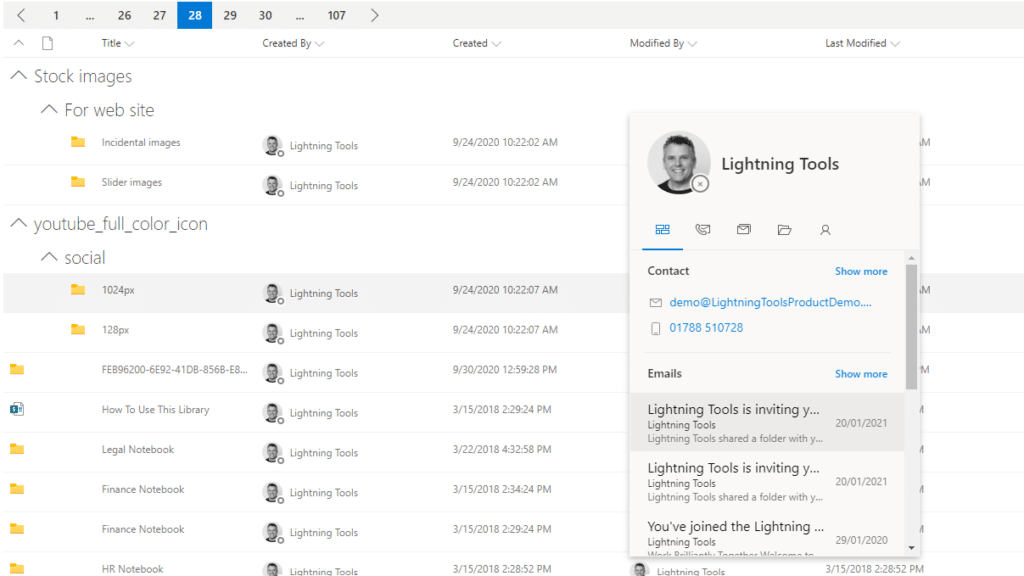
The Lightning Conductor is a SharePoint Content Aggregator that can be configured quickly by business users. The Lightning Conductor can be used to aggregate content from SharePoint Lists such as Tasks, Document Libraries, Contact Lists, and Custom Lists making it easy to view content in one place even if it is distributed across many sites and site collections. Key data can be highlighted using conditional formatting and data-bars as shown. Content from Search and Microsoft Graph can also be aggregated with the Lightning Conductor.
CONTENT AGGREGATION WITHIN MICROSOFT TEAMS
The Lightning Conductor Web Part can be used within Microsoft SharePoint or Microsoft Teams. Even if content is stored within SharePoint sites, it is useful to have aggregated Documents, Tasks, Announcements, Calendars or Custom Lists from multiple sites displayed in a single handy view in Microsoft Teams. The Lightning Conductor can be added as a Teams Tab in any Microsoft Teams Channel.
BUILDING REPORTS ON MICROSOFT GRAPH
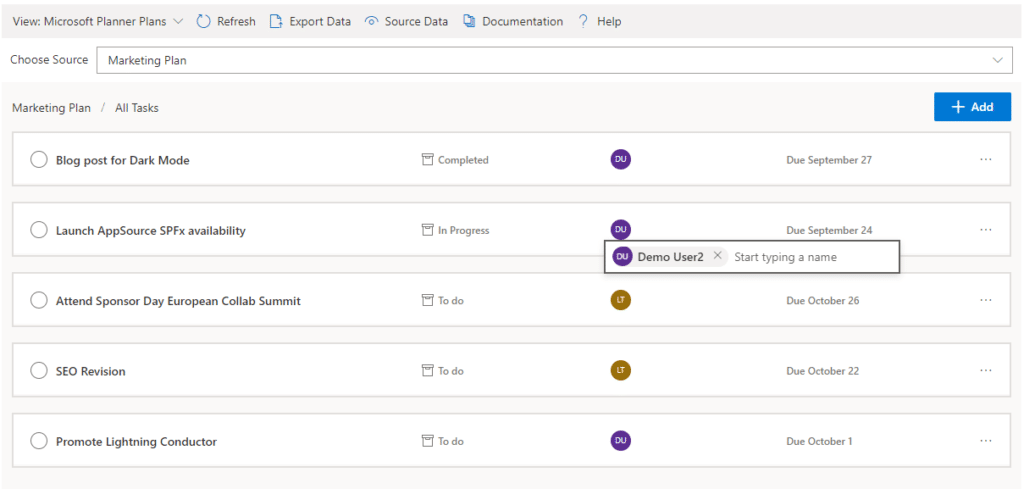
The Lightning Conductor can be used (without code) to aggregate content from Microsoft Graph as well as Search and SharePoint Lists. This example displays Microsoft Planner Plans and Microsoft Planner Tasks where users can Add new Tasks, Assign Users to Planner Tasks, Delete Tasks, and Complete Tasks. The same can be performed on Microsoft To Do items and displayed within Modern SharePoint pages or Microsoft Teams Tabs. The Lighting Conductor can also contain multiple views of content, making it ideal to display all of your tasks from SharePoint Task lists, Microsoft To Do and Microsoft Planner in a single web part or Teams Tab.

*Microsoft Graph Reports are only available for SharePoint Online and not SharePoint 2019.
BUILDING REPORTS ON MICROSOFT 365 GROUPS
Powered by Microsoft Graph, the Microsoft 365 Group Rollup Provider enables users to aggregate content by browsing and selecting Microsoft 365 Groups. Within Microsoft 365 Groups, you’ll be able to select entities such as Drive Items, Owners, Members, Planner Plans, Planner Tasks, Events, Posts,  Sites, Lists, and Calendars.

*Microsoft Graph Reports are only available for SharePoint Online and not SharePoint 2019.
AGGREGATING USING SEARCH
When performance is critical, search can be used for rollups. The Lightning Conductor offers three data source configurations to get to content. Object Model (Real Time Aggregation from SharePoint Lists), Microsoft Graph (Aggregation from Graph Entities such as Planner, OneDrive, Outlook), and Search. The Search Data Source enables the aggregation of content from large SharePoint lists and libraries when performance is critical. Thousands of documents can be displayed in under a second using Search.
HIGHLIGHTING KEY BUSINESS DATA WITHIN VIEWS
End users and Site Owners can highlight the data that is important to them, the data that they need to prioritize. Using conditional formatting, data bars, and icons, conditions can be configured to highlight the data that is most important. Icons and Data Bars can be any color or size desired. Examples include highlighting High Priority tasks, Showing data bars for the completion progress of Tasks, or indicating which tasks are assigned to any particular user.
BUILT IN VIEWS
The Lightning Conductor also includes many built in views. As well as using the flexible, responsive and modern Grid View, The Lightning Conductor includes views specifically designed for Events, Microsoft Planner, Microsoft To Do, Document Tile View, Calendar View and much more. Custom views can be created using JSON.
WEB PART CONNECTIONS
The Lightning Conductor can consume data connections from other web parts, environment variables such as query string parameters, current user, and page title. The connections can provide a value that can be consumed for filtering content aggregated into a view, applying conditional formatting, or selecting the entire view of content based upon the connected value.

*The Connections are only available for SharePoint Online and not SharePoint 2019.
BUILDING CHARTS ON AGGREGATED CONTENT
Through web part connections, the Data Viewer SPFx web part can be used to build charts on the content aggregated with the Lightning Conductor. Here is an example of building charts based upon aggregated Task lists. Charts can be built on content aggregated through Microsoft Graph on entities such as Planner Tasks and display the dashboard within SharePoint or Teams. The Data Viewer is available as an addon purchase.

1 / 9

Top Performing Features

  • Task Management

    This includes the ability to plan, track, collaborate and report on tasks.

    Category average: 7.8

  • Search

    Users can search for related materials across files, discussions threads, schedules, etc. using project keywords or tags.

    Category average: 7.9

Areas for Improvement

Saved my bacon many times - Lightning Tools Lightning Conductor

Use Cases and Deployment Scope

1) We have an information architecture whereby Fire Stations and other departments such as Finance and HR have individual SharePoint team sites and yet need to collaborate on SharePoint Lists that lie outside of their individual team sites. Rather than expect all users to navigate to the master SharePoint List (in a new tab) and navigate to information relevant to their department via a user driven filter or pre-defined views via the Ellipses (which is hard to train and for non educated/casual users), we instead create a SharePoint page on their respective team sites and use Lightning Tools Lightening Conductor to re-create a SharePoint List view bespoke to their department or Fire Station via Lightning Tools. This provides the user with a fluid experience of interacting with a 'master list' without leaving their site and retains the look/feel/navigation of their site. 2) We also use it to show 'alerts' on home pages of SharePoint sites to newly created content on SharePoint List based on the conditions and formatting capabilities of Lighting tools. An example would be that if a new item was added to a SharePoint list to say a Crewing Department was Active, then this alert would show up as Green on the relevant site's homepage, if not the alert would show up in Red with text saying 'Offline' . We also roll up SP Calanders to display a view of all meetings 'Today' which is displayed on a TV screen in our reception Area.

Pros

  • Enables Grouped Views
  • Conditional Formatting
  • Very intuitive Interface
  • Robust Product proven over many years

Cons

  • The ability to 'Add' an item link (we do this manually at the moment by adding a hyperlink with redirect to source page.
  • The ability to 'Delete an item' without it defaulting to the master list
  • Bring back the model window interface rather than opening in new tab, although I appreciate this is M365 issue and not Lightning tool
  • The Conditional formatting is not very clear, took me ages to get this right, but when I cracked it, it was awesome
  • The IF/OR filtering is harder now than on the original product when you could do this all-in-one on the original on prem version, now there is only one condition you can apply to a single column without referring it against a second column at the same time (no logic cross reference). I have worked around this, but I preferred it when I could do it all in one go.

Return on Investment

  • Enabled users to have a fluid experience in using SharePoint Lists relevant to their department only
  • Enabled me to roll up data across multiple lists for reporting on a single page
  • Enabled alert pop ups on multiple sites based on changing a value on a single SharePoint list centrally managed

Other Software Used

ShareGate

Fantastic tool that allows for easy and customizable SharePoint data display!

Use Cases and Deployment Scope

Lightning Conductor has become an integral part of many systems we've built on the SharePoint platform, allowing us to roll up content in ways SharePoint simply can't. A fantastic tool that we will definitely continue using for many years to come!

Pros

  • Content Rollup
  • Easy to configure
  • Highly customizable interface
  • User-friendly

Cons

  • Mobile Friendly
  • Calendar/Gantt views
  • Complex/Custom Logic

Return on Investment

  • There are many internal systems we've built that would've been impossible without Lightning Conductor
  • Before we discovered the Lightning Filters web part, it was frustrating to not have a customizable search view
  • Overall, Lightning Conductor is an absolutely fantastic tool that does its job well!

Alternatives Considered

Microsoft SharePoint

Other Software Used

Microsoft SharePoint, PowerApps, AgilePoint NX

Saving time and training

Use Cases and Deployment Scope

I was just about managing to create as view in my document library but it meant that I was the only one who could create views and it took me forever to create each view as it came along. With this tool I am able to very quickly create the view I need and can also let others self-serve. The tool I am sure will continue to benefit us in many ways.

Pros

  • Easy to use
  • Nice interface
  • Intuitive
  • Works every time
  • Support and upgrades are fab

Cons

  • Autosave option would be good

Return on Investment

  • Policies easier to portray

Other Software Used

Lightning Tools DeliverPoint, Lightning Tools Social Squared Discussion Board

Easy to use game-changing tool

Use Cases and Deployment Scope

Our company uses SharePoint to store controlled documents, and one of my responsibilities is the management of our document control/document review process. We have 70+ plants, each with its own website, as well as shared services divisions. Using the Lightning Conductor to aggregate documents across SharePoint sites and libraries has been a game-changer for us. I was able to set up views that show each document owner all their documents and those that are due for review, as well as to set up Controlled Document Registers for all the plants. Using the Lightning Conductor, the registers automatically update as documents are added or removed from our system, and the Plant Managers & Quality Managers can easily see who on their team has documents due for review, so they manage the process. As the overall owner of the system, I can more easily manage our document control process across plants. Processes that used to take days, now take hours, and those that once took hours, now take minutes. As I said, game changer!

Pros

  • Aggregate documents across SharePoint site & libraries
  • Filtering for owner/person responsible & due dates
  • Ease of end-user filtering on columns
  • Color-coding & other formatting

Cons

  • When I'm selecting & organizing columns, sometimes I get them mostly organized and then decide I want to add one more & somehow where I click unselects all the columns I already had selected to display. If they could stay selected unless/until unselected, that would be awesome!

Return on Investment

  • Less time needed for document control tasks--from corporate through plant level
  • Greater visibility of document & task ownership & completion
  • Elimination of duplication of information in order to facilitate different parts of the document control process (SharePoint & Excel spreadsheets & Access database). Now, we just use SharePoint, with the Lightning Conductor.

Other Software Used

Microsoft SharePoint, PowerApps