TrustRadius: an HG Insights company

Save this comparison

Save this comparison

Add Product

Recommended Comparisons

    Overview
    ProductRatingMost Used ByProduct SummaryStarting Price

    7shifts

    Score9.5 out of 10
    N/A7shifts is a restaurant workforce and scheduling management application, which also features collaboration features, from the Canadian company of the same name.

    $0

    Teamsly

    N/AN/ATeamsly is a cloud-based workforce management platform for hourly, shift-based, deskless, frontline, and field teams. Available on the web, iOS, and Android, Teamsly brings employee scheduling, job and crew scheduling, time and attendance, GPS time tracking, timesheets, team communication, task management, digital forms, audits, employee training, paid time off, labor-cost management, and workforce reporting into one connected system. The platform is designed to…

    $29

    per month per Location

    Pricing
    7shiftsTeamsly
    Editions & Modules
    Free
    $0.00
    Appetizer
    $19.99
    per location/per month
    Entree
    $43.99
    per location/per month
    The Works
    $74.97
    per location/per month
    Gourmet
    Contact sales team
    Free
    $0
    per month Per Location
    Basic
    $29
    per month Per Location
    All-In-One
    $59
    per month Per Location
    Offerings
    Pricing Offerings
    7shiftsTeamsly
    Free Trial
    YesYes
    Free/Freemium Version
    YesYes
    Premium Consulting/Integration Services
    NoNo
    Entry-level Setup FeeNo setup feeNo setup fee
    Additional Details—Teamsly uses flat per-location pricing rather than per-employee pricing. The Free plan supports one location with up to 10 employees. Basic and All-In-One paid plans include unlimited employees, helping businesses maintain predictable costs as their teams grow. Basic costs $29 per location per month with monthly billing or $24 per location per month when billed annually. All-In-One costs $59 per location per month with monthly billing or $49 per location per month when billed annually. Both paid plans include a 30-day free trial with no credit card required. Teamsly does not charge setup fees or require a locked-in contract, and customers can upgrade, downgrade, or change plans as their operational needs evolve.
    More Pricing Information
    Best Alternatives
    7shiftsTeamsly
    Small Businesses
    When I Work
    Score6.5 out of 10
    Deputy
    Score8.6 out of 10
    Medium-sized Companies
    When I Work
    Score6.5 out of 10
    Harri
    Score6 out of 10
    Enterprises
    No answers on this topic
    Enterprise eTIME, by ADP (discontinued)
    Score10 out of 10
    All AlternativesView all alternativesView all alternatives
    User Ratings
    7shiftsTeamsly
    Likelihood to Recommend
    10.0
    (6 ratings)
    -
    (0 ratings)
    Support Rating
    10.0
    (4 ratings)
    -
    (0 ratings)
    User Testimonials
    7shiftsTeamsly
    Likelihood to Recommend
    7shifts
    7Shifts is ideal for a broad number of restaurant clients, whether it is a single unit, independent location or multi-unit, multi-jurisdiction group like ours. Pricing is very reasonable, and as mentioned earlier, a lightweight and intuitive platform makes it easy to implement and maintain, and scalable for growth
    Incentivized
    Read full review
    Teamsly
    No answers on this topic
    Pros
    7shifts
    • Staff can easily access fellow team members' contact info (phone & email).
    • Staff can easily enter availability or time off.
    • Managers have a log book to share issues or updates from the days’ shift so quick action can be completed easily if needed.
    • Being able to communicate with managers only, with a specific department, or with the entire staff easily is very helpful.
    Incentivized
    Read full review
    Teamsly
    No answers on this topic
    Cons
    7shifts
    • When creating schedules I wish there was a way to remember the last schedule you were on instead of ordering them in alphabetical order.
    • When working on a schedule, again when you revisit it, it alphabetizes the employees instead of keeping them in the order you add them. This is pertinent for our business because we're reservation-based and work off of a rotating schedule where the lowest ones are called off if there are not enough reservations.
    Incentivized
    Read full review
    Teamsly
    No answers on this topic
    Support Rating
    7shifts
    I would say everyone at our store really appreciates the fact that we have 7shifts. We would be lost with out it. It would be hard to find anyone that does not support the software.
    Incentivized
    Read full review
    Teamsly
    No answers on this topic
    Alternatives Considered
    7shifts
    For me, 7Shifts has the same amount of functionality, but for a much better price. The app functionality of 7shifts was easier to navigate and allowed me to do more than HotSchedules. I've recommended it to several other local businesses who have implemented it as well and had great luck.
    Incentivized
    Read full review
    Teamsly
    No answers on this topic
    Return on Investment
    7shifts
    • Positive: Less call outs/ and missed communication due to internal conversations that were never communicated. For example, employees tell manager A they are not coming but Manager A does not tell manage B and C.
    • Positive: Manager log book has helped multiple departments stay in touch and on the pulse of the floor operation. Departments like HR, events, reservations, AP/ AR, etc. are not empowered to be more proactive
    • Labor and sales are tracked and can be forecasted which has helps us schedule SMARTER
    Incentivized
    Read full review
    Teamsly
    No answers on this topic
    ScreenShots

    Teamsly Screenshots

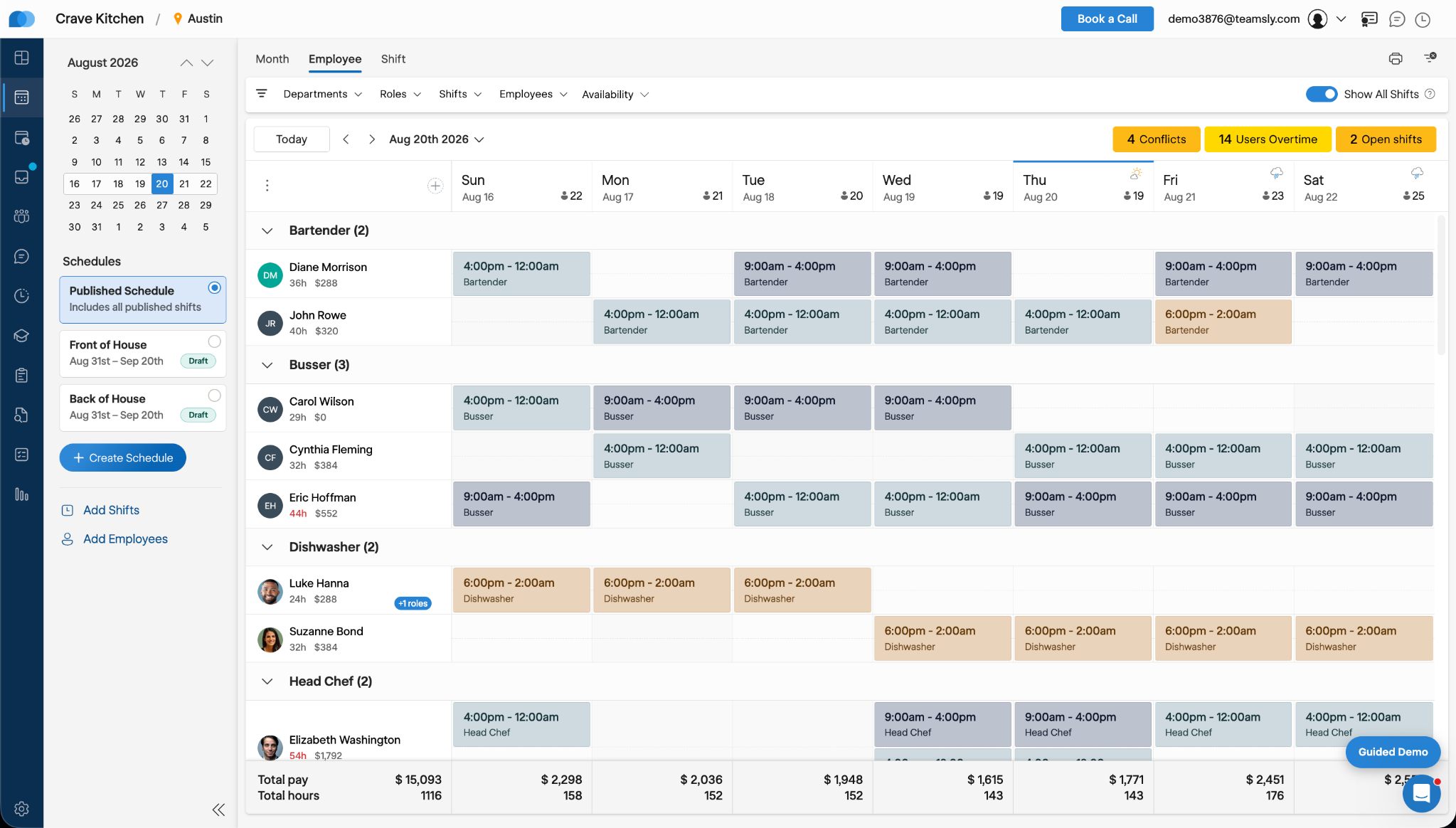
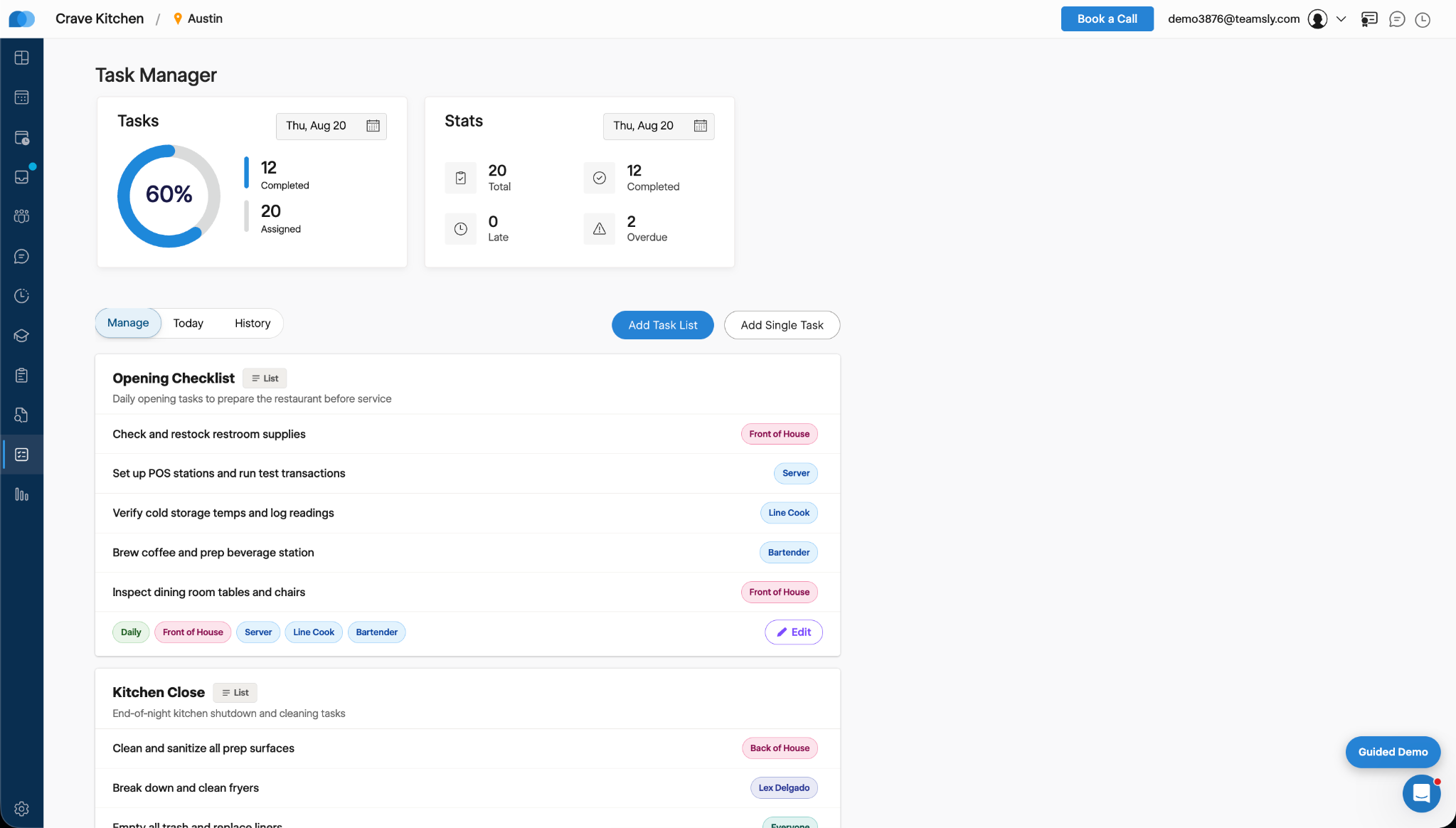
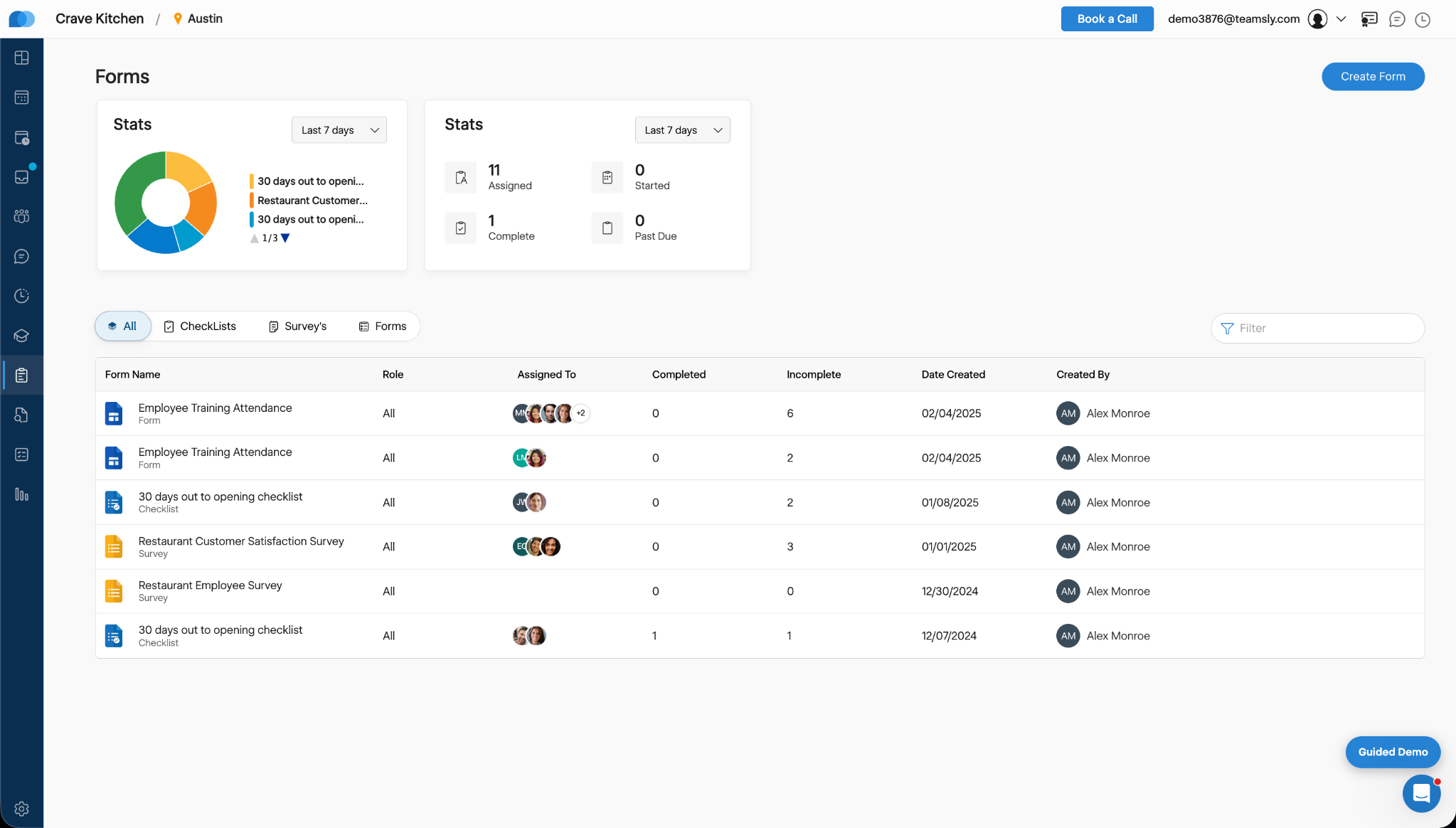
    Screenshot of Teamsly’s employee scheduling software, which gives managers a role-based weekly view of every employee and shift. Managers can create separate draft and published schedules, filter by department, role, shift, employee, or availability, identify scheduling conflicts, projected overtime, and open shifts, and review scheduled hours and estimated labor costs before publishing changes to the team.Screenshot of Teamsly’s workforce management dashboard. This brings daily staffing and operational data into one centralized view. Managers can monitor open shifts, shift swaps, employee requests, availability requests, scheduled coverage by role, paid hours, overtime, estimated pay, paid breaks, training quiz completion, and a visual shift timeline—making urgent staffing and workforce priorities easier to identify.Screenshot of Teamsly’s employee timesheet and time tracking software, which organizes timecards, paid hours, regular hours, overtime, paid and unpaid breaks, and estimated pay. Managers can compare scheduled hours with actual hours, spot timecard issues, review attendance data by employee and date range, add missing timecards, and download detailed reports for payroll preparation.Screenshot of Teamsly’s task management software, which helps managers create one-time tasks and recurring operational checklists, assign work by employee or role, and monitor completion from one dashboard. Status metrics show assigned, completed, late, and overdue work, while Today and History views strengthen accountability across opening, closing, cleaning, food preparation, and other repeatable team workflows.Screenshot of where Teamsly centralizes digital forms, checklists, and surveys for frontline and deskless teams. Managers can create and assign workflows such as employee training attendance forms, new-location opening checklists, customer satisfaction surveys, and employee surveys, then track assigned, started, completed, incomplete, and past-due submissions from a filterable reporting dashboard.Screenshot of Teamsly’s audit management software, which standardizes inspections and evaluations for employees, external participants, locations, equipment, and other operational subjects. Managers can assign audits, set scoring goals, monitor average scores, track completed and incomplete work, and identify past-due audits across food safety, employee hygiene, equipment maintenance, storage, workplace cleanliness, training, and knowledge.