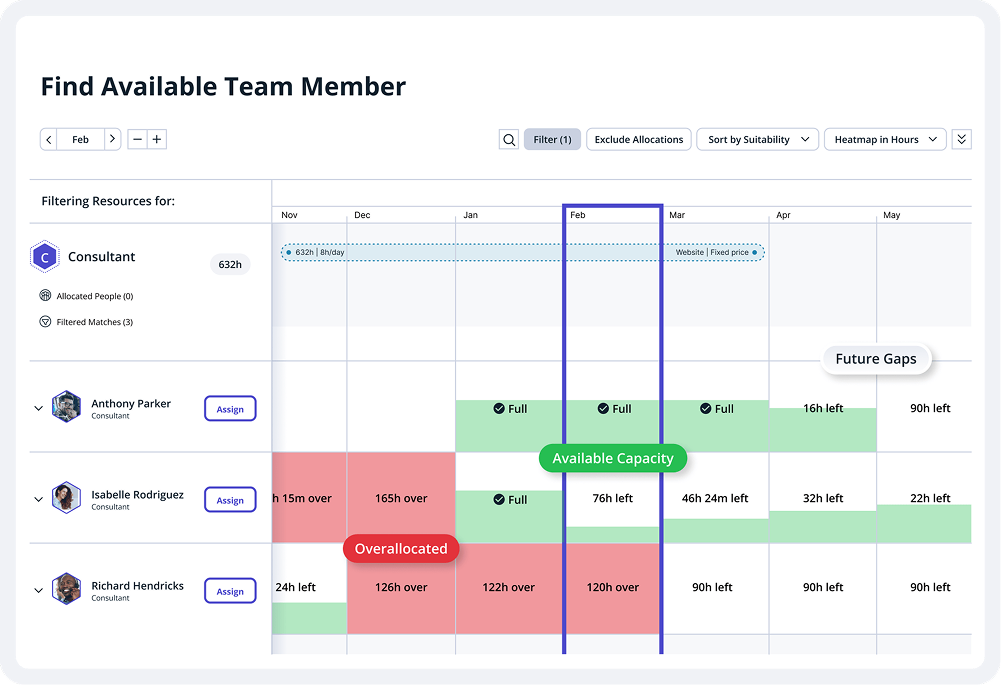
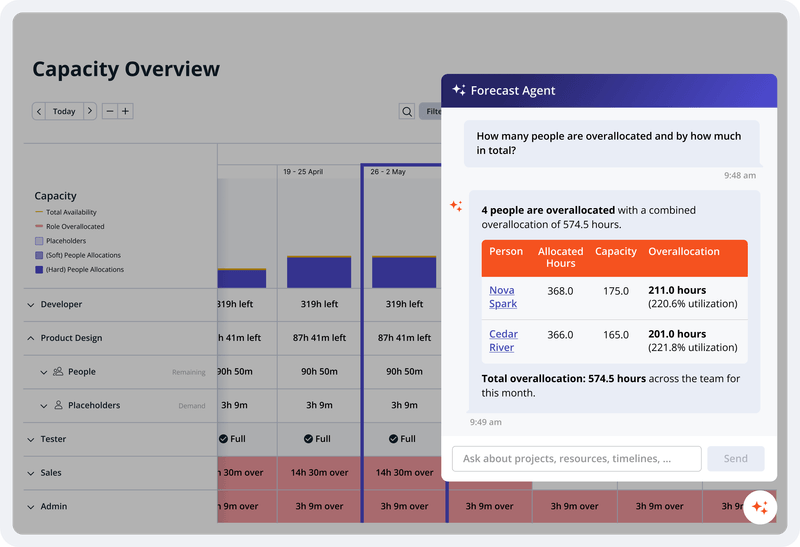
Accelo is a Professional Services Automation (PSA) platform designed to provide visibility into operational risks for service-based organizations. While traditional tools often focus on historical data, Accelo is intended to surface real-time risks such as Project Overruns, Resource Overloading, and Scope Creep. The platform integrates the full client lifecycle, including CRM, Quoting, Project Delivery, Support Ticketing, Time and Expense Tracking, Retainer Management, and…
N/A
Zoho Sheet
Score 9.8 out of 10
N/A
Zoho Sheet enables users to create, edit and share spreadsheets online, and is available with a free plan.
Harvest and Asana combined don't even scratch the surface of what Accelo can do. Harvest is nothing more than rudimentary time tracking. It's about as easy to use as they come, but it stops there. There's no tie in to project management, invoicing, capacity planning, etc. and …
We switched from Teamwork to Accelo. Teamwork outperforms Accelo when it comes to tasks and email communications. However, Accelo does exceed Teamwork when it comes to impeccable time management. Being able not to overspend time on a client has had a significant benefit in ROI.
Accelo doesn't really exceed any competitors in any one area of their product, but in 2015 when we made the move this was the best option that included all the tools we wanted. However, user adoption was low in some areas due to the UI, so we scaled back Accelo and added other …
We used Workfront prior to using Accelo, mainly for project management and retainer management. There is no comparison between the two as Accelo blows it away.
I find both options to be expensive and not suitable for a midrange budget team. Additionally, they have a complex workflow that not every team member can easily use, resulting in a lack of collaboration.
Once familiar with Microsoft Excel, Zoho Sheet is very easy to use. We have teams in different countries and time zone. Zoho Sheet allows us to share the information in real-time, regardless of the time zone as long as you are online. It would be great if there was the option …
The best services management, easy operations reporting, and data analytics features from Accelo are impressive and easy on data visualization and workflow management software. Accelo was very helpful in collaboration and easy to collect feedback from integrated platforms and the scheduling ability is very unique. The Automation tools are also cost-effective and the ability to manage time through Accelo is perfect.
Zoho Sheet is an amazing application that allows us to share information such as cost analysis, preparing projects for Zoho Projects, invoicing for billable tickets. We love that it has live updates when working as a team. We even use it backing up some of our important information. Very user-friendly if you are familiar with Excel.
Tracking customer interactions. Nice integration with G Suite, could be a lot better if they acknowledged that contacts may actually have more than one email address.
Support Ticket system is integrated, so we can view support history and other email correspondence easily. It's cheaper that Zendesk.
Support is reasonably good, usually prompt and responsive.
Constant development - lots of updates, just not often to areas that we use.
The client portal needs to be improved. It does not have the same user interface as we have within Accelo and we get a lot of client complaints about it.
It needs more executive-style reporting and the ability to create your own reports and filters.
It needs to be faster. With all of the things Accelo is doing to give you all the data, it is kind of slow compared to other systems in the browser.
Easy to use, cost-efficient, no setup fee, Easy integrations, simple workflow, best quality and responsive support team, more user-friendly interface, and easy team collaboration.
From the beginning the Accelo team has been very invested in ensuring our success and overall happiness with the platform. The initial implementation specialists and trainers did a fairly good job of learning our company and needs, and tried to tailor the trainings accordingly. However, once we made the formal switch to the platform, meaning we no longer were using our legacy systems, we found that we had a lot of questions....and a lot of ideas and recommendations. The support team is extremely responsive and seemingly happy to receive our continual feedback. And if we encounter an issue that seems to be a system issue, they work diligently to fix it (we've actually had an engineer join a call with us to learn of the issue - and subsequently fix it)
Harvest and Asana combined don't even scratch the surface of what Accelo can do. Harvest is nothing more than rudimentary time tracking. It's about as easy to use as they come, but it stops there. There's no tie in to project management, invoicing, capacity planning, etc. and the reporting isn't great. Asana we found to be very difficult to use for complex projects with multiple deliverables, multiple deadlines, multiple teams - and it didn't tie back to budgets and hours worked. So the deficiencies of those two tools are what led us to Accelo. In terms of more comparable systems, I had previously used Workamajig. The sophistication of Workamajig was there, but it didn't seem to have quite as much flexibility and customization. ProWorkflow we evaluated just based on sales and marketing information available on the platform and felt it wasn't quite as good.
I find both options to be expensive and not suitable for a midrange budget team. Additionally, they have a complex workflow that not every team member can easily use, resulting in a lack of collaboration.
Save Money on Lost Time. You won't go over your client retainers in any given month if you use Accelo properly. This ultimately saves your company time and money.
Lost or Broken Communications. They need to get it together with their email system, aka "request inboxes" ... There are too many lost or broken emails for them to be trustworthy with this. My suggestion is to make sure you know everyone you communicate with (including outside sources like Google or other companies) and set them up in Accelo, then send test emails. Also, when in doubt, use your Outlook or other primary sourced email when you want to make sure an email goes through with all appropriate files.