TrustRadius: an HG Insights company

Save this comparison

Save this comparison

Add Product

Recommended Comparisons

    Overview
    ProductRatingMost Used ByProduct SummaryStarting Price

    ADP ezLaborManager

    Score4 out of 10
    Small Businesses (1-50 employees)
    ADP's ezLaborManager is a time tracking and attendance offering.N/A

    Clockboost

    N/AN/AClockBoost is a time tracking and productivity platform designed for small teams and remote companies. It helps managers gain visibility into daily work activity, reduce unproductive hours, and organize task flow without micromanagement. Key Features: • Automatic time tracking with idle time detection • Task and project boards with assignment tracking • Daily and weekly performance summaries • Activity insights by user, task, and time spent • Lightweight…

    $6.40

    per month per user

    Pricing
    ADP ezLaborManagerClockboost
    Editions & Modules
    ADP Time and Attendance
    Call for details
    ADP Workforce Now Essential Time
    Call for details
    Starter
    $6.40
    per month per user
    Standard
    $9.60
    per month per user
    Growth
    $15
    per month per user
    Starter
    $69.12
    per year per user
    Standard
    $103.68
    per year per user
    Growth
    $180
    per year per user
    Enterprise
    Tailored Solutions
    Offerings
    Pricing Offerings
    ADP ezLaborManagerClockboost
    Free Trial
    NoYes
    Free/Freemium Version
    NoNo
    Premium Consulting/Integration Services
    YesNo
    Entry-level Setup FeeRequiredNo setup fee
    Additional DetailsClockBoost is billed per user, per month or per year. A 3-month free trial is available with full feature access and no credit card required. Enterprise pricing is customized based on team size and needs. Discounts are available for annual billing and larger teams.
    More Pricing Information
    Best Alternatives
    ADP ezLaborManagerClockboost
    Small Businesses
    Time Doctor
    Score8 out of 10
    Time Doctor
    Score8 out of 10
    Medium-sized Companies
    Toggl Track
    Score9 out of 10
    Toggl Track
    Score9 out of 10
    Enterprises
    TimeCamp
    Score7 out of 10
    TimeCamp
    Score7 out of 10
    All AlternativesView all alternativesView all alternatives
    User Ratings
    ADP ezLaborManagerClockboost
    Likelihood to Recommend
    8.0
    (12 ratings)
    -
    (0 ratings)
    Likelihood to Renew
    8.0
    (1 ratings)
    -
    (0 ratings)
    Usability
    7.0
    (1 ratings)
    -
    (0 ratings)
    Availability
    7.0
    (1 ratings)
    -
    (0 ratings)
    Performance
    7.0
    (1 ratings)
    -
    (0 ratings)
    Support Rating
    8.1
    (3 ratings)
    -
    (0 ratings)
    Online Training
    8.0
    (1 ratings)
    -
    (0 ratings)
    Implementation Rating
    3.0
    (1 ratings)
    -
    (0 ratings)
    Configurability
    5.0
    (1 ratings)
    -
    (0 ratings)
    Ease of integration
    7.0
    (1 ratings)
    -
    (0 ratings)
    Product Scalability
    7.0
    (1 ratings)
    -
    (0 ratings)
    User Testimonials
    ADP ezLaborManagerClockboost
    Likelihood to Recommend
    ADP
    [ADP is well suited for] Smaller agencies with a regular payroll and not a complex payroll. Users must be familiar with databases, reporting, etc. as system is not as user friendly as we would like. The cost is also a factor especially as the basic system does not include other features such as performance management, dashboards, etc. I was hoping to have access to the dashboards. Reporting should also provide more sample reports
    Incentivized
    Read full review
    Geeks
    No answers on this topic
    Pros
    ADP
    • Ease of use: employees can clock in and out on the tablets that are at that location site. They can use the same punch information to log into ADP and look up and edit personal information on their own. Like changing address, phone, and open enrollments.
    • Various methods of clocking. Tablets, computer, biometric clocks, and hand clocks.
    Incentivized
    Read full review
    Geeks
    No answers on this topic
    Cons
    ADP
    • Trying to research previous time cards past a month are hard to achieve. There is a custom date range option but it rarely works, the program just sits there and doesn't pull up the custom range.
    • Pulling reports for various needs is also more difficult then it needs to be. Instead of pulling a quick report with the dates and parameters you need you have to go in and edit the report and then go back in and edit it again to return it to default settings.
    • You also have to watch your invoices and make sure you are receiving your discounts otherwise this software can be quite costly.
    • Make sure your employees bookmark the ADP ezLaborManager website, otherwise it gets difficult to find through an internet search.
    Incentivized
    Read full review
    Geeks
    No answers on this topic
    Likelihood to Renew
    ADP
    Still have some issues with it but usage seems to improve
    Incentivized
    Read full review
    Geeks
    No answers on this topic
    Usability
    ADP
    ADP is a good system to track information but, what it lacks is just some detail that provides time savings. Some instances they have made "updates" that tend to have been better previous to those "updates." One example is for staff to see how they have used their time off in the past. There should be an easy way to report and review such other than looking at pay periods. Pay statement and review and totals can also improve.
    Incentivized
    Read full review
    Geeks
    No answers on this topic
    Support Rating
    ADP
    The support is not the best as they take much time to get back to you, days for some items as simple as a standard report. They do not know much about their own system I feel and it shows a lack of knowledge on their part. We have gotten wrong answers and it's not so user friendly.
    Read full review
    Geeks
    No answers on this topic
    Online Training
    ADP
    The training provided was based on a generic database and reporting which made it difficult to compare when you had your own database to work at. It also didn't provide good written materials that would be useful after the training session. It was more geared towards the practice tests or applications within the training.
    Incentivized
    Read full review
    Geeks
    No answers on this topic
    Implementation Rating
    ADP
    Should have had a project manager from ADP to assist.
    Incentivized
    Read full review
    Geeks
    No answers on this topic
    Alternatives Considered
    ADP
    ADP exLaborManager - I prefer ADP over the Paycor and Aon Hewitt timecard applications. This software was more user friendly, had easier access, reporting, and tracking hours than the others I have used. I am not saying the others are horrible, just that ADP was more simplistic to use and administer than the others.
    Incentivized
    Read full review
    Geeks
    No answers on this topic
    Return on Investment
    ADP
    • ADP ezLaborManager saves time, as time sheets are all in the system and can be processed easily with payroll.
    • Reporting makes it easy to look into any discrepancies related to time cards.
    • The process of reconciliation of subcontractors' billing is easier.
    Incentivized
    Read full review
    Geeks
    No answers on this topic
    ScreenShots

    ADP ezLaborManager Screenshots

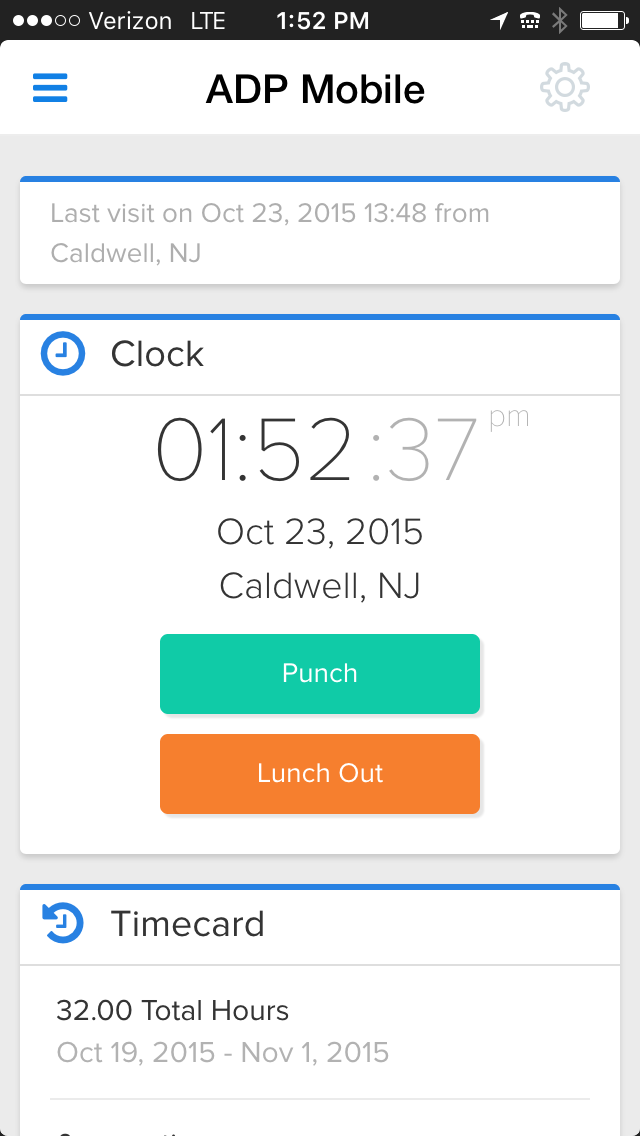
    Screenshot of Simple and quick time reportingScreenshot of Intuitive and easy schedulesScreenshot of Flexible and convenient time collection

    Clockboost Screenshots

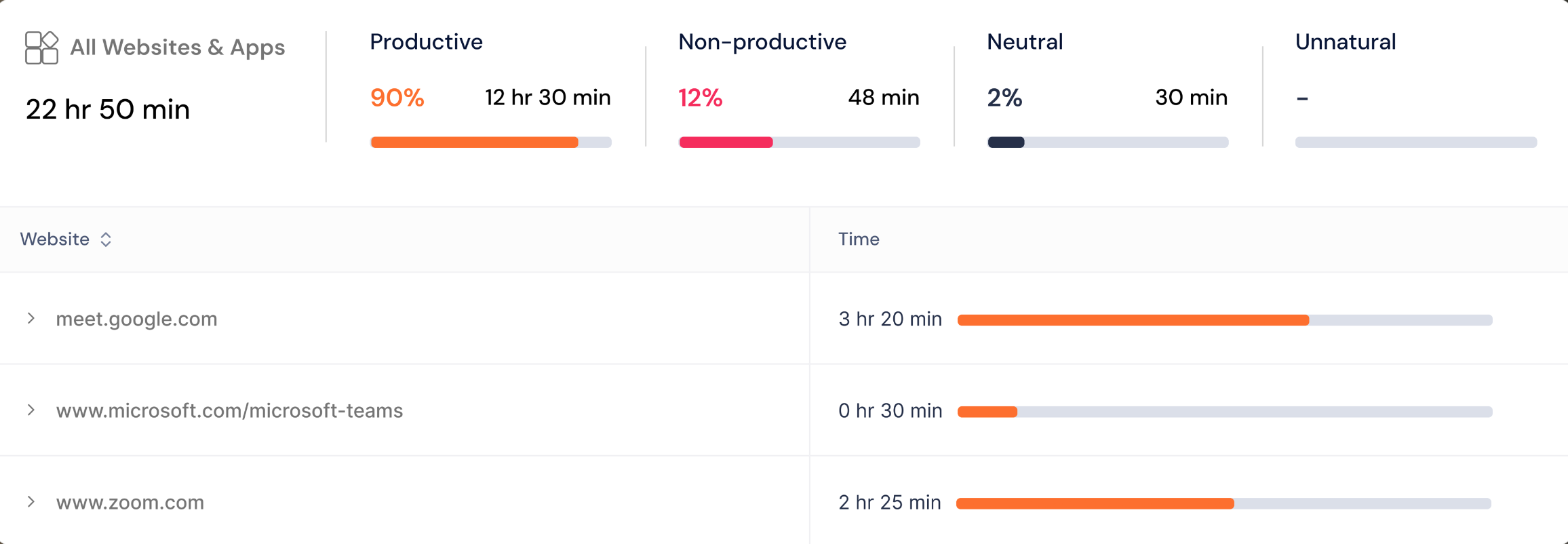
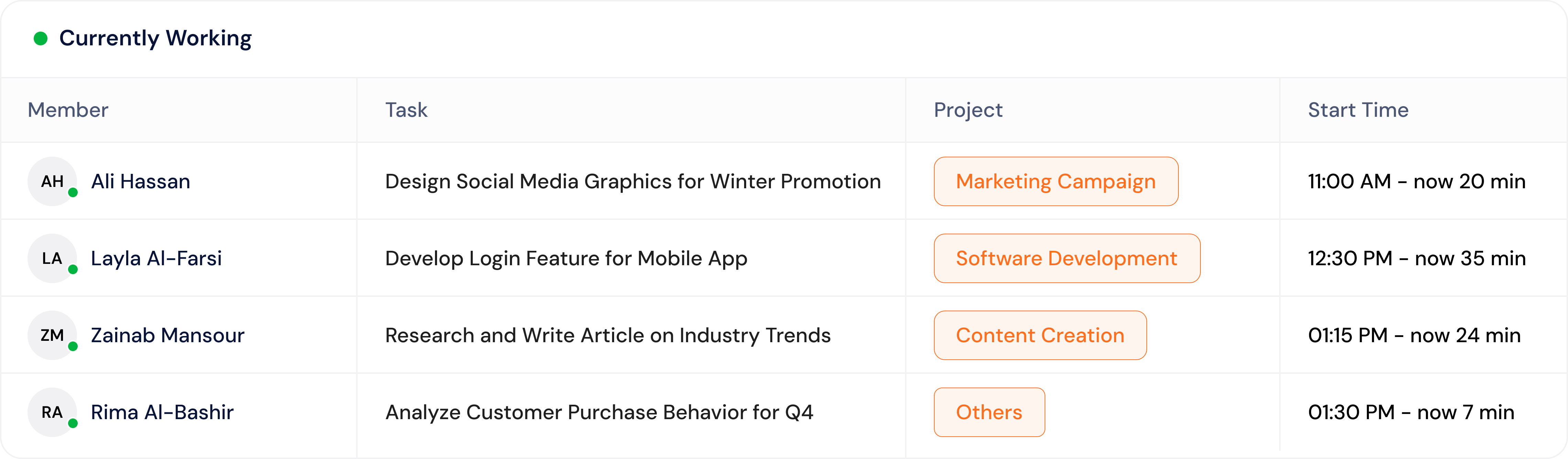
    Screenshot of the dashboard view with active task tracking. Shows real-time task tracking with project names and total time spent on each task that day.Screenshot of an idle time percentage breakdown. Displays idle minutes per user to highlight productivity gaps and reduce burnout or underperformance.Screenshot of a website and app usage breakdown. Shows a detailed view of time spent on websites and apps, categorized as productive, non-productive, neutral and unnatural.Screenshot of a visual breakdown of top projects by time spent. Easily spot where team efforts are going across different categories.Screenshot of a display of what each team member is working on in real time, including task name, project, and how long they’ve been active. ClockBoost gives managers instant visibility without needing constant check-ins or status updates.