AI SoloHR vs. Appian

Overview
ProductRatingMost Used ByProduct SummaryStarting Price
AI SoloHR
Score 0.0 out of 10
N/A
AI SoloHR is HR case management software for U.S. small businesses and lean HR teams that need a structured way to manage sensitive HR workflows. The product is designed for teams that handle HR in-house and need more than spreadsheets, inbox threads, and shared folders to track case activity. AI SoloHR helps users organize FMLA, ADA accommodation, employee relations, benefits renewal, leave-related, and other HR follow-up workflows in a case-based workspace. Each…
$79
per month per workspace
Appian
Score 8.2 out of 10
N/A
Appian is a low-code development and business process management platform. It features drag-and-drop design for app building, automated work processes, unified data management, and cloud-based deployment.
$0
Pricing
AI SoloHRAppian
Editions & Modules
Starter
$79
per month Per workspace
Solo HR
$199
per month Per workspace
HR Ops Team
$399
per month Per workspace
Compliance Plus
$799
per month Per workspace
Appian Community Edition
$0
Application - Input-Only
$2
per month per user
Application - Infrequent
$9
per month per user
Application - Standard
$75
per month per user
Platform
Custom Quote Priced per user with unlimited apps.
minimum 100 users, no maximum
Unlimited
Custom Quote Priced per development with unlimited apps.
unlimited
Offerings
Pricing Offerings
AI SoloHRAppian
Free Trial
YesYes
Free/Freemium Version
NoYes
Premium Consulting/Integration Services
NoYes
Entry-level Setup FeeNo setup feeNo setup fee
Additional DetailsAI SoloHR is sold as subscription SaaS with four monthly plan tiers. Starter begins at $79/month. Solo HR is $199/month, HR Ops Team is $399/month, and Compliance Plus is $799/month. Plans are based on workspace tier and operational limits such as active cases, people records, seats, AI drafts, intake links, outbound email, audit exports, and advanced controls. A 14-day free trial is available with no credit card required.
More Pricing Information
Community Pulse
AI SoloHRAppian
Features
AI SoloHRAppian
Reporting & Analytics
Comparison of Reporting & Analytics features of Product A and Product B
AI SoloHR
-
Ratings
Appian
8.1
9 Ratings
4% above category average
Dashboards00 Ratings8.29 Ratings
Standard reports00 Ratings8.59 Ratings
Custom reports00 Ratings7.69 Ratings
Process Engine
Comparison of Process Engine features of Product A and Product B
AI SoloHR
-
Ratings
Appian
7.4
9 Ratings
1% above category average
Process designer00 Ratings7.99 Ratings
Process simulation00 Ratings6.49 Ratings
Business rules engine00 Ratings6.49 Ratings
SOA support00 Ratings8.29 Ratings
Process player00 Ratings7.39 Ratings
Form builder00 Ratings7.69 Ratings
Model execution00 Ratings8.59 Ratings
User Ratings
AI SoloHRAppian
Likelihood to Recommend
-
(0 ratings)
9.4
(139 ratings)
Likelihood to Renew
-
(0 ratings)
8.5
(19 ratings)
Usability
-
(0 ratings)
8.7
(95 ratings)
Support Rating
-
(0 ratings)
8.4
(118 ratings)
In-Person Training
-
(0 ratings)
9.0
(1 ratings)
Online Training
-
(0 ratings)
6.0
(2 ratings)
Implementation Rating
-
(0 ratings)
1.0
(5 ratings)
User Testimonials
AI SoloHRAppian
Likelihood to Recommend
DragonVerse Media Inc
No answers on this topic
Appian
Appian works great for automating manual processes and integrating multiple systems through its toolset. It gives great flexibility for establishing rules for approvals, routings, escalations, and the like. Because of the low code toolset, it's very easy to deploy and make changes as needed as processes evolve and as the organization learns to utilize the system better. Minimal maintenance is required to support the applications build on the platform. Some of the automated testing integration with tools like Jenkins is limited so that may be an issue for some.
Read full review
Pros
DragonVerse Media Inc
No answers on this topic
Appian
  • Allows at a glance workflow documentation which assists in the need we have for information readiation.
  • Drag and drop interface for workflow development greatly speeds our apps time to market.
  • Using the advanced features of Appian, we are able to create working sites in a fraction of the time it would take to do so using "traditional" development.
Read full review
Cons
DragonVerse Media Inc
No answers on this topic
Appian
  • Search issues when type ahead and database search are used in the same field.
  • Buttons implementation where user is require[d] to click on the button description - if clicks on the button outside that text - button will not work.
  • Problems with using certain off-the-shelf performance tools like WebLoad or Neoload. That is because of different dynamic variables being used internally in Appian - which these tools are unable to correlate. We are still investigating using other tools like Jmeter to overcome dynamic correlation problem for performance testing.
Read full review
Likelihood to Renew
DragonVerse Media Inc
No answers on this topic
Appian
We recently renewed our license with Appian. We are convinced that its flexibility, relative ease of use, the support they provide, there mobile advancements and their general willingness and desire to see us succeed all contributed to our reason to renew our agreement with Appian
Read full review
Usability
DragonVerse Media Inc
No answers on this topic
Appian
Appian is a low code environment, because of this, a very good visual interface is required. Appian is providing a feature-rich dashboard [that] we can use for building the dashboards and other interfaces. Appian also provides patches and releases to enhance these features. A developer can start off development just by going through a basic course from the Appian learning community.
Read full review
Support Rating
DragonVerse Media Inc
No answers on this topic
Appian
Appian is one of the leading low code business automation platforms that support RPA, decision rules, case management, workflow automation, and machine learning all in a single bundle. But it is also harder to implement and replace the traditional business process.
Read full review
In-Person Training
DragonVerse Media Inc
No answers on this topic
Appian
As analyst I participated in a developer boot camp. At times it was hard to keep up but most of the time it made sense. Trainer took the time to explain and slowed pace down to answer questions etc.
Read full review
Online Training
DragonVerse Media Inc
No answers on this topic
Appian
Very boring; hard to get through quickly, but rather effective in demonstrating the use of the platform.
Read full review
Implementation Rating
DragonVerse Media Inc
No answers on this topic
Appian
It was really seamless. SaaS in the true definition of the word. We logged on and started using the product. Very easy.
Read full review
Alternatives Considered
DragonVerse Media Inc
No answers on this topic
Appian
Appian has enormously transformed and keeps on updating the product every quarter to meet the latest needs of the world with new innovations & technologies being integrated within the platform. What gives more pleasure than a product that keeps on continuous[ly] improv[ing]?
Read full review
Return on Investment
DragonVerse Media Inc
No answers on this topic
Appian
  • I believe it has negatively impacted our release dates. There may have been a misunderstanding as to the learning curve, even though it is "low code."
  • The look and feel of the applications created using Appian have uniformity and it's easier to have "reuse" between applications.
  • There is less developer control when it comes to features. I think this mainly has to do with the amount of plugins available. I would think there should be many more available plugins. But again, our use case is probably different than most others.
Read full review
ScreenShots

AI SoloHR Screenshots

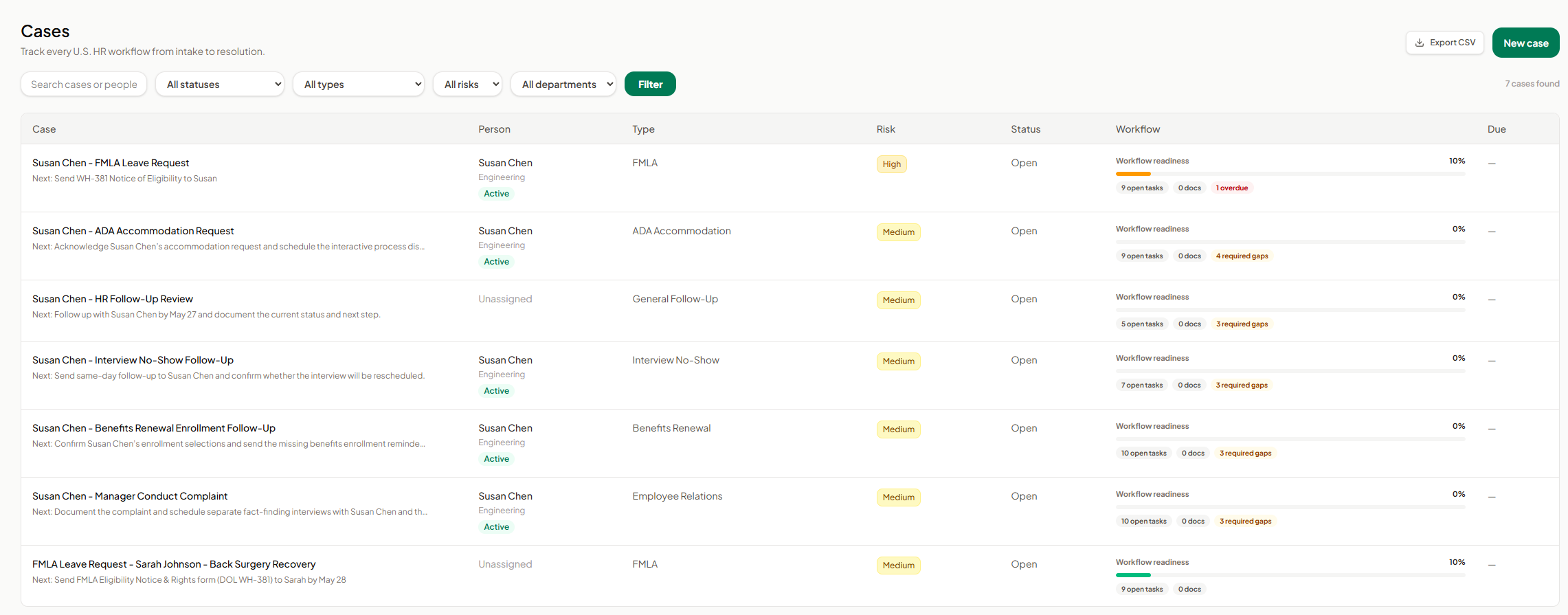
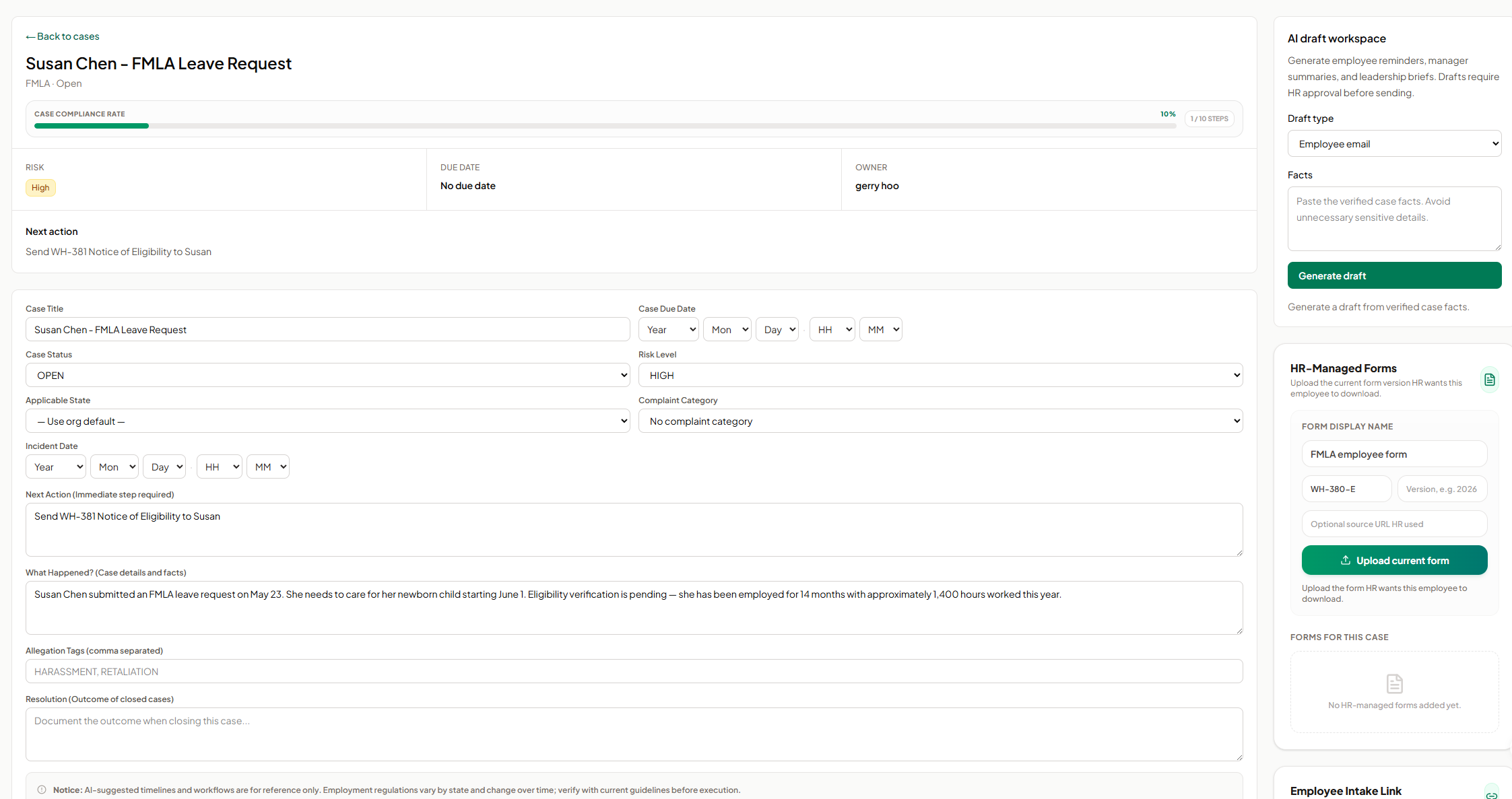
Screenshot of AI SoloHR FMLA workflow screen showing how HR teams can track leave request details, eligibility review, notice dates, certification deadlines, designation status, payroll or benefits status, and return-to-work readiness in one structured case workflow. The screen shows a case moving from intake through certification and designation, with workflow state, blocking reason, key dates, status fields, notes, and a save action for maintaining an organized FMLA case record.Screenshot of AI SoloHR HR-managed forms screen showing how HR can upload and organize the current form version for an employee case. The panel includes fields for form display name, form code, version, optional source URL, and an upload action, helping HR keep case-specific forms such as FMLA employee forms connected to the relevant case record.Screenshot of AI SoloHR AI draft workspace showing how HR can generate draft communications from verified case facts. The screen includes a draft type selector for employee emails, manager summaries, or leadership briefs, a case facts field, and a generate action, with drafts positioned for HR review before sending.Screenshot of AI SoloHR cases dashboard showing a centralized list of HR workflows from intake to resolution. The screen includes search, status, type, risk, and department filters, plus case rows for FMLA, ADA accommodation, interview no-show, benefits renewal, employee relations, and general follow-up workflows. Each row shows the related person, case type, risk level, status, workflow readiness, open tasks, document count, required gaps, overdue items, and export or new case actions.Screenshot of AI SoloHR case detail screen for an FMLA leave request, showing the case summary, compliance progress, risk level, owner, next action, due date, editable case fields, incident details, case facts, tags, and resolution notes. The screen also includes side panels for AI draft generation and HR-managed forms, helping HR keep case tracking, communication drafts, and required form uploads connected to the same employee case record.Screenshot of AI SoloHR new case screen showing how HR can create a structured HR case by capturing the minimum facts first. The form includes primary person, case title, workflow type, risk level, applicable state, next action, and case summary fields, with a disclaimer reminding users to verify AI-generated workflow guidance against current official requirements.

Appian Screenshots

Screenshot of Low-Code DevelopmentScreenshot of Business Process Management SuiteScreenshot of Dynamic Case ManagementScreenshot of Mobile App DevelopmentScreenshot of Appian RPA with Blue Prism