Altium Develop vs. SOLIDWORKS

Overview
ProductRatingMost Used ByProduct SummaryStarting Price
Altium Develop
Score 9.0 out of 10
N/A
Altium Develop is a platform that unifies multidisciplinary teams across engineering, sourcing, and manufacturing to support seamless co-creation. It provides real-time visibility into designs, requirements, and supply chain data, enabling contributors to work together concurrently rather than in silos.N/A
SOLIDWORKS
Score 8.7 out of 10
N/A
Dassault Systemes offers SOLIDWORKS, a computer-aided design (CAD) system for education and manufacturing supporting 2D or 3D design, electrical design, simulations, and product development with collaboration tools.
$1,295
per year
Pricing
Altium DevelopSOLIDWORKS
Editions & Modules
No answers on this topic
Solidworks Annual Subscription
1,295
per year
Solidworks Standard
3,996
per standalone license
Offerings
Pricing Offerings
Altium DevelopSOLIDWORKS
Free Trial
YesNo
Free/Freemium Version
NoNo
Premium Consulting/Integration Services
NoNo
Entry-level Setup FeeNo setup feeNo setup fee
Additional DetailsAltium Develop is offered as an annual subscription starting at $1,990 per year, which includes one Altium Designer ECAD Design Author and a shared workspace for projects, libraries, and collaboration. The subscription provides unlimited workspace users at no additional cost, enabling broad participation in reviews, commenting, task management, BOM access, and change workflows. Teams can add up to four additional Altium Designer ECAD Design Authors for $995 per Author per year, allowing organizations to scale active design capacity while keeping contributors and collaborators included at no extra charge.
More Pricing Information
Community Pulse
Altium DevelopSOLIDWORKS
Considered Both Products
Altium Develop
Chose Altium Develop
The PDM system in solid works is generally superior to Altium 365. I often find the project version in lacking in comparison.
Chose Altium Develop
Moved away from Eagle after Autodesk takeover. KiCad is a powerful tool, and very usable for hobbyist grade designs, but component management, lifecycle management, footprint importing, and version control are all much more easily controlled in Altium.
Chose Altium Develop
Altium is easier to use and more intuitive. Altium provides more feature updates. Autodesk Fusion was technically Eagle when I used it.
Chose Altium Develop
Altium is rapidly losing ground to Kicad and Allegro. The cost of Allegro is not significantly different from that of Altium now, and Cadence still offers perpetual licenses, whereas Altium mandates a subscription. KiCad offers a powerful and free alternative that rivals Altium …
Chose Altium Develop
Altium Develop is a lot better than the PADS version the company had. The PCB view interface is a lot better in AD; PADS seemed very old (although we did not have the latest version). There was not 3d viewer with actual components in PADS; Altium has this feature, which means …
Chose Altium Develop
Altium being the professional defacto software is the main thing that it has got going for it. It is more stable than KiCAD
Chose Altium Develop
Altium is more powerful than KiCAD and a cleaner implementation of UI controls. KiCAD does have a wonderful interactive HTML BOM output that combines an assembly drawing and BOM that highlights components between the two views and is a standalone document not needing additional …
Chose Altium Develop
Allegro/Orcad is the old way of doing things - it's unintuitive, clunky, and has poor community support. EasyEDA is basically just an online copy of Altium - many of the hotkeys/features are in the same places. Altium is by far the best of the three.
Chose Altium Develop
I have used other software's in the past, but I feel altium is very comprehensive. I am unable to do a fair comparison now, since I don't use them now
Chose Altium Develop
Much better. I transitioned my previous company from Orcad to Altium Develop and it really helped development efficiency once everyone got on board and trained and all our libraries got converted over which was pretty easy to do.
Chose Altium Develop
KiCAD and EasyEDA are much better for simple designs with only one engineer. EasyEDA works well especially if you are using a service like JLCPCB or LCSC since the integrate seamlessly and can be run in the web browser. That being said, they have a lot of limitations in …
Chose Altium Develop
Altium has the best feature set among EDA software suites, but it is a bit harder to use out of the box than EasyEDA. KiCAD is powerful, but it takes a lot more effort to get working well.
Chose Altium Develop
Altium is considered "professional" software and has a better narrative when delivering eCAD artifacts and projects to end clients.
Chose Altium Develop
Altium Develop gave the most cohesive experience compared to other platforms. Most others feel like several pieces of software kludged together (and often are). Altium Develop was clearly a unified system and felt like a much more modern piece of software. At the time it was …
Chose Altium Develop
Previously used both products listed. When selecting a product at this company, I decided upon Altium Develop as it appeared to be the most common platform utilized in this area by other companies. This would mean that new-hires were more likely to be familiar with the software.
Chose Altium Develop
Altium Develop seems like it will be much better for library management, schematic capture, and 3D file generation. However, it is not as intuitive and easy to use when creating layouts. We chose Altium Develop because we believe the time savings of the areas where Altium is …
Chose Altium Develop
It's better for collaboration and version control
Chose Altium Develop
Much more professional, the library management is much easier on Altium
Chose Altium Develop
Altium definitely has a more rounded capability than KiCad and a better pricepoint than Cadence, but that gap is closing with KiCad.
Chose Altium Develop
There is no comparison between Altium Develop and Autodesk Fusion. Altium Develop is light years ahead of Autodesk Fusion in every aspect.
There is no way I would ever go back to Autodesk Fusion after switching to Altium Develop.
Chose Altium Develop
Generally, KiCad is missing the component management system that Altium has. It really is very useful.

Chose Altium Develop
We were already using Altium Designer with all of the libraries andprijects in Altium, so it will take too much time to convert to other software at this point.
Chose Altium Develop
PADS feels like Solidworks - the legacy system that works well but hasn't moved forward with everything else.

Altium Develop feels like OnShape - another large provider but much effort spent on modernization and upkeep of the technology.
SOLIDWORKS
Chose SOLIDWORKS
AutoCAD is great for 2D detailing, but I like having the additional features of SOLIDWORKS.
Chose SOLIDWORKS
Hated sketchup at school. It was great for making art, but never really worked to design anything you actually wanted to make.

I've used blender a little, but don't have much time for working with meshes.
Chose SOLIDWORKS
It's faster, easier and a little bit cheaper. Dramatic increased performance on large assemblies management
Chose SOLIDWORKS
SOLIDWORKS is actually used by major corporations to design and create products for wide release, whereas AutoDesk Inventor is usually only seen as an instructional tool to teach students the basics of 3d modeling so that they can adapt to more complex software with less effort …
Chose SOLIDWORKS
Creo is basically focusing on pure solid 3D modeling, while on the other hand the SOLIDWORKS' modeling approach is more parametric type and it is suiting for my purpose of use. Easy to use interface of SOLIDWORKS as compared to Creo. Features are easy to use. Just one click …
Chose SOLIDWORKS
SOLIDWORKS is the best suited for the beginners,as it provides the simplest interface and simulation procedure. With SOLIDWORKS every simulation can be done easily and no professional training is required. SOLIDWORKS also has a drawing tab, which we can use to make General …
Chose SOLIDWORKS
SOLIDWORKS is easier to use with just enough useful features to work with, the designing process is fluid like regular flow of design thinking. The other two software are very similar to SOLIDWORKS, Inventor and Solid Edge are more advanced in certain areas of application, …
Chose SOLIDWORKS
Our team in China uses Siemens NX for the same reason our U.S. counterparts use SOLIDWORKS. Siemens provides similar features as SOLIDWORKS from the 3D CAD usage and Injection Molding Analysis.
Chose SOLIDWORKS
Onshape is a direct competitor. It has great entry level pricing and it is easy to access with no installation required. Being a web based app there is sometime some lag being based in NZ. Management also have concerns over where the data is stored on the cloud. With SW we can …
Chose SOLIDWORKS
We have chosen SOLIDWORKS for its diffusion (many of our partners use it), for its ease of use, for its great experience in the development of sheet metal, and for its excellent after-sales service.
Chose SOLIDWORKS
SOLIDWORKS is way less complicated and easier to use, overall if you have had any computer training anyone can easily sit down and be trained within a minimal time to be able to use it efficiently and effectively. One of my employees went so far as to teach his 10-year-old …
Chose SOLIDWORKS
We use both actually. SW is great for 3D, but given we do not design products, just tooling/processing to make products, we use SW to convert 3D into 2D then do all the work in DraftSight.
Chose SOLIDWORKS
I have not used alternatives to SOLIDWORKS. I've used SOLIDWORKS for the past 7 years as it was the standard in my past job. It has many more capabilities than 2D software and is a staple of our engineering department. I plan to continue to use SOLIDWORKS for many years to …
Chose SOLIDWORKS
Draftsight is the 2-d equivalent of SOLIDWORKS. Its main competitor is AutoCad by Autodesk, however I find Draftsight to be more user friendly. AutoDesk also makes Inventor, a 3-d software more similar to SOLIDWORKS however my experience with it was only limited to high …
Chose SOLIDWORKS
SOLIDWORKS is simple to use and new users become proficient in a short amount of time. Operation is intuitive and with the aid of the built-in tutorials, most of the skills required for day-to-day use become second nature. The ability to collaborate and communicate ideas to …
Chose SOLIDWORKS
In many scenarios, SolidWorks and Inventor actually compare fairly evenly to each other. However, I believe that where SolidWorks really stands out is the fact that it was designed from the start as a 3D parametric solid modeling application whereas Inventor comes from a …
Chose SOLIDWORKS
I have previously worked with AutoDesk Inventor for designing very complex door mechanisms and large assemblies of drilling machines. I did not face any stability or performance issues
Chose SOLIDWORKS
I only used Inventor for the 30-day free trial, which admittedly is not enough time to really give it a fair shot, especially since I had almost no 3D drawing experience before I used Inventor. There were two main things that pushed us toward SOLIDWORKS.
First was the support …
Chose SOLIDWORKS
SOLIDWORKS provides not only aesthetic appearance of a product but also provides the capability to analyze behavior of structural and material components.
Chose SOLIDWORKS
AutoCAD, in many ways, still looks and feels like you are designing something in the 1980's. It definitely caters more to the generation of people who are used to drafting. SOLIDWORKS is much more visually appealing, which counts for a lot when you will have lots of engineers …
Chose SOLIDWORKS
Creo offers easier design for surface modeling. Inventor is simpler to use, however, it is much more limited in modeling. Overall, I find SOLIDWORKS has a good balance of simplicity and completeness at the same time.
Chose SOLIDWORKS
I chose SOLIDWORKS after trying a few open-source solutions. They were great, however sometimes lacked in a few vital areas, in a way that a commercial, well-funded product shouldn't. Given my previous familiarity and confidence with SOLIDWORKS, I didn't bother looking any …
Chose SOLIDWORKS
Originally my company was using Onshape for CAD but many of our engineers were not familiar with the program and found it more difficult and less intuitive to use. SOLIDWORKS PDM vault works well so the cloud-based aspect of Onshape wasn't that unique.
Features
Altium DevelopSOLIDWORKS
Computer-Aided Design Software
Comparison of Computer-Aided Design Software features of Product A and Product B
Altium Develop
-
Ratings
SOLIDWORKS
8.7
Ratings
15% above category average
3D Modeling00 Ratings9.80 Ratings
2D Drafting00 Ratings9.30 Ratings
Rendering and Visualization00 Ratings7.80 Ratings
Parametric Design00 Ratings7.50 Ratings
Collaboration and Sharing00 Ratings9.50 Ratings
Compatibility with other software and formats00 Ratings9.80 Ratings
Assembly Design00 Ratings9.00 Ratings
Simulation and Analysis00 Ratings6.30 Ratings
Documentation and Annotation00 Ratings9.20 Ratings
Customization and Extensions00 Ratings9.30 Ratings
Best Alternatives
Altium DevelopSOLIDWORKS
Small Businesses
SOLIDWORKS
SOLIDWORKS
Score 8.7 out of 10
Onshape
Onshape
Score 6.5 out of 10
Medium-sized Companies
SOLIDWORKS
SOLIDWORKS
Score 8.7 out of 10
Onshape
Onshape
Score 6.5 out of 10
Enterprises
Autodesk Fusion
Autodesk Fusion
Score 7.8 out of 10
Rhino
Rhino
Score 8.4 out of 10
All AlternativesView all alternativesView all alternatives
User Ratings
Altium DevelopSOLIDWORKS
Likelihood to Recommend
9.1
(0 ratings)
9.7
(0 ratings)
Likelihood to Renew
7.0
(0 ratings)
10.0
(0 ratings)
Usability
8.2
(0 ratings)
8.8
(0 ratings)
Availability
6.4
(0 ratings)
-
(0 ratings)
Performance
7.3
(0 ratings)
-
(0 ratings)
Support Rating
4.6
(0 ratings)
5.2
(0 ratings)
In-Person Training
-
(0 ratings)
9.0
(0 ratings)
Online Training
9.1
(0 ratings)
9.0
(0 ratings)
Implementation Rating
7.1
(0 ratings)
-
(0 ratings)
Product Scalability
2.7
(0 ratings)
-
(0 ratings)
User Testimonials
Altium DevelopSOLIDWORKS
Likelihood to Recommend
Altium is my 4th PCBA layout tool used and was very easy to learn how to use and more powerful than the others (except for MentorGraphics Expedition). it is well suited for schematics and layouts for simple to complex boards handling multi-hundred element schematics and placements while easily keeping track of items.
Read full review
As a mechanical engineer, it is one of the best tools to just start modeling and engineering with. The UI tools are intuitive and engineering analysis such Mold Analysis, FEA, are great! Other 3D CAD modeling tools have a longer learning curve to master. All in all, if you're not planning to design an entire airplane with large assembly files, then Solidworks is your tool!
Read full review
Pros
  • BOM management - with just a little bit of extra care any designer produces a usable bom along with their pcb design ready to be ordered
  • 365 - being able to view and review (placing comments) projects without the need to have the software installed locally
  • Multi-pcb projects
Read full review
  • The collaborative work environment is a cool and useful feature where groups of people can work on the same model at the same time, and SOLIDWORKS ensures that you don't overwrite each other's work.
  • The ease and amount of customization options are very useful for creating a personalized and intuitive user interface, whether SOLIDWORKS is your native CAD package or not.
  • It is very easy to quickly edit a model you have already created. The software allows sketch and feature editing without having to take the time to actually enter the sketch/feature environment.
  • The use of configurations and configurations-specific dimensions in the same sketch is very useful for creating different forms of the same part
Read full review
Cons
  • The move to constraint management vs. design rules is half-baked. requiring saving separate constraints to schematics vs. PCBs results in constraints being overwritten constantly when pushing updates.
  • Forcing subscriptions - removing the option for perpetual licenses.
  • Integrated simulation is still un-intuitive and difficult to use.
  • Requirements management feels completely separate, and I forget it's even part of Altium.
  • No easy way to manage or layout schematics with "generic components" - every item is forced to be a manufacturer part at design time, slowing down initial schematic capture.
Read full review
  • To date, the baked in surfacing tools lack power compared to dedicated surfacing software.
  • In a similar vein, the core modeling kernel is not owned by SOLIDWORKS themselves and so there exists limitations with regards to implementing certain modeling/math.
  • SOLIDWORKS is playing catchup to other online vendors of CAD (notable OnShape); instead of being the once leader, they are being forced to compare themselves. This, however, may work to their advantage and in turn allow them to produce a better on-line CAD tool.
Read full review
Likelihood to Renew
ALTIUM DESIGNER is the reference tool in the electronic circuit design sector, its use is widespread worldwide. Although there are other alternatives, some of them free do not rival ALTIUM DESIGNER in terms of features and reliability. It is also very practical to request quotes with ALTIUM DESIGNER BOM reports since all suppliers are accustomed to using the tool.
Read full review
We have absolutely no reasons to not keep with SolidWorks for the foreseeable future.
Read full review
Usability
I originally chose Altium Develop for its superior usability. All operations being handled in one cohesive platform greatly improves efficiency. When handling many different designs, project setup and component creation eat into every project's productivity. Templates, defaults and design reuse all speed up design. I hold back from a higher rating because development focus on those usability features seems to have stagnated a bit. Simple missing features requested seem to remain missing. New collaboration features, simulation and sourcing features are released, but I just want to be able to draw dashed lines! I think this reflects a general focus on the 10% of datacenter/AI/smartphone customers over the 90% of 2-4 layer designs. The lack of information available during the platform transition gave me significant pause before buying in as well.
Read full review
I have been using SOLIDWORKS for around 12 years as of writing this review, so have learned where most things are and how they work. When first starting out it was quite daunting, but the interface is well laid out with like functions near each other which made finding new functions relatively easy.
Read full review
Reliability and Availability
Not very stable. Sudden lack of functionality when the license expires is not indicated clearly and can lead to loss of work.
Read full review
No answers on this topic
Support Rating
I use the educational Program. And so far is the best technical support. Every time that I need one or I have a question. They respond so far and with excellent advice.
Read full review
We have an unusual arrangement. We don’t pay for support, but we’re partnered with a VAR for second-tier support.
I work with other users if I have questions but when we’ve had to ask the VAR, they always have answers. It appears that all of the VARs have access to a support platform from DS SOLIDWORKS that helps them answer most questions.
Read full review
Online Training
easy to follow, Good technical materials. good videos The platform is easy to use.
Read full review
No answers on this topic
Implementation Rating
Overly complex, not designed for small organizations, core functionality poorly implemented to focus on flashy features.
Read full review
No answers on this topic
Alternatives Considered
Altium Develop is a lot better than the PADS version the company had. The PCB view interface is a lot better in AD; PADS seemed very old (although we did not have the latest version). There was not 3d viewer with actual components in PADS; Altium has this feature, which means that we can share 3d images of the PCB with customers before manufacturing.
Read full review
Onshape is a direct competitor. It has great entry level pricing and it is easy to access with no installation required. Being a web based app there is sometime some lag being based in NZ. Management also have concerns over where the data is stored on the cloud. With SW we can control where it is stored
Read full review
Scalability
Because, in my opinion, usage for small organization is poor, it is difficult to set up initial configuration to support scaling.
Read full review
No answers on this topic
Return on Investment
  • Quick PCB design allows for quick sales, thus generating a large ROI for a company
  • Altium Designer's built in BOM price tracker allows the user to have a general idea of the cost of their PCB, so they can plan accordingly when budgeting
  • In addition to the BOM, Altium Designer provides different manufacturers and their part numbers for different components so the user can choose the cheapest option to move forward with
Read full review
  • Hard to answer directly. Given our customer's needs, we absolutely have to have SW to open their file types.
  • Given the relatively limited use we need at our company, it would be useful to have a cheaper option that was more stripped down but still had some capabilities. Something in-between SW and eDrawings, for example. SW is very capable and expensive, eDrawings is free and super limited. Would be nice to have a middle option.
Read full review
ScreenShots

Altium Develop Screenshots

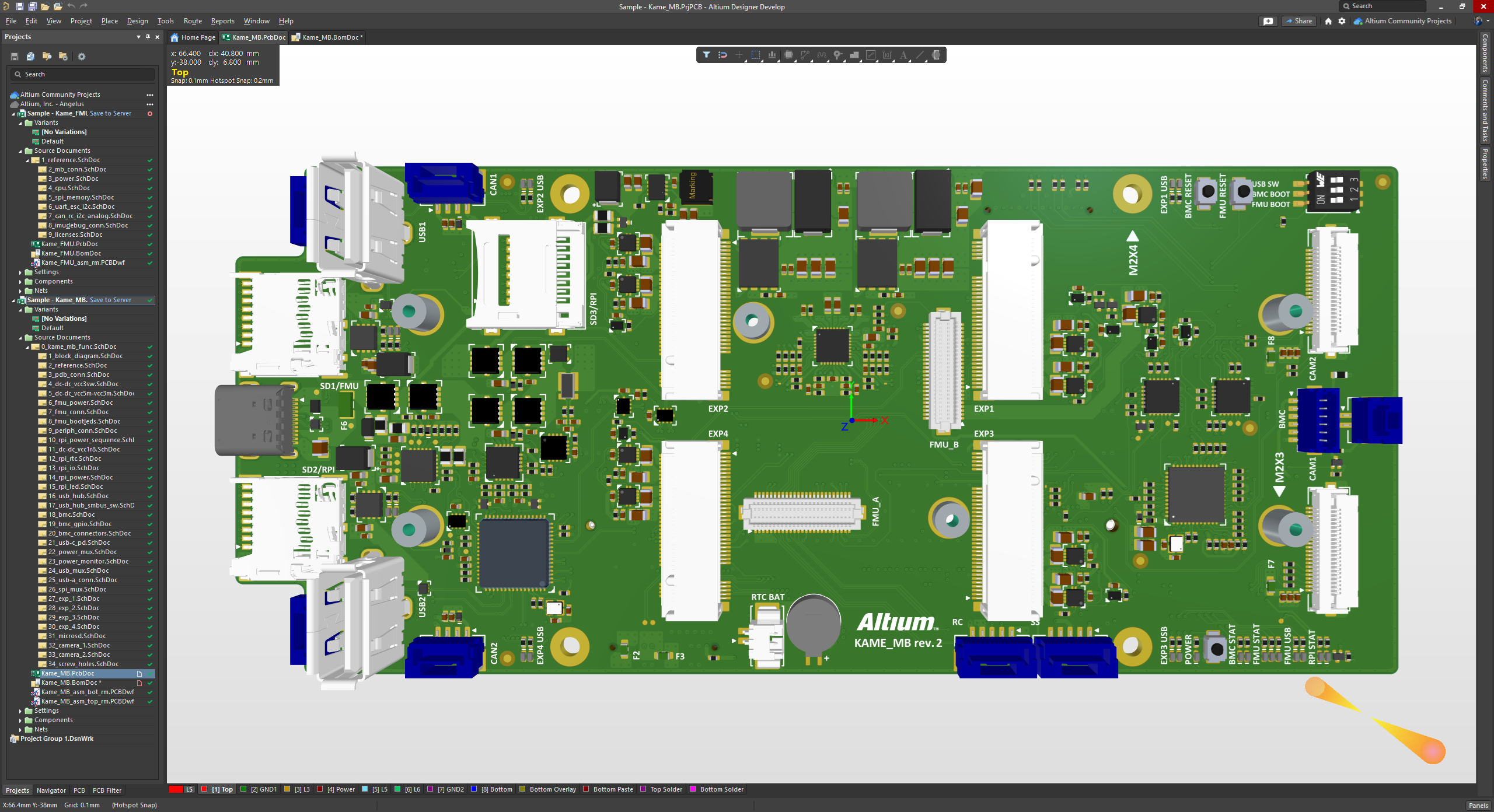
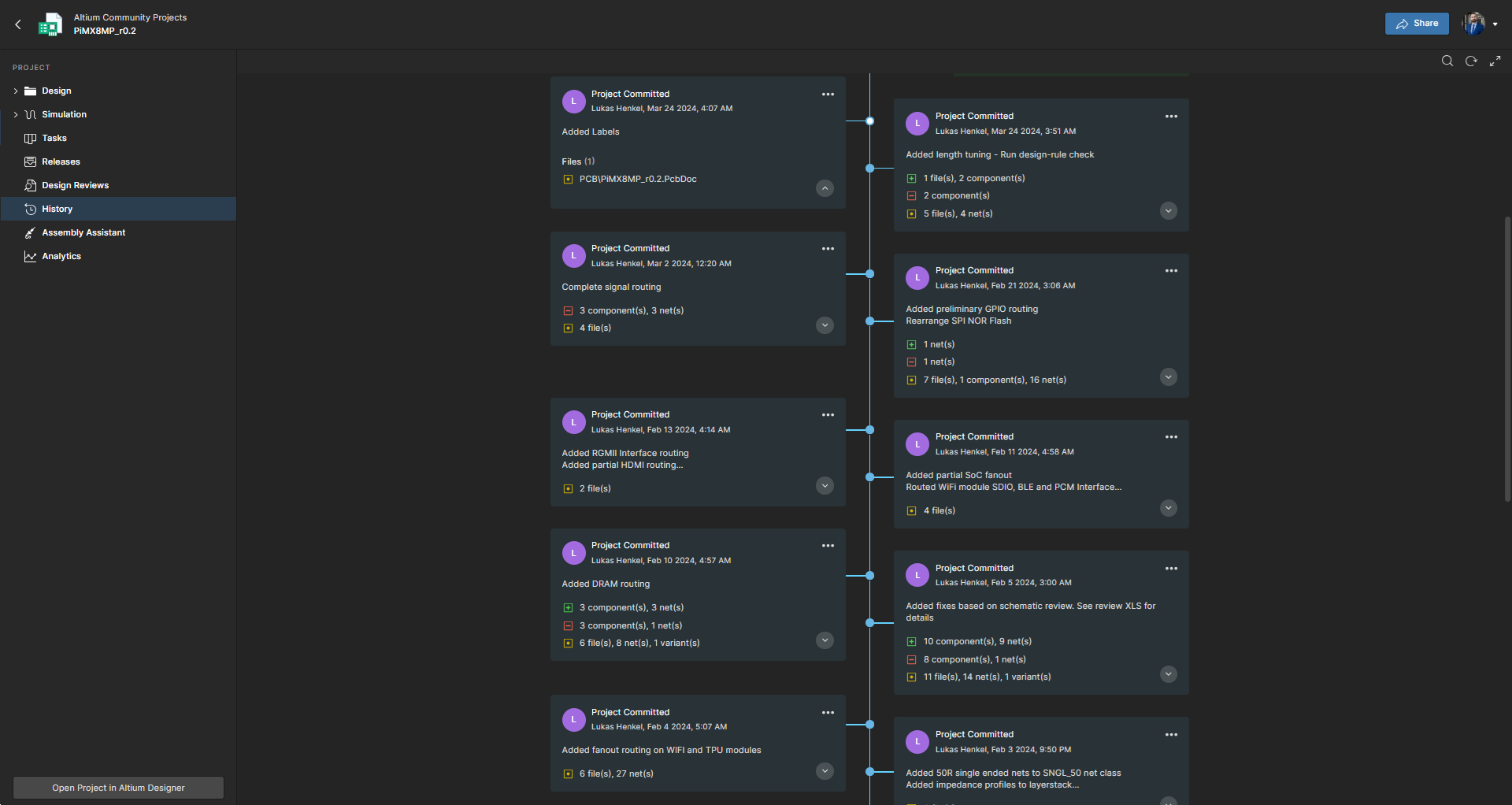
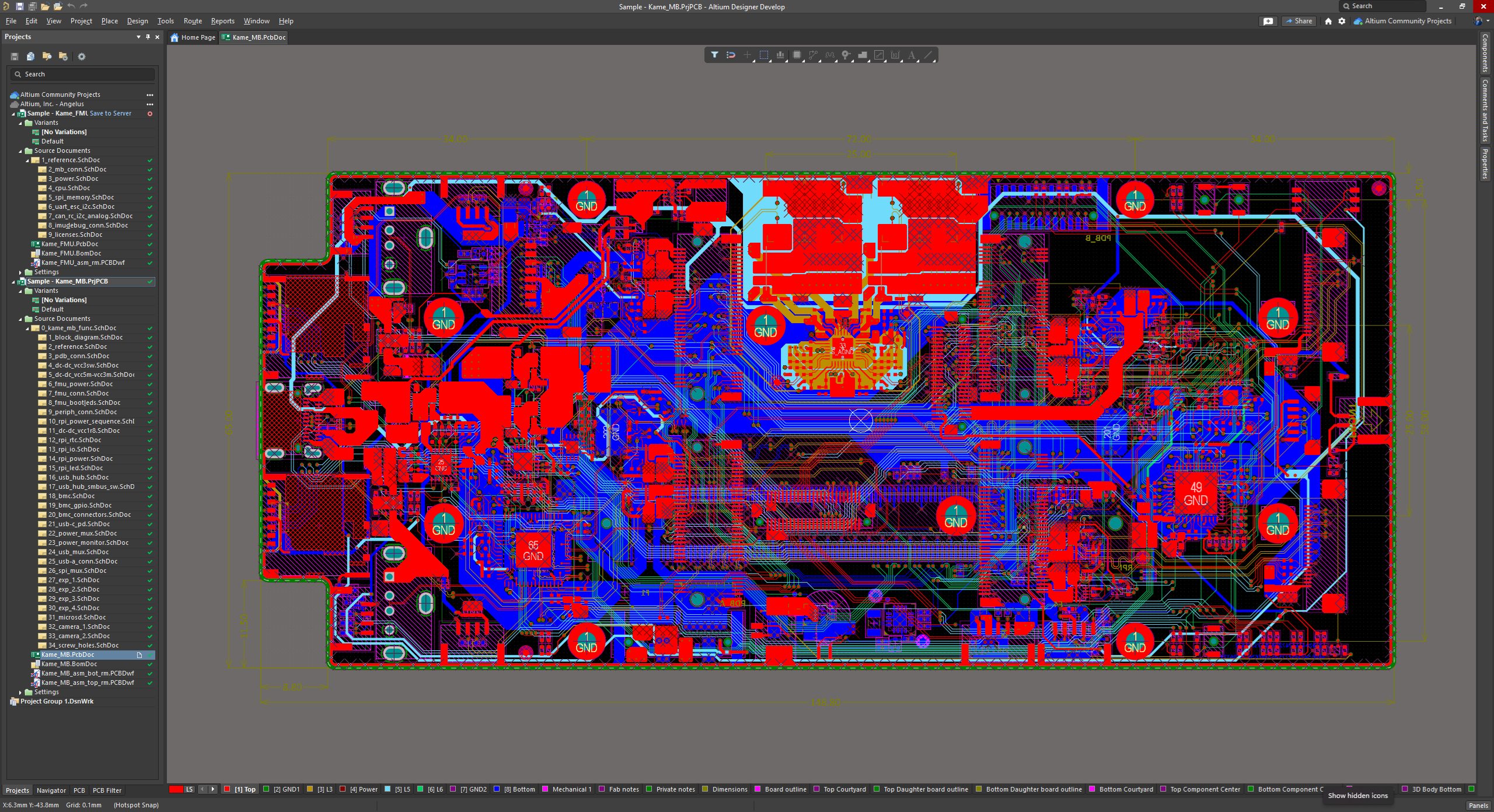
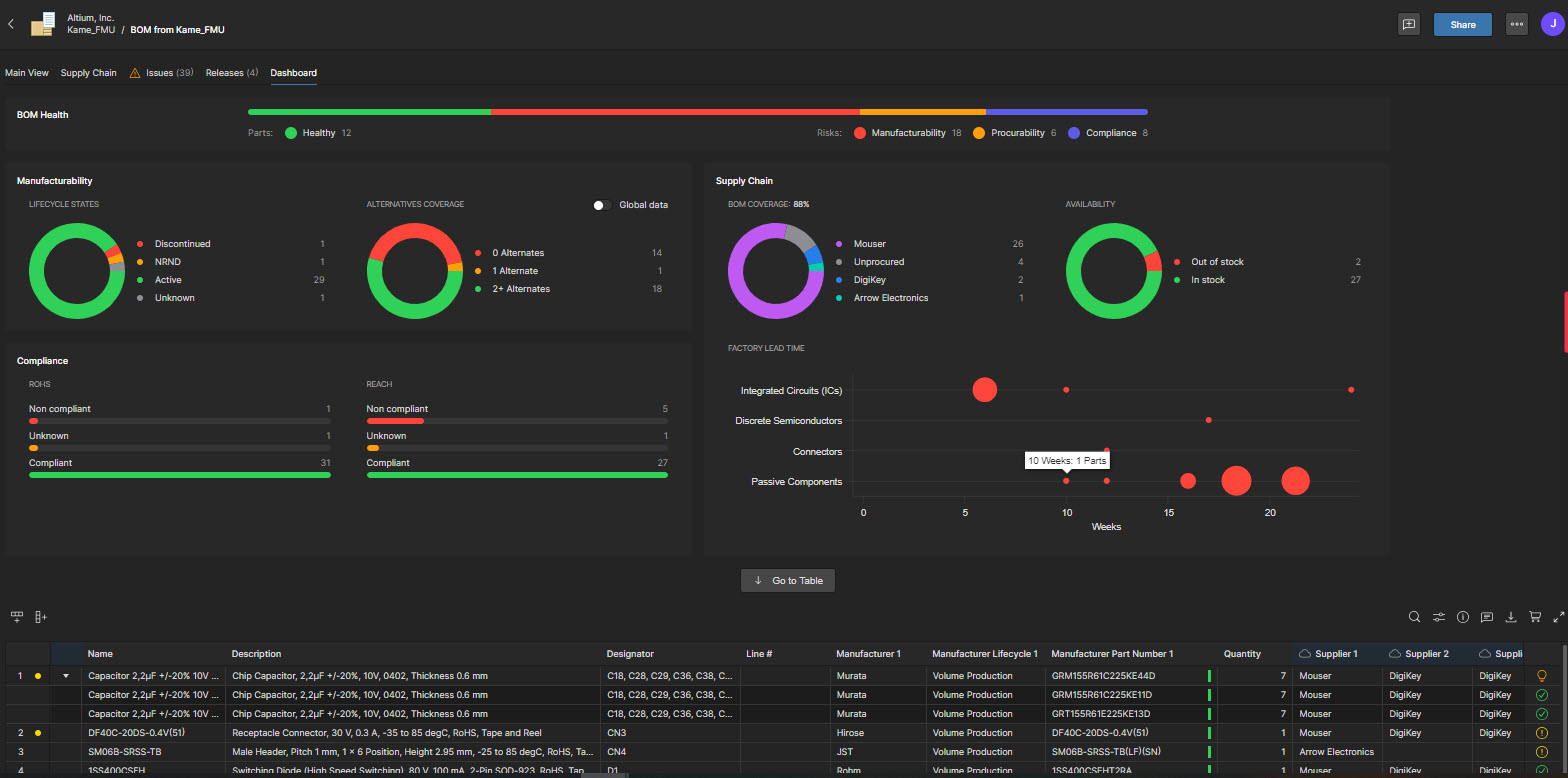
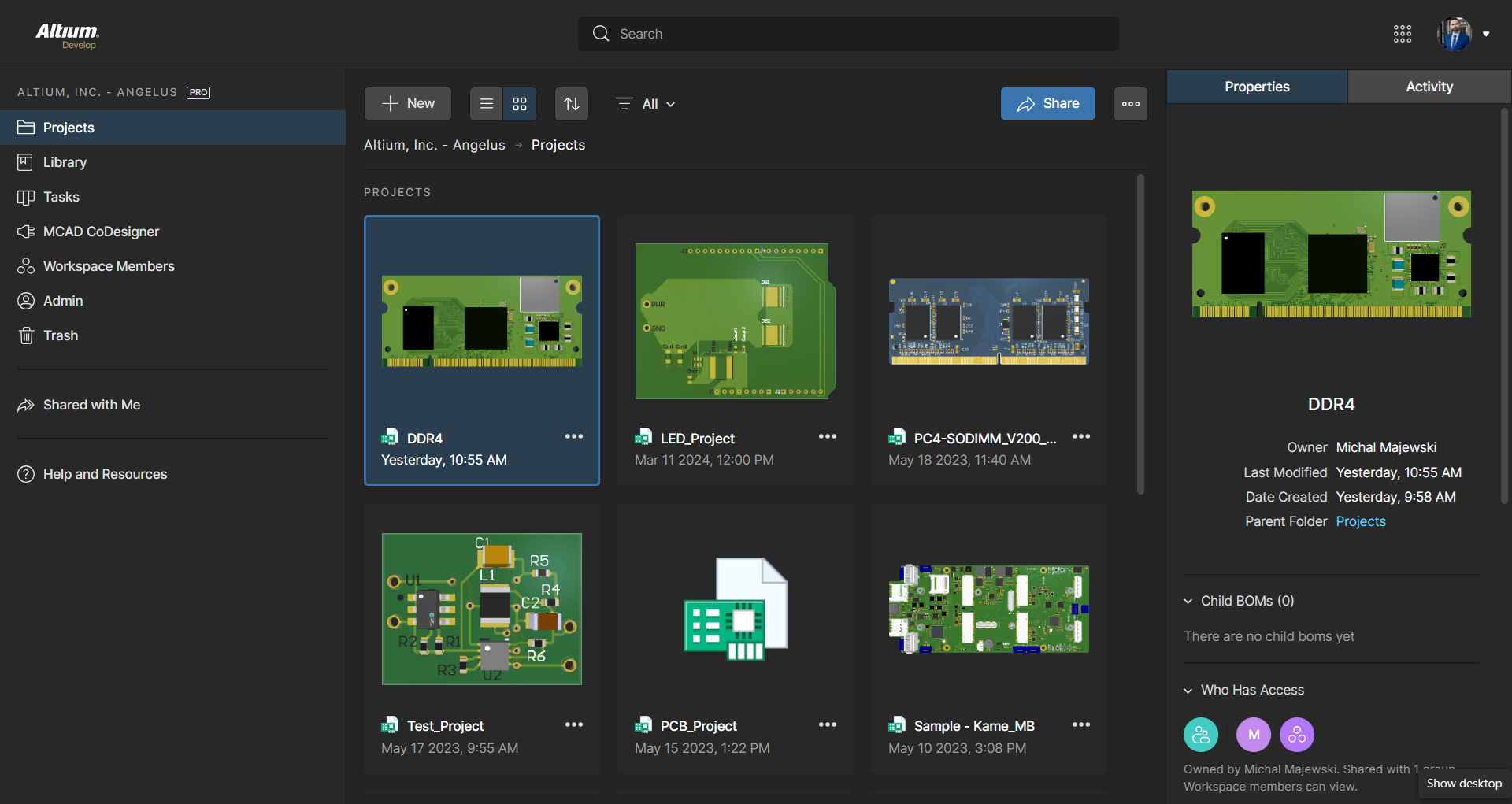
Screenshot of The 3D View Editor in Altium Develop that transforms the standard 2D PCB workspace into a fully interactive, three‑dimensional design environment. Users can toggle between 2D and 3D modes, then zoom, pan, and rotate the board freely using tools like a directional sphere for precise pivot control and adjust display settings (such as transparency or coloring) via the View Configuration panel to visually explore and inspect PCB layouts in realistic detail.Screenshot of Project History in Altium Develop, which provides a browser-based, visually chronological timeline of a project's key events such as: creation, commits, releases, clones, and MCAD exchanges offering version control transparency directly within workspace.Screenshot of Altium Develop's unified design environment built on a single data model. From schematic capture to PCB layout, routing, and assembly preparation, every step flows seamlessly. Smart placement and routing features make complex designs faster, easier, and more reliable.Screenshot of ActiveBOM, which is a dynamic, table-based Bill of Materials (BOM) editor integrated into Altium Develop that elevates component management to a real-time, design-aware process. It automatically aggregates supply chain data such as pricing, stock, lifecycle status, and lead times - from sources like Octopart and IHS Markit, enabling parts selection, alternates, cost calculation, rule-based verification, and traceability - within the same environment as the schematic and PCB design.Screenshot of BOM Portal, which is a cloud-native, procurement-focused tool within Altium Develop that transforms traditional Excel-like Bill of Materials (BOM) workflows by integrating live supply chain, compliance, and pricing data. It enables collaboration between engineering and procurement, helps identify supply risks like obsolescence or shortages, supports BOM consolidation and alternates, and ensures thorough version control and traceability bridging design to manufacturing with real-time visibility and control.Screenshot of Workspace Projects, which provide a cloud-native, version-controlled hub within Altium Develop that simplifies electronic project management with centralized storage, collaboration, and built-in Git-based version control. This interface enables real-time design navigation (including schematic, 2D/3D PCB, BOM, and Draftsman views), task tracking, release and manufacturing management, historical timeline review, and sharing.