Amplenote vs. Microsoft Lists

Overview
ProductRatingMost Used ByProduct SummaryStarting Price
Amplenote
Score 0.0 out of 10
N/A
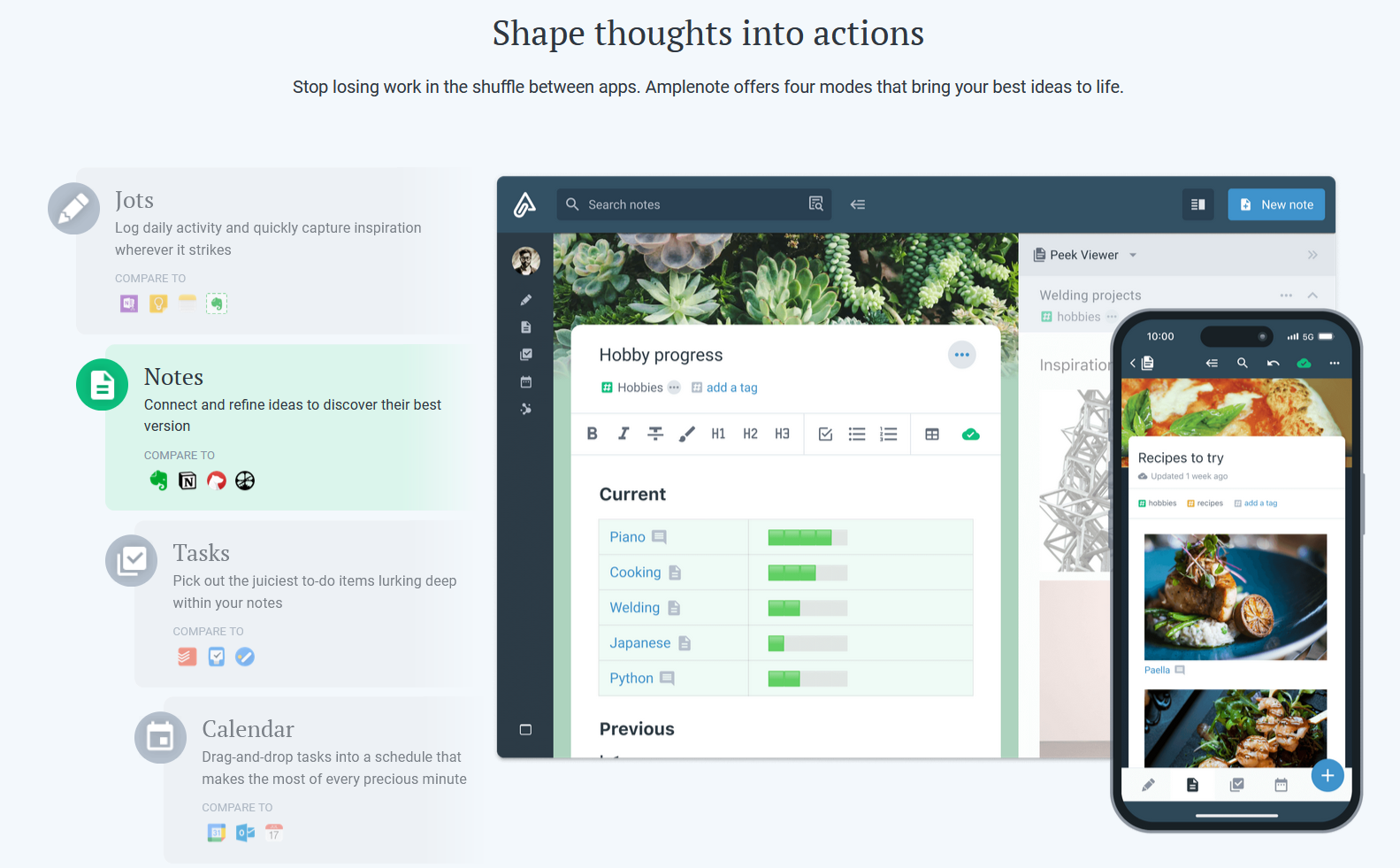
Amplenote is a productivity app combining note-taking, task management, and calendar planning. It is used to capture ideas, organize them with tags and folders, and turn them into actionable plans using its "Task Score" system to prioritize tasks by importance.
$70.08
per year per user
Microsoft Lists
Score 9.8 out of 10
N/A
Lists is an information tracking app in Microsoft 365 that enables users to work with anyone, anywhere. Users can configure lists to better organize events, issues, and assets.N/A
Pricing
AmplenoteMicrosoft Lists
Editions & Modules
Pro
$5.84
per month, billed annually per user
Unlimited
$10
per month, billed annually per user
Founder
$20
per month, billed annually per user
No answers on this topic
Offerings
Pricing Offerings
AmplenoteMicrosoft Lists
Free Trial
YesNo
Free/Freemium Version
YesNo
Premium Consulting/Integration Services
NoNo
Entry-level Setup FeeNo setup feeNo setup fee
Additional Details
More Pricing Information
Best Alternatives
AmplenoteMicrosoft Lists
Small Businesses
7shifts
7shifts
Score 9.9 out of 10
7shifts
7shifts
Score 9.9 out of 10
Medium-sized Companies
Todoist
Todoist
Score 9.2 out of 10
Todoist
Todoist
Score 9.2 out of 10
Enterprises
TimeCamp
TimeCamp
Score 7.0 out of 10
TimeCamp
TimeCamp
Score 7.0 out of 10
All AlternativesView all alternativesView all alternatives
User Ratings
AmplenoteMicrosoft Lists
Likelihood to Recommend
-
(0 ratings)
9.0
(1 ratings)
User Testimonials
AmplenoteMicrosoft Lists
Likelihood to Recommend
Amplenote
No answers on this topic
Microsoft
Organizations with institutional subscriptions should consider maximizing the use of Microsoft Lists in their operations because it has the feature of seamlessly working with all the other Microsoft Apps. You can have a master file of multiple projects that are going on, and you don't have to manually do the updating. However, it is important to note that to maximize the Microsoft List experience, the team should have basic knowledge about integration and automation
Read full review
Pros
Amplenote
No answers on this topic
Microsoft
  • great for capturing loads of data
  • great for manipulating and viewing the data many ways
  • strong integration with other M365 products and Power Automate
Read full review
Cons
Amplenote
No answers on this topic
Microsoft
  • Unlike Excel, you need to go to Edit mode for you to make changes in the entries
  • You cannot just copy paste like Excel
Read full review
Usability
Amplenote
No answers on this topic
Microsoft
The first time I learned about Microsoft Lists, I was automatically converted. How I wish I had learned about Microsoft Lists early on; it could have saved me tons of time, and could have rendered me real-time reports regarding my work, as the data I work with usually keeps changing every time. I believe the best part of it is that it works well with other Microsoft products, so less stressful.
Read full review
Alternatives Considered
Amplenote
No answers on this topic
Microsoft
They are all different but can be used for the same things. They all have different benefits, and I use them except Airtable. Trello has the best automation capabilities natively built into the product of any product I've ever used. (I've personally built over 1,000 automations or more for clients on Trello.) ClickUp has the best flexibility to view data in very different ways and from different organisation levels (i.e. High level data through to detailed specific data across multiple departments or projetcs. Microsoft Lists is an excellent choice if you work in M365 already and you want a deeply integrated way to hold data and use it within M365
Read full review
Return on Investment
Amplenote
No answers on this topic
Microsoft
  • Massively positive, we have build a business that can scale with ease
Read full review
ScreenShots

Amplenote Screenshots

Screenshot of Jots Mode, a tool to capture ideas. Jots mode can be used for daily notes and capture ideas into a centralized, distraction-free place.Screenshot of Notes Mode, consolidates ideas. Notes can be shared for collaboration or published to the web in under 3 clicks.Screenshot of Tasks Mode turns ideas into actions. The task scoring algorithm suggests what to work on next. The task widget visualizes these tasks.Screenshot of the calendar mode, with task details.Screenshot of the graph view. This visualize linked notes and their relationships with one another.Screenshot of Notes Mode, where the user can categorize notes using hierarchical tagging.