Aqua Cloud Native Security Platform vs. NGINX vs. Patch My PC Patch Management

Overview
ProductRatingMost Used ByProduct SummaryStarting Price
Aqua Cloud Native Security Platform
Score 6.2 out of 10
N/A
The Aqua Platform is an integrated Cloud Native Application Protection Platform (CNAPP), that prioritizes risk and automates prevention while also focussing on detection and response across the lifecycle. It aims to stop current and prevent future cloud native attacks.
$10,188
per year
NGINX
Score 9.2 out of 10
Mid-Size Companies (51-1,000 employees)
NGINX, a business unit of F5 Networks, powers over 65% of the world's busiest websites and web applications. NGINX started out as an open source web server and reverse proxy, built to be faster and more efficient than Apache. Over the years, NGINX has built a suite of infrastructure software products o tackle some of the biggest challenges in managing high-transaction applications. NGINX offers a suite of products to form the core of what organizations need to create…N/A
Patch My PC Patch Management
Score 7.1 out of 10
Enterprise companies (1,001+ employees)
Software that extends Microsoft Configuration Manager to deploy and patch third-party applications. It is designed to handle the tedious task of packaging, testing, troubleshooting, and deploying applications in the environment. The software automates the creation and patching of third-party applications. Optionally, users can configure automatic deployment rules for complete automation and control over third-party patch management in the enterprise.
$1
per year per seat
Pricing
Aqua Cloud Native Security PlatformNGINXPatch My PC Patch Management
Editions & Modules
Team
$10,188
per year
Advanced
$25,188
per year
Enterprise
Tiered Pricing
No answers on this topic
Basic
$1
per year per seat
Enterprise
$2
per year per seat
Intune Essentials
$3.25
per year per seat
Enterprise Plus
$3.50
per year per seat
Offerings
Pricing Offerings
Aqua Cloud Native Security PlatformNGINXPatch My PC Patch Management
Free Trial
NoYesYes
Free/Freemium Version
YesYesNo
Premium Consulting/Integration Services
NoYesNo
Entry-level Setup FeeNo setup feeOptionalNo setup fee
Additional Details
More Pricing Information
Community Pulse
Aqua Cloud Native Security PlatformNGINXPatch My PC Patch Management
Features
Aqua Cloud Native Security PlatformNGINXPatch My PC Patch Management
Application Servers
Comparison of Application Servers features of Product A and Product B
Aqua Cloud Native Security Platform
-
Ratings
NGINX
8.7
32 Ratings
9% above category average
Patch My PC Patch Management
-
Ratings
IDE support00 Ratings7.617 Ratings00 Ratings
Security management00 Ratings8.627 Ratings00 Ratings
Administration and management00 Ratings8.827 Ratings00 Ratings
Application server performance00 Ratings9.327 Ratings00 Ratings
Installation00 Ratings8.929 Ratings00 Ratings
Open-source standards compliance00 Ratings9.025 Ratings00 Ratings
Threat Intelligence
Comparison of Threat Intelligence features of Product A and Product B
Aqua Cloud Native Security Platform
-
Ratings
NGINX
-
Ratings
Patch My PC Patch Management
10.0
1 Ratings
22% above category average
Vulnerability Classification00 Ratings00 Ratings10.01 Ratings
Vulnerability Management Tools
Comparison of Vulnerability Management Tools features of Product A and Product B
Aqua Cloud Native Security Platform
-
Ratings
NGINX
-
Ratings
Patch My PC Patch Management
10.0
1 Ratings
19% above category average
Vulnerability Intelligence00 Ratings00 Ratings10.01 Ratings
Best Alternatives
Aqua Cloud Native Security PlatformNGINXPatch My PC Patch Management
Small Businesses

No answers on this topic

Apache HTTP Server
Apache HTTP Server
Score 9.1 out of 10
Action1
Action1
Score 9.5 out of 10
Medium-sized Companies
CrowdStrike Falcon
CrowdStrike Falcon
Score 9.1 out of 10
Apache Tomcat
Apache Tomcat
Score 8.0 out of 10
Action1
Action1
Score 9.5 out of 10
Enterprises
CrowdStrike Falcon
CrowdStrike Falcon
Score 9.1 out of 10
Apache Tomcat
Apache Tomcat
Score 8.0 out of 10
CrowdStrike Falcon
CrowdStrike Falcon
Score 9.1 out of 10
All AlternativesView all alternativesView all alternativesView all alternatives
User Ratings
Aqua Cloud Native Security PlatformNGINXPatch My PC Patch Management
Likelihood to Recommend
6.6
(2 ratings)
8.9
(50 ratings)
10.0
(1 ratings)
Likelihood to Renew
-
(0 ratings)
9.1
(1 ratings)
10.0
(1 ratings)
Usability
6.4
(1 ratings)
8.3
(3 ratings)
-
(0 ratings)
Support Rating
-
(0 ratings)
8.1
(4 ratings)
-
(0 ratings)
Implementation Rating
-
(0 ratings)
-
(0 ratings)
10.0
(1 ratings)
User Testimonials
Aqua Cloud Native Security PlatformNGINXPatch My PC Patch Management
Likelihood to Recommend
Aqua Security
Excellent tool for identifying Cloud security issues such as vulnerabilities or misconfigurations. The complaince scanning ability is perfect for enterprise organization to maintain complaince based off various complaince programs.
Read full review
F5
Nginx is well-suited for any web server scenarios, such as web applications, backend or reverse proxy for both application and HTTP requests, and distribution. It is less appropriate for Windows-based applications that run directly on a Windows Server host. In any case, it is very easy to manage, through separate conf files for each application or site you want to host with it.
Read full review
Patch My PC
I highly recommend Patch My PC to businesses of all types and sizes. The tool is highly customizable and can meet the needs of any organization. It is easy to implement with Configuration Manager (SCCM) and Intune and can be set up within a matter of minutes.
Read full review
Pros
Aqua Security
  • seamless integration with GitHub, Jfrog, etc
  • Easy configuration of security policy
  • detailed instructions regarding finding of Vulnerabilities
Read full review
F5
  • Very low memory usage. Can handle many more connections than alternatives (like Apache HTTPD) due to low overhead. (event-based architecture).
  • Great at serving static content.
  • Scales very well. Easy to host multiple Nginx servers to promote high availability.
  • Open-Source (no cost)!
Read full review
Patch My PC
  • Great customer support
  • Automation of application creation and updates
  • Easy to integrate and manage
Read full review
Cons
Aqua Security
  • The UI/UX of the Aqua platform has several issues, especially with the sign up/in flow, authentication, alerts and display of results
  • Missing a few prominent notification channels for alerts such as Datadog, Webhooks
  • Lacks complete granularity in RBAC with the ability to set permissions based on the cloud
  • Some parts of the cocumentation for connecting an Oracle Cloud account is not up to update or clear
Read full review
F5
  • Customer support can be strangely condescending, perhaps it's a language issue?
  • I find it a little weird how the release versions used for Nginx+ aren't the same as for open source version. It can be very confusing to determine the cross-compatibility of modules, etc., because of this.
  • It seems like some (most?) modules on their own site are ancient and no longer supported, so their documentation in this area needs work.
  • It's difficult to navigate between nginx.com commercial site and customer support. They need to be integrated together.
  • I'd love to see more work done on nginx+ monitoring without requiring logging every request. I understand that many statistics can only be derived from logs, but plenty should work without that. Logging is not an option in many environments.
Read full review
Patch My PC
  • SAS solution
  • Be able to select a specific application version for deployment
Read full review
Likelihood to Renew
Aqua Security
No answers on this topic
F5
Great value for the product
Read full review
Patch My PC
I consider Patch My PC a necessary tool for any environment I manage. I cannot imagine managing an environment without it, as the time and effort it saves is invaluable.
Read full review
Usability
Aqua Security
The UI and UX of the platform requires some work since the platform is not for all screen sizes and the experience with certain features such as authentication and creating alerts is not great. The session times out while performing an action and having to repeat the entire action once again, which is not a great experience. Adding notification channels while creating the alerts is not seamless. But the platform has good UX with some great documentation for integrations along with the ability to customise dashboards.
Read full review
F5
This tool is really easy to use and configure. Consumes very less system resources. It is highly modular and configurable. You can easily use it with other tools like certbot for SSLs. You can configure basic security with configuration and headers
Read full review
Patch My PC
No answers on this topic
Support Rating
Aqua Security
No answers on this topic
F5
Community support is great, and they've also had a presence at conferences. Overall, there is no shortage of documentation and community support. We're currently using it to serve up some WordPress sites, and configuring NGINX for this purpose is well documented.
Read full review
Patch My PC
No answers on this topic
Implementation Rating
Aqua Security
No answers on this topic
F5
No answers on this topic
Patch My PC
The implementation is super easy, specially if you're just Integrating it with Intune.
Read full review
Alternatives Considered
Aqua Security
Aqua Cloud Native Security Platform is easy to implement and manage compare the Dome9.
Read full review
F5
I have found that [NGINX] seems to perform better throughout the years with less issues although I've used Apache more. I would definitely recommend [NGINX] for any high volume site and I've seen this to usually be the case from most provided web hosts who will pick [NGINX] over alternatives
Read full review
Patch My PC
Patch My PC is a tool developed and maintained by experienced systems administrators, who have a deep understanding of the workings of Configuration Manager (SCCM) and Intune. They know what it takes to successfully deploy applications to end-users, making the tool an ideal choice for managing software updates and deployments.
Read full review
Return on Investment
Aqua Security
  • ROI is high with our Aqua project.
Read full review
F5
  • By using Nginx, we can host multiple web services on a single server, keeping our infrastructure costs lower.
  • Nginx maintains our HTTPS connections, allowing us to keep our promise to our customers that their data is safe in transit.
  • Due to Nginx's extremely low failure rate, our web addresses always return something meaningful, even when individual services go down. In sense, this means we are "always online" and allows us to maintain brand and support our customers even in the face of catastrophe.
Read full review
Patch My PC
  • Saves countless hours on manually packaging applications
  • Saves countless hours on investigating what applications in your environment needs updated
  • saves you 1-3 headcounts in your department
Read full review
ScreenShots

NGINX Screenshots

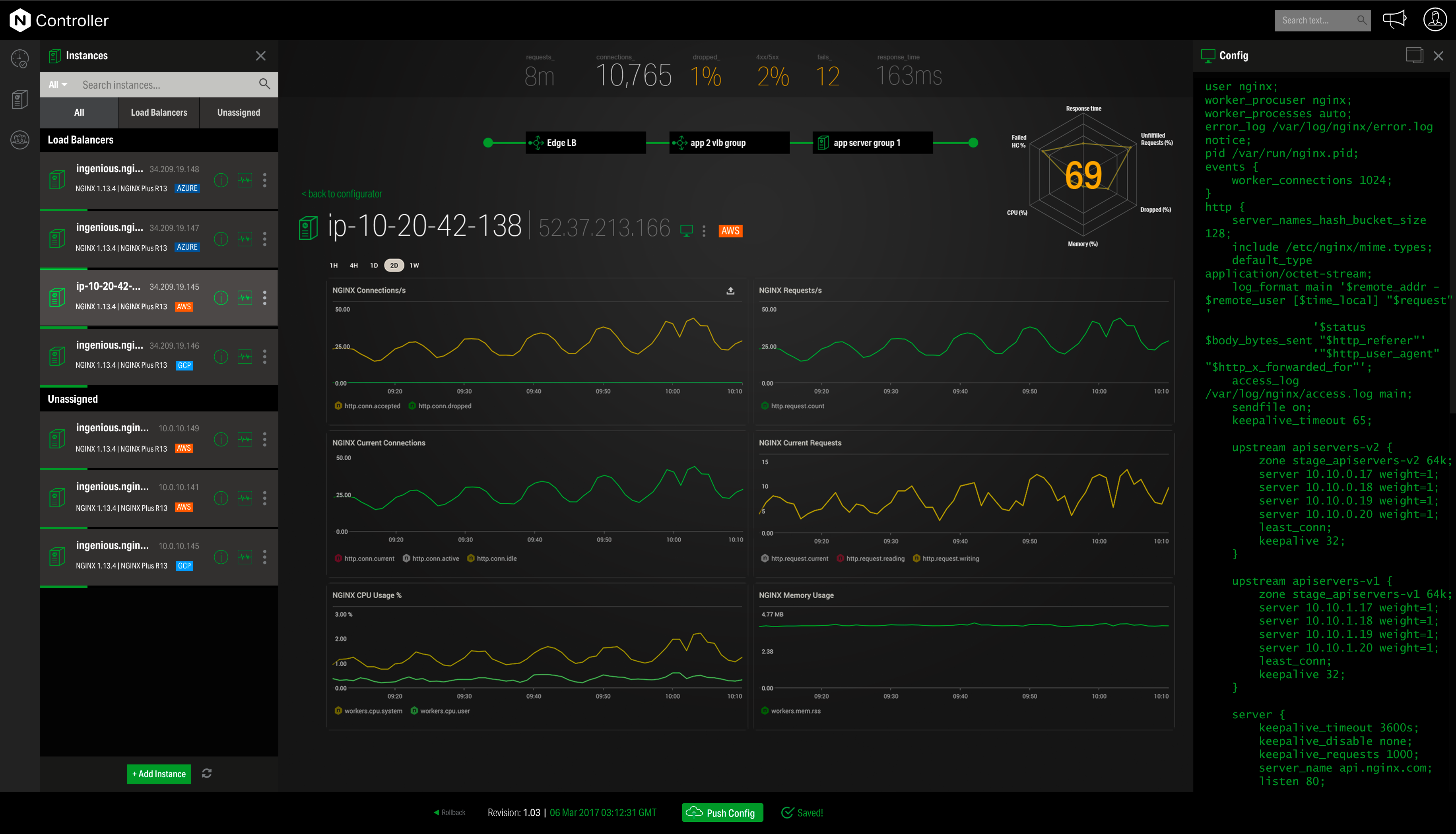
Screenshot of Overview of the NGINX Application PlatformScreenshot of NGINX Controller - MonitoringScreenshot of NGINX Controller - Configuration

Patch My PC Patch Management Screenshots

Screenshot of The general tab is where you can configure the license key and other general settings including the WSUS Code Signing certificate for third-party software updates.Screenshot of You can enable different third-party products to publish to WSUS and sync into Configuration Manager in the updates tab. You can also right-click on all products, vendors, or specific products to enable custom right-click actions.Screenshot of Enable products for application creation and management using the ConfigMgr Apps tab in the Publisher. This feature will automatically package third-party applications and keep them up to date. You can deploy these applications using task sequences or collection deployments in Configuration Manager.Screenshot of The CVE import wizard in the Patch My PC Publisher can evaluate CVE in a file and let you know which ones are either in the Patch My PC catalog or already published to WSUS.Screenshot of The sync schedule controls how often the Publisher will download the catalog and publish new third-party updates and applications to ConfigMgr or Intune.Screenshot of The alerts tab will automatically send you email, Microsoft Teams, or Slack alerts when new updates or applications are created. These alerts will also include details like severity level, classification level, and CVE's.