TrustRadius: an HG Insights company

Save this comparison

Save this comparison

Add Product

Recommended Comparisons

    Overview
    ProductRatingMost Used ByProduct SummaryStarting Price

    Asana

    Score8.5 out of 10
    N/AAsana is a web and mobile project management app. With tasks, projects, conversations, and dashboards, Asana lets an entire team know who's doing what by when, enabling workload balancing. Users can also add integrations for GANTT charts, time tracking and more.

    $13.49

    per month per user

    Lightning Tools Data Viewer

    Score9.1 out of 10
    Mid-Size Companies (51-1,000 employees)
    The Data Viewer provides data visualization in the form of reports or charts that can be created and customized to suit a business's needs. Silos of data exist in most organizations and yet contain valuable insights into how well the organization is performing and where action is needed. Those silos often include Microsoft Excel workbooks, Microsoft SQL Azure databases, On-Premises data sources accessible through OData or Business Connectivity Services and even SharePoint Lists. These data…

    $2,200

    per year per installation

    Pricing
    AsanaLightning Tools Data Viewer
    Editions & Modules
    Starter
    $13.49
    per month per user
    Advanced
    $30.49
    per month per user
    Enterprise
    Contact Sales
    Personal
    Free
    Data Viewer OnPrem
    $1,000
    per year Per installation, 1 x WFE
    Data Viewer Online
    $2,200
    per year per installation
    Data Viewer OnPrem Enterprise Edition
    POA
    per year Per installation, 4+ WFE
    Data Viewer Online Enterprise Edition
    POA
    per year per installation
    Offerings
    Pricing Offerings
    AsanaLightning Tools Data Viewer
    Free Trial
    YesYes
    Free/Freemium Version
    YesNo
    Premium Consulting/Integration Services
    YesYes
    Entry-level Setup FeeOptionalNo setup fee
    Additional DetailsA discount is offered for annual billing.Prices stated are minimum per installation for "stock" products. $2.20 per user / year on top of base price. Enterprise editions can be amended to suit business needs if deemed necessary, additional costs incurred and TBD. All packages include free technical support. Free upgrades available to latest versions of tool as they are released. (online version)
    More Pricing Information
    Community Pulse
    AsanaLightning Tools Data Viewer
    Considered Both Products
    Asana
    No answer on this topic
    Lightning Tools
    No answer on this topic
    Key User Insights
    Would buy again
    88%
    Would buy again
    98 Answers
    No answers on this topic
    Delivers good value for the price
    93%
    Delivers good value for the price
    86 Answers
    No answers on this topic
    Happy with the feature set
    96%
    Happy with the feature set
    107 Answers
    No answers on this topic
    Lived up to sales and marketing promises
    92%
    Lived up to sales and marketing promises
    72 Answers
    No answers on this topic
    Implementation went as expected
    94%
    Implementation went as expected
    78 Answers
    No answers on this topic
    Features
    AsanaLightning Tools Data Viewer
    Project Management
    Comparison of Project Management features of Asana and Lightning Tools Data Viewer
    Feature
    Asana
    8.5
    179 Ratings
    10% above category average
    Lightning Tools Data Viewer
    -
    Ratings
    Task Management9.2179 Ratings00 Ratings
    Resource Management8.1152 Ratings00 Ratings
    Gantt Charts9.261 Ratings00 Ratings
    Scheduling8.3162 Ratings00 Ratings
    Workflow Automation9.3132 Ratings00 Ratings
    Team Collaboration9.4178 Ratings00 Ratings
    Support for Agile Methodology8.57 Ratings00 Ratings
    Support for Waterfall Methodology8.57 Ratings00 Ratings
    Document Management8.7150 Ratings00 Ratings
    Email integration8.8142 Ratings00 Ratings
    Mobile Access8.8149 Ratings00 Ratings
    Timesheet Tracking6.16 Ratings00 Ratings
    Change request and Case Management8.44 Ratings00 Ratings
    Budget and Expense Management7.377 Ratings00 Ratings
    Professional Services Automation
    Comparison of Professional Services Automation features of Asana and Lightning Tools Data Viewer
    Feature
    Asana
    6.7
    48 Ratings
    14% below category average
    Lightning Tools Data Viewer
    -
    Ratings
    Project & financial reporting5.51 Ratings00 Ratings
    Integration with accounting software8.047 Ratings00 Ratings
    BI Standard Reporting
    Comparison of BI Standard Reporting features of Asana and Lightning Tools Data Viewer
    Feature
    Asana
    -
    Ratings
    Lightning Tools Data Viewer
    9.1
    1 Ratings
    12% above category average
    Customizable dashboards00 Ratings9.11 Ratings
    Report Formatting Templates00 Ratings9.11 Ratings
    Ad-hoc Reporting
    Comparison of Ad-hoc Reporting features of Asana and Lightning Tools Data Viewer
    Feature
    Asana
    -
    Ratings
    Lightning Tools Data Viewer
    8.2
    1 Ratings
    5% above category average
    Drill-down analysis00 Ratings6.41 Ratings
    Formatting capabilities00 Ratings9.11 Ratings
    Report sharing and collaboration00 Ratings9.11 Ratings
    Data Discovery and Visualization
    Comparison of Data Discovery and Visualization features of Asana and Lightning Tools Data Viewer
    Feature
    Asana
    -
    Ratings
    Lightning Tools Data Viewer
    3.6
    1 Ratings
    73% below category average
    Pre-built visualization formats (heatmaps, scatter plots etc.)00 Ratings3.61 Ratings
    Best Alternatives
    AsanaLightning Tools Data Viewer
    Small Businesses
    Any.do
    Score8 out of 10
    Chartio (discontinued)
    Score7.5 out of 10
    Medium-sized Companies
    KanbanFlow
    Score7.3 out of 10
    Jet Reports
    Score9.5 out of 10
    Enterprises
    Microsoft To Do
    Score7.9 out of 10
    Kibana
    Score8.4 out of 10
    All AlternativesView all alternativesView all alternatives
    User Ratings
    AsanaLightning Tools Data Viewer
    Likelihood to Recommend
    9.1
    (209 ratings)
    9.1
    (1 ratings)
    Likelihood to Renew
    9.6
    (34 ratings)
    -
    (0 ratings)
    Usability
    8.8
    (37 ratings)
    -
    (0 ratings)
    Availability
    8.4
    (2 ratings)
    -
    (0 ratings)
    Support Rating
    5.0
    (42 ratings)
    -
    (0 ratings)
    Product Scalability
    8.2
    (1 ratings)
    -
    (0 ratings)
    User Testimonials
    AsanaLightning Tools Data Viewer
    Likelihood to Recommend
    Asana
    The usability of Asana is broad since it's available in a variety of platforms that are widely used nowadays. I think that it would be great for people who are constantly on the move and switching devices, since it has allowed me to work from my phone, too. I also think that Asana has proven itself to handle a large quantity of work
    Read full review
    Lightning Tools
    Lightning Tools Data Viewer is well suited for re-surfacing data and customizing its look and feel.
    Read full review
    Pros
    Asana
    • Through it, we were able to communicate and cooperate with the rest of the team to complete the work in the required manner and at the appropriate time.
    • Available for free on Android and iPhone.
    • Asana has a simple and easy user interface
    Read full review
    Lightning Tools
    • Shows Lists created on different sites to be seen and controlled on another site in a Tenant
    • Allows selection of layouts and coloring way beyond what other programs do.
    • Easy to learn and very functional.
    Read full review
    Cons
    Asana
    • Asana is not really a project management tool, it is good for simple projects only
    • UI has some glitches (doesn't save preferences, etc.)
    • Integration with other tools (Office 365, MS Project)
    • No reminders if the working period you entered is on holidays
    Incentivized
    Read full review
    Lightning Tools
    • Data Viewer has a graph feature that is old school flat design. We loved the In House real 3D graph Lightning Tools program.
    Read full review
    Likelihood to Renew
    Asana
    • Mobile + Desktop capabilities - Able to use it anywhere, anytime.
    • Task management - Easy to view projects and their progress.
    • Time management - Easy to see what elements require time / how they interrelate and manage the project on an overall basis.
    • Company management - Be able to see from a master dashboard perspective where each project is in its stages of completion.
    • Clear communication - It's visually documented who is doing what at what time so that the whole project gets done.
    Incentivized
    Read full review
    Lightning Tools
    No answers on this topic
    Usability
    Asana
    It is very user-friendly. Takes a new employee an hour to start figuring out how the system works. That's an important factor. You don't want to encounter the issue where employees need a week to understand how the system works. For example, JIRA, I tried using it for a week and I still don't understand the complicated layout. Asana has a simple interface. Once you see it, you get it type of program.
    Incentivized
    Read full review
    Lightning Tools
    No answers on this topic
    Reliability and Availability
    Asana
    Working with Asana on a daily basis
    Read full review
    Lightning Tools
    No answers on this topic
    Support Rating
    Asana
    I haven't had to use their support so I can't rate it. The fact that I haven't needed them reflects the ease of use of the product. I would recommend that any new users schedule a complete demo of the product to ensure that they are using it to it's fullest (there's a lot of useful features).
    Incentivized
    Read full review
    Lightning Tools
    No answers on this topic
    Alternatives Considered
    Asana
    Asana is a top-tier project management software that helps us organize and track projects from start to finish. It allows us to apply tasks/to-dos to multiple projects without duplication, divide complex projects into smaller tasks, and track project progress. It also helps us organize work on Kanban boards or linear lists. It stands out from the crowd in a big way compared to the competition.
    Read full review
    Lightning Tools
    Lightning Tools Data Viewer is much easier and more powerful than Infowise similar viewer in their lineup. In this case, we use Data Viewer over the one offered by Infowise.
    Read full review
    Scalability
    Asana
    I used this tool on a daily basis at work and it runs as a solid rock
    Read full review
    Lightning Tools
    No answers on this topic
    Return on Investment
    Asana
    • Productivity - Most of all, it allows me to be more productive and have a good sense of where I am with projects and deadlines.
    • Easy to use - I can make the most of my time to get up (and stay) up and running.
    • Project coordination - Allows me to assign tasks to my interns and communicate directly within the platform to keep the work train moving.
    Incentivized
    Read full review
    Lightning Tools
    • It allows us to do things that would take a great deal more time to duplicate in SharePoint
    • It cuts down on ugly looking built in SP list layouts
    • Users find it easy to access, thus this product is more productive
    Read full review
    ScreenShots

    Asana Screenshots

    Screenshot of Product HomepageScreenshot of Team ConversationsScreenshot of Project CalendarsScreenshot of InboxScreenshot of List ProjectScreenshot of Portfolios

    Lightning Tools Data Viewer Screenshots
    Screenshot of DISPLAYING EXTERNAL DATA WITHIN SHAREPOINT OR MICROSOFT TEAMS
The Data Viewer Client Side Web Part can be configured by Business Users within a few minutes to display Line of Business Data from Data Sources such as Excel,  SQL Azure, Business Connectivity Services, OData and SharePoint Lists.  Connections to an organizations data such as Customer Relationship Management Systems, Accounting Systems, or Custom Databases can be connected, giving business users a live up-to-date view of business information within the context of their SharePoint Team Sites or Microsoft Teams Tabs.Screenshot of HIGHLIGHTING KEY BUSINESS DATA (NO CODE)
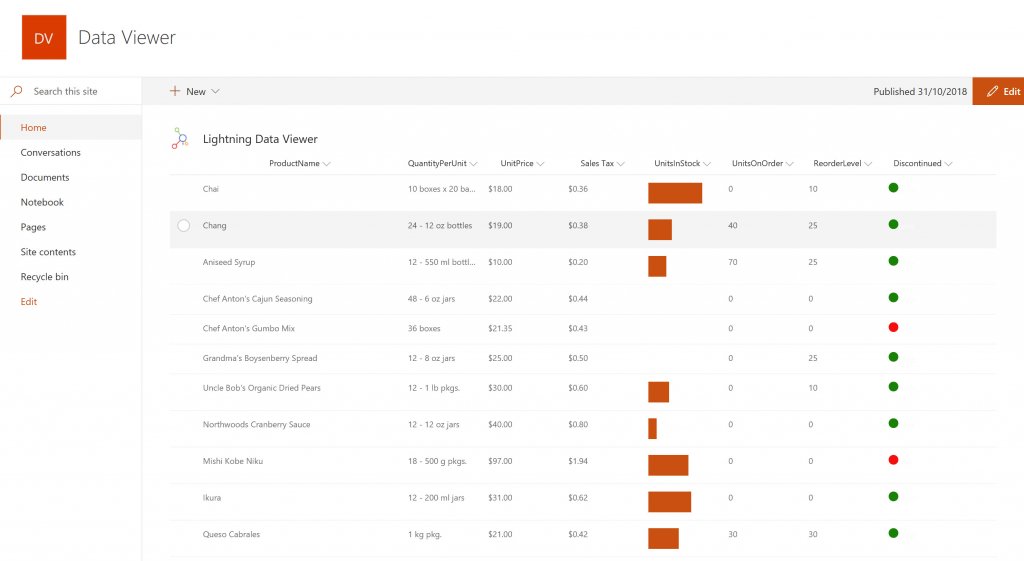
Conditional formatting can be used to highlight key business data. Overdue Tasks, Low Stock, Currency Exchange Rates, Sales Revenue are examples of data to highlight visually allowing for a quick reaction time. Key Financial Indicators and Key Performance Indicators can be configured with a simple dialog and no need to write any code. Choose colours, icons or data bars to highlight key data.Screenshot of SELECTING AND STYLING ICONS
Icons can be chosen as part of the conditional formatting to make data stand out. The Office 365 Fabric icons can be selected and styled and applied to cell values. Pepper pots, Smileys, Envelopes and more icons are available. There are hundreds of options to choose from to highlight data that needs to be acted upon.Screenshot of DATA VIEWER CAN BE A GRID OF DATA OR A CHART IN SHAREPOINT OR MICROSOFT TEAMS
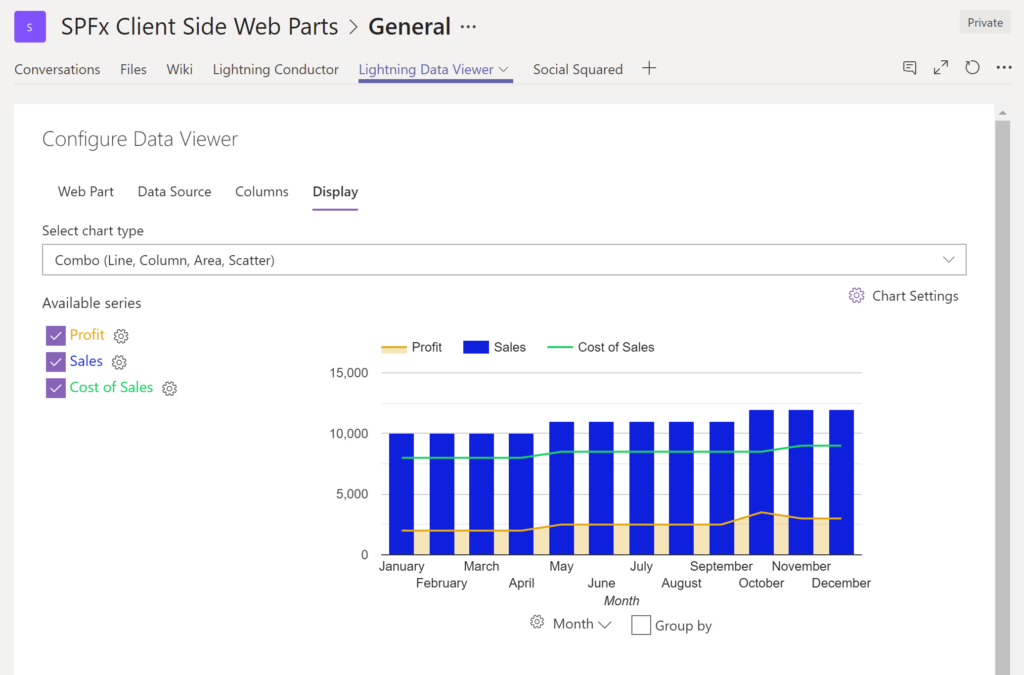
The Data Viewer can be used within Microsoft SharePoint Modern Sites or Microsoft Teams Tabs as a Grid of Data with styling or as a Chart which can be configured. The Charting Feature allows for Pie, Donut, Column, Line, Area, and Scatter Charts which can all be configured and displayed in 2D or 3D.Screenshot of TREEMAPS
summary information can be displayed within a TreeMap next to the detail. Users will be able to see trends, and how the business is performing  using the TreeMap view of data.Screenshot of CHARTS AND GAUGES
The Data Viewer is used to represent data in multiple ways using Gauges, TreeMaps, Multiple Series Charts, and Pie Charts.