
Astera ReportMiner vs. Skyvia
| Product | Rating | Most Used By | Product Summary | Starting Price |
|---|---|---|---|---|
 Astera ReportMiner | Score8.2 out of 10 | Mid-Size Companies (51-1,000 employees) | Astera ReportMiner automates data extraction from unstructured documents with a drag-and-drop UI. It is used to create reusable, pattern-based templates. Combining AI and template-based extraction, ReportMiner allows for auto-generating and fine-tuning templates. | N/A |
 Skyvia | Score10 out of 10 | Mid-Size Companies (51-1,000 employees) | Skyvia is a no-code cloud data integration platform for ETL, ELT, Reverse ETL, data migration, one-way and bi-directional data sync, workflow automation, and real-time connectivity. Benefits of Using Skyvia: • Cost efficiency: With flexible pricing plans for each product, Skyvia suites for businesses of any size. • Flexibility: Skyvia provides adaptable, no-code integration tools for both basic and advanced business… | $99 per month |
| Astera ReportMiner | Skyvia | |||||||||||||||
|---|---|---|---|---|---|---|---|---|---|---|---|---|---|---|---|---|
| Editions & Modules |
|
| ||||||||||||||
| Offerings |
| |||||||||||||||
| Entry-level Setup Fee | Optional | No setup fee | ||||||||||||||
| Additional Details | Discounts are provided for 10 pack, 20 pack, 50 pack, and enterprise-wide ReportMiner Professional licenses. | 20% discount for annual pricing. | ||||||||||||||
| More Pricing Information | ||||||||||||||||
| Astera ReportMiner | Skyvia | |
|---|---|---|
| Considered Both Products | No answer on this topic | No answer on this topic |
| Key User Insights | ||
| Would buy again | ||
100% Would buy again 5 Answers | 97% Would buy again 28 Answers | |
| Delivers good value for the price | ||
No answers on this topic | 100% Delivers good value for the price 28 Answers | |
| Happy with the feature set | ||
100% Happy with the feature set 5 Answers | 100% Happy with the feature set 29 Answers | |
| Lived up to sales and marketing promises | ||
No answers on this topic | 96% Lived up to sales and marketing promises 23 Answers | |
| Implementation went as expected | ||
100% Implementation went as expected 5 Answers | 100% Implementation went as expected 27 Answers | |
| Astera ReportMiner | Skyvia | ||||||||||
|---|---|---|---|---|---|---|---|---|---|---|---|
| Data Source Connection |
| ||||||||||
| Data Transformations |
| ||||||||||
| Data Modeling |
| ||||||||||
| Astera ReportMiner | Skyvia | |
|---|---|---|
| Small Businesses | No answers on this topic | No answers on this topic |
| Medium-sized Companies | No answers on this topic |  IBM InfoSphere Information Server Score10 out of 10 |
| Enterprises | No answers on this topic |  SolarWinds Task Factory Score8.3 out of 10 |
| All Alternatives | View all alternatives | View all alternatives |
| Astera ReportMiner | Skyvia | |
|---|---|---|
| Likelihood to Recommend | 8.1 | 10.0 |
| Likelihood to Renew | 9.1 | 9.1 |
| Usability | - | 9.1 |
| Support Rating | - | 8.2 |
| Implementation Rating | - | 9.1 |
| Data Sharing and Collaboration | 6.4 | - |
| Data Sources | 8.2 | - |
| Astera ReportMiner | Skyvia | |
|---|---|---|
| Likelihood to Recommend |
|
|
| Pros |
|
|
| Cons |
|
|
| Likelihood to Renew |
|
|
| Usability | No answers on this topic |
|
| Support Rating | No answers on this topic |
|
| Implementation Rating | No answers on this topic |
|
| Alternatives Considered |
|
|
| Return on Investment |
|
|
| ScreenShots | Astera ReportMiner Screenshots     | Skyvia Screenshots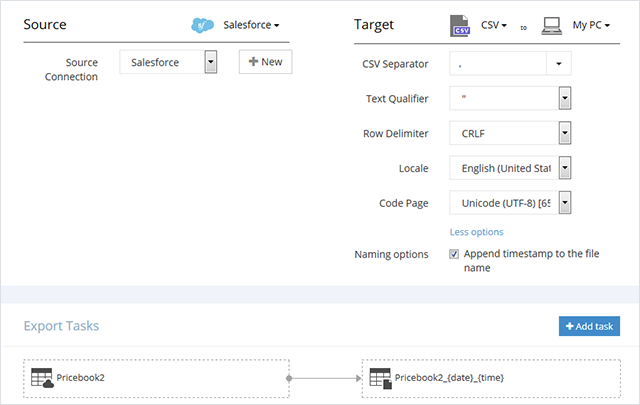  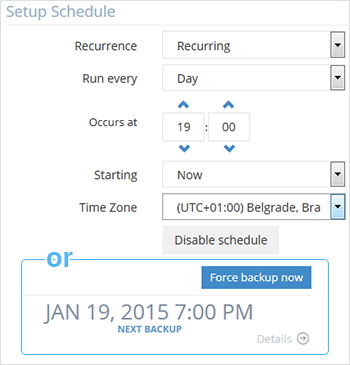  |



