TrustRadius: an HG Insights company

Save this comparison

Save this comparison

Add Product

Recommended Comparisons

    Overview
    ProductRatingMost Used ByProduct SummaryStarting Price

    Autodesk Forma Build

    Score9.6 out of 10
    N/AAutodesk Forma Build, previously known as Autodesk Build and originally based on PlanGrid, is a Construction Management and Job Site Management application within the Autodesk Forma suite. It provides contractors, owners, and subcontractors with a unified platform for project collaboration and information management across the construction and operations lifecycle.

    $100

    per month

    ZBrush

    Score9.6 out of 10
    N/APixologic in Los Angeles offers ZBrush, a digital sculpting and painting program for the 3D industry. Built within its interface, ZBrush offers tools for digital artists with an arsenal of features that have been developed with usability in mind, to create a user experience designed to feel natural while simultaneously inspiring the artist. With the ability to sculpt up to a billion polygons, ZBrush allows users to create almost limitless models.

    $39.95

    per month

    Pricing
    Autodesk Forma BuildZBrush
    Editions & Modules
    Forma Build Essentials
    $100
    per month for a single user
    Forma Build
    $175
    per month per user
    Individual
    $39.95
    per month
    Individual
    $179.95
    per 6 months
    Individual
    $895.00
    perpetual license
    Companies & Students
    price varies
    floating perpetual license
    Companies & Students
    price varies
    academic perpetual license
    Offerings
    Pricing Offerings
    Autodesk Forma BuildZBrush
    Free Trial
    YesNo
    Free/Freemium Version
    NoNo
    Premium Consulting/Integration Services
    YesNo
    Entry-level Setup FeeNo setup feeNo setup fee
    Additional Details$800 / year for 1 user when billed annually.—
    More Pricing Information
    Community Pulse
    Autodesk Forma BuildZBrush
    Considered Both Products
    Autodesk
    No answer on this topic
    Pixologic
    No answer on this topic
    Key User Insights
    Would buy again
    80%
    Would buy again
    4 Answers
    No answers on this topic
    Delivers good value for the price
    No answers on this topic
    No answers on this topic
    Happy with the feature set
    80%
    Happy with the feature set
    4 Answers
    No answers on this topic
    Lived up to sales and marketing promises
    No answers on this topic
    No answers on this topic
    Implementation went as expected
    No answers on this topic
    No answers on this topic
    Features
    Autodesk Forma BuildZBrush
    Reporting & Analytics
    Comparison of Reporting & Analytics features of Autodesk Forma Build and ZBrush
    Feature
    Autodesk Forma Build
    8.5
    1 Ratings
    10% above category average
    ZBrush
    -
    Ratings
    Dashboards7.01 Ratings00 Ratings
    Standard reports9.01 Ratings00 Ratings
    Custom reports9.01 Ratings00 Ratings
    Data exportability9.01 Ratings00 Ratings
    Construction Project & Field Management
    Comparison of Construction Project & Field Management features of Autodesk Forma Build and ZBrush
    Feature
    Autodesk Forma Build
    8.0
    60 Ratings
    4% above category average
    ZBrush
    -
    Ratings
    Plan distribution & viewing8.059 Ratings00 Ratings
    Plan markups & sharing7.059 Ratings00 Ratings
    Issue tracking & punchlists9.454 Ratings00 Ratings
    Photo documentation7.051 Ratings00 Ratings
    Jobsite reports6.539 Ratings00 Ratings
    Document sharing9.058 Ratings00 Ratings
    RFI tools9.441 Ratings00 Ratings
    Collaboration & approvals9.545 Ratings00 Ratings
    As-built drawings5.545 Ratings00 Ratings
    Mobile app7.057 Ratings00 Ratings
    Submittal design and management8.52 Ratings00 Ratings
    Checklists8.02 Ratings00 Ratings
    Meeting Minutes10.02 Ratings00 Ratings
    Specifications6.52 Ratings00 Ratings
    Change orders8.52 Ratings00 Ratings
    Best Alternatives
    Autodesk Forma BuildZBrush
    Small Businesses
    Autodesk Forma Design Collaborate
    Score8.3 out of 10
    Autodesk Maya
    Score8.4 out of 10
    Medium-sized Companies
    Bluebeam
    Score8.8 out of 10
    Navisworks
    Score9 out of 10
    Enterprises
    Revit
    Score8.9 out of 10
    Navisworks
    Score9 out of 10
    All AlternativesView all alternativesView all alternatives
    User Ratings
    Autodesk Forma BuildZBrush
    Likelihood to Recommend
    9.9
    (73 ratings)
    8.4
    (3 ratings)
    Likelihood to Renew
    10.0
    (1 ratings)
    -
    (0 ratings)
    Usability
    9.8
    (5 ratings)
    -
    (0 ratings)
    Support Rating
    9.0
    (52 ratings)
    -
    (0 ratings)
    User Testimonials
    Autodesk Forma BuildZBrush
    Likelihood to Recommend
    Autodesk
    Well Suited: Autodesk Construction Cloud is cost effective, user friendly, and robust. They aren't nickel and diming you for use of each module. Once users are on-board with the system it creates an ecosystem that all users "go to first" for an answer. Less Appropriate: As a Developer, there are some hiccups as it is designed more for the GC (general contractor). A template option that is Developer forward would an improvement.
    Incentivized
    Read full review
    Pixologic
    Blender is still behind Zbrush when it comes to production quality. But ZBrush is a bit on the expensive side. But again, I've used it for 20 years. So the $100s of spent back then have paid off many times over by now. Just something to consider when purchasing, though.
    Incentivized
    Read full review
    Pros
    Autodesk
    • The user interface is extremely easy to use for both the advanced and not-so-advanced computer users. This is huge in an industry that has a high diversity of computer skills among end-users of technology.
    • Rendering speed of documents is extremely quick on every device/platform.
    • The application can be used on every platform from Windows/iOS/Andriod (mobile or desktop) as well as the web, without diluting platform features.
    • The ability to import 3D models and maintain accompanying metadata is extremely beneficial.
    Incentivized
    Read full review
    Pixologic
    • Intuitive UI design.
    • Advanced sculpting capabilities.
    • Integration with other 3D software.
    Incentivized
    Read full review
    Cons
    Autodesk
    • Plangrid is in the process of adding enhanced construction documentation such as better Submittal, RFI, and Field Reporting modules, but the ones in place right now will not be up to par for some people used to more full-featured applications such as Sage or Procore.
    • Like other SaaS Construction applications, Plangrid is very expensive. Too expensive in my opinion. They should find ways to offer more tiers of cost so smaller companies can use the application is a limited manner and not have to pay the same cost as the larger companies which may get more use out of advanced features.
    • On the same theme of cost, many of Plangrids collaboration features require all collaborators to have a license. Try telling all 30 subs on your project that they have to run out and pay an extra $50-$100/MO per employee to collaborate with you. Does not always go over well.
    • Plangrids Field Report, Submittal and RFI modules are still a bit of a work in progress.
    Incentivized
    Read full review
    Pixologic
    • Difficult and messy UI
    • Not well-suited for renders
    • Not suitable for animation and rigging
    • Expensive
    Incentivized
    Read full review
    Likelihood to Renew
    Autodesk
    We are at the point where we have shown our teams what is possible with this software. We cannot take it away and go back to the way we used to do things. I think that they would push back on us to give them access to something electronic. It is a good program that we will continue to use
    Incentivized
    Read full review
    Pixologic
    No answers on this topic
    Usability
    Autodesk
    Because it is very user friendly and it also adapts the software to the device... For example , iPads are more Superintendent friendly and the desktop version is more useful for PM and Project Engineers. I also like that theres versions of the software that are on our desktop or ipad, so when we have a network failure we are still able to do the majority of our work
    Incentivized
    Read full review
    Pixologic
    No answers on this topic
    Support Rating
    Autodesk
    I haven't used PlanGrid support much, because I'm getting used to it. But the few times I have, they seem very good. A rep has reached out to me for help, scheduling a demo, etc. Once I get my team on board to buy the software we will use the video and web demos more often and I'd imagine they could be quite useful.
    Incentivized
    Read full review
    Pixologic
    No answers on this topic
    Alternatives Considered
    Autodesk
    Plangrid, while not serving the external document distribution function, is unrivaled for internal document distribution and sharing in the construction industry. The speed at which documents are navigatable, the ability to download your projects for viewing without an internet connection, and the document mark-up and photo tools place it head and shoulders above the competition.
    Incentivized
    Read full review
    Pixologic
    Even though it's 4x as old, ZBrush is still better in my opinion. Plus, I'm just so used to it by now after 20 years. Blender will indeed become better over time and the leading industry standard soon, but for now, ZBrush is still better for me for sure. Love it!
    Incentivized
    Read full review
    Return on Investment
    Autodesk
    • It helped us "wow" a joint commission survey in 2016 and have a successful survey because he loved how we could access plans on an iPad, check suite sizes, and didn't have to carry around huge, heavy sets of life safety plans.
    Incentivized
    Read full review
    Pixologic
    • a single tool to quickly and effectively create 3D objects.
    • Highly detailed 3D models allow us to create a range of highly detailed NFT 3D art collections for our clients.
    • Setting up licenses across an entire team can become costly.
    Incentivized
    Read full review
    ScreenShots

    Autodesk Forma Build Screenshots

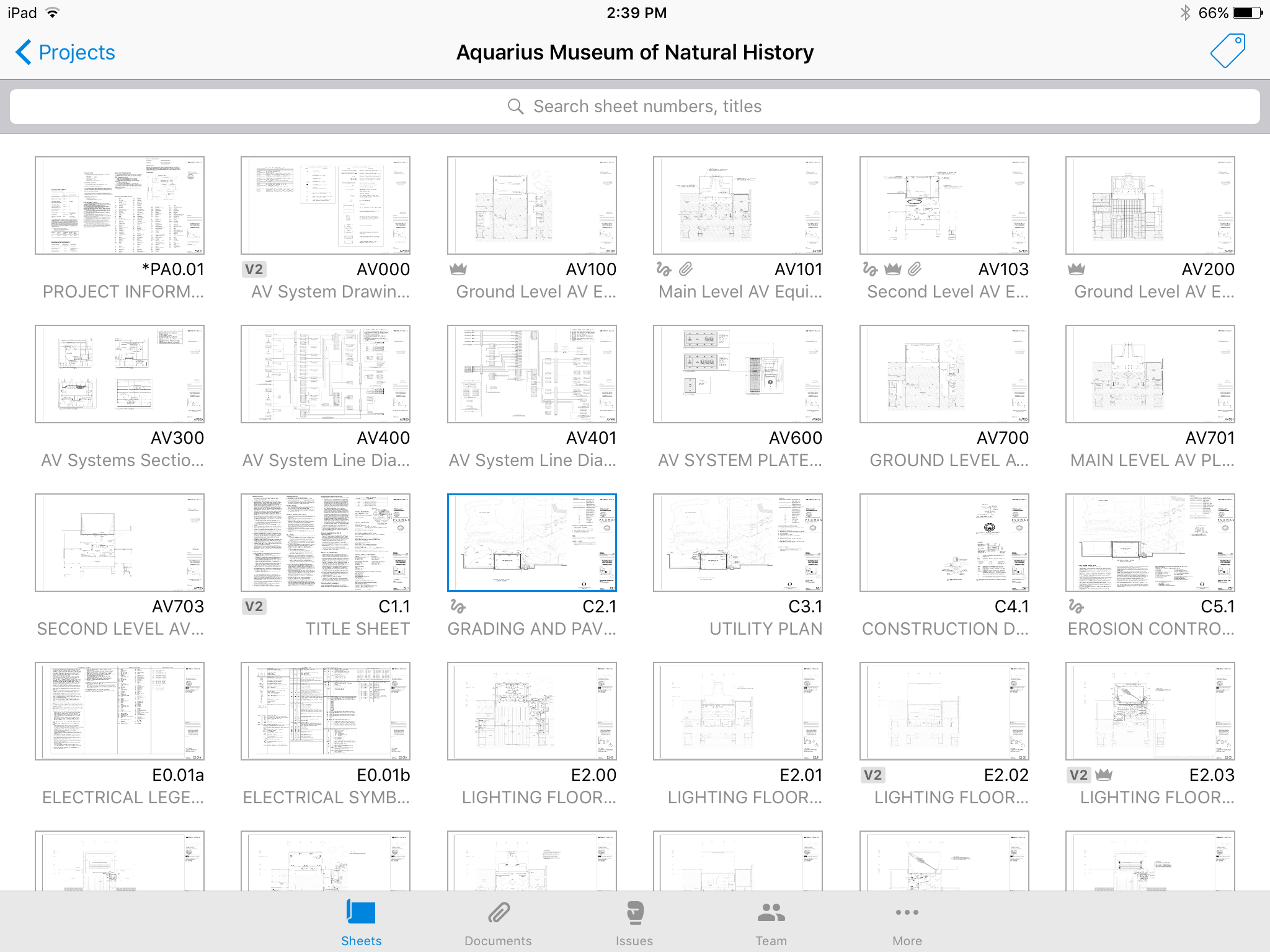
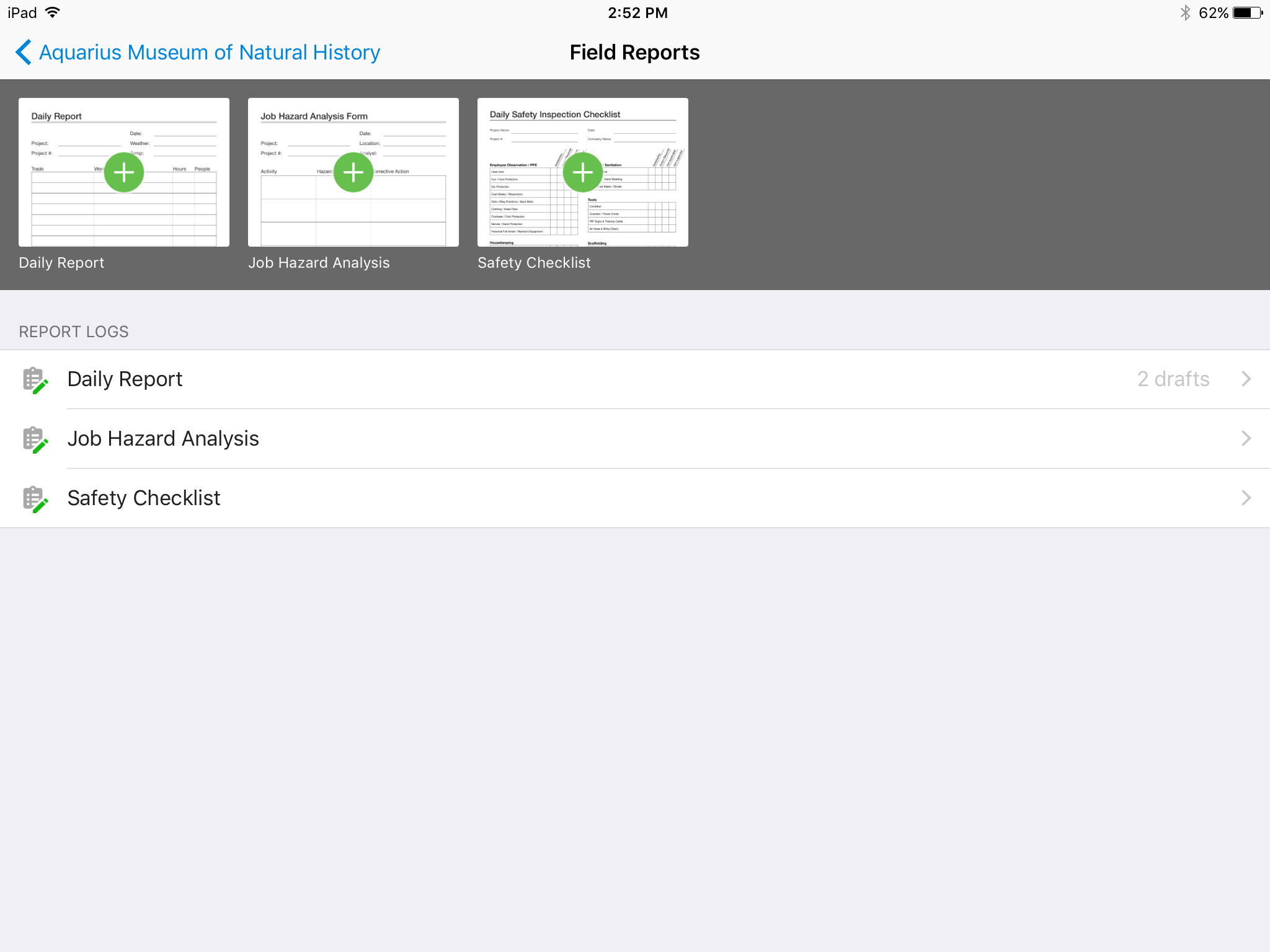
    Screenshot of No confusing folders - all your plans at your fingertips.Screenshot of Easy overlay to visually detect changes or clashes.Screenshot of Track issues directly on the plan, including descriptions, photos, cost, and schedule impacts.Screenshot of Mark up plans for instant communication between field and office.Screenshot of Attach any kind of construction documents to your plans, including 360 photos.Screenshot of Track, review, and submit all your field reports on a mobile device.