Microsoft's Azure Network Watcher monitors, diagnoses, and provides insights into network performance and health.
N/A
SolarWinds Engineer's Toolset
Score 7.7 out of 10
N/A
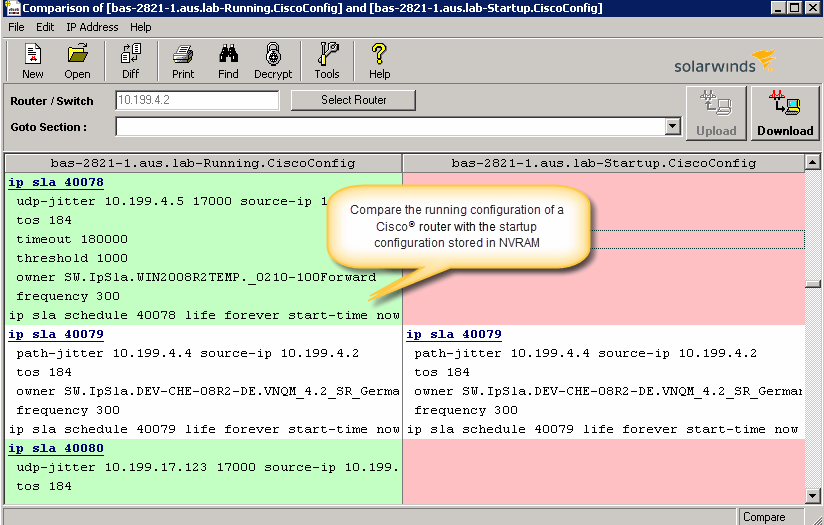
SolarWinds® Engineer’s Toolset (ETS) helps users monitor and troubleshoot a network with over 60 tools for network management. ETS allows users to monitor and receive alerts in real time on network availability and health, and perform network diagnostics for faster troubleshooting and resolution of complex
network issues. With ETS users can deploy an array of network discovery tools including Port Scanner, Switch Port Mapper or advanced Subnet Calculator, manage Cisco®
devices with specialized…
I really have not experiences with Solarwinds in the Azure Public Cloud. I would believe Solarwinds would have a good product in comparison. However with my experiences with Azure Tools, I do not think I would be inclined to go that route unless a reason presents itself. I am …
Azure Network Watcher can help with resources in the Cloud if this device is able to send traffic. We are using Azure Network Watcher in cases Solarwinds can't cover easily like API to load balancers & additional testing.
Azure Network watcher provides various feature that stacks up against other products such as monitoring which include network monitoring and connection monitoring etc. Diagnostic feature which includes connection troubleshoot, VPN troubleshoot etc. Logging feature which …
Azure Network Watcher is built into Azure and is much more powerful, less expensive. Microsoft is investing heavily in its cloud solutions and cloud service, Microsoft is always becoming a leader in this area. The strong integration and ease of use via blades from the azure …
I haven't compared any tools similar to SolarWinds Engineer's Toolset. This might be because I'm pretty biased when it comes to monitoring, and reporting solutions. I've found that SolarWinds provides the biggest bang for the buck in my opinion. I'm sure there are other …
We honestly didn't look at much beyond this because of all of the tools this toolset had in it. We found a use for a good chunk of them right away, and are finding more every month it seems like. We really wanted to make use of the majority of the tools included so we could …
To be honest, I'm not aware of any other toolset from a competitor that is remotely comparable. All other monitoring systems/vendors tend to use standard browser viewable monitoring systems and the option to use a locally installed software, to obtain the same results is not …
We have used LogicMonitor, PRTG and WhatsUp Gold previously which are similar to SolarWinds Engineer's Toolset capability. However SolarWinds Engineer's Toolset is completely unique with features like - Realtime monitoring, diagnostics on the fly, network discovery, easy …
These tools complement the Engineer's Toolset. They are excellent at detecting most issues and at keeping the network monitored and protected. However, when it comes time to dig into an issue, especially a hard to fix intermittent issue, these products lack the granularity of …
I love the NPM package, but if you are doing one-off monitoring to diagnose, SolarWinds Engineer's Toolset is more than adequate. The main drawback with SolarWinds Engineer's Toolset is the monitoring is only valid as long as you have the laptop on (obviously). NPM provides for …
Because it's a great tool. Very useful, convenient and reliant, We use it to monitor out production servers and it works just great. I use it pretty much every day, and it is very good monitoring system, that allows proactively troubleshoot certain areas, because you can see …
SolarWinds NPM and NCM use a lot of the tools available in the toolset. This is a nice combo of the two with a little bit of IPAM thrown in. I would say the toolset is geared more toward the field engineer, that will be doing work that may sever communications to the rest of …
Azure Network Watcher is well-suited for cloud environment, it's necessary for the network troubleshooting. It is especially useful in where you have done integration with azure virtual wan and custom routes (udr) to control traffic in a hub & spoke network with Azure firewall. When the traffic is manipulated with udr, the troubleshooting at the routing level becomes important in some cases.
[SolarWinds Engineer's Toolset is] a great tool for monitoring database servers, highly recommended. The very good thing is that it keeps the history for two weeks, and you can see the time slice for all the server activities. Helps a lot to identify the memory and CPU bottlenecks, research blocking issues and kill the sessions, if necessary.
The unifying component that is intended to be the initial interface to the tools seems clunky. I prefer to start the tools individually rather than using it.
The port scanner could use some improvements to make it easier to use.
Azure Network watcher provides various feature that stacks up against other products such as monitoring which include network monitoring and connection monitoring etc. Diagnostic feature which includes connection troubleshoot, VPN troubleshoot etc. Logging feature which includes network traffic analysis and helps in understanding network traffic more efficiently. All these features in azure network watcher make it worth.
These tools complement the Engineer's Toolset. They are excellent at detecting most issues and at keeping the network monitored and protected. However, when it comes time to dig into an issue, especially a hard to fix intermittent issue, these products lack the granularity of monitoring needed for these types of issues. Having said that the toolset is not made to do full time enterprise level monitoring. With these tools and the toolset I am able to have a more complete view of the network and deliver higher levels of service and quicker responses to issues.