BoldSign, by Syncfusion® vs. RSign

Overview
ProductRatingMost Used ByProduct SummaryStarting Price
BoldSign, by Syncfusion®
Score 10.0 out of 10
N/A
BoldSign is an e-signature solution that enables users to send documents out for legally binding signatures. Users can save frequently used contracts as custom-branded templates, track and follow up, and manage complex sequences. BoldSign also provides an API for integrating e-signatures into one's own applications.
$0
per month per user
RSign
Score 9.0 out of 10
N/A
RSign, from RPost headquartered in Los Angeles, is presented as an E-Signature solution that the vendor describes as simple but feature-rich, elegantly easy, and affordable.
$7
per month per user
Pricing
BoldSign, by Syncfusion®RSign
Editions & Modules
Essentials
$0
per month 1 sender
Growth
$5
per-month, billed annually. Monthly billing option also available. 1 Sender. Price shown is the per-month cost when annual billing is selected.
Business
$15
per-month, billed annually. Monthly billing option also available. 1 Sender. Price indicated is the per-month cost when annual billing is selected.
Enterprise API
$30
per month. $0.75 per signature request (40 signature requests included in base plan)
Premium
$99
per-month, billed annually. Monthly billing option also available. Includes unlimited senders.
Custom Plan
Custom Pricing
RSign Personal
$7.00
per month per user
RSign Standard
$15.00
per month per user
Offerings
Pricing Offerings
BoldSign, by Syncfusion®RSign
Free Trial
YesYes
Free/Freemium Version
YesNo
Premium Consulting/Integration Services
NoYes
Entry-level Setup FeeNo setup feeNo setup fee
Additional DetailsMonthly and annual options. In addition to BoldSign's web app options, API plans are also available. A free sandbox is available that allows you to integrate BoldSign into an application in a testing environment.Contact Sales for API & Custom Integrations.
More Pricing Information
Community Pulse
BoldSign, by Syncfusion®RSign
Best Alternatives
BoldSign, by Syncfusion®RSign
Small Businesses
Foxit eSign
Foxit eSign
Score 9.0 out of 10
Foxit eSign
Foxit eSign
Score 9.0 out of 10
Medium-sized Companies
MSB Docs
MSB Docs
Score 9.4 out of 10
MSB Docs
MSB Docs
Score 9.4 out of 10
Enterprises
DocuSign
DocuSign
Score 8.7 out of 10
DocuSign
DocuSign
Score 8.7 out of 10
All AlternativesView all alternativesView all alternatives
User Ratings
BoldSign, by Syncfusion®RSign
Likelihood to Recommend
10.0
(20 ratings)
10.0
(7 ratings)
Likelihood to Renew
7.3
(1 ratings)
-
(0 ratings)
Usability
10.0
(14 ratings)
-
(0 ratings)
Availability
7.3
(1 ratings)
-
(0 ratings)
Performance
7.3
(1 ratings)
-
(0 ratings)
Support Rating
9.1
(2 ratings)
-
(0 ratings)
Implementation Rating
7.3
(1 ratings)
-
(0 ratings)
Configurability
7.3
(1 ratings)
-
(0 ratings)
Contract Terms and Pricing Model
7.3
(1 ratings)
-
(0 ratings)
Product Scalability
7.3
(1 ratings)
-
(0 ratings)
Vendor post-sale
7.3
(1 ratings)
-
(0 ratings)
Vendor pre-sale
8.2
(1 ratings)
-
(0 ratings)
User Testimonials
BoldSign, by Syncfusion®RSign
Likelihood to Recommend
Syncfusion
BoldSign is perfect for the small business or startup that needs a legally-binding solution to digitally sign contracts/agreements between 2 parties or more. It's no frills and super easy to use, and requires no training to understand how to use. BoldSign is less appropriate for organisations that require complex integrations and automation capabilities for their digital signature solution.
Read full review
RPost
RSign is really useful in organizations where many different kinds of forms and applications for signature have to be sent to customers. In the industry where signature time stamp is important.
Read full review
Pros
Syncfusion
  • BoldSign was incredibly easy to pickup and start using. The UX was very intuitive and required no training or guidance.
  • BoldSign's signed contracts repository is a very easy-to-access and navigate system to store and access all our signed documents.
  • BoldSign customer support has always been incredibly responsive and helpful.
Read full review
RPost
  • Making documents that we require use as templates and reuse them with rules.
  • Streamlined the process of esigning when multiple people are involved.
  • Pre-fill, back-fill removed manual work & human error
Read full review
Cons
Syncfusion
  • It would be great if BoldSign saved my signature in my account to use each time
  • It might be easier if you could select signature (or any heading for that matter) and click where you want it instead of dragging it to where you want it.
  • It would be nice if completed document’s automatically saved to a selected folder for safe keeping.
Read full review
RPost
  • The most useful feature would be if we were able to type within the forms/applications that we upload to RSign to be sent for signature.
Read full review
Likelihood to Renew
Syncfusion
Great product. Great price. Free for up to 25 signatures for one persons account. Having a group using it under one account is even a great price. Much cheaper than all the alternatives out there and does the same stuff the others do
Read full review
RPost
No answers on this topic
Usability
Syncfusion
Very straight forward to use and customers understand the service. No questions or need for me to explain. The free tier is amazing and has locked me in as a customer for when we're big enough to need the paid version.
Read full review
RPost
No answers on this topic
Reliability and Availability
Syncfusion
No issues to date.
Read full review
RPost
No answers on this topic
Performance
Syncfusion
No issues with performance.
Read full review
RPost
No answers on this topic
Support Rating
Syncfusion
At the beginning I had a question so I emailed them. Response was super quick. Other then that I have not had to contact them for any help. System is easy to use
Read full review
RPost
No answers on this topic
Implementation Rating
Syncfusion
Very easy...I was able to start using it immediately.
Read full review
RPost
No answers on this topic
Alternatives Considered
Syncfusion
The price-performance ratio is better with BoldSign. If I want to scale up to the next level and then go back, I can do it easily with BoldSign, unlike Adobe, for example. If you want to try another application, that's fine. They all do the same thing. In my experience, the ease of use, sourcing and functionality was perfect with BoldSign.
Read full review
RPost
Honestly I thought DocuSign would have more advantages because I usually think "Most expensive" equals "The best", but DocuSign was very hard to adopt for my business, the interface was packed and messy, full of stuff that not intuitive to learn. And I couldn't get ANY support at all. So we ended up looking for another software and my colleagues recommended RSign. I didn't personally try any other softwares, but my colleagues switched from HelloSign and from PandaDoc to RSign because of similar reasons.
Read full review
Contract Terms and Pricing Model
Syncfusion
No changes necessary.
Read full review
RPost
No answers on this topic
Scalability
Syncfusion
Not sure as I don't have a need to scale.
Read full review
RPost
No answers on this topic
Return on Investment
Syncfusion
  • So far I have only used the free version
  • I am sure that the paid version would be extremely beneficial if you did a bunch of contracts. I just started using the program, so not too many contracts yet. If I need to upgrade my subscription, the price will be well worth it.
Read full review
RPost
  • RSign has had tremendous ROI for us. We don't have to print the forms to be sent to customer for signature.
  • Huge time savings
  • No paper printing. Very environment friendly application
Read full review
ScreenShots

BoldSign, by Syncfusion® Screenshots

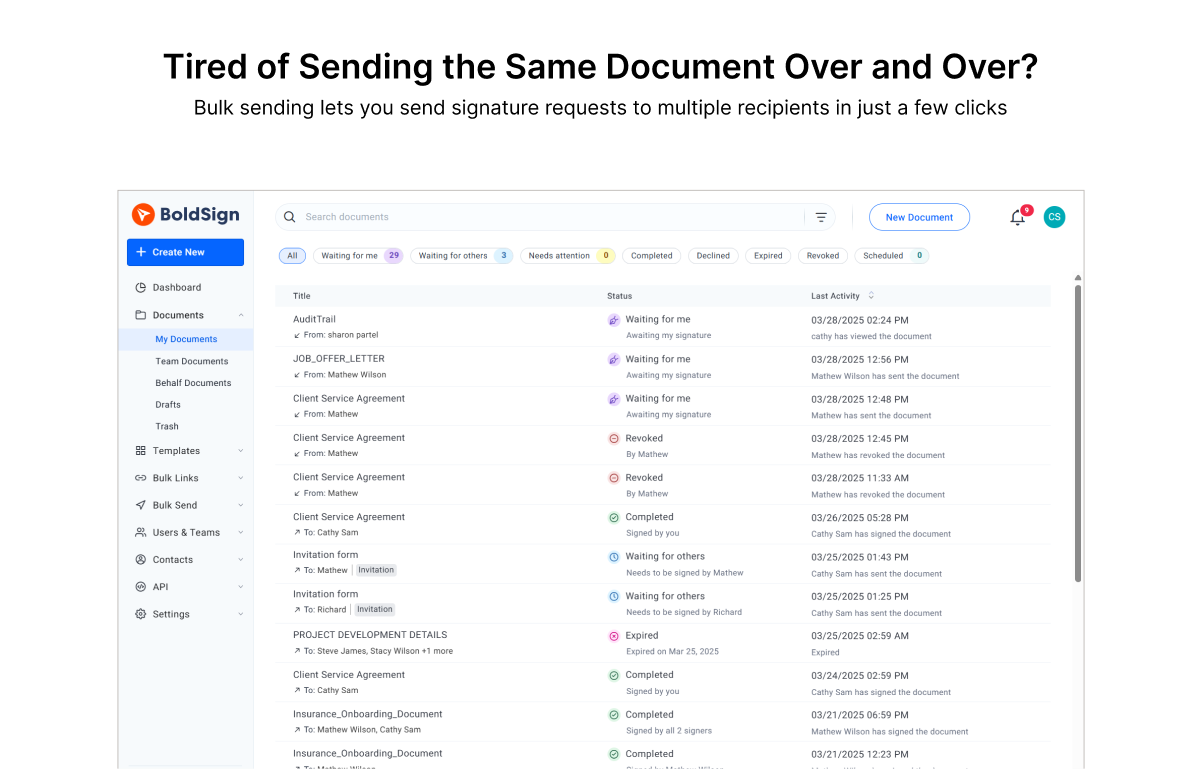
Screenshot of the bulk sending feature, that lets users send signature requests to multiple recipients in just a few clicks.Screenshot of the bulk sending feature, that lets users send signature requests to multiple recipients in just a few clicks.Screenshot of the bulk sending feature, that lets users send signature requests to multiple recipients in just a few clicks.

RSign Screenshots

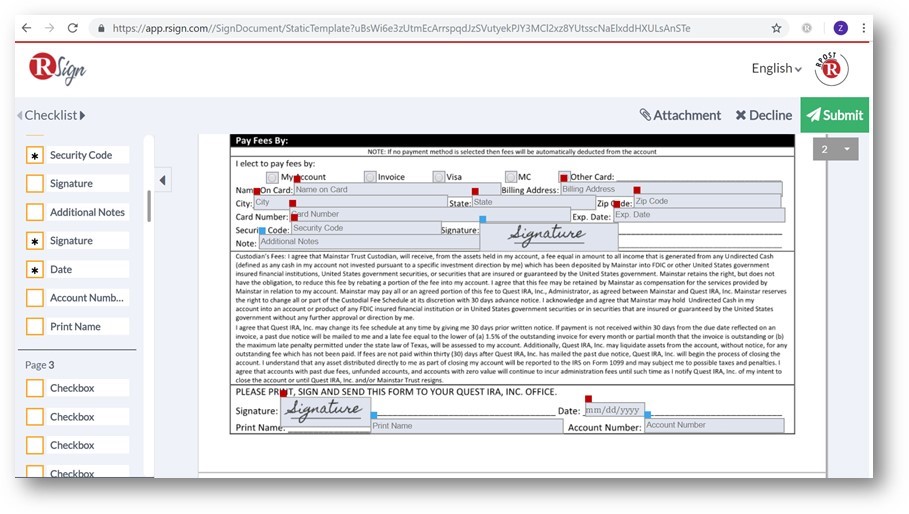
Screenshot of RSign EnvelopeScreenshot of RSign eSignatures requestScreenshot of RSign eSignatures PrepareScreenshot of RSign Prepare & SendScreenshot of RSign Sending SettingsScreenshot of RSign Sign Document