BQE CORE vs. Planview AgilePlace

Overview
ProductRatingMost Used ByProduct SummaryStarting Price
BQE CORE
Score 8.8 out of 10
Small Businesses (1-50 employees)
BQE CORE is a business management solution built specifically for professional service firms. BQE CORE is a combination of a billing assistant, project management, and accounting solution. CORE is designed to do the hard work of delivering actionable insights directly to the user's dashboards or inbox. BQE CORE replaces the products Engineeroffice, Archioffice, and BillQuick; the functionality of these applications is now found in BQE CORE.N/A
Planview AgilePlace
Score 8.0 out of 10
N/A
AgilePlace is a project management solution built around flexibility, data-driven analytics, and workflow automation. The software was acquired by Planview in December 2017 to expand that company's capabilities.
$19
per user, per month
Pricing
BQE COREPlanview AgilePlace
Editions & Modules
No answers on this topic
Teams
$19
per user, per month
Scaled Teams
$29
per user, per month
Custom
Contact Sales for Quote
per user, per month
Offerings
Pricing Offerings
BQE COREPlanview AgilePlace
Free Trial
YesYes
Free/Freemium Version
NoNo
Premium Consulting/Integration Services
NoNo
Entry-level Setup FeeNo setup feeNo setup fee
Additional DetailsAll editions include unlimited boards.
More Pricing Information
Community Pulse
BQE COREPlanview AgilePlace
Considered Both Products
BQE CORE
Chose BQE CORE
Toms Planner gant charts are very easy to navigate and edit.
Chose BQE CORE
I previously used Gusto for both benefits / employee details and also time tracking. It was really nice to have everything in one place, and Gusto felt very simple. However, it did not have as many broken down categories for time allotment. Harvest felt similar to Gusto, and it …
Chose BQE CORE
It helps and have a great impact on It employees like me to track and submit my timesheet to my managers and higher officials and make a note that I have spend my working house valuable and resourceful and the managers can take a look at what have I done in my working hours
Chose BQE CORE
our team uses both the platforms and does not tie very well. bamboo does have a more pleasant to the eye interface comparatively. it is also a bit easier to navigate and not have to click too many times to reach any particular information on bamboo. BQE CORE does do visuals of …
Chose BQE CORE
BQE CORE combined numerous products for us. It allows everything to be in one place which cuts down on the back and forth, as well as user error.
Chose BQE CORE
It was an admin desiring to switch. However CORE is easy to manage and calculate timesheet automatic with timer future. In addition I believe the admin stag like the billing aimless function and multiple additional future that monograph does not have. Without mentioning that …
Chose BQE CORE
BQE has more visual tools for determining billable hours and for tracking hours against a project. BQE has a better system for involving employee and simpler methods of tracking expenses.
Chose BQE CORE
Monograph did not allow exporting/importing of data nor did they offer integration with Quickbooks Desktop
Chose BQE CORE
Again, since I'm only an employee, I had no part in choosing BQE for my organization. But it is the best timesheet tracking system that I've used, and I've used 3 other ones in the past. BQE is the simplest to use, yet equally as powerful as the others. When editing my …
Chose BQE CORE
It’s the best program I have used to date! It was selected for me through my company.
Chose BQE CORE
They aren't used for the same thing so not able to compare.
Chose BQE CORE
Not used any other software than accounting. This is much easier for my staff to use because it's not a straight up accounting software.
Chose BQE CORE
I didn't take part in selecting BQE CORE; however, our CEO chose it because of its ability to help with invoicing and incorporating other software into the program such as Gantt charts. I like BQE CORE better than BillQuick because it is more user friendly and also displays the …
Chose BQE CORE
BQE CORE has a much more streamlined process for entering expense entries than Concur. You are able to select which project you would like to charge to and where expense entries are sent for approval, whether that be your manager or the project manager. BQE CORE also is very …
Chose BQE CORE
I have only really used this product.
Chose BQE CORE
BQE CORE is much more in-depth at time tracking than Harvest. Harvest is easier to use out of the gate but BQE CORE is worth the learning curve. I haven't had a chance to use BQE CORE on a mobile device so I can't speak to how it stacks up there against Harvest.
Chose BQE CORE
I don't recall the previous program we used as this was years ago, but we had to put in time manually each week and this was very time consuming. BQE CORE keeps your projects in the timesheet from week to week to you don't have to reinput the project number.
Planview AgilePlace
Chose Planview AgilePlace
AgilePlace is better than JIRA when it comes to ease of use and intuitiveness of the tool. Card based model and ability to customize/tailor the way you want makes AgilePlace is a great tool. Look and feel as well as colored cards, makes the board layout much more easier to …
Chose Planview AgilePlace
All these tools are different and have different uses. Depending upon SDLC your organization uses, you would use any of these tools. They all have their plusses and minuses.
Chose Planview AgilePlace
We use both tools together as they have different benefits and provide value in various ways.
Chose Planview AgilePlace
I personally much prefer AgilePlace over Jira. It is much easier to organize your work and keep track of a wide variety of different types of work.
Chose Planview AgilePlace
Another poorly designed question that forces me to choose a random response from the list of products, in order to allow me to move on in this survey.
Chose Planview AgilePlace
Much easier to use for simple projects.
Chose Planview AgilePlace
Originally, we had evaluated two other tools next to Planview LeanKit: Kanbantool and Kanbanflow. The latter was a close contestant for productive use, as it was also very customizable and a joy to work with and look at. It also had lower user fees and a mobile integration.

In …
Chose Planview AgilePlace
I use Trello a bit for personal use. It's much less powerful than LeanKit, but it's also a better design and simpler to use. ServiceNow has some kanban board stuff built-in, but I wasn't super impressed with it. JIRA seemed to be even more complex than LeanKit for the short …
Chose Planview AgilePlace
LeanKit functionality and usability make it a perfect tool for agile project management.
Chose Planview AgilePlace
LeanKit seems to be more baked and more mature. The others listed are a little more siloed.
Chose Planview AgilePlace
I think that LeanKit is very similar to Asana's Kanban feature and Trello, but is much less sleek looking than Asana. Asana's clean and sleek UI makes me enjoy project management much more than LeanKit. It might sound silly that the UI makes so much of a difference to me, but …
Chose Planview AgilePlace
Leankit was already in use when I joined the organization.
Chose Planview AgilePlace
Our company uses LeanKit, Pivotal Tracker, and Trello. It all depends on what team you're on. There's even a team that just does KanBan on a whiteboard. In the end, I would tank LeanKit above Pivotal Tracker, but below Trello. The differences are relatively subtle between …
Chose Planview AgilePlace
Both VersionOne and Trello are good products. VersionOne is for the real hardcore Agile shops who want to track and report on everything related to the Agile process. Trello is a tool that works for Agile, but really is just a simple list making/tracking tool. Both tools serve …
Chose Planview AgilePlace
[We selected LeanKit over alternatives because it is an] All in one solution.
Chose Planview AgilePlace
I have used Trello, which is not as robust for tracking and customizing workflows as
LeanKit is. It does not scale well to big teams. JIRA is the standard project management software but does not support Kanban well.
Chose Planview AgilePlace
Nearly all the other tools I evaluated against are free, so that's one area where LeanKit is not as competitive. LeanKit does allow the experience to be much more customizable, though.
Chose Planview AgilePlace
Being from QA I prefer Spiratest and QC for the fact my team can do all our work in one program and it is linked. But the tech department as a whole prefers Leankit as it is the tool of choice based on ease of use and overall performance.
Chose Planview AgilePlace
While LeanKit was not designed for project and task management, we selected it because of its collaborative nature as a project and task management platform for our marketing team. It was also selected because our engineering and product management teams were using Leankit. We …
Features
BQE COREPlanview AgilePlace
Project Management
Comparison of Project Management features of Product A and Product B
BQE CORE
8.1
Ratings
5% above category average
Planview AgilePlace
7.4
Ratings
1% below category average
Task Management9.40 Ratings10.00 Ratings
Resource Management9.00 Ratings9.90 Ratings
Gantt Charts9.30 Ratings10.00 Ratings
Scheduling9.00 Ratings9.90 Ratings
Workflow Automation8.10 Ratings00 Ratings
Team Collaboration6.90 Ratings00 Ratings
Support for Agile Methodology7.40 Ratings9.30 Ratings
Support for Waterfall Methodology4.60 Ratings4.00 Ratings
Document Management8.70 Ratings6.50 Ratings
Email integration6.30 Ratings7.30 Ratings
Mobile Access7.80 Ratings2.10 Ratings
Timesheet Tracking9.70 Ratings6.40 Ratings
Change request and Case Management8.40 Ratings7.20 Ratings
Budget and Expense Management9.10 Ratings00 Ratings
Visual planning tools00 Ratings7.30 Ratings
Professional Services Automation
Comparison of Professional Services Automation features of Product A and Product B
BQE CORE
8.7
Ratings
12% above category average
Planview AgilePlace
-
Ratings
Quotes/estimates8.40 Ratings00 Ratings
Invoicing8.90 Ratings00 Ratings
Project & financial reporting9.00 Ratings00 Ratings
Integration with accounting software8.40 Ratings00 Ratings
Agile Development
Comparison of Agile Development features of Product A and Product B
BQE CORE
-
Ratings
Planview AgilePlace
8.8
Ratings
12% above category average
DevOps Tool Integrations00 Ratings8.10 Ratings
Dependencies and Blockers00 Ratings9.60 Ratings
Best Alternatives
BQE COREPlanview AgilePlace
Small Businesses
Stackby
Stackby
Score 8.9 out of 10
GitLab
GitLab
Score 8.8 out of 10
Medium-sized Companies
InEight
InEight
Score 8.2 out of 10
GitLab
GitLab
Score 8.8 out of 10
Enterprises
InEight
InEight
Score 8.2 out of 10
GitLab
GitLab
Score 8.8 out of 10
All AlternativesView all alternativesView all alternatives
User Ratings
BQE COREPlanview AgilePlace
Likelihood to Recommend
9.3
(0 ratings)
10.0
(0 ratings)
Likelihood to Renew
7.0
(0 ratings)
8.6
(0 ratings)
Usability
9.5
(0 ratings)
8.2
(0 ratings)
Availability
8.2
(0 ratings)
8.3
(0 ratings)
Performance
7.3
(0 ratings)
8.0
(0 ratings)
Support Rating
7.4
(0 ratings)
10.0
(0 ratings)
Online Training
6.4
(0 ratings)
-
(0 ratings)
Implementation Rating
2.3
(0 ratings)
7.7
(0 ratings)
Configurability
-
(0 ratings)
7.0
(0 ratings)
Ease of integration
4.5
(0 ratings)
8.0
(0 ratings)
Product Scalability
8.2
(0 ratings)
8.0
(0 ratings)
Vendor post-sale
8.2
(0 ratings)
9.3
(0 ratings)
Vendor pre-sale
8.2
(0 ratings)
9.3
(0 ratings)
User Testimonials
BQE COREPlanview AgilePlace
Likelihood to Recommend
I would recommend this for our industry: architecture, engineering, or construction. I would recommend this for any larger firm with many employees or high number of projects. I would particularly recommend this for a company with projects that have budget constraints and where time tracking and expense tracking is very important. I would not recommend this complicated software for a small firm with a small amount of income or number of projects.
Read full review
AgilePlace is a great way for teams, or individuals, to bring visibility to the work in process and in their backlog. The color coding and icon use helps to quickly analyze the type of work or status of the work. The product team is doing a good job at listening to their user's feedback and implementing improvements. Where it falls short is when reporting needs to occur.
Read full review
Pros
  • Invoice Collections within Billing is a great tool because of the ability to take notes and track contact.
  • Invoices are professional looking and easy for our clients to understand the overall progress within each phase of their project.
  • Dashboards are the best tool EVER!
  • The Contact List feature within Clients setup is the perfect way to track multiple project managers within a large company that also has multiple contracts with us.
Read full review
  • Okta Integration: We love using SSO for all our SaaS apps, and as new team members join, they can be automatically joined to the appropriate LeanKit boards.
  • Filtering and viewing: Can filter and refine by several fields as well as custom fields. Assigned Users, Tagged, Card Type, Date, etc
  • Their analytics and reporting can be helpful for PMs, especially if they have several teams they oversee.
Read full review
Cons
  • Customizable Reporting
  • Linking Project to Payment all together
  • Assigning contacts to particular roles - such as Invoicing, Contracts, etc.
  • Accounting Functionality - they are basically a project management accounting software, so in my opinion, they could learn some things from other accounting software such as QuickBooks etc.
Read full review
  • The formatting of what they call "cards" could be better. They can be clunky if you have a lot of text in just one.
  • Needs better support for media, attachments.
  • Not the most pretty interface in my opinion, though it works.
Read full review
Likelihood to Renew
We have been using Core for a few years now, and honestly started to look at other software systems to see what was out there. What we chose was a nightmare for migration so we never left Core. Now we have added invoicing and payments from Core instead of double entry with QBO. Still only a few cycles in but looks like it will be up to speed soon and working smoothly.
Read full review
we are happy with the tool and the service and continuos improvement of the tool so there is no need yet to change to another one.
Read full review
Usability
The foundation is awesome, like I have said before, however the house being built on it, the educational resources being provided to us (more of sales pitches that don't work), and flexible workflow opportunities, is making us look elsewhere for how much we will be spending on per user. It's crazy to think how flexible they are not when it comes to user settings. Lack of integration with other sources is awful.
Read full review
LeanKit isn't the best designed Kanban system I've seen, but overall it's pretty usable. The boards I've used are pretty complex, so it can be difficult to find things. I found that searching and filtering for specific cards was somewhat of a challenge. Dragging a card from one lane to another is kind of a fun way to get things done though.
Read full review
Reliability and Availability
I can only remember a couple of times in 4 years that Core has been unavailable.
Read full review
Not experienced any outage
Read full review
Performance
This is one area that does need some improvement. It can be slow at time, so we had our IT look at it from our side and we had no issues, so it has to be some slowness on their side.
Read full review
Larger boards take longer to load
Read full review
Support Rating
As a new employee and CORE user, I talk to support on a weekly basis. I have never had to wait for more than 3 min to get connect with a support rep, and all my questions have been answered. The support representatives are polite and eager to help no matter how simple your question is.
Read full review
Every time I have reached out to the AgilePlace support team I have received a timely response in addition to professional & personal feedback. Their consultants are knowledgeable and the management team is happy to jump in and help when needed.
Read full review
Online Training
Make sure you have someone training you that fits your style of learning.
Read full review
No answers on this topic
Implementation Rating
wont let me skip
Read full review
Very easy.
Read full review
Alternatives Considered
Deltek Vision is far more advanced, more encompassing and offers more flexibility with what you want to do. However, it's also quite difficult to use, whereas BQE CORE is intuitive and user friendly. The trade off is worth it in some arenas but overall it's not suited for a larger fast paced company. Great for smaller companies.
Read full review
Originally, we had evaluated two other tools next to Planview LeanKit: Kanbantool and Kanbanflow. The latter was a close contestant for productive use, as it was also very customizable and a joy to work with and look at. It also had lower user fees and a mobile integration. In the end, we picked Planview LeanKit because of several reasons: Aesthetics: The look was much more clean and professional. Reporting: It was obvious from the start that we could use Planview LeanKit as a tool for improvement. API: We needed to integrate the Kanban into our central systems and Planview LeanKit API was (and still is) a way to do it. Card Headers: This sounds like a simple thing, but the headers above the titles fit our work perfectly and looked perfect, which helped the decision.
Read full review
Scalability
This software works on a small and large scale.
Read full review
Good use cases for small/large teams
Read full review
Return on Investment
  • Quick setup of new tasks under a parent project, with immediate hourly billing to it.
  • Monitoring of details of non-chargeable efforts in appropriate detail
  • Validation of hourly cost, billing cost, benefit cost, profitability by person and role
  • Company tracking of write-off's included in corporate and project reporting, no data is "lost"
  • Can track excessive work time as +PTO in lieu of pay for use as future vacation
Read full review
  • Our team meetings are more direct and quick to get through thanks to the better visibility of the workload
  • Easily being able to move cards between team lanes gives instant visibility to where the responsibility for the next step is needed.
Read full review
ScreenShots

BQE CORE Screenshots

Screenshot of Core powered by BQE SoftwareScreenshot of BQE CORE Project Dashboard ViewScreenshot of BQE CORE 360* Firm Performance ViewScreenshot of BQE CORE Reporting & AnalyticsScreenshot of BQE CORE Project Time EntryScreenshot of BQE CORE Project Expense Tracking

Planview AgilePlace Screenshots

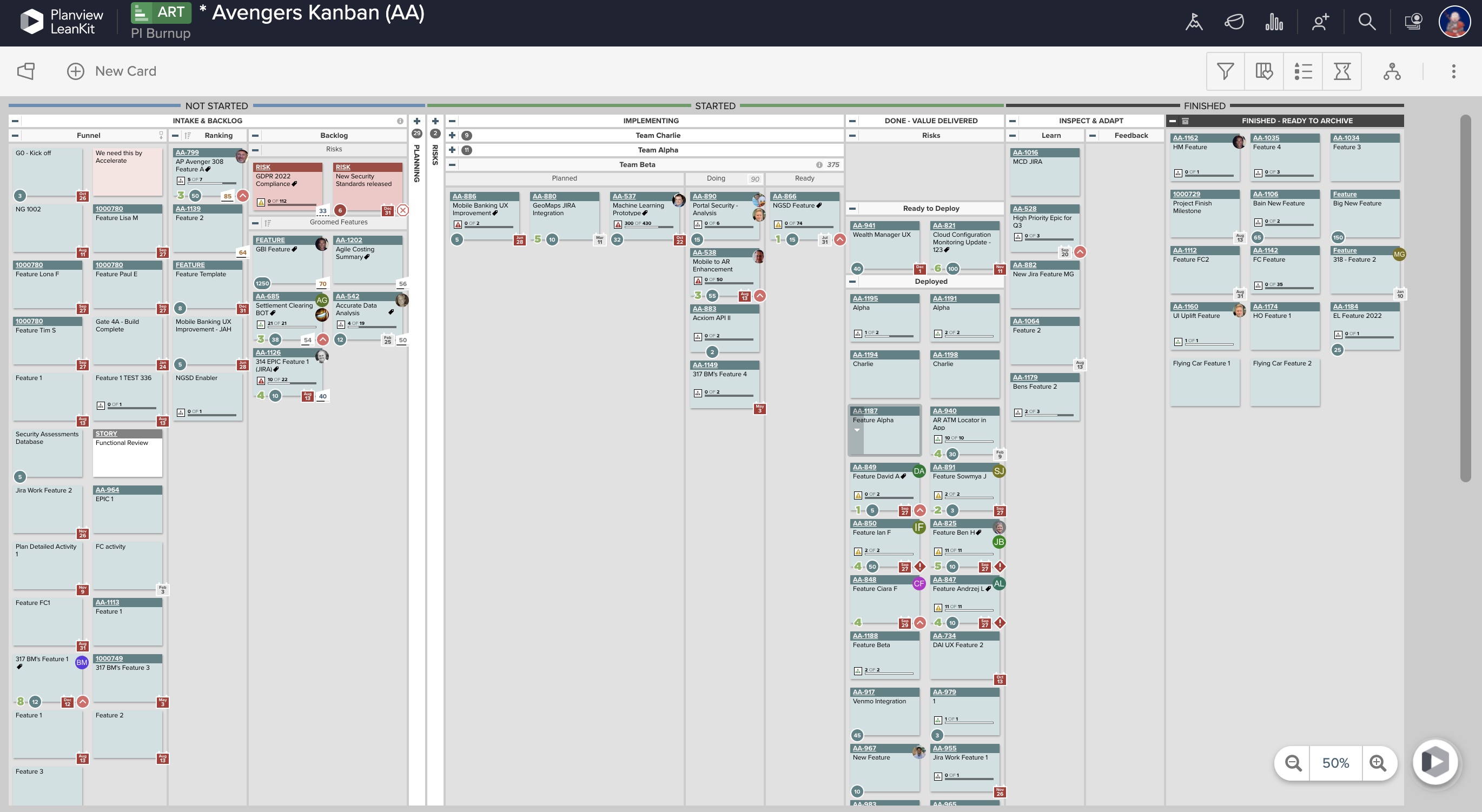
Screenshot of Real-Time Analytics: Utilize board health metrics involving bottlenecks, WIP, and throughput to guide the optimization of workflows, improve velocity, and better prioritize efforts for more predictable delivery. Lean and Agile metrics can be used to assess team performance and promote continuous improvement.Screenshot of PI Planning: Offers enterprise Kanban boards to visualize the work of teams regardless of the methodologies they apply or workflows they follow, and insights into progress and create opportunities for better alignment.Screenshot of Dependency Visualization and Management: Surfaces risks to plans resulting from cross-team dependency conflicts, blockers, and capacity constraints, and helps drive proactive measures to enable teams to deliver on time.Screenshot of Team Planning and Coordination: Boards can be used to breakdown work, build and manage plans, and execute against strategy to deliver more value to customers, faster.