Chose Emburse Chrome River
I don't have any previous experience with similar products.

| Product | Rating | Most Used By | Product Summary | Starting Price |
|---|---|---|---|---|
 Emburse Chrome River | N/A | Chrome River EXPENSE is expense management software, from Chrome River Technologies in Los Angeles, California. | N/A |
| Emburse Chrome River | |||||||||||
|---|---|---|---|---|---|---|---|---|---|---|---|
| Editions & Modules | No answers on this topic | ||||||||||
| Offerings |
| ||||||||||
| Entry-level Setup Fee | No setup fee | ||||||||||
| Additional Details | We offer three cost-effective, subscription-based pricing models: A transaction-based model, priced according to expense report volume A submitter-based model, priced according to an average number of monthly submitters An enterprise-level model that includes unlimited expense reports. Pricing for this model is based on total employee headcount Feel free to contact us to discuss the best one for your organization. | ||||||||||
| More Pricing Information | |||||||||||
| Emburse Chrome River | |
|---|---|
| Considered Both Products | Emburse Chrome River  Kortney Fowler Accounts Payable Chose Emburse Chrome River Easier to use and more cost effective.  Philip Barnett Travel Reporting & System Administrator Chose Emburse Chrome River The user interface and features surpass the experience and similar features of other products because of the following. Good customer support to also make the program better. Also, a good interface to navigate the expense creation process.  Lorrie Black Sr., Business Analyst Chose Emburse Chrome River Chrome River provided us: Paperless process Electronic routings Realtime status Configurable to fit our business policies. The implementation team understood our needs and accepted the challenge of making sure those needs were met. At the time we when live, Chrome River …  Karen Keegan Assistant Controller Chose Emburse Chrome River We currently use Concur for travel bookings. I was not impressed with Concur when our procurement department was getting this product set up. Not very flexible. I imagine (and have heard stories from other current Chrome River organizations) that this is similar for their …  Jacob Kletzli Accountant Chose Emburse Chrome River Expense Track, better since approvals are in the app. The export still isn't as good.  Robert Ferrandino Controller Chose Emburse Chrome River Concur was the other software we were comparing, and we found Chrome River EXPENSE to be more user friendly for end-users. We also felt we had more control on setting up the software to our needs.  Craig Lundskog Finance Director/Controller Chose Emburse Chrome River Chrome River Expense is much easier to use and implement, much less expensive, and the people are much more passionate about their product and company.  Jordan Kerr, CPA Director of Finance/Controller Chose Emburse Chrome River The 3 biggest reasons we went with Chrome River were: The dynamic workflow capabilities of Chrome River compared to other systems. We have 30-45 budget owners who need to review/approve based on the budget codes they oversee. Most other systems just allowed for a …  Jose Romero Area Director of Marketing and Business Development Chose Emburse Chrome River It's the [industry-leading] software for Enterprise level organizations with [large-scale] teams and financial responsibilities. The software has the most robust set of tools and pays for itself with the amount of time it saves. Many newer alternatives have sprouted up but I … |
| Emburse Chrome River | |||||||||||||||||
|---|---|---|---|---|---|---|---|---|---|---|---|---|---|---|---|---|---|
| Expense Management |
| ||||||||||||||||
| Payment Management |
|
| Emburse Chrome River | |
|---|---|
| Small Businesses |  Dext Score 9.5 out of 10 |
| Medium-sized Companies |  Expensify Score 9.1 out of 10 |
| Enterprises |  Webexpenses Score 8.7 out of 10 |
| All Alternatives | View all alternatives |
| Emburse Chrome River | |
|---|---|
| Likelihood to Recommend | 7.2 (124 ratings) |
| Likelihood to Renew | 9.8 (18 ratings) |
| Usability | 8.0 (108 ratings) |
| Availability | 10.0 (1 ratings) |
| Performance | 9.0 (1 ratings) |
| Support Rating | 9.0 (113 ratings) |
| Online Training | 9.0 (1 ratings) |
| Implementation Rating | 9.8 (7 ratings) |
| Configurability | 8.0 (1 ratings) |
| Ease of integration | 6.0 (1 ratings) |
| Product Scalability | 8.0 (1 ratings) |
| Vendor post-sale | 10.0 (1 ratings) |
| Vendor pre-sale | 10.0 (1 ratings) |
| Emburse Chrome River | |
|---|---|
| Likelihood to Recommend | Emburse
|
| Pros | Emburse
|
| Cons | Emburse
|
| Likelihood to Renew | Emburse
Lorrie Black Sr., Business Analyst |
| Usability | Emburse
|
| Reliability and Availability | Emburse
Robert Ferrandino Controller |
| Performance | Emburse
Robert Ferrandino Controller |
| Support Rating | Emburse
|
| Online Training | Emburse
Robert Ferrandino Controller |
| Implementation Rating | Emburse
Robert Ferrandino Controller |
| Alternatives Considered | Emburse
Jose Romero Area Director of Marketing and Business Development |
| Scalability | Emburse
Robert Ferrandino Controller |
| Return on Investment | Emburse
 Athena Gazikas Senior Expense Administrator |
| ScreenShots | Emburse Chrome River Screenshots  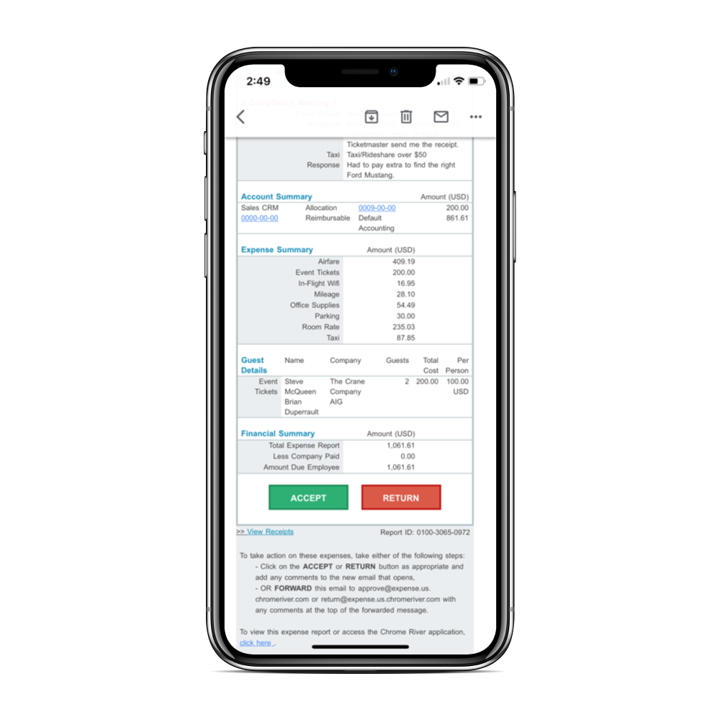 |