ClickUp vs. elapseit

Overview
ProductRatingMost Used ByProduct SummaryStarting Price
ClickUp
Score 8.6 out of 10
Small Businesses (1-50 employees)
ClickUp is a productivity platform that brings together work apps, data, and workflows. Also presented as a Converged AI Workspace, ClickUp eliminates work sprawl to provide context and a single place for humans and agents to work together. The platform currently boasts over 20 million users worldwide.
$0
per month per seat
elapseit
Score 0.0 out of 10
N/A
elapseit is a web-based resource management software solution. It helps businesses match their resources with the upcoming needs and deadlines, as an integrated solution with modules for resource planning, financial management, and project management. The product comes with smart automation, especially for invoicing. It is presented as an ideal choice for medium and large companies, designed to cover most part of their need in resources and project management, but it can also be used by…
$14
per month per user
Pricing
ClickUpelapseit
Editions & Modules
Unlimited
$10
per month per user
Business
$19
per month per user
Enterprise
Custom
Resourcing
$14
per month per user
Complete
$21
per month per user
Offerings
Pricing Offerings
ClickUpelapseit
Free Trial
YesYes
Free/Freemium Version
YesYes
Premium Consulting/Integration Services
YesYes
Entry-level Setup FeeNo setup feeNo setup fee
Additional DetailsDiscount available for annual billing.There is also the 3rd pricing plan - Enterprise, which offers integrated and customised solution as specific features, customised integrations, dedicated support, isolated environment and custom URL. There is no fixed price for this plan, the client receiving an offered price after discussions, when we have a clear image of what the client needs.
More Pricing Information
Community Pulse
ClickUpelapseit
Features
ClickUpelapseit
Project Management
Comparison of Project Management features of Product A and Product B
ClickUp
8.3
681 Ratings
7% above category average
elapseit
-
Ratings
Task Management9.2681 Ratings00 Ratings
Resource Management8.3534 Ratings00 Ratings
Gantt Charts8.1490 Ratings00 Ratings
Scheduling8.4560 Ratings00 Ratings
Workflow Automation8.1533 Ratings00 Ratings
Team Collaboration9.1651 Ratings00 Ratings
Support for Agile Methodology8.7453 Ratings00 Ratings
Support for Waterfall Methodology8.5377 Ratings00 Ratings
Document Management8.0584 Ratings00 Ratings
Email integration7.8471 Ratings00 Ratings
Mobile Access7.3542 Ratings00 Ratings
Timesheet Tracking7.9452 Ratings00 Ratings
Professional Services Automation
Comparison of Professional Services Automation features of Product A and Product B
ClickUp
7.8
342 Ratings
1% above category average
elapseit
-
Ratings
Project & financial reporting7.8342 Ratings00 Ratings
Best Alternatives
ClickUpelapseit
Small Businesses
Stackby
Stackby
Score 9.0 out of 10
Stackby
Stackby
Score 9.0 out of 10
Medium-sized Companies
InEight
InEight
Score 9.5 out of 10
InEight
InEight
Score 9.5 out of 10
Enterprises
InEight
InEight
Score 9.5 out of 10
InEight
InEight
Score 9.5 out of 10
All AlternativesView all alternativesView all alternatives
User Ratings
ClickUpelapseit
Likelihood to Recommend
8.7
(681 ratings)
-
(0 ratings)
Likelihood to Renew
7.8
(33 ratings)
-
(0 ratings)
Usability
8.0
(30 ratings)
-
(0 ratings)
Availability
9.5
(6 ratings)
-
(0 ratings)
Performance
8.0
(5 ratings)
-
(0 ratings)
Support Rating
9.2
(46 ratings)
-
(0 ratings)
Online Training
10.0
(2 ratings)
-
(0 ratings)
Implementation Rating
7.9
(7 ratings)
-
(0 ratings)
Configurability
8.0
(2 ratings)
-
(0 ratings)
Contract Terms and Pricing Model
5.0
(1 ratings)
-
(0 ratings)
Ease of integration
7.0
(2 ratings)
-
(0 ratings)
Product Scalability
9.0
(6 ratings)
-
(0 ratings)
Professional Services
5.0
(1 ratings)
-
(0 ratings)
Vendor post-sale
5.0
(2 ratings)
-
(0 ratings)
Vendor pre-sale
5.0
(2 ratings)
-
(0 ratings)
User Testimonials
ClickUpelapseit
Likelihood to Recommend
ClickUp
Great for project management, reoccurring task management, building trackers and keeping track of what everyone is up to. Like all software that has great functionality, having solid governance and control over access is essential. I recommend ensuring that your admins/owners have a close eye on what is going on across the space or it can turn into an unmanageable nightmare.
Read full review
Elapse IT SRL
No answers on this topic
Pros
ClickUp
  • Customizable setup and views for any personal preference (works for EVERYONE)
  • The communication tools inside of ClickUp help reduce emails
  • The ability to share ClickUp forms and documents with people outside of ClickUp is powerful
  • Unlimited file size for form attachments is amazing
Read full review
Elapse IT SRL
No answers on this topic
Cons
ClickUp
  • Add new people to meetings that are already in progress
  • Adicionar pessoas novas em reunioes que já estao em andamento
  • Record meetings within ClickUp
  • Gravar as reunioes dentro do clickup
  • connection with whatsapp to manage leads within the CRM in ClickUp
  • conexão com whatsapp para gerenciar leads dentro do CRM no ClickUp
Read full review
Elapse IT SRL
No answers on this topic
Likelihood to Renew
ClickUp
It has been a game-changer in terms of project tracking, as animation is a demanding product that requires multiple layers of analysis, revisions, tracking, scheduling, etc. ClickUp simplifies many approvals as anyone can easily add items, and you can tag the people who need to look at them.
Read full review
Elapse IT SRL
No answers on this topic
Usability
ClickUp
Far easier to use than any other PM tool. ClickUp is incredibly intuitive and had us saving time and energy within the first week of implementation. In my opinion, PM software should make it easier to focus on the deliverables - it shouldn't take all your time and energy to learn how to use the tool in the first place. ClickUp is a user-friendly tool that actually helps us focus on what's important.
Read full review
Elapse IT SRL
No answers on this topic
Reliability and Availability
ClickUp
For over a year ClickUp was unavailable to us just twice for a couple of hours. I would say for a system this big and working globally that was a minor issue. They managed to fix all the issues within a couple hours and then it was back up and running perfectly fine.
Read full review
Elapse IT SRL
No answers on this topic
Performance
ClickUp
The speed of ClickUp is average to be honest. This is one of the biggest flaws of the system, sometimes it's also lagging a little bit but we also have a lot of documents, lists etc. on our workspace. However, with the next version of ClickUp I've seen they are planning to increase the speed by almost 500%, probably by changing the technology, so I am more than looking forward to it.
Read full review
Elapse IT SRL
No answers on this topic
Support Rating
ClickUp
I started using ClickUp when it was what most would consider a baby company. There were the occasional bugs that made working in ClickUp a little bit of a headache, but the support feature allowed me to chat with a real persona and communicate my issues. I would always get prompt support and someone willing to really help me, not just point me to FAQ pages. Not feeling like a number really makes a difference.
Read full review
Elapse IT SRL
No answers on this topic
Online Training
ClickUp
There are multiple guides on literally all of the functions you can find within the system, therefore it's easy to learn anything you'd really like to use, starting from project and people management, down to Gantts, mind maps, time tracking, inviting Clients as guests to work with you on the projects and so much more.
Read full review
Elapse IT SRL
No answers on this topic
Implementation Rating
ClickUp
Start small. Don’t try to build the most elaborate plans first. Resist the urge to get into Gantt charts if no one is used to them. Just get work written, add dates and assignees, and start getting used to it. If you did not use a work management tool before, you need to be gracious with yourself about the fact that you likely do not have the muscle memory for working this way yet. But you will get there.
And leverage people who know it if possible. Look for ClickUp experts and vendors. They can really supercharge your effectiveness at building the tool out and speed up the process.
Read full review
Elapse IT SRL
No answers on this topic
Alternatives Considered
ClickUp
I did not make the decision to move to ClickUp, but I did provide feedback and hear feedback from our internal team about how ClickUp centralizes a lot of the company wides resources into one space. I feel that ClickUp provides more dynamic workflow building beyond Jira and Karbon, and tasks and questions are more searchable cross team, causing more time saved and less time reaching out to ask for an update. All Apps have their individual strengths, but ClickUp has it all live together in one space, making it easier overall for searching and updating items internally as a team.
Read full review
Elapse IT SRL
No answers on this topic
Scalability
ClickUp
Scaling with ClickUp is superb. If you create a workflow best suited for your organization then it's all about creating new accounts and teaching the new employees the workflow you're using. It's that simple. There is no black magic when it comes to Clickup.
Read full review
Elapse IT SRL
No answers on this topic
Return on Investment
ClickUp
  • Before ClickUp, my team would have multiple different project trackers, all in different locations, formatted in different ways. ClickUp has allowed us to move all those trackers into one location with a specified template and the ability to directly link tasks to tickets. This has greatly impacted project deliveries in a very positive way.
  • The time tracking feature of ClickUp has been amazing for our development team. Instead of them having to track in a separate document or at the end of every day, try to remember what they worked on and when, they instead can just hit a timer button on the ticket and go off to work. This alone has saved time and improved the accuracy of tracked time to projects.
Read full review
Elapse IT SRL
No answers on this topic
ScreenShots

ClickUp Screenshots

Screenshot of Screenshot of Screenshot of Screenshot of Screenshot of

elapseit Screenshots

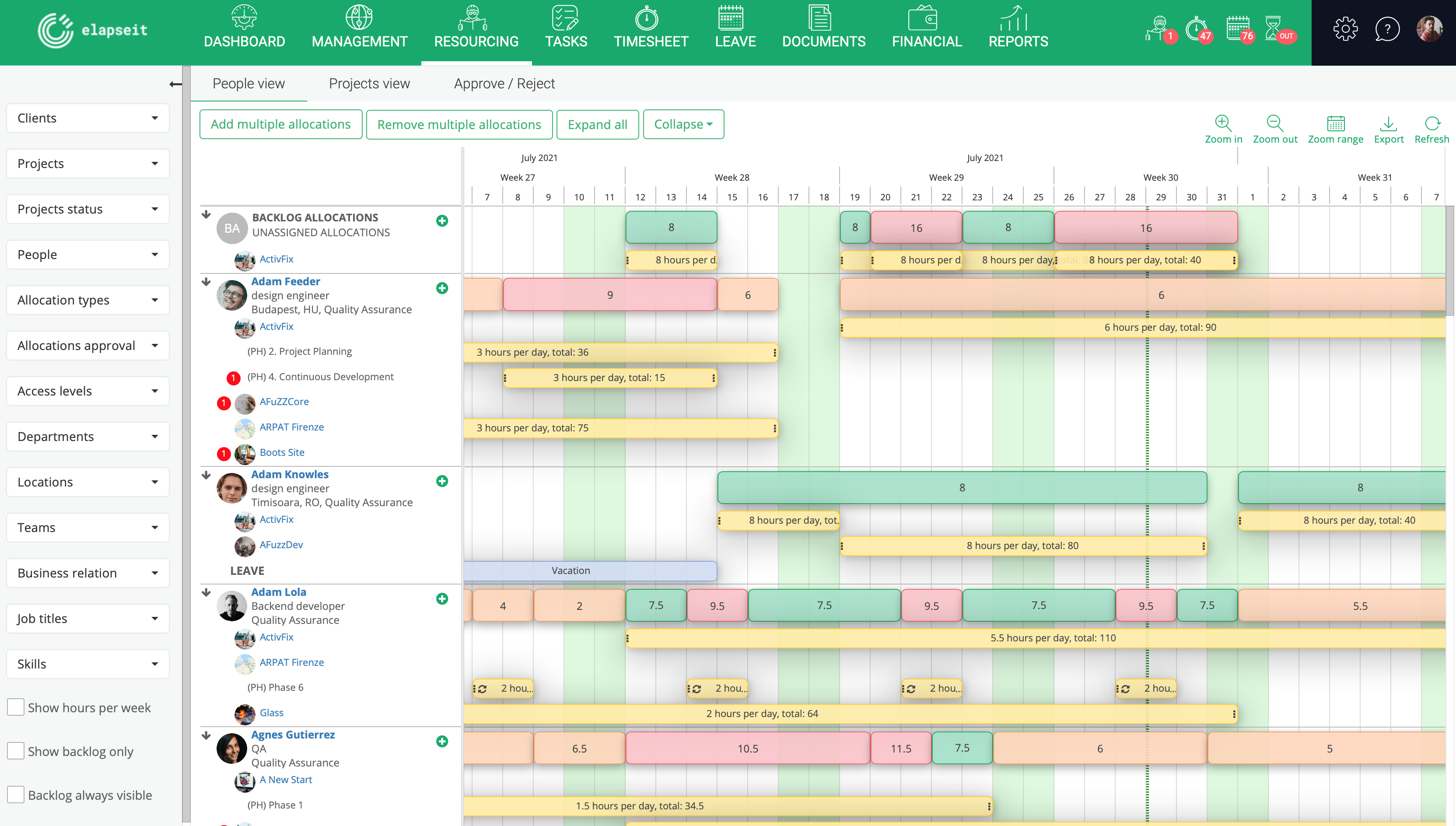
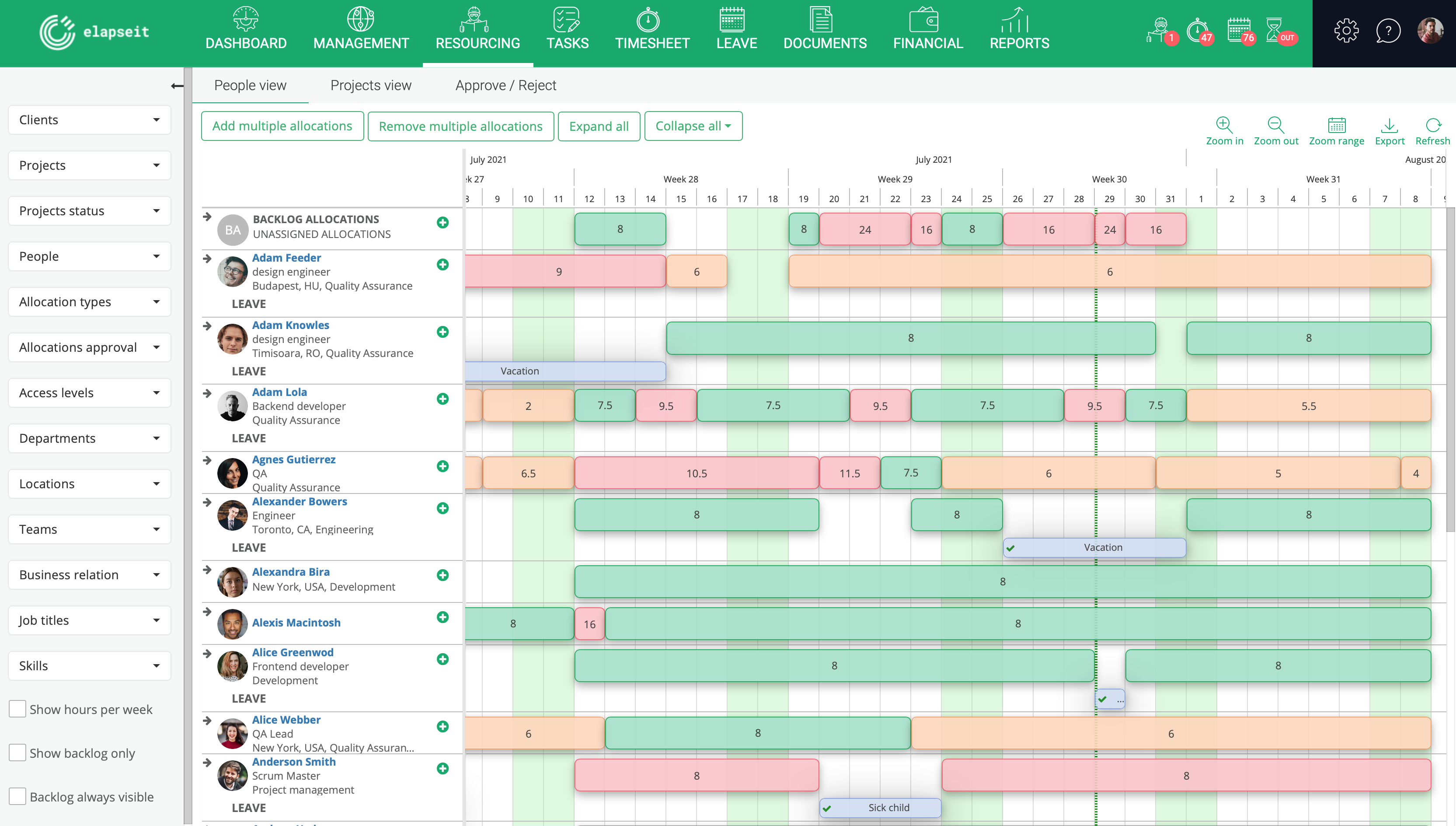
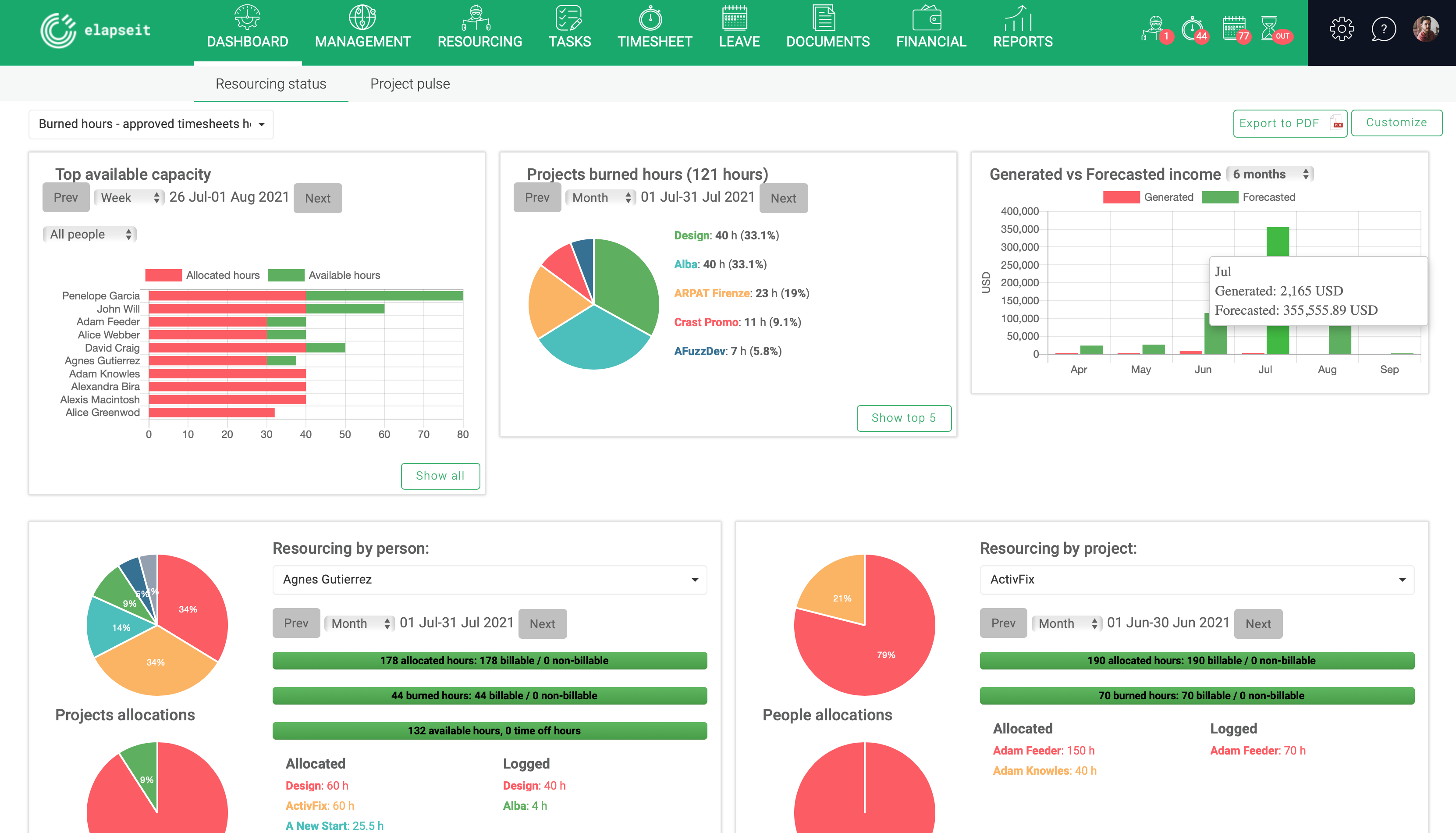
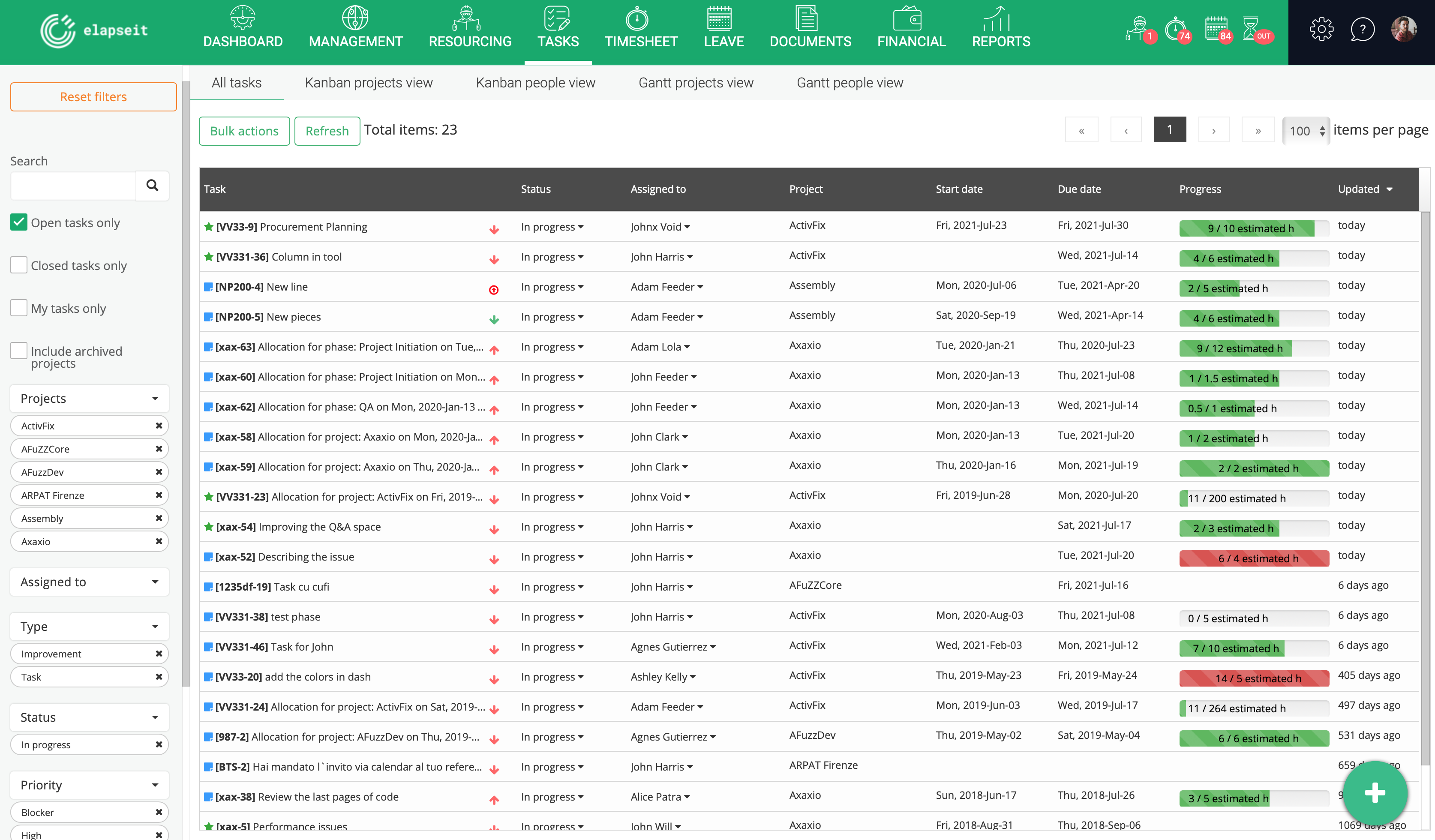
Screenshot of Resource planner expanded, where you can see the availability of all your resources, and who is working on what project, how many hours, etcScreenshot of Resource planner collapsed, which gives you a very clear image of who is under allocated (orange), fully allocated (green) and over allocated (red). Having this view, a project manager can rearrange the allocations, so that all the resources can work a normal schedule.Screenshot of Resourcing dashboard is showing you the state of your business in one page, from resourcing information (availability, leave, tasks allocations) to financial information (revenue forecasted vs generate, invoices, expenses)Screenshot of Tasks list, where are listed all the tasks with statistics about the logged hours, and basic information about the status, project and resource assigned to the task.Screenshot of KanBan board for a project, with the statuses (columns) for each taskScreenshot of Gantt view, with tasks assigned and dependencies for each one