
Curata vs. Drupal vs. Strapi
Curata vs. Drupal vs. Strapi
| Product | Rating | Most Used By | Product Summary | Starting Price |
|---|---|---|---|---|
 Curata | N/A | Curata's content marketing platform (Curata CMP) enables more efficient content creation with greater impact on pipeline. According to the vendor, this solution enables users to: Analyze marketing and sales pipeline impact: Instantly access content metrics such as leads generated/touched and sales opportunities generated/touched by gated, un-gated and off-site content. Streamline content production: An easy to use editorial calendar to keep your team on the same page and… | $699 per Instance (no seat limits) | |
 Drupal | N/A | Drupal is a free, open-source content management system written in PHP that competes primarily with Joomla and Plone. The standard release of Drupal, known as Drupal core, contains basic features such as account and menu management, RSS feeds, page layout customization, and system administration. | N/A | |
 Strapi | N/A | Strapi is an open-source software platform that helps developers to easily build, deploy, and manage APIs. | N/A |
| Curata | Drupal | Strapi | ||||||||||||||||||||||
|---|---|---|---|---|---|---|---|---|---|---|---|---|---|---|---|---|---|---|---|---|---|---|---|---|
| Editions & Modules |
| No answers on this topic | No answers on this topic | |||||||||||||||||||||
| Offerings |
| |||||||||||||||||||||||
| Entry-level Setup Fee | No setup fee | No setup fee | No setup fee | |||||||||||||||||||||
| Additional Details | We have 2 solutions: - Curata CCS content curation software - Curata CMP content marketing platform (e.g., editorial calendar, analytics engine) | — | — | |||||||||||||||||||||
| More Pricing Information | ||||||||||||||||||||||||
| Curata | Drupal | Strapi |
|---|
| Curata | Drupal | Strapi | |||||||||||||||||||||||||||||||||||
|---|---|---|---|---|---|---|---|---|---|---|---|---|---|---|---|---|---|---|---|---|---|---|---|---|---|---|---|---|---|---|---|---|---|---|---|---|---|
| Content Creation |
| ||||||||||||||||||||||||||||||||||||
| Content Publishing |
| ||||||||||||||||||||||||||||||||||||
| Content Reporting & Analytics |
| ||||||||||||||||||||||||||||||||||||
| Security |
| ||||||||||||||||||||||||||||||||||||
| Platform & Infrastructure |
| ||||||||||||||||||||||||||||||||||||
| Web Content Creation |
| ||||||||||||||||||||||||||||||||||||
| Web Content Management |
|
| Curata | Drupal | Strapi | |
|---|---|---|---|
| Small Businesses |  CoSchedule Marketing Suite Score 10.0 out of 10 |  ManageWP Score 10.0 out of 10 | ManageWP Score 10.0 out of 10 |
| Medium-sized Companies | CoSchedule Marketing Suite Score 10.0 out of 10 |  RWS Tridion Sites Score 9.0 out of 10 | RWS Tridion Sites Score 9.0 out of 10 |
| Enterprises |  Conductor Score 9.2 out of 10 | RWS Tridion Sites Score 9.0 out of 10 | RWS Tridion Sites Score 9.0 out of 10 |
| All Alternatives | View all alternatives | View all alternatives | View all alternatives |
| Curata | Drupal | Strapi | |
|---|---|---|---|
| Likelihood to Recommend | 8.0 (3 ratings) | 6.0 (84 ratings) | 9.0 (1 ratings) |
| Likelihood to Renew | 10.0 (1 ratings) | 1.0 (19 ratings) | - (0 ratings) |
| Usability | - (0 ratings) | 6.6 (18 ratings) | - (0 ratings) |
| Availability | - (0 ratings) | 9.7 (3 ratings) | - (0 ratings) |
| Performance | - (0 ratings) | 8.9 (2 ratings) | - (0 ratings) |
| Support Rating | - (0 ratings) | 1.0 (5 ratings) | - (0 ratings) |
| In-Person Training | - (0 ratings) | 8.0 (1 ratings) | - (0 ratings) |
| Online Training | - (0 ratings) | 6.0 (2 ratings) | - (0 ratings) |
| Implementation Rating | - (0 ratings) | 5.1 (4 ratings) | - (0 ratings) |
| Ease of integration | - (0 ratings) | 9.0 (1 ratings) | - (0 ratings) |
| Product Scalability | - (0 ratings) | 8.0 (2 ratings) | - (0 ratings) |
| Curata | Drupal | Strapi | |
|---|---|---|---|
| Likelihood to Recommend |  Curata
 Shane Adair Marketing Manager |  Open Source
 Paul Nielsen Volunteer Web Developer | Strapi
|
| Pros | Curata
 Allison Davis Marketing and Social Media Coordinator | Open Source
| Strapi
|
| Cons | Curata
| Open Source
| Strapi
|
| Likelihood to Renew | Curata
Allison Davis Marketing and Social Media Coordinator | Open Source
 Eric Batson Learning and Development Specialist | Strapi No answers on this topic |
| Usability | Curata No answers on this topic | Open Source
| Strapi No answers on this topic |
| Reliability and Availability | Curata No answers on this topic | Open Source
 Peter Wolanin Principal Engineer | Strapi No answers on this topic |
| Performance | Curata No answers on this topic | Open Source
 Michael Sypes Programmer Analyst | Strapi No answers on this topic |
| Support Rating | Curata No answers on this topic | Open Source
Michael Sypes Programmer Analyst | Strapi No answers on this topic |
| In-Person Training | Curata No answers on this topic | Open Source
Eric Batson Learning and Development Specialist | Strapi No answers on this topic |
| Online Training | Curata No answers on this topic | Open Source
Eric Batson Learning and Development Specialist | Strapi No answers on this topic |
| Implementation Rating | Curata No answers on this topic | Open Source
Michael Sypes Programmer Analyst | Strapi No answers on this topic |
| Alternatives Considered | Curata
| Open Source
 Dustin Day Director of UX development, social media and SEO/SEM | Strapi No answers on this topic |
| Scalability | Curata No answers on this topic | Open Source
Michael Sypes Programmer Analyst | Strapi No answers on this topic |
| Return on Investment | Curata
Shane Adair Marketing Manager | Open Source
 Sohail Lajevardi Drupal Front-end Engineer | Strapi
|
| ScreenShots | Curata Screenshots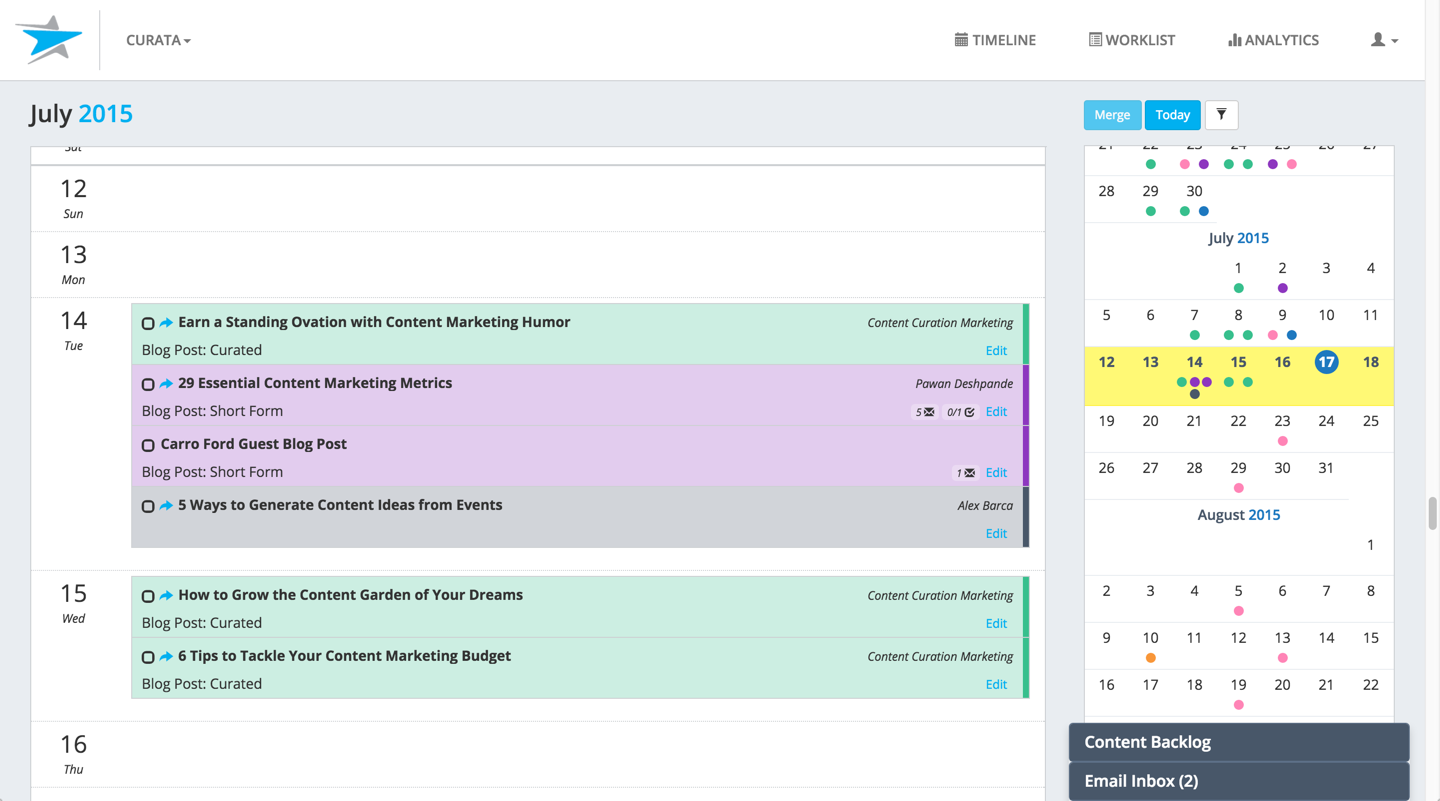 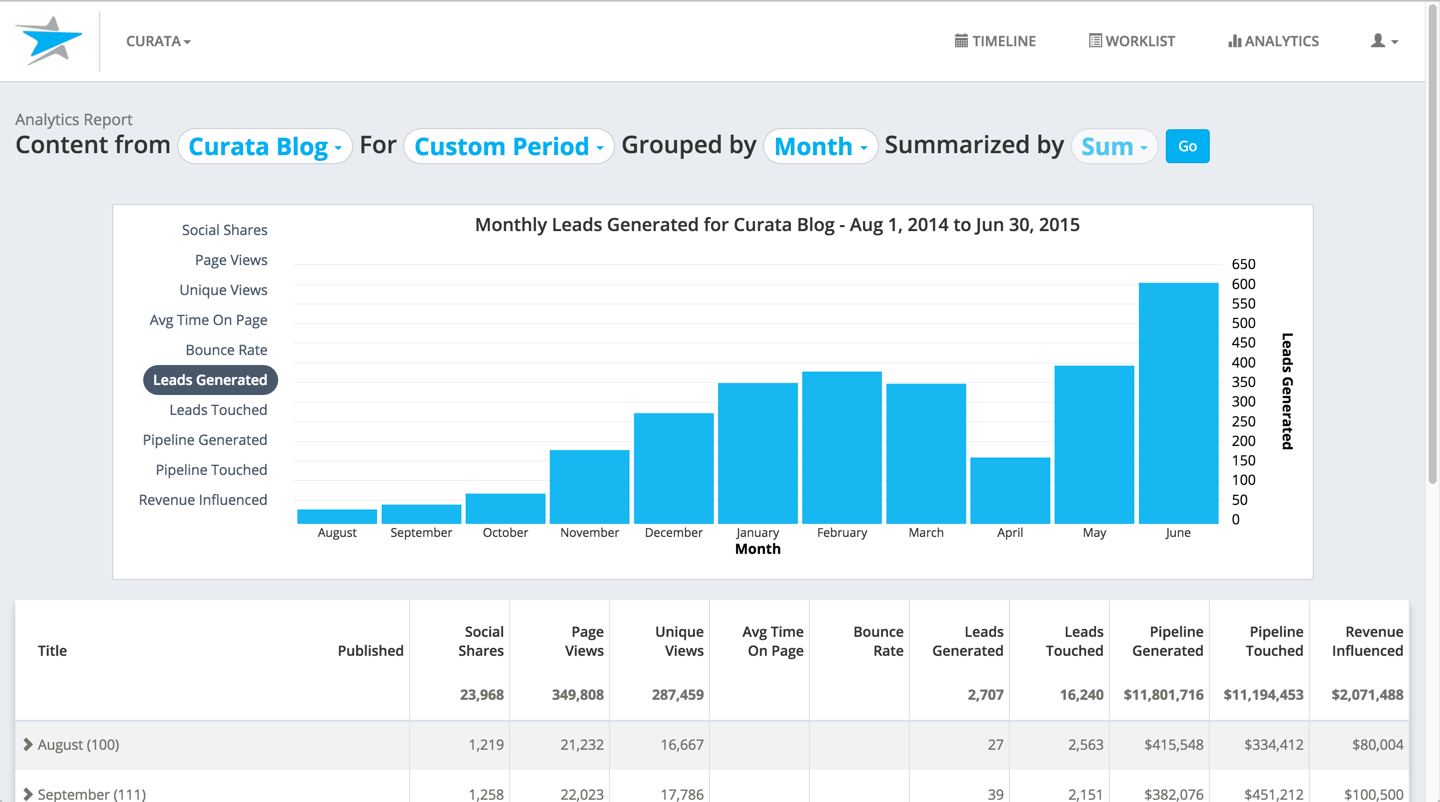   | Strapi Screenshots     |