Data Rover vs. OneDrive

Overview
ProductRatingMost Used ByProduct SummaryStarting Price
Data Rover
Score 0.0 out of 10
N/A
Data Rover is a solution for Infrastructure and Security managers that allows to explore, manage, process and protect data, by simultaneously addressing the two primary needs related to the use of data: Cyber Security and Data Management. Data Rover provides precise information on access privileges to files/folders on corporate storage devices allowing the user to analyse the effective permissions and identify not only who can access data, but also who did what, when, and from where. It…N/A
OneDrive
Score 7.4 out of 10
N/A
OneDrive from Microsoft is a cloud storage and file syncing service.
$5
per month
Pricing
Data RoverOneDrive
Editions & Modules
No answers on this topic
OneDrive for Business Plan 1
$5.00
Per Month (Annual Commitment)
Microsoft 365 Business Basic
$5.00
Per Month (Annual Commitment)
OneDrive for Business Plan 2
$10.00
Per Month (Annual Commitment)
Microsoft 365 Business Standard
$12.50
Per Month (Annual Commitment)
Offerings
Pricing Offerings
Data RoverOneDrive
Free Trial
NoYes
Free/Freemium Version
NoNo
Premium Consulting/Integration Services
NoNo
Entry-level Setup FeeNo setup feeNo setup fee
Additional DetailsOneDrive can be purchased as a standalone tool, or as part of a Microsoft 365's business suite.
More Pricing Information
Community Pulse
Data RoverOneDrive
Features
Data RoverOneDrive
File Sharing & Management
Comparison of File Sharing & Management features of Product A and Product B
Data Rover
-
Ratings
OneDrive
6.7
118 Ratings
22% below category average
Versioning00 Ratings7.394 Ratings
Video files00 Ratings5.6105 Ratings
Audio files00 Ratings5.499 Ratings
Document collaboration00 Ratings8.0112 Ratings
Access control00 Ratings6.5113 Ratings
File search00 Ratings6.9118 Ratings
Device sync00 Ratings7.0116 Ratings
Cloud Storage Security & Administration
Comparison of Cloud Storage Security & Administration features of Product A and Product B
Data Rover
-
Ratings
OneDrive
7.1
112 Ratings
20% below category average
User and role management00 Ratings6.8100 Ratings
File organization00 Ratings7.8112 Ratings
Device management00 Ratings6.695 Ratings
Cloud Storage Platform
Comparison of Cloud Storage Platform features of Product A and Product B
Data Rover
-
Ratings
OneDrive
7.4
115 Ratings
16% below category average
Performance00 Ratings7.6114 Ratings
Reliability00 Ratings7.2115 Ratings
Storage Reports00 Ratings7.489 Ratings
Best Alternatives
Data RoverOneDrive
Small Businesses
SugarSync
SugarSync
Score 4.3 out of 10
SugarSync
SugarSync
Score 4.3 out of 10
Medium-sized Companies
M‑Files
M‑Files
Score 8.9 out of 10
Druva Security Cloud
Score 9.5 out of 10
Enterprises
M‑Files
M‑Files
Score 8.9 out of 10
Druva Security Cloud
Score 9.5 out of 10
All AlternativesView all alternativesView all alternatives
User Ratings
Data RoverOneDrive
Likelihood to Recommend
-
(0 ratings)
5.5
(118 ratings)
Likelihood to Renew
-
(0 ratings)
6.0
(6 ratings)
Usability
-
(0 ratings)
6.0
(17 ratings)
Performance
-
(0 ratings)
9.0
(1 ratings)
Support Rating
-
(0 ratings)
8.0
(36 ratings)
User Testimonials
Data RoverOneDrive
Likelihood to Recommend
Data Rover Ltd
No answers on this topic
Microsoft
I'll start with what I would not use OneDrive for! I would not use it as a primary source for code repository, there are other more robust tools out there that can help you with storing and making available code repos. Where I would use OneDrive is in a platform for managing files, and with that I mean any file that can be saved offline and access a OneDrive access point, share, or mount. This could be personal, business, or data from a system that is saved in a standard file format. The OneDrive platform is great for documents collaboration as well, with the ability to allow for share and links to be provided to for easy access and collaboration. I would also recommend if you are someone who likes to use cloud services and rely less and less on offline storage. OneDrive excels in this area!
Read full review
Pros
Data Rover Ltd
No answers on this topic
Microsoft
  • Sync functions allow to access work virtually anywhere
  • Collaboration options make working with others easier, increasing productivity
  • It works seamlessly in different devices
  • The one drive online functions allows to use office programs like work and excel without having them installed in a device
Read full review
Cons
Data Rover Ltd
No answers on this topic
Microsoft
  • I wish OneDrive would allow you to sync multiple personal/individual accounts to your computer. At this time, you can only sync one account at a time. That means that my personal OneDrive and individual corporate OneDrive can't be synced to my computer at the same time.
  • OneDrive has a file size limitation of 15 GB. I know that that is a very large amount, but I have several files that are larger than 15 GB that I wish I could get to sync. I'm hoping that file size limitation changes in the future.
Read full review
Likelihood to Renew
Data Rover Ltd
No answers on this topic
Microsoft
I like Box better. If you sign into Microsoft using a personal account, be EXTREMELY careful. All of your downloads could suddenly be available to your entire company, and that is incredibly embarrassing. Did that happen to me? Not going to say, but just always check which MS account you sign into.
Read full review
Usability
Data Rover Ltd
No answers on this topic
Microsoft
Using OneDrive is very intuitive and has been improved over the years. It's just like using native file management on either your Mac or PC. It's drag and drop functionality is easy and it clearly shows when files are uploaded to the cloud or if there are errors
Read full review
Performance
Data Rover Ltd
No answers on this topic
Microsoft
It has a good performance, the pages load normally, access to the files, management, reports, everything is working well. With regard to integration with other systems, we have not done so yet.
Read full review
Support Rating
Data Rover Ltd
No answers on this topic
Microsoft
It's a Microsoft product so there is a wealth of information online both from Microsoft directly and from millions of users but as a corporate user we also have access to direct Microsoft support through a variety of avenues (phone, email, etc.). This makes finding answers to issues more accessible, however, it does also mean that any new feature requests will get buried.
Read full review
Alternatives Considered
Data Rover Ltd
No answers on this topic
Microsoft
Box is another file-sharing application that is very similar to OneDrive. Box falls short of OneDrive in its syncing capabilities. OneDrive is very quick with syncing so you never have to be concerned that you are not using the most up-to-date materials. Box was always a bit delayed and did not always accurately sync across systems. OneDrive benefits from being backed by Microsoft, so you expect the connection across applications that it allows. OneDrive also provides consistency for use and intuitive understanding because of that Microsoft consistency. I'd prefer OneDrive over Box.
Read full review
Return on Investment
Data Rover Ltd
No answers on this topic
Microsoft
  • OneDrive allows us to save much time on creating and archiving backup copies of our data. Microsoft gives a guarantee on the possibility of recovery of files or folders even from 30 days ago. It provides a great comfort of work.
Read full review
ScreenShots

Data Rover Screenshots

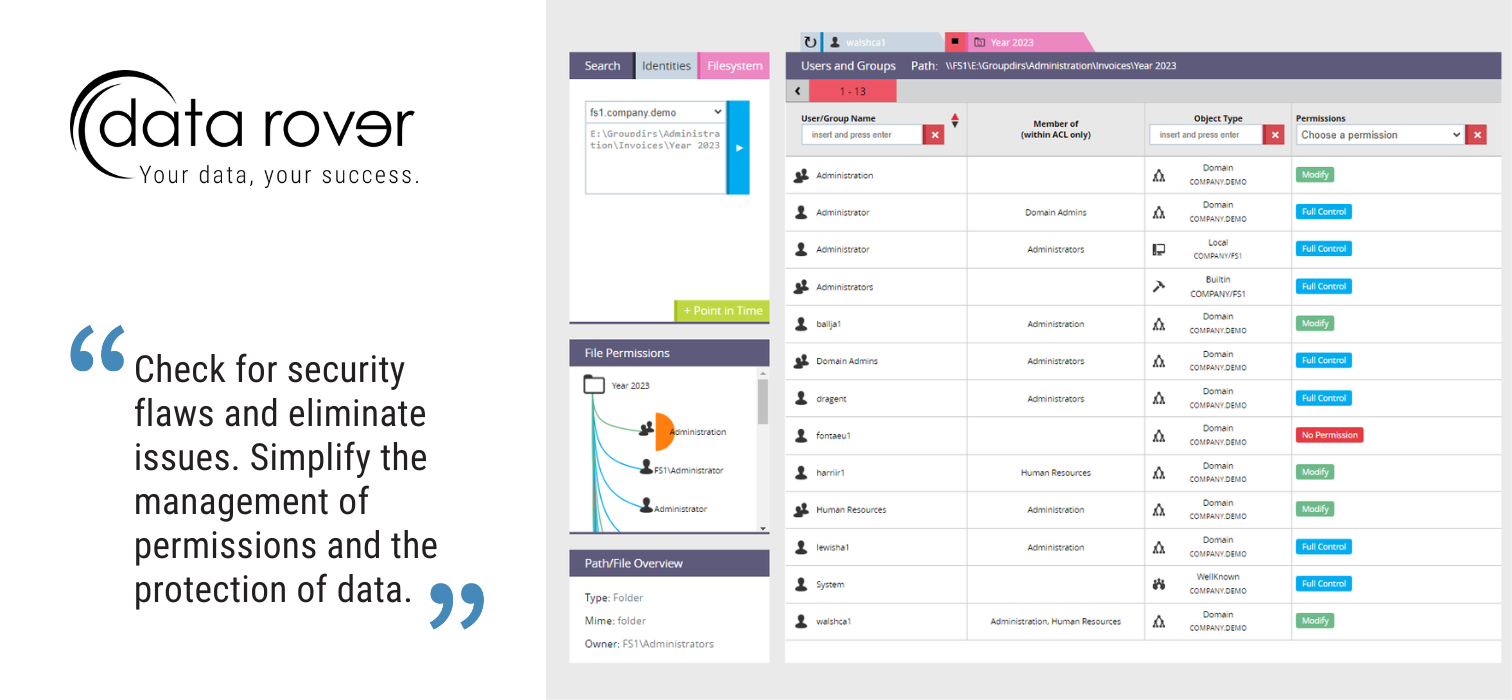
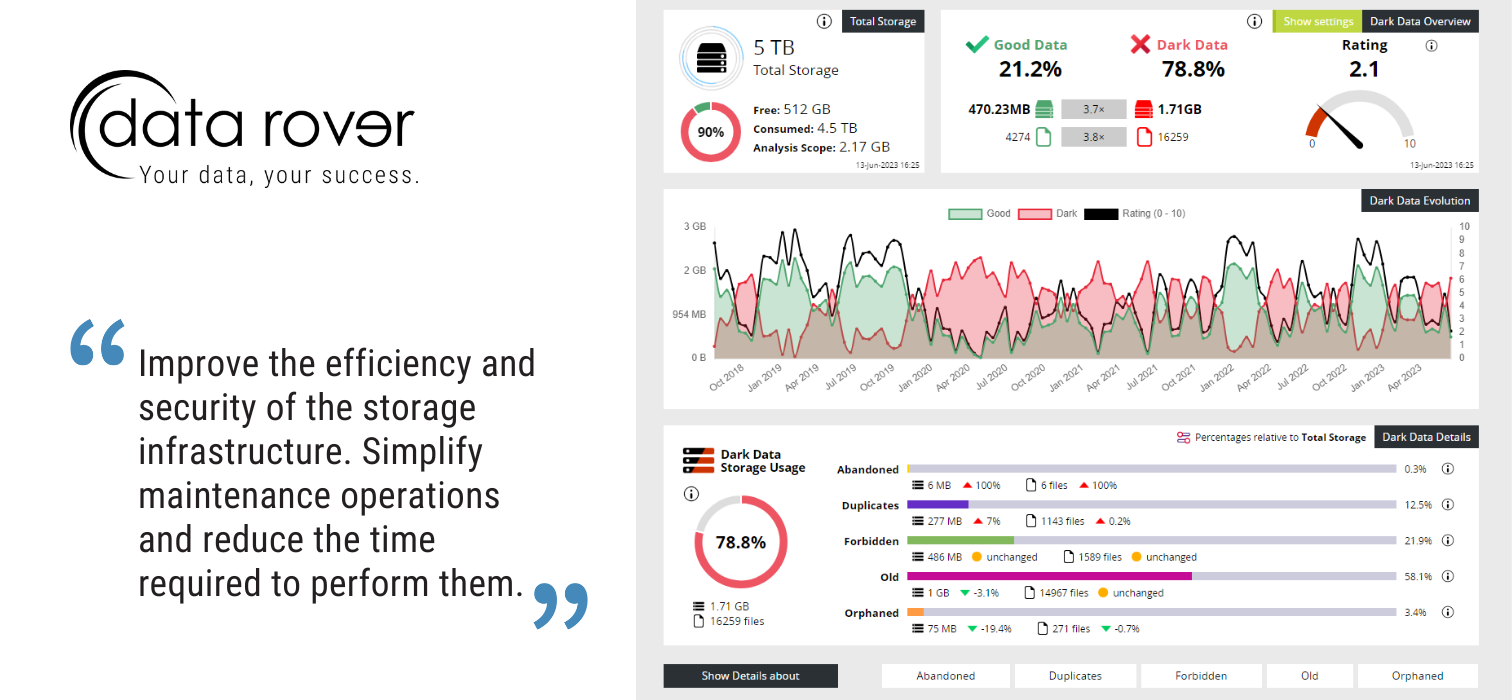
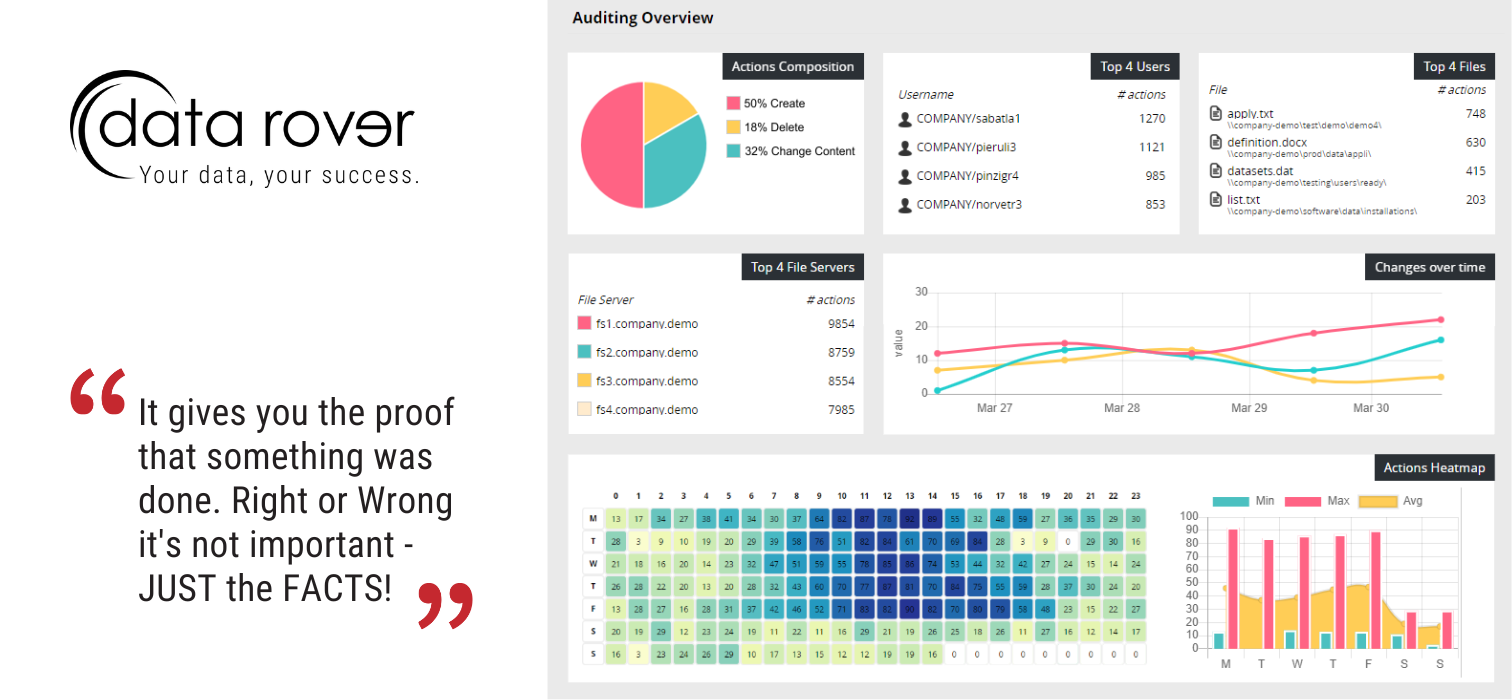
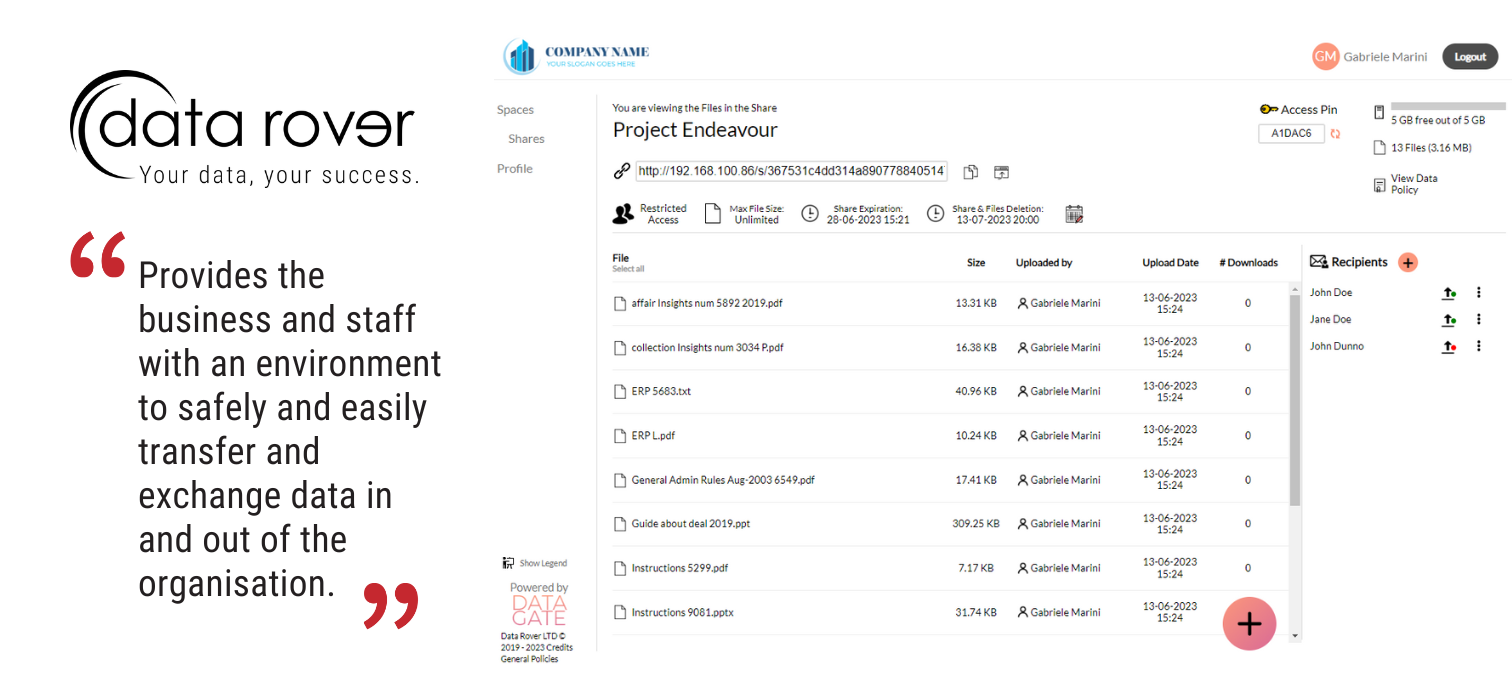
Screenshot of how Data Rover provides precise information on access privileges to files/folders on corporate storage devices.Screenshot of a view displaying Data Analytics and Effective Permissions management in Data Rover. The application provides a complete and detailed view of the access privileges to the files and folders present across the entire company's storage devices.Screenshot of an example of Dark Data. "Dark Data" is useless data that accumulates over time and constitutes an unjustified cost. Data Rover offers precise information for the identification of each specific Dark Data type (obsolete files, duplicate documents, data belonging to users who no longer work in the company, or file types that are non-pertinent to the business) and provides statistical information for the evaluation of the impact on infrastructure.Screenshot of the File Auditor. Data Rover’s File Auditor determines who did exactly what, from where and when. File auditing is an important tool for monitoring users activity on company network-shared folders. This enables users to track all the operations performed, such as the creation, modification or deletion of a file, by whom, when and from where.Screenshot of the Data Gate. Data Gate is an Advanced Data Exchange and Tracking system. It can be used to create shared folders and maintain a comprehensive log of access activities thanks to the internal auditing tool that ensures the transparency and traceability on the life cycle of the information being exchanged.