Overview
ProductRatingMost Used ByProduct SummaryStarting Price
datapine
Score 9.7 out of 10
Mid-Size Companies (51-1,000 employees)
datapine is a business intelligence and and data visualization solution that is focused on self-service. Its interface for data analysis and discovery combines interactive dashboards to deliver insights across and beyond the user’s organization. No coding skills are required. datapine helps businesses monitor KPIs and their artificial algorithms learn from the user’s data and inform them as soon as something…
$249
per month
Grist
Score 9.9 out of 10
N/A
Grist combines the capabilities of spreadsheets, databases and app builders. Using a familiar spreadsheet interface, information can be organized as a relational database, and dashboards built using drag-and-drop. Solving spreadsheet problems Ensures data is well-structured and stored in one place with no duplication, no spreadsheet-wrangling, no merging documents. Collaboration on sensitive data Data is protected…
$8
per month per user
Microsoft Excel
Score 8.9 out of 10
N/A
Microsoft Excel is a spreadsheet application available as part of Microsoft 365 (Office 365), or standalone, in cloud-based and on-premise editions.
$6.99
per month
Pricing
datapineGristMicrosoft Excel
Editions & Modules
Basic
$249
per installation
Professional
$499
per installation
Premium
$769
per installation
datapine Server
$999
per installation
Pro
$8
per month per user
Enterprise
Contact Sales
Excel with Microsoft 365
$6.99
per month
Excel for 1 PC or Mac
$139.99
perpetual license
Offerings
Pricing Offerings
datapineGristMicrosoft Excel
Free Trial
YesYesYes
Free/Freemium Version
NoYesYes
Premium Consulting/Integration Services
YesNoNo
Entry-level Setup Fee$2,000 per installationNo setup feeNo setup fee
Additional DetailsPrices are per month.
More Pricing Information
Community Pulse
datapineGristMicrosoft Excel
Considered Multiple Products
datapine

No answer on this topic

Grist
Chose Grist
Grist is easier to use, faster, and loads quicker with heavy data.
Microsoft Excel

No answer on this topic

Features
datapineGristMicrosoft Excel
BI Standard Reporting
Comparison of BI Standard Reporting features of Product A and Product B
datapine
9.9
3 Ratings
19% above category average
Grist
-
Ratings
Microsoft Excel
-
Ratings
Pixel Perfect reports9.93 Ratings00 Ratings00 Ratings
Customizable dashboards9.93 Ratings00 Ratings00 Ratings
Ad-hoc Reporting
Comparison of Ad-hoc Reporting features of Product A and Product B
datapine
10.0
3 Ratings
22% above category average
Grist
-
Ratings
Microsoft Excel
-
Ratings
Drill-down analysis10.03 Ratings00 Ratings00 Ratings
Formatting capabilities10.03 Ratings00 Ratings00 Ratings
Report sharing and collaboration10.03 Ratings00 Ratings00 Ratings
Report Output and Scheduling
Comparison of Report Output and Scheduling features of Product A and Product B
datapine
10.0
3 Ratings
20% above category average
Grist
-
Ratings
Microsoft Excel
-
Ratings
Publish to Web10.03 Ratings00 Ratings00 Ratings
Publish to PDF9.93 Ratings00 Ratings00 Ratings
Report Versioning10.03 Ratings00 Ratings00 Ratings
Report Delivery Scheduling9.93 Ratings00 Ratings00 Ratings
Data Discovery and Visualization
Comparison of Data Discovery and Visualization features of Product A and Product B
datapine
10.0
3 Ratings
22% above category average
Grist
-
Ratings
Microsoft Excel
-
Ratings
Pre-built visualization formats (heatmaps, scatter plots etc.)10.03 Ratings00 Ratings00 Ratings
Location Analytics / Geographic Visualization9.93 Ratings00 Ratings00 Ratings
Predictive Analytics10.03 Ratings00 Ratings00 Ratings
Access Control and Security
Comparison of Access Control and Security features of Product A and Product B
datapine
10.0
3 Ratings
16% above category average
Grist
-
Ratings
Microsoft Excel
-
Ratings
Multi-User Support (named login)10.03 Ratings00 Ratings00 Ratings
Role-Based Security Model10.03 Ratings00 Ratings00 Ratings
Multiple Access Permission Levels (Create, Read, Delete)9.93 Ratings00 Ratings00 Ratings
Mobile Capabilities
Comparison of Mobile Capabilities features of Product A and Product B
datapine
9.9
3 Ratings
25% above category average
Grist
-
Ratings
Microsoft Excel
-
Ratings
Responsive Design for Web Access10.03 Ratings00 Ratings00 Ratings
Dashboard / Report / Visualization Interactivity on Mobile9.93 Ratings00 Ratings00 Ratings
Best Alternatives
datapineGristMicrosoft Excel
Small Businesses
Yellowfin
Yellowfin
Score 8.7 out of 10
Stackby
Stackby
Score 8.9 out of 10
Stackby
Stackby
Score 8.9 out of 10
Medium-sized Companies
Reveal
Reveal
Score 10.0 out of 10
Microsoft Excel
Microsoft Excel
Score 8.9 out of 10
Google Sheets
Google Sheets
Score 8.9 out of 10
Enterprises
Kyvos Semantic Layer
Score 9.5 out of 10
Microsoft Excel
Microsoft Excel
Score 8.9 out of 10
Google Sheets
Google Sheets
Score 8.9 out of 10
All AlternativesView all alternativesView all alternativesView all alternatives
User Ratings
datapineGristMicrosoft Excel
Likelihood to Recommend
10.0
(3 ratings)
9.9
(2 ratings)
9.3
(76 ratings)
Likelihood to Renew
-
(0 ratings)
-
(0 ratings)
9.9
(7 ratings)
Usability
10.0
(1 ratings)
-
(0 ratings)
8.4
(22 ratings)
Availability
-
(0 ratings)
-
(0 ratings)
10.0
(2 ratings)
Performance
-
(0 ratings)
-
(0 ratings)
10.0
(2 ratings)
Support Rating
8.0
(1 ratings)
-
(0 ratings)
10.0
(2 ratings)
Implementation Rating
-
(0 ratings)
-
(0 ratings)
8.0
(1 ratings)
Configurability
-
(0 ratings)
-
(0 ratings)
10.0
(2 ratings)
Ease of integration
-
(0 ratings)
-
(0 ratings)
10.0
(2 ratings)
Product Scalability
-
(0 ratings)
-
(0 ratings)
10.0
(2 ratings)
Vendor post-sale
-
(0 ratings)
-
(0 ratings)
10.0
(2 ratings)
Vendor pre-sale
-
(0 ratings)
-
(0 ratings)
10.0
(2 ratings)
User Testimonials
datapineGristMicrosoft Excel
Likelihood to Recommend
datapine
Our team wanted a software that can handle our data in a cloud setting and connect our data sources easily. The values that we got from Datapine cannot be compared with other any other tools Because datapine always focus on the best possible user experience and can certainly compete with other, even bigger softwares in the market.
Read full review
Grist Labs
This is well suited to someone (or a team) who are technically minded and have a dataset that they need to be able to use in many ways. It's less appropriate for a team who isn't technically minded and/or don't have the data they need to manipulate. It would be useful for things that you could use a database or spreadsheet for such as CRM, Advertising database, Business tracking, Health tracking etc.
Read full review
Microsoft
I don't really know another program as powerful as Excel. I've used Google Doc programs but do not feel they come close. So far, anytime I've needed a table of some sort for data, whether it's budget oriented or information off a survey, the best system has been Excel. We do web audits on occasion and we create an Excel worksheet featuring every URL of the pages we're auditing, notes, data about the content, information about files attached to the page and other information to help us determine what pages need updating, deleting or otherwise. We also use Excel primarily to export our Google Analytics to in order for us to create reports for clients that need to see specific information about their traffic.
Read full review
Pros
datapine
  • Intuitive user interface, especially within the analyzer (drag & drop).
  • Dashboard templates helped to create visually appealing dashboards.
  • Many different reporting options.
  • Customer support is really helpful.
Read full review
Grist Labs
  • Provides amazing customer service, help, examples, and explains what they are having you do
  • The layout is easy
Read full review
Microsoft
  • It is very good at embedded formulas and tying cells to one another
  • It allows me to compare deals terms on a side-by-side basis and talk my clients through it easily.
  • It is very helpful as well in terms of allowing me to filter/sort results in many different ways depending on what specific information I am most interested in prioritizing.
Read full review
Cons
datapine
  • Some advanced functions need SQL knowledge.
Read full review
Grist Labs
  • Making the user permissions more obvious on how to use them - They are highly adaptable, but hard to understand how to use them
  • Small changes such as auto colouring the choices/toggles options and being able to edit them once set.
  • Being able to copy the formatting from one column to the next
Read full review
Microsoft
  • Excel offers collaboration features that allow multiple users to work on the same spreadsheet, but managing changes made by different users can be challenging. Excel could improve its features by offering more granular control, better tracking of changes, and more robust conflict resolution tools.
  • Itcan be a barrier to productivity when importing and exporting data from other applications or file formats. To improve its features, it should offer better support for standard file formats and more robust error handling and reporting tools.
  • Excel can be challenging for finance students and working professionals, but it can be improved by offering more robust tutorials, better documentation, and more user communities and support forums.
Read full review
Likelihood to Renew
datapine
No answers on this topic
Grist Labs
No answers on this topic
Microsoft
Excel remains the industry standard for spreadsheets and has maintained simple and straight-forward formula writing methods. Although there is a learning curve to do more complex calculations, there are countless help sites and videos on the Internet for almost any need.
Read full review
Usability
datapine
With the help of Datapine i can easily share and send my all reports at a specific time and without any worry about the updates or accuracy of information. The tool is really one of the best tool available in the market.
Read full review
Grist Labs
No answers on this topic
Microsoft
I'm giving it a 7 because it is my go to. But the fact other prefer Google Sheets when working with a team does get irritating. I've used the online version of Microsoft Excel that other teams can get into and it still seems behind Google Sheets. It's a little clanky and slow? If that's even a term.
Read full review
Reliability and Availability
datapine
No answers on this topic
Grist Labs
No answers on this topic
Microsoft
I have rarely, if ever, had issues with its availability.
Read full review
Performance
datapine
No answers on this topic
Grist Labs
No answers on this topic
Microsoft
Excel load and performs calculations immediately. It integrate well with all Microsoft Office applications and does not slow them down.
Read full review
Support Rating
datapine
24×7 support is available in Datapine software. They are always there to provide you every kind of support from their side.
Read full review
Grist Labs
No answers on this topic
Microsoft
I have not had to use it often, but it is good.
Read full review
Alternatives Considered
datapine
No answers on this topic
Grist Labs
Grist is easier to use, faster, and loads quicker with heavy data.
Read full review
Microsoft
Out of Microsoft Excel, Microsoft Power BI, IBM SPSS, and Google Sheets, Microsoft Excel is by far the most common tool used for anything data-related across organizations. Accordingly, our organization has also implemented Microsoft Excel as a first-step tool. We recently adopted Microsoft Power BI (the free version), and use it occasionally (mostly for creating dashboards), but it is less commonly understood by stakeholders across our organization and by our clients. Accordingly, Microsoft Excel is more user-friendly and because of its popularity, we can easily look up how to do things in the program online. Google Sheets is a comparable alternative to Microsoft Excel, but because it's cloud-based and we have sensitive data that needs to be protected, we chose against using this software. Finally, a few users (including myself) have access to and utilize IBM's SPSS. For my role, it's a helpful tool to do more rigorous analyses. However, because of its cost and limited functionality as a simple spreadsheet, we only use it for more complex analyses.
Read full review
Contract Terms and Pricing Model
datapine
No answers on this topic
Grist Labs
No answers on this topic
Microsoft
N/A I was not involved in this process.
Read full review
Scalability
datapine
No answers on this topic
Grist Labs
No answers on this topic
Microsoft
Each user can use it to whatever level of expertise they have. It remains the same so users can contribute to another's work regardless of whether they have more or less expertise
Read full review
Return on Investment
datapine
No answers on this topic
Grist Labs
  • It's saved a lot of time in both creating an advertising database and managing it week to week effectively. I had previously created in others that haven't worked, and this does, saving me a good 1 hour weekly, and 5 hours or more each time I had problems with the last ones
  • Being able to stay on track with this has meant I'm following up at the right time (advertisers) and keeping a professional manner and not losing business due to missed communication
  • Saving me $ from buying a program like Access (or Airtable monthly) and then the learning curve that that has. This has a much easier learning curve to say the least.
Read full review
Microsoft
  • Excel has positively impacted the business as it has increased our efficiency.
  • It also saves us the time that we would have spent on making the calculations that it does for us.
  • Since it works on all devices and is compatible with both Windows and Mac, we do not have to invest in any other alternative.
Read full review
ScreenShots

datapine Screenshots

Screenshot of datapine's User Interface (Analyzer)Screenshot of datapine Demo Dashboard

Grist Screenshots

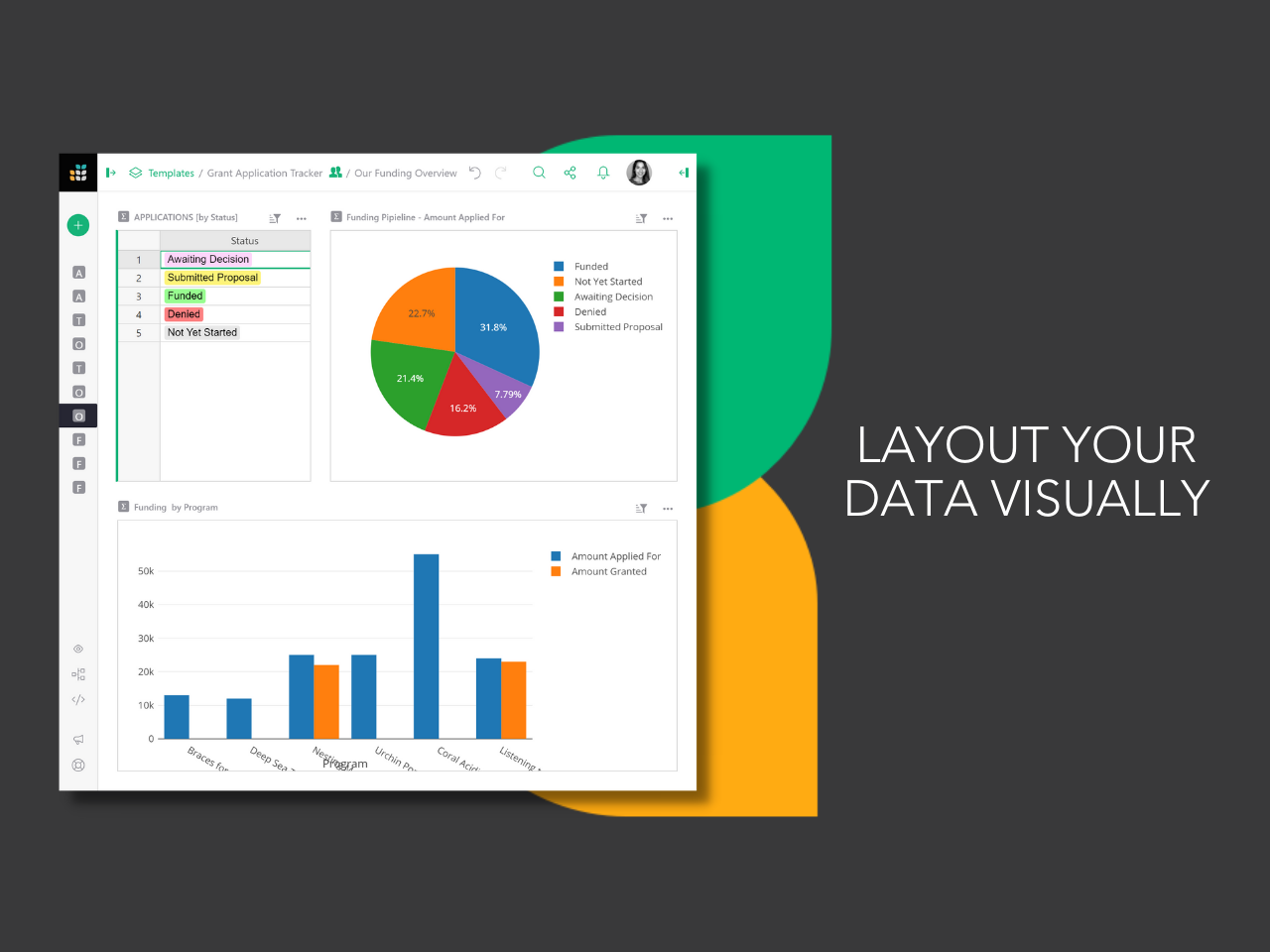
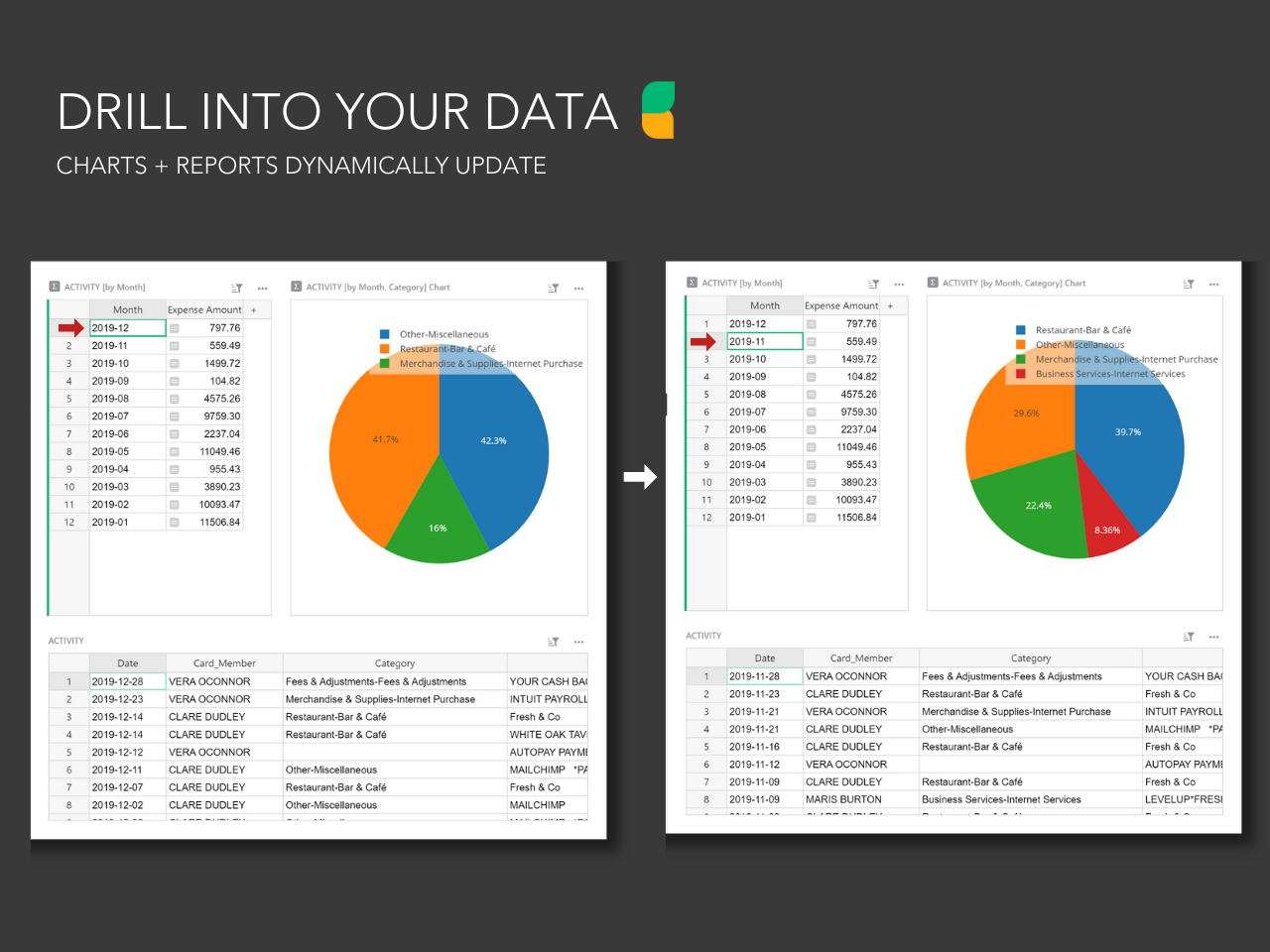
Screenshot of the drag and drop dashboard editor used to build layouts.Screenshot of the custom user permissions that determine who can see what, down to each column and row.Screenshot of dynamic charts and reports that update with the click of a mouse.Screenshot of Grist's formula support for Excel-like functions or Python formulas. Technical users can drill into database structure in code view.