TrustRadius: an HG Insights company

IBM SPSS Statistics

Score8.2 out of 10

437 Reviews and Ratings

What is IBM SPSS Statistics?

SPSS Statistics is a software package used for statistical analysis. It is now officially named "IBM SPSS Statistics". Companion products in the same family are used for survey authoring and deployment (IBM SPSS Data Collection), data mining (IBM SPSS Modeler), text analytics, and collaboration and deployment (batch and automated scoring services).

Media

SPSS Statistics Forecasting. This enables users to build time-series forecasts regardless of their skill level.
SPSS Statistics Regression. These predict categorical outcomes and apply nonlinear regression procedures.
IBM SPSS Statistics Neural Networks. These can discover complex relationships and improve predictive models.
IBM SPSS Statistics Curated Help. These can interpret correlation output.
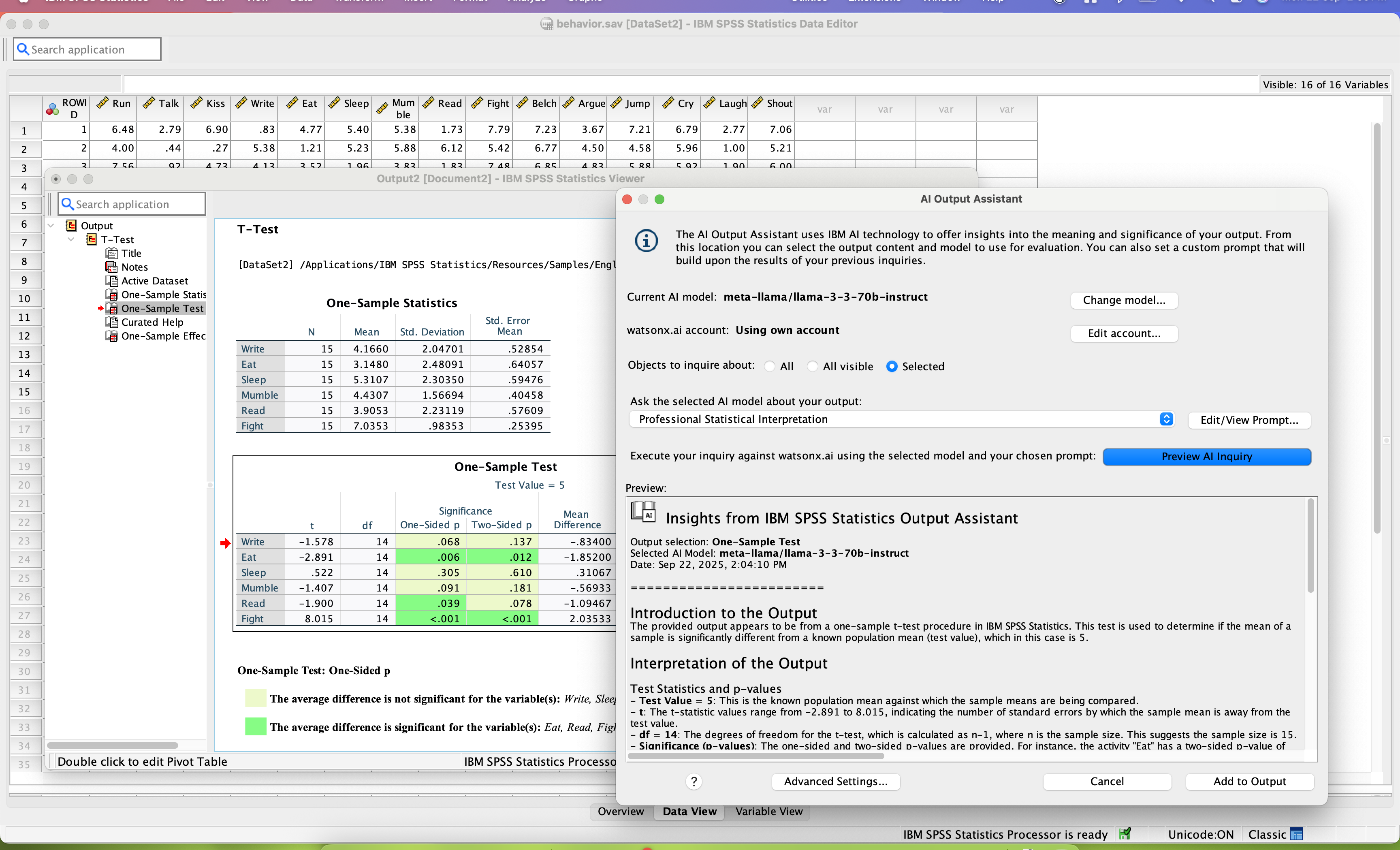
IBM SPSS Statistics AI Output Assistant interprets statistical output in easy to consume language

1 / 5

Powerful raw data analysis system

Use Cases and Deployment Scope

IBM SPSS Statistics has intuitive user interface that is easy to navigate and run linear regression. It is the most reliable platform that I have used in the organization for data analysis from different departments. The customer support team is proactive and ever offers quick feedback when contacted via live chat or phone call.

Pros

  • Management of metadata.
  • Spreadsheet analysis.
  • Result and chart analysis in different navigation panes.

Cons

  • The UI can be upgraded to suit modern demands.
  • The price is high for most business enterprises.

Return on Investment

  • Efficient data analysis has enhanced positive ROI.
  • We have achieved main business objectives from effective performance.

Other Software Used

Splunk AppDynamics, IBM Process Mining, HubSpot CRM

IBM SPSS Statistics Turning data into decisions

Use Cases and Deployment Scope

We have used IBM SPSS for analyzing surveyed data and also internal behavioral matrix. Its UI is very easy to understand and clean. In addition, SPSS is the backbone of data analysis workflow. Undoubtedly, it is primarily used for survey analysis, predictive modeling and reporting. We can utilize raw data from multiple sources and convert it into market research charts and other forms of insights. It helps and gives us assurance in applying statistics and also for forecasting models helps analyze demand and support.

Pros

  • Definetely, its advanced statistical analysis which it supports without coding
  • Its predictive modeling and forecasting
  • Surved data analysis
  • Reporting and Visualizing

Cons

  • Its licence costing is a little drawback.
  • Integration with modern tools like tableau or power BI seems like a cherry on a cake.

Return on Investment

  • Time saving
  • improved decision making
  • faster reporting

Alternatives Considered

SAS Viya, Microsoft Excel and Stata

Other Software Used

Microsoft Excel

IBM SPSS Statistics handles statistical analysis in a clear user-friendly manner.

Use Cases and Deployment Scope

In my organization, I regularly use IBM SPSS Statistics for data analysis on my projects in public health social work.

Pros

  • regressions
  • descriptive statistics
  • scatter plots

Cons

  • In my opinion, there is room for improvement regarding Issues with labeling variables easily with IBM SPSS Statistics
  • Another place where I think there is room for improvement in IBM SPSS Statistics is that I would like to automatically create dummy variables

Return on Investment

  • sure, the impact IBM SPSS Statistics has on our organization's overall business objectives is the positive impact from people having universal access to IBM SPSS Statistics

Other Software Used

Stata, NVivo

Great product - Easy to Use.

Use Cases and Deployment Scope

As a CX researcher, I use SPSS Statistics to analyze survey data and internal behavioral metrics and combine the two. I like the easy-to-use GUI. When I am doing routine stuff, taking the time to write the code feels like a waste and another chance for a QC error. I have been using SPSS for over 30 years, and I'm a big fan. That said, it's getting to be almost too expensive.

Pros

  • GUI Interface.
  • Ease of manipulating data.
  • Processing speed.

Cons

  • Cost is becoming prohibitive.
  • Availability of procedures in the base package seems to be dwindling.
  • The copy-and-paste function from output to Excel is not as easy as it once was (now I have to do a "paste special").
  • Text and date handling are terrible.
  • Need to include AI-based NLP for survey verbatims and other text-based fields. This is becoming increasingly important in the CX world, yet SPSS seems to be ignoring it.

Return on Investment

  • Fast data.
  • Easy training.
  • Reliable results.

Alternatives Considered

Python IDLE

Other Software Used

Qualtrics XM for Strategy and Research, Decipher, Microsoft Excel

Not a Data Scientist use IBM SPSS Statistics for your Analytics and Modeling. No one will be the wiser

Use Cases and Deployment Scope

We resell IBM SPSS Statistics as a distributor, enablement and advisory partner. We provide partner enablement, training, solutioning, positioning, and licensing assistance for our partners and their end customers. We also have demo facilities where we can deliver end customer demos on the product and also integrate it with other IBM products or other vendor complementary products

Pros

  • Graphical interface much easier that SAS. It requires little coding.
  • Great job with Data Management and Prep
  • Automation and Scheduling are easy and efficient for routine, period based analysis.

Cons

  • Compare do some of the capabilities in other IBM products the especially closely aligned like Cognos, the visualization do meet the same standard.
  • Sometime we notice it gets sluggish on larger data sets when using the desktop version.
  • The UI which is much friendlier than SAS heavy code-based application still leave room for improvement and modernization even compared to other IBM products in the same genre.

Return on Investment

  • Time saved in development of the required analytics
  • built in models remove time sensitive coding and prep
  • Automation allows a set it and forget it setup for recurring analysis.
  • Less reliance on higher compensated data scientists.

Alternatives Considered

IBM Cloud Pak for Data, SAS-STAT Software and SAS Intelligent Decisioning

Other Software Used

IBM Cognos Dashboard Embedded, IBM Cognos Analytics, Atlassian Jira, Microsoft 365, Microsoft 365 Copilot
