Overview
ProductRatingMost Used ByProduct SummaryStarting Price
DraftSight
Score 8.5 out of 10
N/A
DraftSight is a 2D and 3D CAD solution for architects, engineers and construction service providers, as well as professional CAD users, designers, educators and hobbyists. DraftSight lets users create, edit, view, and markup any kind of 2D and 3D DWG file with greater ease, speed, and efficiency. Its familiar user interface helps to facilitate a quick transition from other CAD applications. DraftSight Offerings: DraftSight Professional: the advanced 2D CAD drafting…
$249
per year
Poser
Score 0.0 out of 10
N/A
N/AN/A
Designcenter
Score 8.1 out of 10
N/A
Designcenter™ software (formerly NX™ software) is an integrated product design and engineering solution. The platform supports stages of product development—from concept design and engineering to manufacturing—to optimize design processes and enhance team collaboration.N/A
Pricing
DraftSightPoserDesigncenter
Editions & Modules
DraftSight Professional
$249
per year
DraftSight Premium (3D)
$549
per year
DraftSight Enterprise
Contact sales team
DraftSight Enterprise Plus
Contact sales team
No answers on this topic
Offerings
Pricing Offerings
DraftSightPoserDesigncenter
Free Trial
YesNoYes
Free/Freemium Version
NoNoNo
Premium Consulting/Integration Services
NoNoNo
Entry-level Setup FeeNo setup feeNo setup feeNo setup fee
Additional DetailsDraftSight Professional, and Premium are available to purchase online directly. DraftSight Enterprise and Enterprise Plus are available to purchase through local resellers.
More Pricing Information
Community Pulse
DraftSightPoserDesigncenter
Considered Multiple Products
DraftSight
Chose DraftSight
I use DraftSight Professional. The Power Trim feature is essential for me. I use it all the time
Chose DraftSight
DraftSight offers simple cost-effective options. The ease of use and functionality outweighs all the other products.
It is easy to transfer from the other products as a user, while not offering parametric modelling, it does allow the designer to effectively solve problems that …
Chose DraftSight
In my opinion, very similar to each other but DraftSight Professional is priced at $299 per year while AutoCAD is priced at $2030 per year. The $1731 savings per year allows for hardware upgrades sooner.
Chose DraftSight
We have used AutoCAD in the past and it often had extended hang times when working on drawings.
DraftSight has cut that almost completely out, processing and rendering times are so fast.
The cost of DraftSight compared to AutoCAD was also a huge impact for us.
Chose DraftSight
Lower price with similar performance and functions. It is extremely easy to use. I have no problem switching between Draftsight and AutoCAD. It saved me some time from learning a new software so that I can focus on the requests/tasks.
Chose DraftSight
AutoCAD. DraftSight is a better CAD software that can handle our CAD needs at a very reasonable price. These CAD products are either very limited or crippled, or are very expensive.
Chose DraftSight
We selected DraftSight because Autodesk wanted too much money for their LT software. Initially, I was impressed with the seamless integration, I could use the command line just like AutoCAD. As I became more familiar with DraftSight, and also had more exposure, I started to …
Chose DraftSight
DraftSight is very similar to order versions of AutoCAD, so the learning curve was minimal. Of course the language and commands are different; which takes some getting used to. I still have to think "Sheet Mode" and "Model Mode". I haven't really used the 3D capabilities, but …
Chose DraftSight
DraftSight is just as good, or better, than Autocad. Also at a price that is very competitive. Plus, DraftSight has new features every few releases.
Chose DraftSight
Comparisons done with AutoCAD, FreeCAD & LibreCAD. Until DraftSight sales & support address a query raised on more than occasion, I am not willing to recommend full replacement of AutoCAD with DraftSight Pro.
Chose DraftSight
It was referred by my former employer. We had a great presentation showing the high ROI, which it would have been if the software actually worked.
Chose DraftSight
While Sketchup is free, DraftSights cost is minimal and its abilities are much greater. It is so much easier to layout and modifies a system design. Since DraftSight is compatible with all versions of CAD, it makes it easy to collaborate with customers on their specific …
Chose DraftSight
We use Draftsight in conjunction with the above products. Some users are primarily reviewing drawings and they use DraftSght while others need the 3D modelers for conceptual work and more detailed analysis.
Chose DraftSight
Both [AutoCAD] and Bentley [ProjectWise] provide direct customer support for their application. DraftSight has been abandoned and replaced with both Bentley [ProjectWise] and [AutoCAD] applications.
Chose DraftSight
AutoCAD and Draftsight are literally the exact same application. The same commands, shortcuts, and ways to draw are identical. Draftsight out puts in many native output file formats, like .dxf and .dwg. Draftsight is tons cheaper and just as good as AutoCAD, if not even better …
Chose DraftSight
Are two different software but a useful one to the other.
Chose DraftSight
The initial cost has AutoCad LT beat. Draftsight functions similarly, It has been a number of years since using AutoCad so I don't have the current experience to compare them. We selected Draftsight because, for our small business, it made no financial sense to continue with …
Chose DraftSight
I have not tested side-by-side; the other options are on my list to investigate
Chose DraftSight
Have used AutoCadLT, and find DraftSight to be just as useful and powerful at a better price point. Have used DWG TrueView but DraftSight loads faster and uses [fewer] resources. We have tried using LibreCad but [are] not satisfied with [the] functionality and rendering of …
Chose DraftSight
DraftSight is very similar to AutoCAD. If you know how to use AutoCAD, it takes no time at all to transfer over to DraftSight.
Chose DraftSight
I picked DraftSight because I started with the free version and upgraded because it proved to have all the features I needed and the cost was great!
Poser

No answer on this topic

Designcenter
Chose Designcenter
Customer requirement is in NX CAD.
NX CAD is easy to use.
NX and TCPLM integration is easy.
Chose Designcenter
I like NX CAD modelling features and drafting tool bars which helps in accomplishing the task in minimum steps. The available tools precisely generate the splines and complex geometries as required. There is perfect integration between NX CAD and NX CAM modules with less data …
Chose Designcenter
Was not question. The SW is only a translator, export, import system.
Chose Designcenter
NX CAD is very good for interoperability between different three dimensional modelling softwares, it can convert to .jt models, from native format such as .CATPart, .CATProduct, and ones from Solidworks. Also it is integrated to Siemens Teamcenter, which also enables other …
Chose Designcenter
The API is more great then by the others. Also the Integration in Teamcenter. This is also leading to collaborative functions.
Chose Designcenter
Copy of parts and assemblies was much easier in NX CAD than in Solid Edge. The same was with parameters. I don't know if this changed in the last few years.
Chose Designcenter
more design options,
load large assemblies
Chose Designcenter
Siemens NX CAD is having very simple layout as compared to other competitors. It supports many numbers of file formats & translation to other software. It supports easy conversion of 3D to 2D. It supports PLM for project & Data Management. It is very versatile & supports Mold …
Chose Designcenter
The only reason why NX was chosen was due to the process management, and revision control that's built-in. And being able to limit access to files and if they can be modified.
Chose Designcenter
I find DraftSight as a pure 2d integration of Siemens NX CAD. They don't collide, they are useful for different needs.
Chose Designcenter
Currently do not have any experience outside of Siemens PLM.
Features
DraftSightPoserDesigncenter
Computer-Aided Design Software
Comparison of Computer-Aided Design Software features of Product A and Product B
DraftSight
6.8
Ratings
8% below category average
Poser
-
Ratings
Designcenter
7.6
Ratings
3% above category average
3D Modeling7.90 Ratings00 Ratings8.70 Ratings
2D Drafting8.50 Ratings00 Ratings8.80 Ratings
Rendering and Visualization5.60 Ratings00 Ratings5.90 Ratings
Parametric Design6.30 Ratings00 Ratings8.40 Ratings
Collaboration and Sharing7.20 Ratings00 Ratings6.50 Ratings
Compatibility with other software and formats8.10 Ratings00 Ratings7.60 Ratings
Assembly Design7.80 Ratings00 Ratings8.30 Ratings
Simulation and Analysis4.40 Ratings00 Ratings7.30 Ratings
Documentation and Annotation6.70 Ratings00 Ratings7.10 Ratings
Customization and Extensions5.80 Ratings00 Ratings7.40 Ratings
Best Alternatives
DraftSightPoserDesigncenter
Small Businesses
Onshape
Onshape
Score 6.4 out of 10
Onshape
Onshape
Score 6.4 out of 10
Onshape
Onshape
Score 6.4 out of 10
Medium-sized Companies
Onshape
Onshape
Score 6.4 out of 10
Onshape
Onshape
Score 6.4 out of 10
Onshape
Onshape
Score 6.4 out of 10
Enterprises
Rhino
Rhino
Score 8.4 out of 10
Rhino
Rhino
Score 8.4 out of 10
Rhino
Rhino
Score 8.4 out of 10
All AlternativesView all alternativesView all alternativesView all alternatives
User Ratings
DraftSightPoserDesigncenter
Likelihood to Recommend
9.2
(0 ratings)
-
(0 ratings)
8.1
(0 ratings)
Likelihood to Renew
9.1
(0 ratings)
-
(0 ratings)
8.5
(0 ratings)
Usability
8.4
(0 ratings)
-
(0 ratings)
7.3
(0 ratings)
Availability
8.2
(0 ratings)
-
(0 ratings)
-
(0 ratings)
Performance
8.2
(0 ratings)
-
(0 ratings)
-
(0 ratings)
Support Rating
4.8
(0 ratings)
-
(0 ratings)
7.3
(0 ratings)
In-Person Training
9.1
(0 ratings)
-
(0 ratings)
-
(0 ratings)
Implementation Rating
9.0
(0 ratings)
-
(0 ratings)
7.4
(0 ratings)
Configurability
8.3
(0 ratings)
-
(0 ratings)
-
(0 ratings)
Ease of integration
8.2
(0 ratings)
-
(0 ratings)
-
(0 ratings)
Product Scalability
7.4
(0 ratings)
-
(0 ratings)
-
(0 ratings)
Vendor post-sale
9.1
(0 ratings)
-
(0 ratings)
-
(0 ratings)
Vendor pre-sale
8.0
(0 ratings)
-
(0 ratings)
-
(0 ratings)
User Testimonials
DraftSightPoserDesigncenter
Likelihood to Recommend
We put it through its paces with our drawings and it works fine. We do a lot of wiring diagrams and industrial control panel layout drawings, so we use a lot of its 2D capabilities. I would not use it in a multi-user environment where you have multiple designers working on one project at a time. This software makes no provisions for allowing multiple users to work at the same time on the same drawing and has no native version control. And because of their poor software control, DraftSight many times put out versions that are "crashy", which would make a lot of people very unproductive very quickly. I would look at other products for larger projects like that.
Read full review
No answers on this topic
NX CAD is very good when it comes to three dimensional modelling and rendering and visualization. Furthermore, the export to jt function together with import into other Siemens software packages, such as Teamcenter, is a major reason why I am using NX. However, it can be a little more computationally expensive compare to other CAD packages.
Read full review
Pros
  • You can easily bring in a dwg format drawing into the programme and it will display the information just as well as AutoCAD.
  • The programme supports shortcut features or one-click buttons for the most commonly used operations.
  • Script files can be used which is a bonus.
Read full review
No answers on this topic
  • Seamless interaction across multiple departments.
  • The software allows you to create a very high level of control and organization within your engineering staff. This reduces the companies mistakes and maximizes productivity.
  • The software makes it very easy to track your product through every phase of the production cycle.
Read full review
Cons
  • The layers palette icons are confusing and it requires too many steps to create a new layer. I shouldn't have to open the layer manager to create a layer.
  • Converting splines to polylines and arcs (quickly and easily) that can be cut on CNC equipment. This is a nut no CAD package I've come across has been able to crack to my expectations. I need less "workarounds" and a more straightforward workflow with tunable options for this very frequent process.
Read full review
No answers on this topic
  • Keeping the colors of surfaces if volume bodies are linked
  • Show and keep symbolic threads
  • For me, I miss more information why a surface can't be deleted or a radius is not possible. And maybe a solution, how could it look like, if NX CAD adds a new surface.
Read full review
Likelihood to Renew
It has given us, a small startup, the ability to compete effectively with far larger competitors by evening the playing field at a low cost.
Read full review
No answers on this topic
It works very well for our organization. It has made us much more productive.
Read full review
Usability
Easy if you know how to use CAD software. But is not very difficult to learn using DraftSight if this is your first CAD software. As soon as you get in to it the work flow will save you a lot of time and its simple interface is very nice.
Read full review
No answers on this topic
Siemens NX CAD has been has been simple in design & user interface. It is best among the competitors. It can develop heavy models & designs with very ease. It has Layers options for arranging multiple assemblies in the same file. It does not require heavy system investment & works fine on professional PCs
Read full review
Reliability and Availability
Other than a bug created by a VAR tech support that didn't get resolved until I installed the next version, DraftSight has worked fine.
Read full review
No answers on this topic
Performance
In general it's very quick to load drawings...now it depends a lot on the file we're opening or working on.
Read full review
No answers on this topic
Support Rating
Technical support seems to be overseas with broken English and difficulty to read English. I asked for a trial license to try the fix but it was declined. Ask pratiksha.dahotre and gayatri.keskar for details. In summary, they released a broken version, I helped to fix by providing feedback and error logs. They claimed it is fixed but I can't test it.
Read full review
No answers on this topic
NX CAD version is going out of support after only 12 months. Changes will not be implemented after 12 months from prodcution
Read full review
In-Person Training
Based on some knowledge of AutoCad, using Draftsight took a short time before I felt comfortable using it.
Read full review
No answers on this topic
Implementation Rating
Take time to get used to where commands are and how the interface can be customized to suit your needs and work style. The keyboard commands are very helpful and can make work more efficient if time is taken to learn them.
Read full review
No answers on this topic
Need more clear training
Read full review
Alternatives Considered
While SketchUp is free, DraftSights cost is minimal and its abilities are much greater. It is so much easier to layout and modifies a system design. Since DraftSight is compatible with all versions of CAD, it makes it easy to collaborate with customers on their specific system design. We spend less time and see greater sales on our projects.
Read full review
No answers on this topic
I like NX CAD modelling features and drafting tool bars which helps in accomplishing the task in minimum steps. The available tools precisely generate the splines and complex geometries as required. There is perfect integration between NX CAD and NX CAM modules with less data loss. Better graphical interface and simplified commands makes NX CAD a better software then others.
Read full review
Scalability
As a startup, we really appreciate scalable software or tools, and because we use it for diverse types of projects, flexibility is key.
Read full review
No answers on this topic
Return on Investment
  • Draftsight has been very cost effective, it was free a few years ago then £79 a year, which it still is if you have the standard version. Now the minium level is Profession edition at £159+ VAT per year. Which is still very good value for money, just more that what we currently pay with the standard licences we have.
Read full review
No answers on this topic
  • Through API implementation we have created some CAD Automation tool that saved us about 100h to create specific 3D geometry
  • Teamcenter integration leverage quality of 3D geometry because avoid any situation of duplicated version of same Item that can take lot of hours to verify the correct version
  • Possibility to integrate different 3D format allow to earlier detect possible impact of wrong geometry
Read full review
ScreenShots

DraftSight Screenshots

Screenshot of Plate InsertScreenshot of Image TraceScreenshot of 2D and 3D DWG filesScreenshot of HomeByMe Integration

Designcenter Screenshots

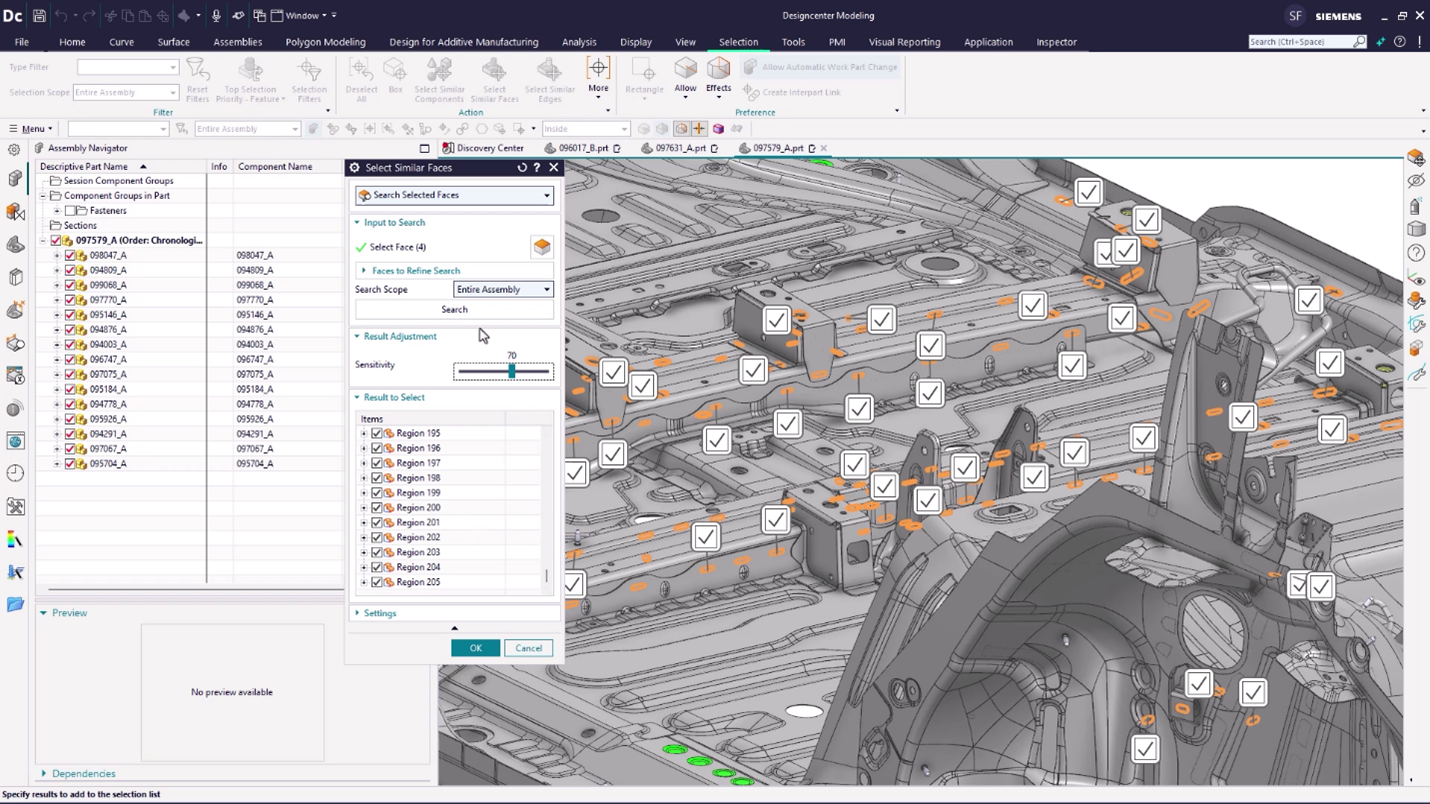
Screenshot of Sustainability in Designcenter helps evaluate a product's environmental impact. Analyze material choices and manufacturing processes to create eco-friendly designs that meet global standards and reduce your carbon footprint.Screenshot of the Performance Predictor, used to simulate and forecast operational efficiency. This helps optimize designs and proactively avoid bottlenecks before physical implementation.Screenshot of Immersive Engineering, used to dive deep into manufacturing environments. Viewers can explore and analyze processes virtually to pinpoint potential issues and optimize workflows before they ever reach the factory floor.Screenshot of the Select Similar tool, used to quickly identify and group geometrically identical or parametrically similar components within a design. This streamlines modifications and ensures consistency across an entire project.Screenshot of a rendering created from the actual product design. Notice the lighting and surface realism.