Everhour vs. Timeclock.Kiwi

Overview
ProductRatingMost Used ByProduct SummaryStarting Price
Everhour
Score 8.2 out of 10
N/A
Everhour is a time tracker equipped with project & team management features. Everhour integrates with project management apps so users can track time on tasks right from its interface: Asana, Basecamp, Trello, Jira, ClickUp, Basecamp, Notion, Todoist, GitHub, GitLab, etc. Its time tracking features provide options for timekeeping and time management. It helps to facilitate a team's time tracking experience by adding reminders, auto stop timers, start and stop timers, and…
$0
Timeclock.Kiwi
Score 10.0 out of 10
N/A
A cloud timeclock program that is used to either track hours worked or log time against a job. Export the calculated data in a format of choice or straight into favourite payroll program. Update Kiosk settings in the portal and it will be updated instantly from anywhere Time can be logged against a job or task, to keep track of materials used and record notes if something out of the ordinary happens. Everything can be associated to a Cost Code so the data can…
$3.50
per month per Kiosk
Pricing
EverhourTimeclock.Kiwi
Editions & Modules
Free
$0
Lite
$6.00
per month per user
Team
$10.00
per month per user
No answers on this topic
Offerings
Pricing Offerings
EverhourTimeclock.Kiwi
Free Trial
YesYes
Free/Freemium Version
YesNo
Premium Consulting/Integration Services
YesYes
Entry-level Setup FeeNo setup feeNo setup fee
Additional Details
More Pricing Information
Community Pulse
EverhourTimeclock.Kiwi
Best Alternatives
EverhourTimeclock.Kiwi
Small Businesses
Traqq
Traqq
Score 9.1 out of 10
Traqq
Traqq
Score 9.1 out of 10
Medium-sized Companies
TimeClock Plus
TimeClock Plus
Score 9.5 out of 10
TimeClock Plus
TimeClock Plus
Score 9.5 out of 10
Enterprises
Zoho People
Zoho People
Score 8.9 out of 10
Zoho People
Zoho People
Score 8.9 out of 10
All AlternativesView all alternativesView all alternatives
User Ratings
EverhourTimeclock.Kiwi
Likelihood to Recommend
7.5
(61 ratings)
10.0
(3 ratings)
Usability
9.0
(3 ratings)
-
(0 ratings)
Support Rating
7.7
(21 ratings)
-
(0 ratings)
User Testimonials
EverhourTimeclock.Kiwi
Likelihood to Recommend
Everhour
It's great when you need precise billable hour tracking across multiple clients with different rates, integrated invoicing, and detailed project breakdowns. I would have liked to see regular security audits and/or a SOC report given the nature of the information that's being documented in the product. However, that may not be a huge deal depending on your organization.
Read full review
Timeclock.Kiwi
The staff was able to start using it straight away, they didn't need to be taught as it is really simple. Have set up several of them around the factory and as they are all synced in real-time people can sign in at anyone they want which is really helpful as it is a big site. Also being able to get the "trouble makers" to have to use a PIN has stopped the complaints about people clocking them out while they were working.
Read full review
Pros
Everhour
  • Integration with project management tools, like Trello, that makes the project management easier to do because you have metrics and statistics grouped on just one site.
  • Metrics of expended time per user and per project makes decisions easier You can have all the data to support changes or decisions in the company, like rentability of certain type of products offered.
  • The Everhour team is always evolving, so they always ask how you feel about everything and if anything is not working as expected. You are always surprised with new improvements that you didn't think could be useful but that end up adding value to your business.
Read full review
Timeclock.Kiwi
  • Easy to use, clever design and the setup is really easy.
  • Getting the data into my payroll is incredibly easy.
  • Very cheap, the pricing is by far the best I have ever seen on a product like this.
Read full review
Cons
Everhour
  • Schedule filtering for Teams/Groups of people
  • Expenses tracking system - if it will allow to track all fixed INs and OUTs inside the project (and track invoices based not only on time tracking but generated manually) it can replace our financial tool or make it more automated
Read full review
Timeclock.Kiwi
  • None, the software is very easy to use. Nothing to complain about.
Read full review
Usability
Everhour
Everhour's overall usability is definitely one of its key strengths. The UI is intuitive and clean, making time tracking feel less "technical" than other solutions we've tried. Our entire team, including less tech-savvy contractors, found it easy to use.
Read full review
Timeclock.Kiwi
No answers on this topic
Support Rating
Everhour
In the almost 2 1/2 years we have had to contact support 1 time and it really was for a feature request. Their support team responded quickly and told us that the feature was going to be added in the next few months. We have had no support issues ever. I have never had a time tracking solution that has had no issues until Everhour.
Read full review
Timeclock.Kiwi
No answers on this topic
Alternatives Considered
Everhour
Originally, I was using Harvest and really liked its features. However, the Harvest invoicing system only pushes data into QBO, but doesn't check / sync invoice numbers or update for payment status, so it was resulting in duplicate invoice numbers and extra effort to update status in both places. So, I started looking for another solution. I tried a LOT of products. Everhour addressed the following issues I encountered from various other services:
  • Bi-directional sync of invoices so records in QBO & Everhour always match (without having to load a bunch of extraneous records to either system)
  • Start-stop timer
  • Set budgets by project and client to easily monitor project status & profitability
  • Allow all team members to track to projects they're following, even if not assigned to them
  • Clean, modern interface (if I'm using it every day, it better be pretty and easy to use)
  • Ability to edit time, and limit others' ability to edit their time (though we don't restrict time editing for our users)
  • Doesn't require use of Projects in QBO in order to sync properly
  • Doesn't try to take over invoicing or break QBO functionality
Read full review
Timeclock.Kiwi
Read full review
Return on Investment
Everhour
  • We're more aware on the investement of hours required in a project, not just the estimated hours but the actual time invested by every member of the team
  • Everhour is a good tool to adequate the pricing to the actual investement of hours needed and to bill the clients when the actual time invested exceeded the estimated time
  • The members of the team (and i'm speaking for myself too) are now more aware of how much it takes to complete a task. Having this in mind help us to organise our everyday and to know when we are free to take new clients
Read full review
Timeclock.Kiwi
  • Saves a lot of time for payroll
  • Less time spent trying to figure out what is wrong with the time clock today haha
Read full review
ScreenShots

Everhour Screenshots

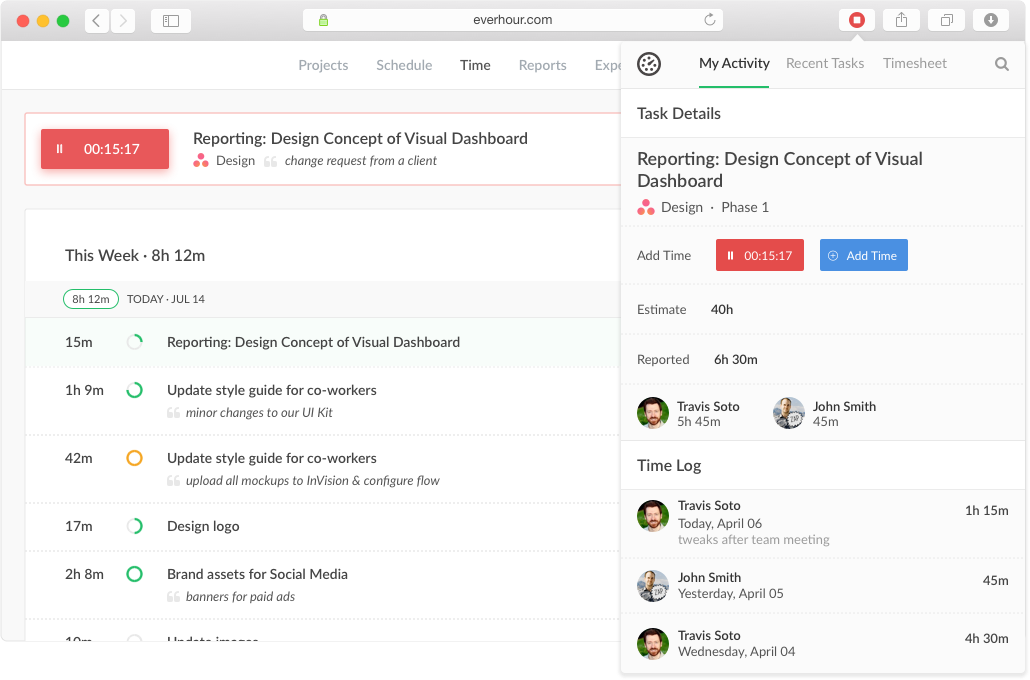
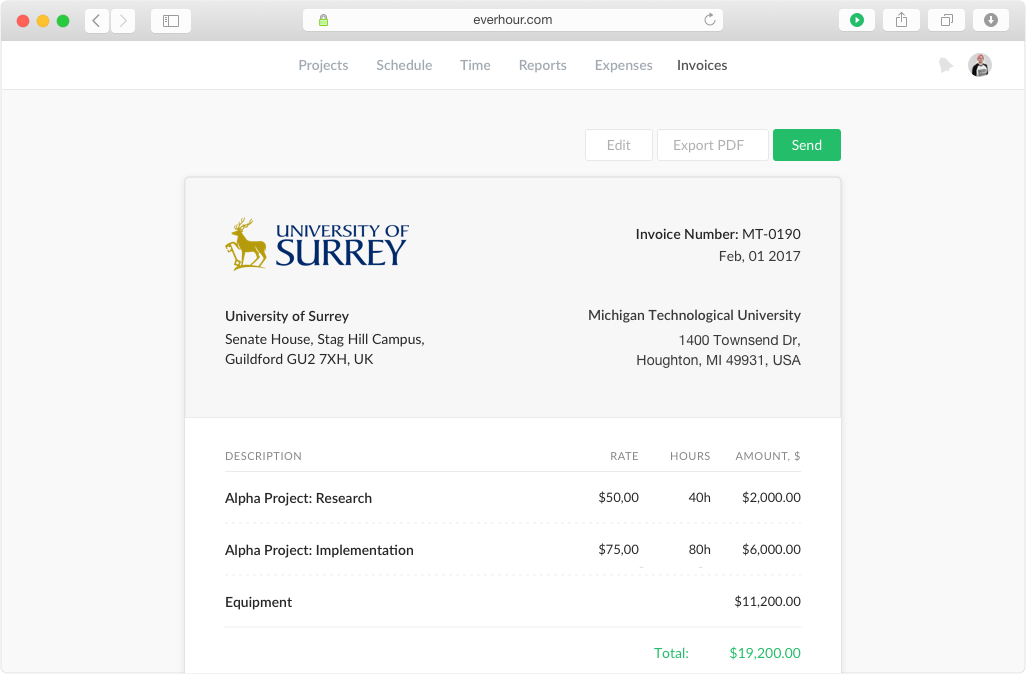
Screenshot of Keep track of projects, set budgets and alerts, split billable and non-billable hoursScreenshot of Track time from the website, from a browser toolbar and inside project management toolsScreenshot of Create tasks, track time, and update progress in one place.Screenshot of Track staff related expenses and invoice billable expenses to clients with integrated invoicingScreenshot of Create invoices from the logged work just in a few clicks. Watch the reported time and the accurate time invoiced.

Timeclock.Kiwi Screenshots

Screenshot of Timeclock with simple filter enabledScreenshot of Timeclock Portal - People pageScreenshot of Timeclock with T9 filter enabledScreenshot of Timeclock Portal - Kiosk settings