ExpenseNet vs. ZipBooks

Overview
ProductRatingMost Used ByProduct SummaryStarting Price
ExpenseNet
Score 6.0 out of 10
Enterprise companies (1,001+ employees)
InterpIX ExpenseNet 8.0 offers expense reporting for enterprises. The product is compatible with nearly all global languages and currencies, and aims to significantly reduce the time it takes to complete the expense reporting process. According to the vendor, ExpenseNet 8.0 is the next generation of expense reporting.N/A
ZipBooks
Score 7.0 out of 10
Small Businesses (1-50 employees)
ZipBooks is an accounting software solution for small business owners and accountants. Users can track expenses, manage their team, send recurring invoices and manage projects.
$15
per month
Pricing
ExpenseNetZipBooks
Editions & Modules
No answers on this topic
ZipBooks Starter
$0
ZipBooks Smarter
$15
ZipBooks Sophisticated
$35
ZipBooks Accountant
Custom
Offerings
Pricing Offerings
ExpenseNetZipBooks
Free Trial
NoYes
Free/Freemium Version
NoYes
Premium Consulting/Integration Services
YesYes
Entry-level Setup FeeRequiredNo setup fee
Additional DetailsWe offer a complete solution for automating your Expense Reporting process for the lowest cost on the market. The BEST value in Expense Reporting.
More Pricing Information
Community Pulse
ExpenseNetZipBooks
Features
ExpenseNetZipBooks
Customization
Comparison of Customization features of Product A and Product B
ExpenseNet
-
Ratings
ZipBooks
9.1
2 Ratings
18% above category average
API for custom integration00 Ratings9.12 Ratings
Plug-ins00 Ratings9.11 Ratings
Security
Comparison of Security features of Product A and Product B
ExpenseNet
-
Ratings
ZipBooks
9.5
5 Ratings
15% above category average
Single sign-on capability00 Ratings9.74 Ratings
Role-based user permissions00 Ratings9.34 Ratings
Reporting & Analytics
Comparison of Reporting & Analytics features of Product A and Product B
ExpenseNet
-
Ratings
ZipBooks
10.0
6 Ratings
24% above category average
Dashboards00 Ratings10.06 Ratings
Standard reports00 Ratings10.06 Ratings
General Ledger and Configurable Accounting
Comparison of General Ledger and Configurable Accounting features of Product A and Product B
ExpenseNet
-
Ratings
ZipBooks
8.8
6 Ratings
14% above category average
Accounts receivable00 Ratings8.05 Ratings
Bank reconciliation00 Ratings8.01 Ratings
Expense management00 Ratings10.05 Ratings
Time tracking00 Ratings9.06 Ratings
Multi-currency support00 Ratings9.12 Ratings
Order Management
Comparison of Order Management features of Product A and Product B
ExpenseNet
-
Ratings
ZipBooks
9.2
6 Ratings
21% above category average
Credit card processing00 Ratings10.06 Ratings
Cost of goods sold00 Ratings8.52 Ratings
Best Alternatives
ExpenseNetZipBooks
Small Businesses
Dext
Dext
Score 9.6 out of 10
QuickBooks Self-Employed (discontinued)
Score 5.3 out of 10
Medium-sized Companies
BILL Spend & Expense
Score 8.9 out of 10
Zoho Books
Zoho Books
Score 9.0 out of 10
Enterprises
Emburse Chrome River
Score 7.8 out of 10
SAP Cloud ERP
SAP Cloud ERP
Score 8.6 out of 10
All AlternativesView all alternativesView all alternatives
User Ratings
ExpenseNetZipBooks
Likelihood to Recommend
6.0
(1 ratings)
9.0
(6 ratings)
User Testimonials
ExpenseNetZipBooks
Likelihood to Recommend
InterplX Expense Management
ExpenseNet is well suited to a large organization with many travelers or purchasing cards holders. It allows the entire expense reporting process to be done electronically. For employees who are not based on site or not based at the same site as their manager and accounting, it really streamlines the process compared to having paper or even e-mailed expense reports. The wholly electronic process also enables easier reporting and auditing. ExpenseNet would likely be less appropriate for small organizations with few travelers.
Read full review
ZipBooks
ZipBooks is really strong for small businesses (and non-profits like the ones I help manage). It may not yet be ready to handle medium or large businesses given the deep, niche functionality that is sometimes required in those cases.
Read full review
Pros
InterplX Expense Management
  • Integration with expenses posted to the employee's corporate card account.
  • Feature that allows an employee to take a picture of their receipt and then send it to their ExpenseNet account via e-mail.
  • Ability to view and save a copy of the expense report with or without the receipts.
Read full review
ZipBooks
  • Invoicing is particularly easy-to-use, quick, clean and beautiful. GREAT for branding.
  • The time tracker was unexpected, but very useful and integrates well with the invoicing. Leads to quick invoicing every time.
  • Customer support is phenomenal -- the support staff is friendly and helpful.
  • Although they are a new company, they are definitely on the right track!
  • I recommend this software to clients, colleagues, and friends alike, mostly for it quick and beautiful invoicing.
  • They do what they can to live up to their name! It doesn't take very long to get set up, or very long to create a complete invoice and send it to the right person.
Read full review
Cons
InterplX Expense Management
  • Overall the look and feel is dated and the navigation is clunky. Even employees who travel a lot will only go into the system once a month to do their expense report. A more user-friendly interface would take some of the chore out of it.
  • The feature to take a picture of a receipt and then e-mail it to your ExpenseNet account is great, but it does not always work, which can be frustrating to redo
  • It would be handy if just as the charges from the corporate card are imported, the statement could be as well. This would eliminate the need for the employee to go into their corporate card account to download and save the statement and then attach it in ExpenseNet.
  • It is senseless that once you add a receipt to the queue, you cannot delete it until after you have submitted the given report. Sometimes, a duplicate receipt will be loaded or a receipt will be loaded in error. To have to work around it in the queue is rather annoying.
Read full review
ZipBooks
  • There is some difficulty with a need to learn the use of the menus, they are not open and click, at the moment, the user needs to open the menu then using the pad keys scroll down and use enter to select from the drop-down menu. A mouse does not work.
Read full review
Alternatives Considered
InterplX Expense Management
No answers on this topic
ZipBooks
I've primarily compared ZipBooks vs. Quickbooks because I've used Quickbooks at larger companies before. ZipBooks was the right fit for a smaller organization because it still had all the core features of Quickbooks but at a dramatically lower price that fits the budget.
Read full review
Return on Investment
InterplX Expense Management
  • Enables fully electronic expense reporting process
  • Easier reporting
  • Easier to audit / provide audit documentation
Read full review
ZipBooks
  • ZipBooks is entirely affordable, and with my current $15/mo payments, I get ROI pretty quickly.
  • Invoices are simple and easy to make, while staying beautiful and functional at the same time. This saves me TIME, which means that I don't need to spend 15-20 minutes fiddling with the software to make it do what I want it to do. It just works. And that means, I can spend more time doing client work, and managing projects and sales.
Read full review
ScreenShots

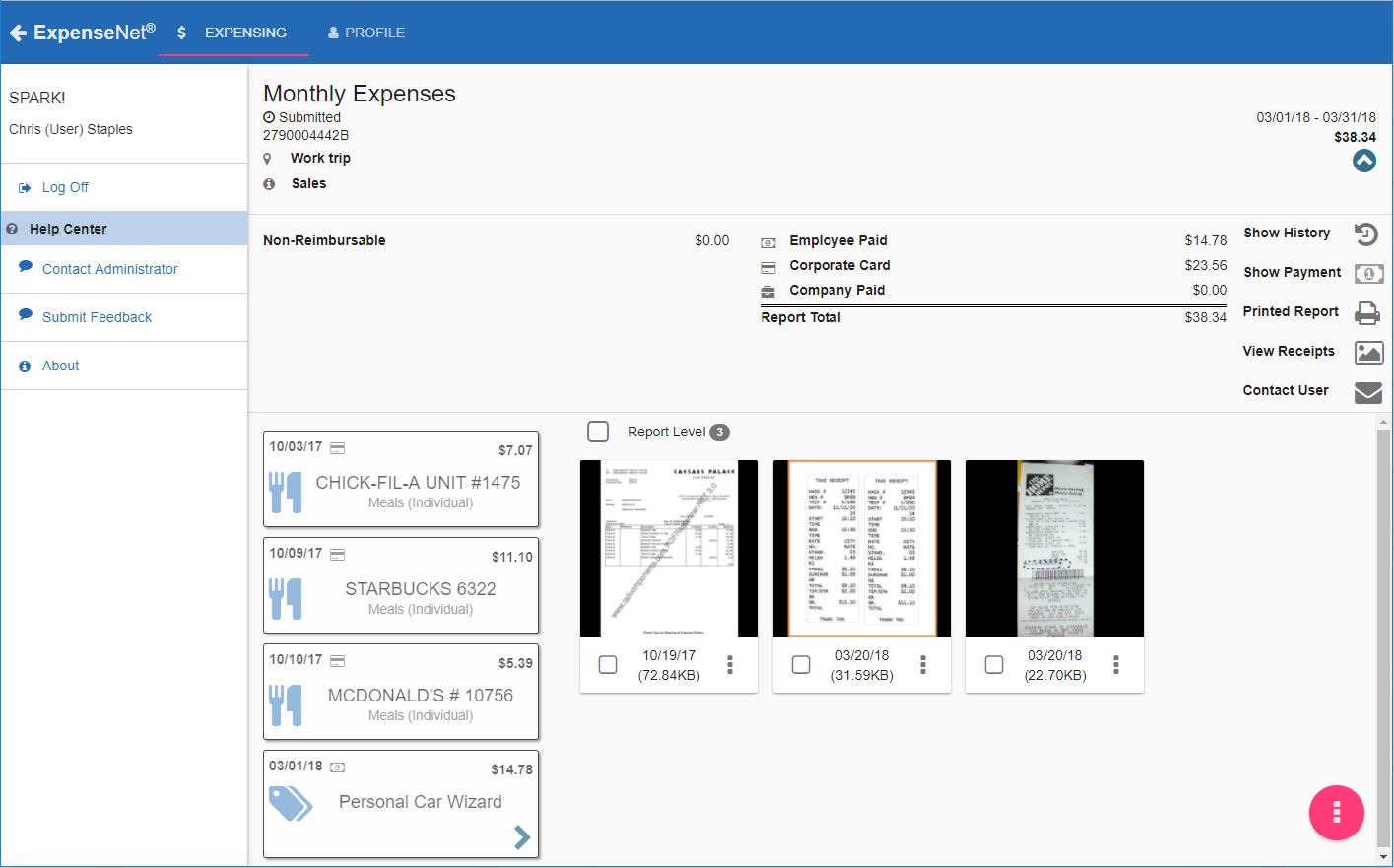
ExpenseNet Screenshots

Screenshot of Mobile interfaceScreenshot of Desktop interface

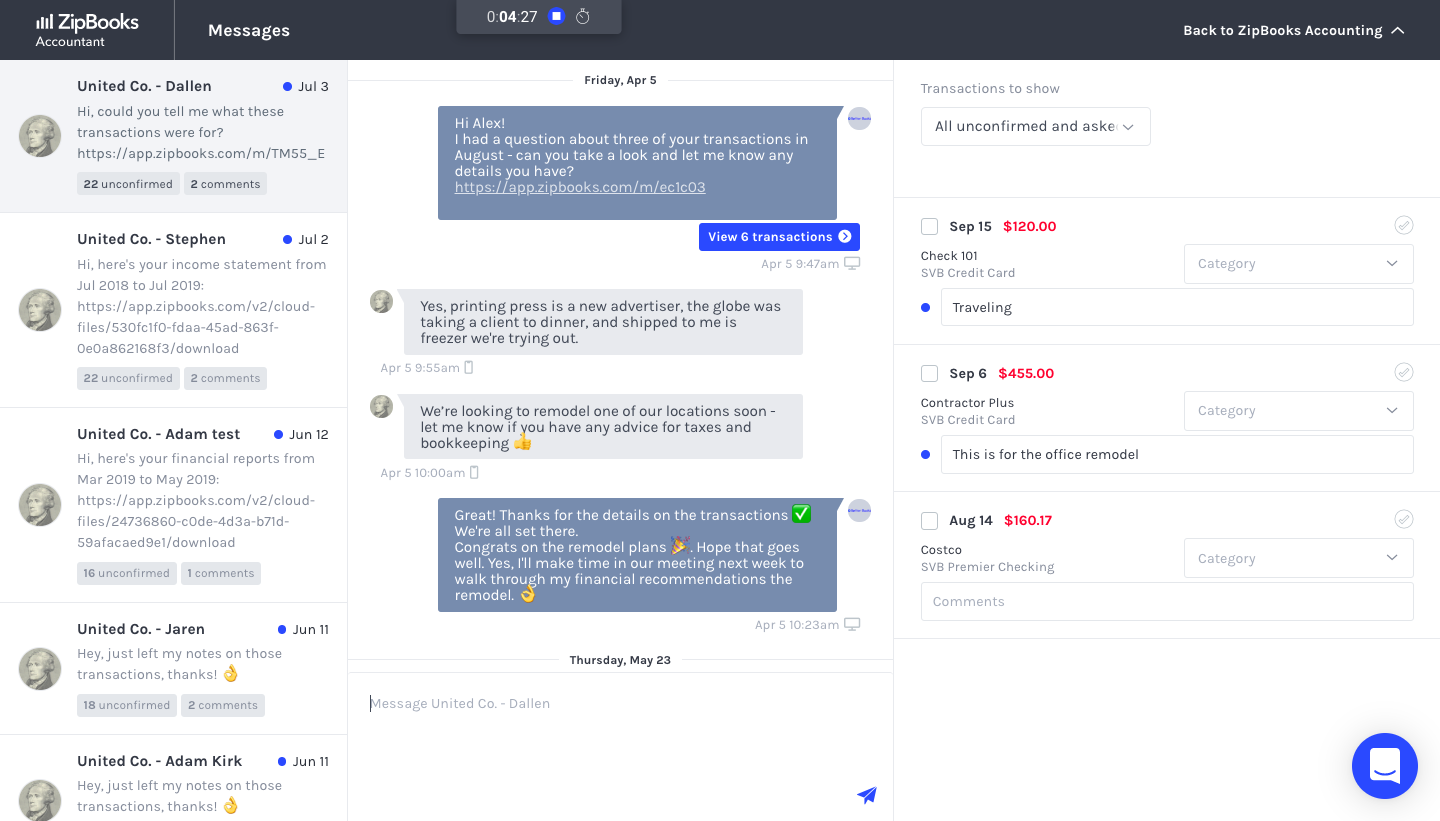
ZipBooks Screenshots

Screenshot of ZipBooks DashboardScreenshot of ZipBooks TransactionsScreenshot of ZipBooks InvoicingScreenshot of ZipBooks Accountant Messaging