Flexmonster Pivot Table & Charts Component vs. Progress Kendo UI vs. Microsoft BI (MSBI)

Overview
ProductRatingMost Used ByProduct SummaryStarting Price
Flexmonster Pivot Table & Charts Component
Score 10.0 out of 10
Mid-Size Companies (51-1,000 employees)
Flexmonster Pivot Table & Charts is a component for interactive pivot reports that can be inserted into a web page or a web application. It’s a JavaScript tool that enables a user to visualize their business data. This solution supports Microsoft Analysis Services OLAP cubes, Mondrian, icCube, JSON, SQL (MS SQL, MySQL and others) databases or static JSON or CSV files. According to the vendor, this solution allows users to work extremely quickly with really large data…
$0
Annual SaaS Subscription
Progress Kendo UI
Score 8.0 out of 10
N/A
Kendo UI is a JavaScript UI toolkit that allows users to build responsive web-based apps integrated into their framework of choice (jQuery, Angular, React, or Vue). The vendor’s value proposition is that Kendo UI offers a large library of popular and configurable components ranging from sophisticated grids and charts to basic buttons, so users don’t have to waste development time building their UI. The vendor also says the large library of customizable themes means users can easily deploy a…
$999
per developer, royalty-free
Microsoft BI (MSBI)
Score 8.9 out of 10
N/A
Microsoft BI is a business intelligence product used for data analysis and generating reports on server-based data. It features unlimited data analysis capacity with its reporting engine, SQL Server Reporting Services alongside ETL, master data management, and data cleansing.
$14
per month per user
Pricing
Flexmonster Pivot Table & Charts ComponentProgress Kendo UIMicrosoft BI (MSBI)
Editions & Modules
Pivot Table for SQL/CSV/JSON Unlimited
$0
Annual SaaS Subscription
Pivot Table for Pentaho Mondrian
$0
Annual SaaS Subscription
Pivot Table for MS Analysis Services
$0
Annual SaaS Subscription
Pivot Table for SQL/CSV/JSON Basic
$299
Annual subscription
Pivot Table for Pentaho Mondrian
$799
Annual subscription
Pivot Table for SQL/CSV/JSON Unlimited
$799
Annual subscription
Pivot Table for MS Analysis Services
$799
Annual subscription
Kendo UI with Priority Support
$999
per developer, royalty-free
DevCraft UI
$1,299
per developer, royalty-free
DevCraft Complete
$1,499
per developer, royalty-free
DevCraft Ultimate
$2,199
per developer, royalty-free
Power BI Pro
$14
per month per user
Power BI Premium
$24
per month per user
Offerings
Pricing Offerings
Flexmonster Pivot Table & Charts ComponentProgress Kendo UIMicrosoft BI (MSBI)
Free Trial
YesYesNo
Free/Freemium Version
NoNoYes
Premium Consulting/Integration Services
YesYesNo
Entry-level Setup FeeNo setup feeNo setup feeNo setup fee
Additional Details
More Pricing Information
Community Pulse
Flexmonster Pivot Table & Charts ComponentProgress Kendo UIMicrosoft BI (MSBI)
Features
Flexmonster Pivot Table & Charts ComponentProgress Kendo UIMicrosoft BI (MSBI)
BI Standard Reporting
Comparison of BI Standard Reporting features of Product A and Product B
Flexmonster Pivot Table & Charts Component
10.0
1 Ratings
20% above category average
Progress Kendo UI
-
Ratings
Microsoft BI (MSBI)
9.5
50 Ratings
15% above category average
Report Formatting Templates10.01 Ratings00 Ratings9.548 Ratings
Pixel Perfect reports00 Ratings00 Ratings9.543 Ratings
Customizable dashboards00 Ratings00 Ratings9.450 Ratings
Ad-hoc Reporting
Comparison of Ad-hoc Reporting features of Product A and Product B
Flexmonster Pivot Table & Charts Component
9.5
1 Ratings
17% above category average
Progress Kendo UI
-
Ratings
Microsoft BI (MSBI)
9.6
50 Ratings
18% above category average
Formatting capabilities9.01 Ratings00 Ratings9.450 Ratings
Report sharing and collaboration10.01 Ratings00 Ratings9.550 Ratings
Drill-down analysis00 Ratings00 Ratings9.545 Ratings
Integration with R or other statistical packages00 Ratings00 Ratings9.939 Ratings
Report Output and Scheduling
Comparison of Report Output and Scheduling features of Product A and Product B
Flexmonster Pivot Table & Charts Component
10.0
1 Ratings
19% above category average
Progress Kendo UI
-
Ratings
Microsoft BI (MSBI)
9.6
49 Ratings
15% above category average
Publish to PDF10.01 Ratings00 Ratings9.545 Ratings
Publish to Web00 Ratings00 Ratings9.545 Ratings
Report Versioning00 Ratings00 Ratings9.541 Ratings
Report Delivery Scheduling00 Ratings00 Ratings9.544 Ratings
Delivery to Remote Servers00 Ratings00 Ratings9.924 Ratings
Mobile Capabilities
Comparison of Mobile Capabilities features of Product A and Product B
Flexmonster Pivot Table & Charts Component
10.0
1 Ratings
25% above category average
Progress Kendo UI
-
Ratings
Microsoft BI (MSBI)
8.8
39 Ratings
13% above category average
Responsive Design for Web Access10.01 Ratings00 Ratings8.936 Ratings
Mobile Application00 Ratings00 Ratings8.027 Ratings
Dashboard / Report / Visualization Interactivity on Mobile00 Ratings00 Ratings10.036 Ratings
Data Discovery and Visualization
Comparison of Data Discovery and Visualization features of Product A and Product B
Flexmonster Pivot Table & Charts Component
-
Ratings
Progress Kendo UI
-
Ratings
Microsoft BI (MSBI)
9.6
49 Ratings
18% above category average
Pre-built visualization formats (heatmaps, scatter plots etc.)00 Ratings00 Ratings9.548 Ratings
Location Analytics / Geographic Visualization00 Ratings00 Ratings9.545 Ratings
Predictive Analytics00 Ratings00 Ratings9.942 Ratings
Pattern Recognition and Data Mining00 Ratings00 Ratings9.53 Ratings
Access Control and Security
Comparison of Access Control and Security features of Product A and Product B
Flexmonster Pivot Table & Charts Component
-
Ratings
Progress Kendo UI
-
Ratings
Microsoft BI (MSBI)
9.5
50 Ratings
11% above category average
Multi-User Support (named login)00 Ratings00 Ratings9.547 Ratings
Role-Based Security Model00 Ratings00 Ratings9.544 Ratings
Multiple Access Permission Levels (Create, Read, Delete)00 Ratings00 Ratings9.547 Ratings
Report-Level Access Control00 Ratings00 Ratings9.53 Ratings
Single Sign-On (SSO)00 Ratings00 Ratings9.529 Ratings
Application Program Interfaces (APIs) / Embedding
Comparison of Application Program Interfaces (APIs) / Embedding features of Product A and Product B
Flexmonster Pivot Table & Charts Component
-
Ratings
Progress Kendo UI
-
Ratings
Microsoft BI (MSBI)
9.4
22 Ratings
19% above category average
REST API00 Ratings00 Ratings9.919 Ratings
Javascript API00 Ratings00 Ratings9.919 Ratings
iFrames00 Ratings00 Ratings9.918 Ratings
Java API00 Ratings00 Ratings9.917 Ratings
Themeable User Interface (UI)00 Ratings00 Ratings9.519 Ratings
Customizable Platform (Open Source)00 Ratings00 Ratings6.918 Ratings
Best Alternatives
Flexmonster Pivot Table & Charts ComponentProgress Kendo UIMicrosoft BI (MSBI)
Small Businesses
Yellowfin
Yellowfin
Score 8.7 out of 10
Syncfusion Essential Studio
Score 6.6 out of 10
Yellowfin
Yellowfin
Score 8.7 out of 10
Medium-sized Companies
Reveal
Reveal
Score 10.0 out of 10
React (React.js)
React (React.js)
Score 8.8 out of 10
Reveal
Reveal
Score 10.0 out of 10
Enterprises
Kyvos Semantic Layer
Score 9.5 out of 10
React (React.js)
React (React.js)
Score 8.8 out of 10
Kyvos Semantic Layer
Score 9.5 out of 10
All AlternativesView all alternativesView all alternativesView all alternatives
User Ratings
Flexmonster Pivot Table & Charts ComponentProgress Kendo UIMicrosoft BI (MSBI)
Likelihood to Recommend
10.0
(1 ratings)
8.2
(177 ratings)
9.9
(73 ratings)
Likelihood to Renew
-
(0 ratings)
8.8
(21 ratings)
8.0
(25 ratings)
Usability
9.0
(1 ratings)
9.0
(38 ratings)
10.0
(15 ratings)
Availability
-
(0 ratings)
9.1
(2 ratings)
9.5
(2 ratings)
Performance
-
(0 ratings)
9.1
(2 ratings)
7.0
(2 ratings)
Support Rating
10.0
(1 ratings)
7.5
(38 ratings)
8.9
(15 ratings)
In-Person Training
-
(0 ratings)
-
(0 ratings)
6.9
(3 ratings)
Online Training
-
(0 ratings)
-
(0 ratings)
8.5
(2 ratings)
Implementation Rating
-
(0 ratings)
8.1
(9 ratings)
9.6
(7 ratings)
Configurability
-
(0 ratings)
8.2
(2 ratings)
10.0
(2 ratings)
Ease of integration
-
(0 ratings)
8.2
(2 ratings)
-
(0 ratings)
Product Scalability
-
(0 ratings)
8.2
(2 ratings)
-
(0 ratings)
Vendor post-sale
-
(0 ratings)
9.1
(2 ratings)
-
(0 ratings)
Vendor pre-sale
-
(0 ratings)
9.1
(2 ratings)
-
(0 ratings)
User Testimonials
Flexmonster Pivot Table & Charts ComponentProgress Kendo UIMicrosoft BI (MSBI)
Likelihood to Recommend
Flexmonster
Fantastic product to embed in any SaaS solution for reporting and data exports. Excellent performance, ability to customize fields and tons of other features out of the box that makes it a well-rounded tool that is easy to use. To top it off their support is amazing for answering technical questions quickly and they provide great examples to learn how to interact with the code. We are very happy with our choice to use Flexmonster!
Read full review
Progress Software Corporation
It allows us to extend the components or create new components in an easy way. The control suite is complete and powerful enough that you do not need to consider other competing packages. The controls are relatively easy to implement and when we ran into problems the documentation and online support were very reliable.
Read full review
Microsoft
Microsoft BI is well suited for Stream analytics, easy data integration, report creation and UI/UX designs (limited but what all available are great ones) Microsoft BI may be less appropriate for handling huge number of datasets and difficult queries. It may also be difficult for a company with heavy data.
Read full review
Pros
Flexmonster
No answers on this topic
Progress Software Corporation
  • Kendo UI controls provides rich set of features and capability that is required for enterprise products.
  • Performance of controls are satisfactory overall though few other vendors provides extraordinary performance for specific controls and for specific purpose. Kendo UI provides most of the required controls and with rich feature that made us to select Kendo UI controls for our development.
  • Kendo UI controls quality, in terms of performance, robustness and well defined interfaces are very positive notes.
Read full review
Microsoft
  • Comparatively easy to use compared to other data analytics solutions, collaborating with other colleagues on data work is simple.
  • Using Visual Studio for database, ETL, reporting, and analytics development save time and money.
  • Transfer of data from one application to another via Excel and comparison of data attributes between applications
  • Dashboard functionality, as well as Python support, are available, allowing you to add additional charts and graphs.
Read full review
Cons
Flexmonster
No answers on this topic
Progress Software Corporation
  • Kendo UI is always moving forward and staying current with latest development trends. While that is beneficial, that can cause some issues when supporting customers (particularly government) that don't move their IT infrastructure along nearly as fast. A prime example is web font icons. Great and easy to use, but where Kendo UI utilizes web font icons as the sole means of displaying an icon, not all organizations (again, especially government) allow the use of these. There have been times where Kendo UI became unusable and we had to downgrade to a version a few years old. Makes continued payment for licenses sometimes feel wasted as we may not be able to always use the new releases
  • Kendo UI has a wonderful feedback system and they do indeed listen to the community. However, there do seem to be some instances where there is large support for a new feature/component and it never gets addressed. It is easy to understand that not all ideas are easy or even prudent to implement, but would be nice to see a better follow-up on ideas with a current status
  • Refreshing Kendo UI grids is simple, yet the standard API method causes the grid to return to the default state. We have many use cases where we would love to update the grid data but need current grid state (such as expanded detail rows, sorts, filters, etc) preserved after the grid is updated so that users do not have to perform grid actions again to return to the desired state.
Read full review
Microsoft
  • The race to perfect gathering of Non-Traditional datasets is on-going; with Microsoft arguably not the leader of the pack in this category.
  • Licensing options for PowerBI visualizations may be a factor. I.e. if you need to implement B2C PowerBI visualizations, the cost is considerably high especially for startups.
  • Some clients are still resistant putting their data on the cloud, which restricts lots of functionality to Power BI.
Read full review
Likelihood to Renew
Flexmonster
No answers on this topic
Progress Software Corporation
Nothing better has come along. I'm always on the lookout for new UI libraries and I have tried most of them. Kendo has done a good job of keeping my business. They aren't perfect, but no one has done it better as far as I can tell. I'll keep a look out and my rating may change in the future if they get complacent.
Read full review
Microsoft
Microsoft BI is fundamental to our suite of BI applications. That being said, Northcraft Analytics is focused on delighting our customers, so if the underlying factors of our decision change, we would choose to re-write our BI applications on a different stack. Luckily, mathematics are the fundamental IP of our technology... and is portable across all BI platforms for the foreseeable future.
Read full review
Usability
Flexmonster
Checks all the boxes! Easy to use, great out of the box feature set and fantastic support team
Read full review
Progress Software Corporation
it's easy to implement in applications. The kendo widgets are able to be used in almost any type of business application which has a UI. For most part, once the developer has completed a project which uses Kendo, many time code can be copy/paste into a new application. Kendo UI documentation keeps improving so finding the answers to questions can be easy
Read full review
Microsoft
The Microsoft BI tools have great usability for both developers and end users alike. For developers familiar with Visual Studio, there is little learning curve. For those not, the single Visual Studio IDE means not having to learn separate tools for each component. For end-users, the web interface for SSRS is simple to navigate with intuitive controls. For ad-hoc analysis, Excel can connect directly to SSAS and provide a pivot table like experience which is familiar to many users. For database development, there is beginning to be some confusion, as there are now three tool choices (VS, SSMS, Azure Data Studio) for developers. I would like to see Azure Data Studio become the superset of SSMS and eventually supplant it.
Read full review
Reliability and Availability
Flexmonster
No answers on this topic
Progress Software Corporation
The errors that we have detected were not of great importance and the online support provided a temporary solution until the next release.
Read full review
Microsoft
The product has been reliable.
Read full review
Performance
Flexmonster
No answers on this topic
Progress Software Corporation
Reports sometimes take a bit of time to load
Read full review
Microsoft
SQL Server Reporting Services (SSRS) can drag at times. We created two report servers and placed them under an F5 load balancer. This configuration has worked well. We have seen sluggish performance at times due to the Windows Firewall.
Read full review
Support Rating
Flexmonster
Quick response to questions and feedback, excellent documentation for learning about the product and tons of examples to leverage.
Read full review
Progress Software Corporation
Overall, we are satisfied with the support offered by the Progress Kendo UI team. We had raised few helpline incidents in the past and they have been resolved timely by the team. Also, we were satisfied with the level of information and support provided by the team.
Read full review
Microsoft
While support from Microsoft isn't necessarily always best of breed, you're also not paying the price for premium support that you would on other platforms. The strength of the stack is in the ecosystem that surrounds it. In contrast to other products, there are hundreds, even thousands of bloggers that post daily as well as vibrant user communities that surround the tool. I've had much better luck finding help with SQL Server related issues than I have with any other product, but that help doesn't always come directly from Microsoft.
Read full review
In-Person Training
Flexmonster
No answers on this topic
Progress Software Corporation
No answers on this topic
Microsoft
This training was more directed toward what the product was capable of rather than actual programming.
Read full review
Online Training
Flexmonster
No answers on this topic
Progress Software Corporation
No answers on this topic
Microsoft
I have used on-line training from Microsoft and from Pragmatic Works. I would recommend Pragmatic Works as the best way to get up to speed quickly, and then use the Microsoft on-line training to deep dive into specific features that you need to get depth with.
Read full review
Implementation Rating
Flexmonster
No answers on this topic
Progress Software Corporation
it took me about one day to make the components available for all the team members, including a quick demo, parallel setup in everyone’s workstation and packages deployment into our nuget server after 3 days of one to one support, everyone was able to use the components or find help in the documentation or resuest support
Read full review
Microsoft
We are a consulting firm and as such our best resources are always billing on client projects. Our internal implementation has weaknesses, but that's true for any company like ours. My rating is based on the product's ease of implementation.
Read full review
Alternatives Considered
Flexmonster
No answers on this topic
Progress Software Corporation
At the time of our product selection we identified better cross-browser compatibility and we estimated that turnaround for support was superior. At the time, the vendor had a higher positive feedback footprint among their user community.
Read full review
Microsoft
We have used the built in ConnectWise Manager reports and custom reports. The reports provide static data. PowerBI shows us live data we can drill down into and easily adjust parameters. It's much more useful than a static PDF report.
Read full review
Scalability
Flexmonster
No answers on this topic
Progress Software Corporation
Never faced a problem even when we threw a large amount of data at it
Read full review
Microsoft
No answers on this topic
Return on Investment
Flexmonster
No answers on this topic
Progress Software Corporation
  • Kendo UI has saved us a ton of time in development.
  • We were able to get certain things to market faster due to the fact that we didn't have to piece multiple libraries together like is so common with modern web development.
  • Because of the price of the library, however, we have not been able to purchase upgrades every year.
Read full review
Microsoft
  • As a SaaS provider we see being able to provide self-service BI to our client users as a competitive advantage. In fact the MSSQL enabled BI is a contributing factor to many winning RFPs we have done for prospective client organisations.
  • However MSSQL BI requires extensive knowledge and skills to design and develop data warehouses & data models as a foundation to support business analysts and users to interrogate data effectively and efficiently. Often times we find having strong in-house MSSQL expertise is a bless.
Read full review
ScreenShots

Flexmonster Pivot Table & Charts Component Screenshots

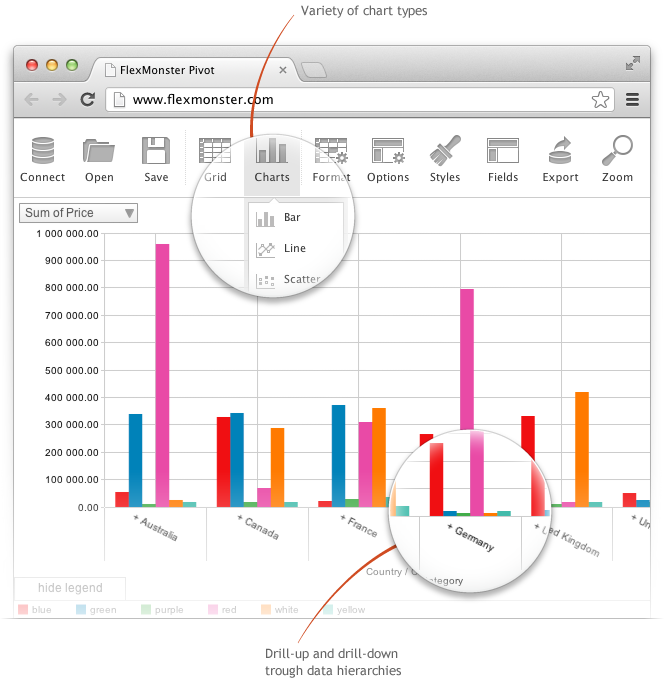
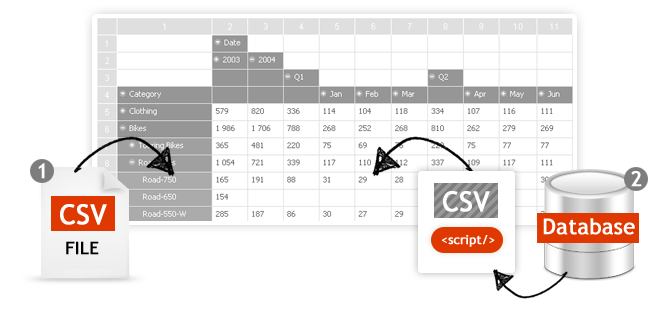
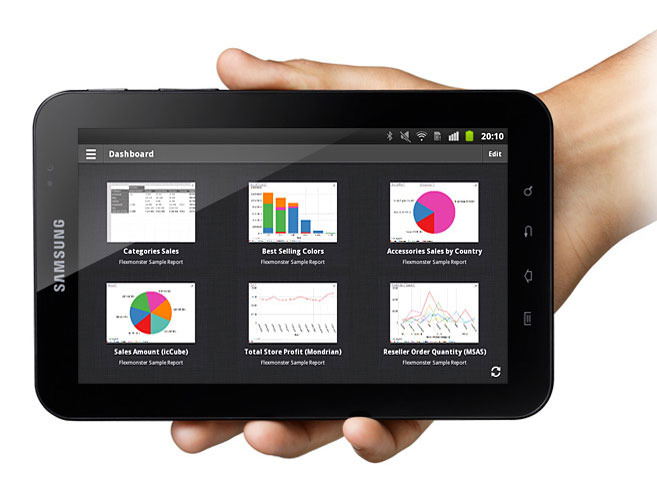
Screenshot of Pivot Component supports the printing of the Pivot view. Additionally users can export the reports into a variety of formats.Screenshot of Pivot Table Component helps you to create interactive pivot tables and charts reports for web and Flex applications. Pivot Component will provide your customers with an extremely intuitive end-user experience while creating and analyzing reports.Screenshot of Pivot Charts provide an alternative, interactive way to visualize data.Screenshot of The component will connect to any database: MS SQL, MySQL, Oracle, PostgreSQL - using simple script generating CSV output to enable real-time business analysis. Pivot Component is full browser-side component, thus you can use any desired server-side to generate CSV data.Screenshot of Pivot Table Component can connect to OLAP cubes via XMLA protocol. XMLA is XML for Analysis - an industry standard for data access in analytical systems, such as OLAP and Data Mining.Screenshot of Start mobile business reporting with the Flexmonster mobile application. It can be downloaded to your tablets from Google Play or Apple App Store.

Progress Kendo UI Screenshots

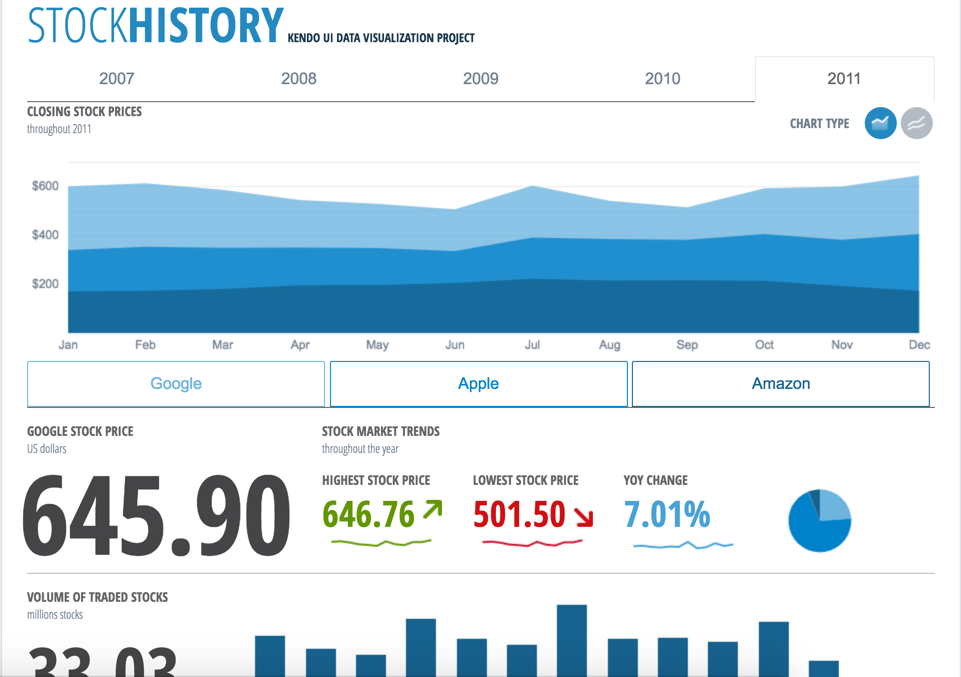
Screenshot of Our extensive library provides you with the tools you need to easily control your app and display data in whatever format you need. Our advanced Sass Themebuilder lets you take any of our stock library themes and modify it to precisely match your brand requirements. Enhance your customer’s user experience with seamlessly integrated Kendo UI components.Screenshot of Easily create eye-catching and full-featured user interfaces by selecting from our rich library of components. Use advanced features like our grid component to create tables that display data in a wide range of formats from both local and remote sources.  We support popular frameworks like jQuery, Angular, React, Vue, and others so you can integrate our Kendo UI components into whatever environment you choose.Screenshot of Create rich dashboard applications by taking advantage of the breadth of UI widgets available within the Kendo UI toolset. Easily wire up the UI widgets to any existing RESTful API and backend to display any and all kind of data that you need to surface in your applications.Screenshot of Combine existing HTML elements and styling alongside with the Kendo UI components to create the exact kind of user interface that your users are requesting. The Kendo UI widgets can be dropped in to any existing application and be added widget-by-widget to ensure that adding the rich Kendo UI components can be done in a timely manner without disrupting existing app dev workflows.