Flexmonster Pivot Table & Charts Component vs. Tableau Cloud

Overview
ProductRatingMost Used ByProduct SummaryStarting Price
Flexmonster Pivot Table & Charts Component
Score 10.0 out of 10
Mid-Size Companies (51-1,000 employees)
Flexmonster Pivot Table & Charts is a component for interactive pivot reports that can be inserted into a web page or a web application. It’s a JavaScript tool that enables a user to visualize their business data. This solution supports Microsoft Analysis Services OLAP cubes, Mondrian, icCube, JSON, SQL (MS SQL, MySQL and others) databases or static JSON or CSV files. According to the vendor, this solution allows users to work extremely quickly with really large data…
$0
Annual SaaS Subscription
Tableau Cloud
Score 8.0 out of 10
N/A
Tableau Cloud (formerly Tableau Online) is a self-service analytics platform that is fully hosted in the cloud. Tableau Cloud enables users to publish dashboards and invite colleagues to explore hidden opportunities with interactive visualizations and accurate data, from any browser or mobile device.
$15
per month per user
Pricing
Flexmonster Pivot Table & Charts ComponentTableau Cloud
Editions & Modules
Pivot Table for SQL/CSV/JSON Unlimited
$0
Annual SaaS Subscription
Pivot Table for Pentaho Mondrian
$0
Annual SaaS Subscription
Pivot Table for MS Analysis Services
$0
Annual SaaS Subscription
Pivot Table for SQL/CSV/JSON Basic
$299
Annual subscription
Pivot Table for Pentaho Mondrian
$799
Annual subscription
Pivot Table for SQL/CSV/JSON Unlimited
$799
Annual subscription
Pivot Table for MS Analysis Services
$799
Annual subscription
Tableau Viewer
$15
per month billed annually per user
Enterprise Viewer
$35
per month billed annually per user
Tableau Explorer
$42
per month billed annually per user
Enterprise Explorer
$70
per month billed annually per user
Tableau Creator
$75
per month billed annually per user
Enterprise Creator
$115
per month billed annually per user
Tableau+
Contact Sales
Offerings
Pricing Offerings
Flexmonster Pivot Table & Charts ComponentTableau Cloud
Free Trial
YesNo
Free/Freemium Version
NoNo
Premium Consulting/Integration Services
YesNo
Entry-level Setup FeeNo setup feeNo setup fee
Additional Details
More Pricing Information
Community Pulse
Flexmonster Pivot Table & Charts ComponentTableau Cloud
Features
Flexmonster Pivot Table & Charts ComponentTableau Cloud
BI Standard Reporting
Comparison of BI Standard Reporting features of Product A and Product B
Flexmonster Pivot Table & Charts Component
10.0
1 Ratings
20% above category average
Tableau Cloud
7.6
74 Ratings
7% below category average
Report Formatting Templates10.01 Ratings6.563 Ratings
Pixel Perfect reports00 Ratings7.756 Ratings
Customizable dashboards00 Ratings8.774 Ratings
Ad-hoc Reporting
Comparison of Ad-hoc Reporting features of Product A and Product B
Flexmonster Pivot Table & Charts Component
9.5
1 Ratings
17% above category average
Tableau Cloud
7.6
74 Ratings
6% below category average
Formatting capabilities9.01 Ratings7.271 Ratings
Report sharing and collaboration10.01 Ratings8.672 Ratings
Drill-down analysis00 Ratings8.674 Ratings
Integration with R or other statistical packages00 Ratings6.247 Ratings
Report Output and Scheduling
Comparison of Report Output and Scheduling features of Product A and Product B
Flexmonster Pivot Table & Charts Component
10.0
1 Ratings
19% above category average
Tableau Cloud
7.8
72 Ratings
5% below category average
Publish to PDF10.01 Ratings7.567 Ratings
Publish to Web00 Ratings8.568 Ratings
Report Versioning00 Ratings7.655 Ratings
Report Delivery Scheduling00 Ratings8.559 Ratings
Delivery to Remote Servers00 Ratings6.538 Ratings
Mobile Capabilities
Comparison of Mobile Capabilities features of Product A and Product B
Flexmonster Pivot Table & Charts Component
10.0
1 Ratings
25% above category average
Tableau Cloud
7.5
59 Ratings
3% below category average
Responsive Design for Web Access10.01 Ratings7.457 Ratings
Mobile Application00 Ratings7.744 Ratings
Dashboard / Report / Visualization Interactivity on Mobile00 Ratings7.851 Ratings
Data Discovery and Visualization
Comparison of Data Discovery and Visualization features of Product A and Product B
Flexmonster Pivot Table & Charts Component
-
Ratings
Tableau Cloud
7.8
70 Ratings
2% below category average
Pre-built visualization formats (heatmaps, scatter plots etc.)00 Ratings8.267 Ratings
Location Analytics / Geographic Visualization00 Ratings8.266 Ratings
Predictive Analytics00 Ratings7.757 Ratings
Pattern Recognition and Data Mining00 Ratings7.26 Ratings
Access Control and Security
Comparison of Access Control and Security features of Product A and Product B
Flexmonster Pivot Table & Charts Component
-
Ratings
Tableau Cloud
8.4
69 Ratings
1% below category average
Multi-User Support (named login)00 Ratings8.363 Ratings
Role-Based Security Model00 Ratings7.756 Ratings
Multiple Access Permission Levels (Create, Read, Delete)00 Ratings8.559 Ratings
Report-Level Access Control00 Ratings8.77 Ratings
Single Sign-On (SSO)00 Ratings8.654 Ratings
Application Program Interfaces (APIs) / Embedding
Comparison of Application Program Interfaces (APIs) / Embedding features of Product A and Product B
Flexmonster Pivot Table & Charts Component
-
Ratings
Tableau Cloud
6.9
41 Ratings
11% below category average
REST API00 Ratings7.836 Ratings
Javascript API00 Ratings7.234 Ratings
iFrames00 Ratings6.833 Ratings
Java API00 Ratings5.629 Ratings
Themeable User Interface (UI)00 Ratings6.735 Ratings
Customizable Platform (Open Source)00 Ratings7.232 Ratings
Best Alternatives
Flexmonster Pivot Table & Charts ComponentTableau Cloud
Small Businesses
Yellowfin
Yellowfin
Score 8.7 out of 10
Yellowfin
Yellowfin
Score 8.7 out of 10
Medium-sized Companies
Reveal
Reveal
Score 10.0 out of 10
Reveal
Reveal
Score 10.0 out of 10
Enterprises
Kyvos Semantic Layer
Score 9.5 out of 10
Kyvos Semantic Layer
Score 9.5 out of 10
All AlternativesView all alternativesView all alternatives
User Ratings
Flexmonster Pivot Table & Charts ComponentTableau Cloud
Likelihood to Recommend
10.0
(1 ratings)
9.3
(75 ratings)
Usability
9.0
(1 ratings)
8.8
(28 ratings)
Support Rating
10.0
(1 ratings)
8.7
(20 ratings)
User Testimonials
Flexmonster Pivot Table & Charts ComponentTableau Cloud
Likelihood to Recommend
Flexmonster
Fantastic product to embed in any SaaS solution for reporting and data exports. Excellent performance, ability to customize fields and tons of other features out of the box that makes it a well-rounded tool that is easy to use. To top it off their support is amazing for answering technical questions quickly and they provide great examples to learn how to interact with the code. We are very happy with our choice to use Flexmonster!
Read full review
Tableau
If you're using Tableau as the primary BI tool, then Tableau Cloud is well suited to publish and share the results with a wide(r) audience. It is well suited for various degrees of self-service proficiency, from pure consumers of analytical work to more advanced users who can use web editing for smaller or larger adjustments, and even for desktop power users who will publish their work to Tableau Cloud. It has many good ways to organize the content and make it easily accessible via search, favorites, folders, collections ("playlists for your data"), or history ("recents"). It might not be ideally suited if there are many on-prem sources to be used (even though there are options to connect them) or if you have very special requirements regarding custom server setup, which is limited in a shared cloud environment like Tableau Cloud.
Read full review
Pros
Flexmonster
No answers on this topic
Tableau
  • Tableau Online is completely cloud based and that's why the reports and dashboards are accessible even on the go. One doesn't always need to access the office laptop to access the reports.
  • The visualizations are interactive and one can quickly change the level at which they want to view the information. For example, one person might be more interested in looking at the country level performances rather than client level. This is intuitive and one doesn't need to create multiple reports for the same.
  • The feature to ask questions in plain vanilla English language is great and helpful. For quick adhoc fact checks one can simply type what they are looking for and the Natural Language Programming algorithms under the hood parse the query, interpret it and then fetch the results accordingly in a visual form.
Read full review
Cons
Flexmonster
No answers on this topic
Tableau
  • Can be a steep learning curve for new users
  • Modeling and building algorithms aren't always intuitive and take some testing/retesting to ensure it's working as it should
  • Inability to integrate easily with our HRIS platform. Reports are pulled from HRIS at various intervals and uploaded into Tableau
Read full review
Usability
Flexmonster
Checks all the boxes! Easy to use, great out of the box feature set and fantastic support team
Read full review
Tableau
Based on comments from our clients, I awarded it this grade. Non-technical customers frequently compliment us on the ease with which they can utilize Tableau Online. Usability is rarely a source of contention amongst our customers. Few complaints have come from me as a user of our internal products.
Read full review
Support Rating
Flexmonster
Quick response to questions and feedback, excellent documentation for learning about the product and tons of examples to leverage.
Read full review
Tableau
I have not had any issues that require customer support from Tableau at this time, which speaks well to Tableau. I have taken an online course with Tableau and it was very professional and well done, so based on that I would assume a similar level of quality for their customer service.
Read full review
Alternatives Considered
Flexmonster
No answers on this topic
Tableau
In determining whether to go with Tableau Online versus Alteryx, two important factors stood out in determining our go-to solution. First, while Alteryx is an impressive tool for data cleansing, it did not stack up in terms of data visualization capabilities. Tableau, on the other hand, provided us everything we needed in terms of visualizing our data and analytics. The second factor is cost. Well neither solution would be considered cheap, Tableau was the more cost effective solution for our needs.
Read full review
Return on Investment
Flexmonster
No answers on this topic
Tableau
  • When we release new products, we are now able to quickly see data and toggle between current periods and previous to see performance
  • Generating new reports requires less IT time to build
  • Data can be shared across many different device types
  • We now have integration where our customers can extract data from our software more easily-this was a big ask from our customers
Read full review
ScreenShots

Flexmonster Pivot Table & Charts Component Screenshots

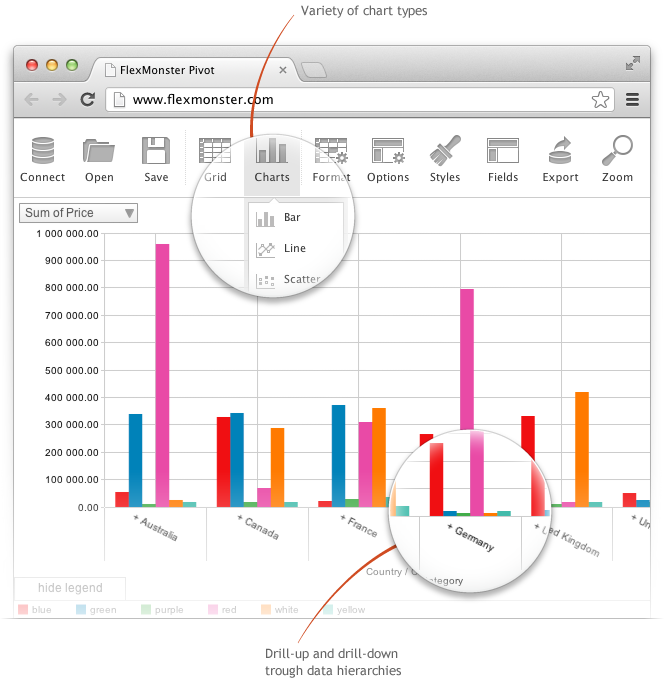
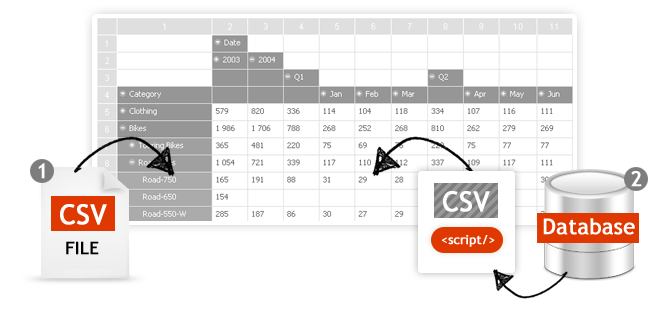
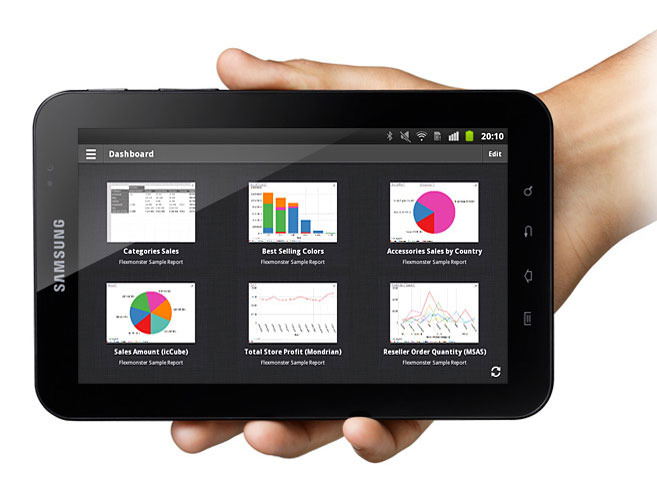
Screenshot of Pivot Component supports the printing of the Pivot view. Additionally users can export the reports into a variety of formats.Screenshot of Pivot Table Component helps you to create interactive pivot tables and charts reports for web and Flex applications. Pivot Component will provide your customers with an extremely intuitive end-user experience while creating and analyzing reports.Screenshot of Pivot Charts provide an alternative, interactive way to visualize data.Screenshot of The component will connect to any database: MS SQL, MySQL, Oracle, PostgreSQL - using simple script generating CSV output to enable real-time business analysis. Pivot Component is full browser-side component, thus you can use any desired server-side to generate CSV data.Screenshot of Pivot Table Component can connect to OLAP cubes via XMLA protocol. XMLA is XML for Analysis - an industry standard for data access in analytical systems, such as OLAP and Data Mining.Screenshot of Start mobile business reporting with the Flexmonster mobile application. It can be downloaded to your tablets from Google Play or Apple App Store.