TrustRadius: an HG Insights company

Forcepoint Secure Web Gateway vs. Radware Bot Manager

Save this comparison

Save this comparison

Add Product

Recommended Comparisons

    Overview
    ProductRatingMost Used ByProduct SummaryStarting Price

    Forcepoint SWG

    Score8 out of 10
    N/AThe Forcepoint ONE Secure Web Gateway (SWG) is one of the three foundational gateways of the Forcepoint ONE all-in-one cloud platform. Forcepoint ONE SWG monitors and controlsany interaction with any website, including blocking access to websites based on category and risk score, blocking download of malware, blocking upload of sensitive data to personal filesharing accounts, detecting shadow IT, and optionally providingRemote Browser Isolation (RBI) with Content Disarm andReconstruction (CDR).N/A

    Radware Bot Manager

    Score10 out of 10
    N/ARadware Bot Manager (formerly ShieldSquare) is a non-intrusive API-based Bot Management solution to detect, eliminate, and manage bot traffic from websites, mobile apps, and APIs in real-time. The solution leverages Intent-based Deep Behavior Analysis, device fingerprinting, and domain-specific detection technologies to identify and eliminate invalid traffic with zero false positives. The vendor states they protect users against automated attacks such as account takeover, application…N/A
    Pricing
    Forcepoint SWGRadware Bot Manager
    Editions & Modules
    No answers on this topic
    No answers on this topic
    Offerings
    Pricing Offerings
    Forcepoint SWGRadware Bot Manager
    Free Trial
    NoYes
    Free/Freemium Version
    NoYes
    Premium Consulting/Integration Services
    YesNo
    Entry-level Setup FeeNo setup feeOptional
    Additional Details——
    More Pricing Information
    Community Pulse
    Forcepoint SWGRadware Bot Manager
    Considered Both Products
    Forcepoint
    No answer on this topic
    Radware
    No answer on this topic
    Key User Insights
    Would buy again
    70%
    Would buy again
    7 Answers
    No answers on this topic
    Delivers good value for the price
    100%
    Delivers good value for the price
    8 Answers
    No answers on this topic
    Happy with the feature set
    100%
    Happy with the feature set
    10 Answers
    No answers on this topic
    Lived up to sales and marketing promises
    86%
    Lived up to sales and marketing promises
    6 Answers
    No answers on this topic
    Implementation went as expected
    78%
    Implementation went as expected
    7 Answers
    No answers on this topic
    Best Alternatives
    Forcepoint SWGRadware Bot Manager
    Small Businesses
    No answers on this topic
    No answers on this topic
    Medium-sized Companies
    UniFi Cloud Gateways
    Score8.3 out of 10
    No answers on this topic
    Enterprises
    Skyhigh Secure Web Gateway
    Score8 out of 10
    No answers on this topic
    All AlternativesView all alternativesView all alternatives
    User Ratings
    Forcepoint SWGRadware Bot Manager
    Likelihood to Recommend
    8.0
    (76 ratings)
    8.0
    (4 ratings)
    Likelihood to Renew
    10.0
    (3 ratings)
    -
    (0 ratings)
    Usability
    10.0
    (3 ratings)
    -
    (0 ratings)
    Support Rating
    9.0
    (1 ratings)
    -
    (0 ratings)
    Implementation Rating
    8.0
    (1 ratings)
    -
    (0 ratings)
    User Testimonials
    Forcepoint SWGRadware Bot Manager
    Likelihood to Recommend
    Forcepoint
    Over the years, [in our experience], the maintenance of the Forcepoint Web Security solution proved to be more cumbersome and troublesome with each version upgrade. In addition, it did not transition well to support the large increase of remote workers. We also experienced weird incompatibilities with the client. We have since replaced this solution with Zscaler Internet Access, a cloud-based secure web gateway solution with a client that behaves as expected, is more flexible, and requires significantly less administration.
    Incentivized
    Read full review
    Radware
    All new upgraded non-human bot detection feature is widely used across all the platforms open for customers and it is a great success. It provides zero access to malicious bots.
    Incentivized
    Read full review
    Pros
    Forcepoint
    • It prevents users from accessing websites that may have recently been created for the purpose of distributing malware.
    • It prevents users from accidentally or intentionally accessing websites that are considered inappropriate for a work environment.
    • It allows us to create different policies for different teams in our organization.
    Incentivized
    Read full review
    Radware
    • ShieldSquare provides an easy to implement way of identifying website users that could be bots.
    • By rating the potential of the user of being a bot, we are able to handle that user in the proper way.
    • False positives are extremely rare with ShieldSquare. Plus, their support staff is also available to analyze traffic to specific content, and they can customize their algorithms when necessary to optimize the performance of their solution to suit our needs.
    Read full review
    Cons
    Forcepoint
    • The user access logs contain a lot of useless information. I understand this is very hard to tackle as I've seen this across any product that logs web activity.
    • I would like to see more customization options of website block pages.
    Incentivized
    Read full review
    Radware
    • It would be nice to allow for more granularity when selecting which bots I'd like to allow through. I contacted support and asked about this and they said this was in the works.
    • If you select to show captchas instead of blocking, I feel their captcha screen could use some improvement on the UI/UX to make it more intuitive for users to know what to do. I contacted support and made them aware of this.
    • Would be nice to see captchas information in the statistics (i.e. how many captchas were presented, from what IP addresses, how many were filled out correctly),
    Incentivized
    Read full review
    Likelihood to Renew
    Forcepoint
    It is very stable, the organisation has "locked in" the product and has no plans to change or try another product. We have already renewed our 2019-2020 licenses. It is user friendly and people catch on easily when they first use it. The only downtime is when we install Microsoft updates! It has excellent reporting which help in determining how the organisation's Internet is used and also during both internal and external IT audits.
    Incentivized
    Read full review
    Radware
    No answers on this topic
    Usability
    Forcepoint
    Despite the intimidating Linux CLI when you use the appliance for troubleshooting, the web security usability compensates as most of the Administration of the system is done there. It is GUI based and has an easy to use UI where one can navigate around rather easily like getting reports, checking alerts, looking the whole setup under deployment to check if all services are running in one place though there are other parts to the system.
    Incentivized
    Read full review
    Radware
    No answers on this topic
    Support Rating
    Forcepoint
    The is a quick first response to acknowledge your issue and the Engineers never take more than two hours to fix an issue and we hardly get issues looking at the fact that the system is pretty stable. There is also a robust Knowledge Base in the site for known problems.
    Incentivized
    Read full review
    Radware
    No answers on this topic
    Implementation Rating
    Forcepoint
    Research known issues with upgrading from the Support Knowledge base, this will enable you avoid road blocks along the way and reduce your dependence on Forcepoint Support
    Incentivized
    Read full review
    Radware
    No answers on this topic
    Alternatives Considered
    Forcepoint
    To be honest, once using Forcepoint for our Web Security, I have not wanted to look anywhere else. The dashboard gives me quick insight of threats, productivity, and bandwidth usage. Again, this is a layer in my security and it fills many holes. I feel safe and I do like I can just let it do its thing
    Incentivized
    Read full review
    Radware
    When I compared these two products, Distil Networks only offered a solution where their bot detection sits in between your website and the visitors, similar to how Cloudflare works. I didn't want this so I decided to go for ShieldSquare that uses connectors. I want my visitors to hit the website directly, not have something sit in between.
    Read full review
    Return on Investment
    Forcepoint
    • Being a non-profit the cost is a bit higher than some competitors so our ROI takes a bit longer to recoup. I would really like to see better non-profit pricing.
    • The ease of doing a report on someone cuts down on the IT man-hours to do website tracking for managers as we can do it from a central point whereas in the past (prior to Forcepoint/Websense) we would have to ghost their machine to look for activity as well as their local servers.
    Incentivized
    Read full review
    Radware
    • Network Bandwidth efficiency
    Incentivized
    Read full review
    ScreenShots

    Radware Bot Manager Screenshots

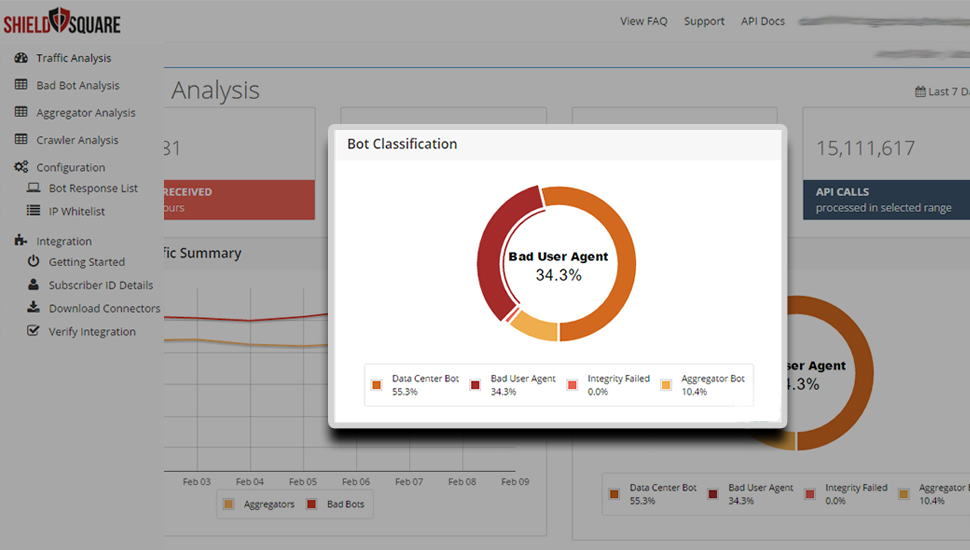
    Screenshot of Classification of BotsScreenshot of Integration - Support DocumentsScreenshot of ShieldSquare Dashboard