Genebra Quality Management vs. Hubdoc

Overview
ProductRatingMost Used ByProduct SummaryStarting Price
Genebra Quality Management
Score 10.0 out of 10
N/A
Genebra is a document management software, entirely developed based on ISO 9001 Standard. According to the vendor, key features and business benefits include: OPTIMIZING INFORMATION MANAGEMENT • Simplifies the creation, approval and document review. • Maintains quality document history. • Alerts you about document changes and deadline expiration dates. • Unifies the Documented Information: eliminates scattered documents and ensures greater control…N/A
Hubdoc
Score 8.9 out of 10
N/A
Hubdoc, a Xero company since the 2018 acquisition, is a bill management software solution, allowing users to capture and sync bills, receipts, bank statements and related documents to the user's preferred accounting software (e.g. Quickbooks, Xero, etc.).
$12
per month
Pricing
Genebra Quality ManagementHubdoc
Editions & Modules
No answers on this topic
Starting Price
$12.00
per month
Offerings
Pricing Offerings
Genebra Quality ManagementHubdoc
Free Trial
YesNo
Free/Freemium Version
NoNo
Premium Consulting/Integration Services
NoNo
Entry-level Setup FeeNo setup feeNo setup fee
Additional DetailsGenebra Quality costs $10 per user, offering a 30-day free trial.
More Pricing Information
Community Pulse
Genebra Quality ManagementHubdoc
Best Alternatives
Genebra Quality ManagementHubdoc
Small Businesses
Square 9 Softworks
Square 9 Softworks
Score 9.7 out of 10
Square 9 Softworks
Square 9 Softworks
Score 9.7 out of 10
Medium-sized Companies
MSB Docs
MSB Docs
Score 9.4 out of 10
MSB Docs
MSB Docs
Score 9.4 out of 10
Enterprises
Tungsten Capture
Tungsten Capture
Score 8.0 out of 10
Tungsten Capture
Tungsten Capture
Score 8.0 out of 10
All AlternativesView all alternativesView all alternatives
User Ratings
Genebra Quality ManagementHubdoc
Likelihood to Recommend
-
(0 ratings)
10.0
(14 ratings)
Usability
-
(0 ratings)
10.0
(1 ratings)
Support Rating
-
(0 ratings)
3.0
(3 ratings)
User Testimonials
Genebra Quality ManagementHubdoc
Likelihood to Recommend
Genebra Quality Management
No answers on this topic
Xero
When I am out purchasing items for my business I can quickly take photos of receipts and upload via the app and not have to worry if I lose or damage a receipt. This is very handy for me. Hubdoc also allows me to get all my invoices, payments and statements to my bookkeeper very easily which saves me money and time. I only use Hubdoc for business purposes which is where I feel it is most suitable. I probably wouldn't use it for personal stuff as I don't track personal that strictly.
Read full review
Pros
Genebra Quality Management
No answers on this topic
Xero
  • Extracts data from documents both from a feed and a scan really quick.
  • Availability of automated feeds directly from the supplier.
  • Integration with accounting software e.g. Xero (now owned by them) and QBO.
  • Ability to auto-archive to many different cloud storage locations such as Google Drive and ShareFile.
Read full review
Cons
Genebra Quality Management
No answers on this topic
Xero
  • Although it is great that they can automatically get bank statements and transactions once linked, these links have been very unreliable historically.
  • Figuring out how to set up the automatic feed is cumbersome. You can land up being inundated with useless transaction data.
  • you have to upload each document separately. The program cannot differentiate/split PDFs.
Read full review
Usability
Genebra Quality Management
No answers on this topic
Xero
I think this is one of the easiest apps to use on both mobile and desktop. Once it was all set up by my bookkeeper all I needed to do was upload things. I recall the set up being quite simple and we've only made a few small changes over the years.
Read full review
Support Rating
Genebra Quality Management
No answers on this topic
Xero
At the time we implemented Hubdoc (more than 2 years ago) it was quite cutting edge and did have strong advances from the competition plus its pricing was definitely more competitive (flat rate vs price per data extraction model). However, currently the competition has caught up and now many of Hubdoc's core features are being built into online accounting software natively.
Read full review
Alternatives Considered
Genebra Quality Management
No answers on this topic
Xero
We did not get far into evaluating other solutions we were looking at because Hubdoc came highly recommended from peers, coupled with Xero and Gusto. The cost for Thompson-Reuters is high. We quickly honed in on Hubdoc due to cost and recommendation and are very glad that we did.
Read full review
Return on Investment
Genebra Quality Management
No answers on this topic
Xero
  • We are processing much faster than expected
  • Clients are getting receipts in faster and allowing us not to stalk them to process their banking
  • It is a file for us besides attaching to the invoice we also have the history of bills/receipts in Hubdoc
Read full review
ScreenShots

Genebra Quality Management Screenshots

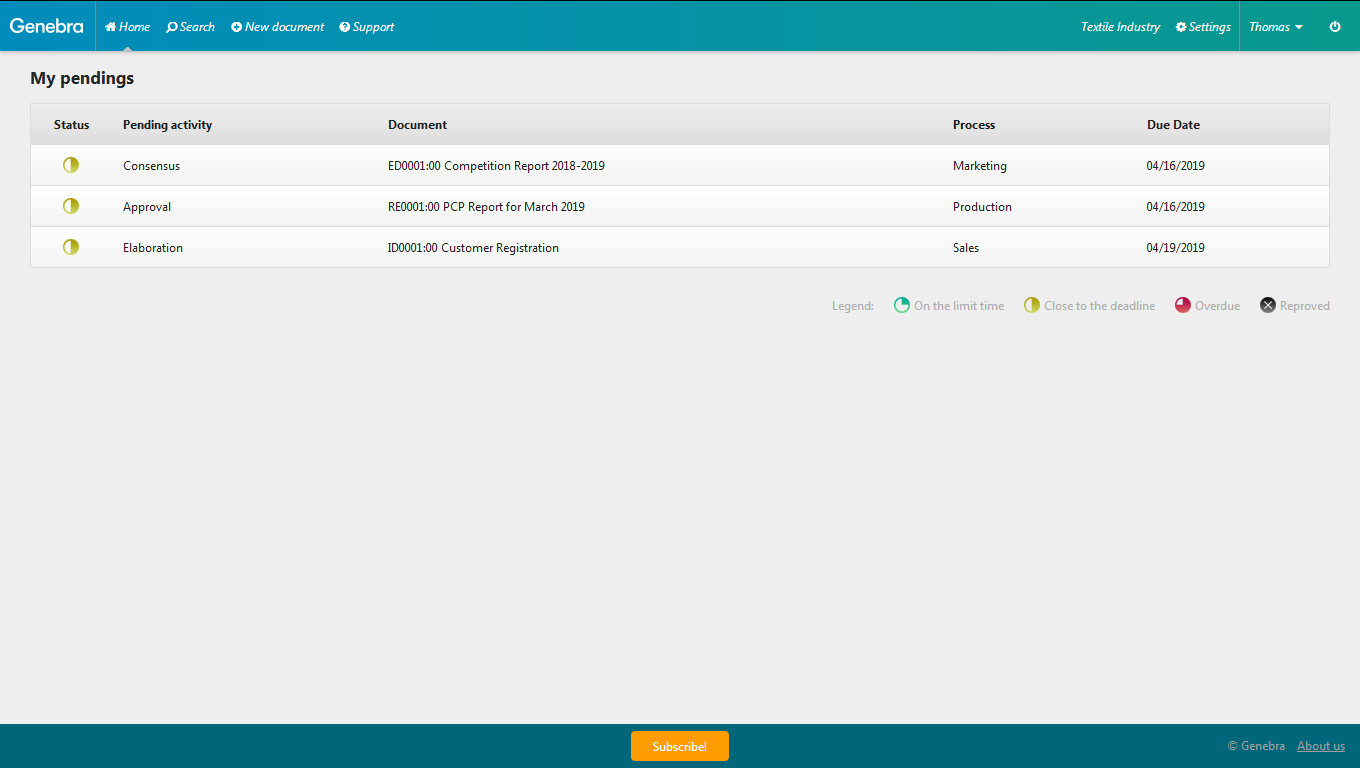
Screenshot of While registering a document, you can set the title, a category, a process, the people in charge of the workflow steps related to Genebra’s input information, as well as the document elaboration due date.Screenshot of You can control Genebra to manage the users that will be able to use the document management system, controlling their information, access permissions, and status.Screenshot of With Genebra, while elaborating a document, you can upload a file as well as add a description about its revision changes. It is possible to attach additional files to be used together with the main document, complementing it. After registering the documents, they are available to be approved or reproved by consensus, being possible to may or may not send it to final approval.Screenshot of When logging into Genebra, it will always remind you about the actions necessary for your document management. On this screen, you will be informed about the document status, stage, name, process, and due date.Screenshot of On the search screen, you see a list of all registered documents, search for a specific document by its title or using the status, category and process filter.