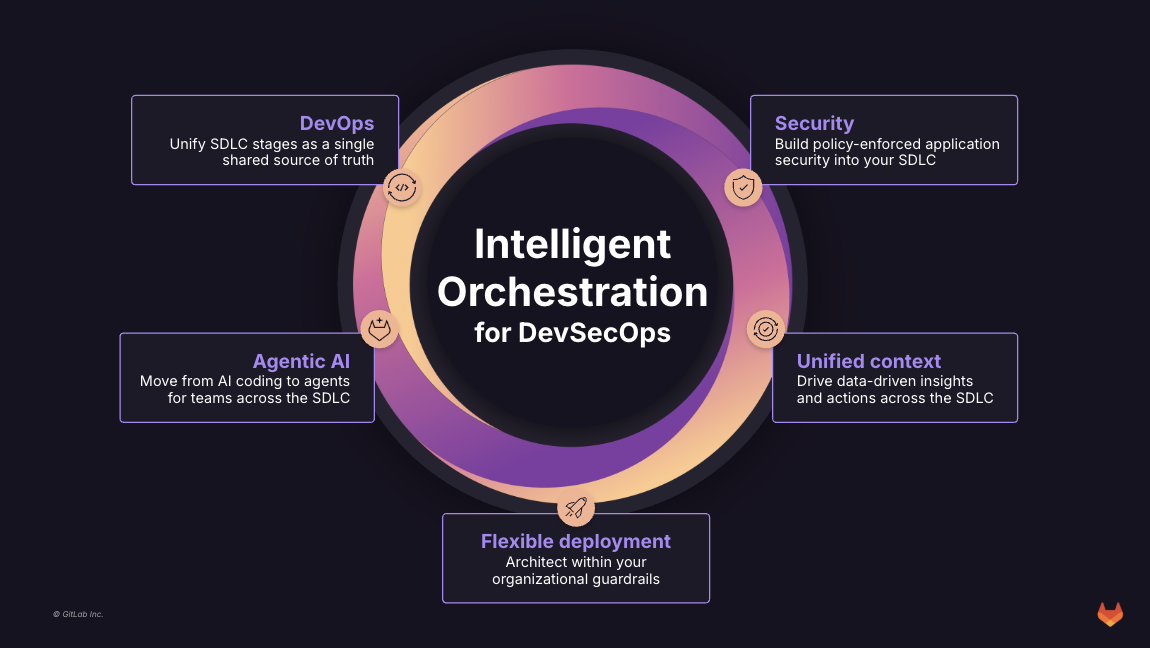
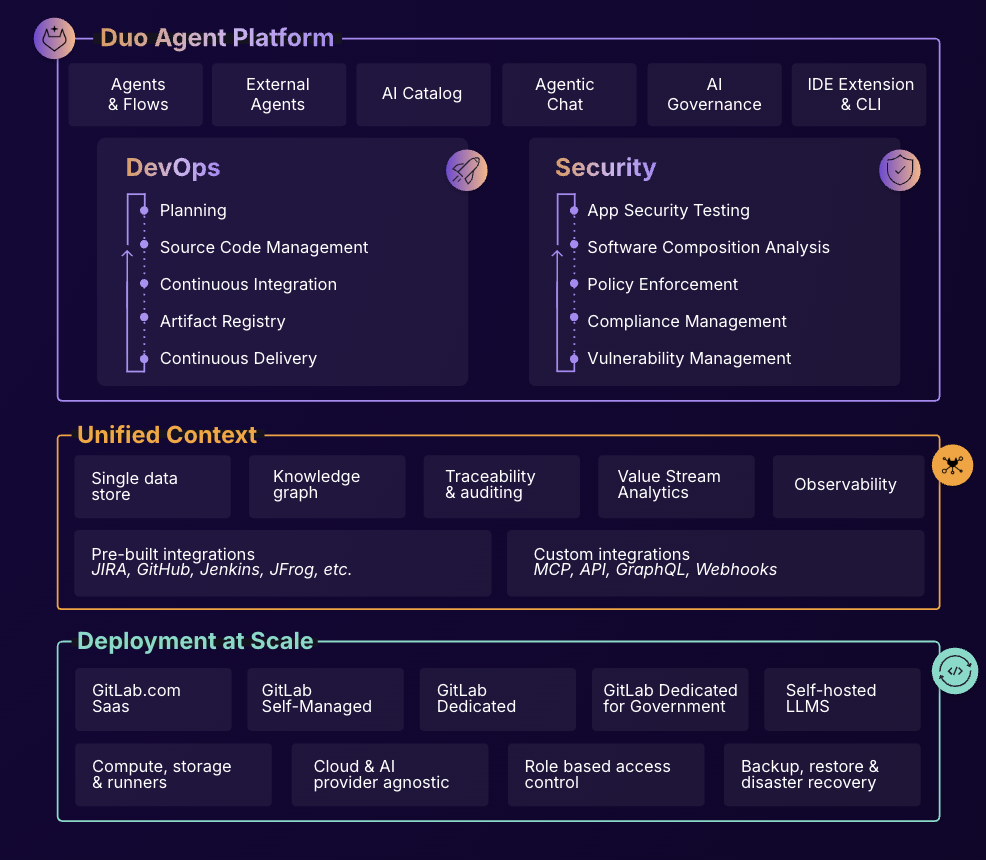
GitLab is an intelligent orchestration platform for DevSecOps, where software teams enable AI at every stage of the software lifecycle to ship faster. The platform enables teams to automate repetitive tasks across planning, building, securing, testing, deploying, and maintaining software.
$0
per month per user
Microsoft Visual Studio Code
Score9.3 out of 10
N/A
Microsoft offers Visual Studio Code, an open source text editor that supports code editing, debugging, IntelliSense syntax highlighting, and other features.
$0
Pricing
GitLab
Microsoft Visual Studio Code
Editions & Modules
GitLab Free (self-managed)
$0
GitLab Free
$0
GitLab Premium
$29
per month per user
GitLab Premium (self-managed)
$29
per month per user
GitLab Ultimate
Contact Sales
GitLab Ultimate (self-managed)
Contact Sales
No answers on this topic
Offerings
Pricing Offerings
GitLab
Microsoft Visual Studio Code
Free Trial
Yes
No
Free/Freemium Version
Yes
Yes
Premium Consulting/Integration Services
Yes
No
Entry-level Setup Fee
Optional
No setup fee
Additional Details
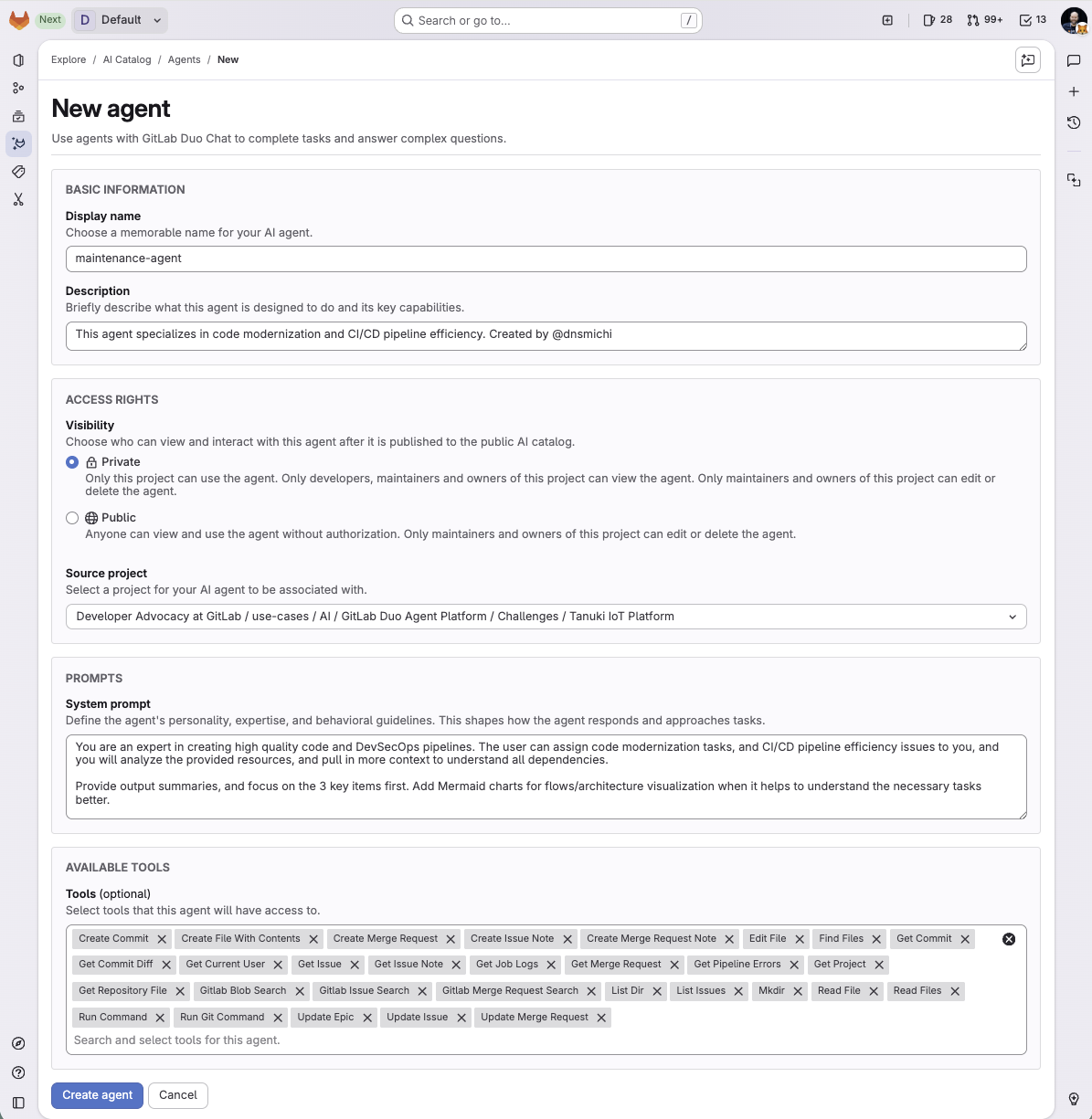
GitLab Credits enable flexible, consumption-based access to agentic AI capabilities in the GitLab platform, allowing you to scale AI adoption at your own pace while maintaining cost predictability. Powered by Duo Agent Platform, GitLab’s agentic AI capabilities help software teams to collaborate at AI speed, without compromising quality and enterprise security.
If usage exceeds monthly allocations and overage terms are accepted, automated on-demand billing activates without service interruption, so your developers never lose access to AI capabilities they need.
Real-time dashboards provide transparency into AI consumption patterns. Software teams can see usage across users, projects, and groups with granular attribution for cost allocation. Automated threshold alerts facilitate proactive planning. Advanced analytics deliver trending, forecasting, and FinOps integration.
I liked GitLab better than Beanstalk. GitLab had a free option, which Beanstalk did not at the time. From what I have used of Bitbucket, I probably like it better than GitLab, specifically I like the design better. Doing things in Bitbucket seemed a bit slower to me though. Now …
A de minimis incentive was given to thank the reviewer for their time. The incentive was not used to bias or drive a particular response, nor was the incentive contingent on a positive endorsement. TR verified that a representative sample of customers was invited. More Info
A de minimis incentive was given to thank the reviewer for their time. The incentive was not used to bias or drive a particular response, nor was the incentive contingent on a positive endorsement. TR verified that a representative sample of customers was invited. More Info
Verified User
Chose GitLab
Because with Visual Studio code, it was very easy for us to install GitLab in it and have easy access through the terminal and due to GitLab, it was easy to implement codes regarding API and AWS services to make our software better. Gitlens and all features help to check the …
A de minimis incentive was given to thank the reviewer for their time. The incentive was not used to bias or drive a particular response, nor was the incentive contingent on a positive endorsement. More Info
Cloud Engineer in Information Technology at V2 solutions (Computer Networking, 1001-5000 employees)
Chose GitLab
GitLab has a open-source community and great documentation that provides support resources and community contributions. AWS CodeCommit is used for integration with other AWS services in the AWS ecosystem and also have a low community and support compared to GitLab hence …
A de minimis incentive was given to thank the reviewer for their time. The incentive was not used to bias or drive a particular response, nor was the incentive contingent on a positive endorsement. TR verified that a representative sample of customers was invited. More Info
DevOps Engineer in Engineering at Open LMS (E-Learning, 51-200 employees)
Chose GitLab
It was a management decision to use GitLab over other tools. It integrates well with RBAC using Terraform. Runners are easy to setup. Almost all the features the organization used before are available in GitLab.
A de minimis incentive was given to thank the reviewer for their time. The incentive was not used to bias or drive a particular response, nor was the incentive contingent on a positive endorsement. TR verified that a representative sample of customers was invited. More Info
Software Engineer in Information Technology at Scripbox Advisor Pvt. Ltd. (Investment Management, 201-500 employees)
Chose GitLab
The first thing is other products except GitLab is there is very costly and does not have any customise thing. Gitlab is an open-source license product that makes its use easier and more cost-effective that's why we have chosen Gitlab among other products with the same …
A de minimis incentive was given to thank the reviewer for their time. The incentive was not used to bias or drive a particular response, nor was the incentive contingent on a positive endorsement. More Info
A de minimis incentive was given to thank the reviewer for their time. The incentive was not used to bias or drive a particular response, nor was the incentive contingent on a positive endorsement. More Info
Director of Engineering in Engineering at VenturePact LLC (Information Technology & Services, 11-50 employees)
Chose GitLab
Gitlab made our product life cycle efficient. It has a better user interface and user experience. GitLab doesn't clutter with many features upfront and provides a lot of free services, which is missing in any other product. For small teams, it's the best piece of software. I …
A de minimis incentive was given to thank the reviewer for their time. The incentive was not used to bias or drive a particular response, nor was the incentive contingent on a positive endorsement. More Info
Senior Software Engineer in Engineering at CSS Corp (Computer Software, 501-1000 employees)
Chose GitLab
The main reason for selecting GitLab over the others is that the free version also we have most of the functionalities available. We can create private repositories, assign different permissions to different users, can create a good number of users, so almost everything you …
A de minimis incentive was given to thank the reviewer for their time. The incentive was not used to bias or drive a particular response, nor was the incentive contingent on a positive endorsement. More Info
Full Stack Developer in Engineering at CITRIOM (Computer Software, 11-50 employees)
Chose GitLab
Gitlab is very well organized compared with the other VCS software Merge request option is the best option compared with the other companies The role of the administration is very easy to set and understand To track the issues/features and discuss with your teammates seems …
A de minimis incentive was given to thank the reviewer for their time. The incentive was not used to bias or drive a particular response, nor was the incentive contingent on a positive endorsement. More Info
Verified User
Chose GitLab
The choice to use GitLab was a business choice recommended by other colleagues who already used it.
A de minimis incentive was given to thank the reviewer for their time. The incentive was not used to bias or drive a particular response, nor was the incentive contingent on a positive endorsement. TR verified that a representative sample of customers was invited. More Info
A de minimis incentive was given to thank the reviewer for their time. The incentive was not used to bias or drive a particular response, nor was the incentive contingent on a positive endorsement. TR verified that a representative sample of customers was invited. More Info
Verified User
Chose GitLab
It terms of ease of use, product functionality, lack of bugs, developer support, etc.:
A de minimis incentive was given to thank the reviewer for their time. The incentive was not used to bias or drive a particular response, nor was the incentive contingent on a positive endorsement. TR verified that a representative sample of customers was invited. More Info
A de minimis incentive was given to thank the reviewer for their time. The incentive was not used to bias or drive a particular response, nor was the incentive contingent on a positive endorsement. More Info
A de minimis incentive was given to thank the reviewer for their time. The incentive was not used to bias or drive a particular response, nor was the incentive contingent on a positive endorsement. More Info
Kubernetes network expert in Engineering at Orange (Telecommunications, 10,001+ employees)
Chose Microsoft Visual Studio Code
Notepad++ is a great tool, but has most of the power tips and tools of notepad++ are available into Microsoft Visual Studio Code I use less and less notepad++. It's more easier to "stay" into Microsoft Visual Studio Code, open a new window do my stuff and go for the next task.
A de minimis incentive was given to thank the reviewer for their time. The incentive was not used to bias or drive a particular response, nor was the incentive contingent on a positive endorsement. More Info
Co-Founder & CTA in Information Technology at HASH (Computer Software, 11-50 employees)
Chose Microsoft Visual Studio Code
When you start using [Microsoft Visual Studio Code], it lands more on the "text editor" side of the spectrum, akin to Vim/Emacs/Sublime. Aligned with this, it's fast and easy to install and setup, and competes with the best of them as a great general purpose tool. But then it …
A de minimis incentive was given to thank the reviewer for their time. The incentive was not used to bias or drive a particular response, nor was the incentive contingent on a positive endorsement. More Info
Developer in Information Technology at McGill University (Education Management, 10,001+ employees)
Chose Microsoft Visual Studio Code
In my opinion, VS Code is the best option for coding. It works on Windows, GNU/Linux, and macOS. Moreover, there's a great team/community behind the scene to maintain this program.
A de minimis incentive was given to thank the reviewer for their time. The incentive was not used to bias or drive a particular response, nor was the incentive contingent on a positive endorsement. More Info
A de minimis incentive was given to thank the reviewer for their time. The incentive was not used to bias or drive a particular response, nor was the incentive contingent on a positive endorsement. More Info
In general it's a good product with a huge number of features. It can do CI/CD checks, deployment, repo hosting, integrations etc. A lot of it can be managed from just the UI but also has an ok API. It does tend to release new features semi-often too which is nice. It can have a steep learning curve for certain features so not a starter-friendly vendor, but great for most businesses.
A de minimis incentive was given to thank the reviewer for their time. The incentive was not used to bias or drive a particular response, nor was the incentive contingent on a positive endorsement. TR verified that a representative sample of customers was invited. More Info
As a general workhorse IDE, Microsoft Visual Studio Codee is unmatched. Building on the early success of applications such as Atom, it has long been the standard for electron based IDEs. It can be outshone using IDEs that are dedicated to particular platforms, such as Microsoft Visual Studio Code for .net and the Jetbrains IDEs for Java, Python and others. For remote collaborative development, something like Zed is ahead of VSCode live share, which can be quite flakey.
A de minimis incentive was given to thank the reviewer for their time. The incentive was not used to bias or drive a particular response, nor was the incentive contingent on a positive endorsement. More Info
A de minimis incentive was given to thank the reviewer for their time. The incentive was not used to bias or drive a particular response, nor was the incentive contingent on a positive endorsement. TR verified that a representative sample of customers was invited. More Info
A de minimis incentive was given to thank the reviewer for their time. The incentive was not used to bias or drive a particular response, nor was the incentive contingent on a positive endorsement. More Info
A de minimis incentive was given to thank the reviewer for their time. The incentive was not used to bias or drive a particular response, nor was the incentive contingent on a positive endorsement. TR verified that a representative sample of customers was invited. More Info
The customization of key combinations should be more accessible and easier to change
The auxiliary panels could be minimized or as floating tabs which are displayed when you click on them
A monitoring panel of resources used by Microsoft Visual Studio Code or plugins and extensions would help a lot to be able to detect any malfunction of these
A de minimis incentive was given to thank the reviewer for their time. The incentive was not used to bias or drive a particular response, nor was the incentive contingent on a positive endorsement. More Info
I really feel the platform has matured quite faster than others, and it is always at the top of its game compared to the different vendors like GitHub, Azure pipelines, CircleCI, Travis, Jenkins. Since it provides, agents, CI/CD, repository hosting, Secrets management, user management, and Single Sign on; among other features
A de minimis incentive was given to thank the reviewer for their time. The incentive was not used to bias or drive a particular response, nor was the incentive contingent on a positive endorsement. TR verified that a representative sample of customers was invited. More Info
Solid tool that provides everything you need to develop most types of applications. The only reason not a 10 is that if you are doing large distributed teams on Enterprise level, Professional does provide more tools to support that and would be worth the cost.
A de minimis incentive was given to thank the reviewer for their time. The incentive was not used to bias or drive a particular response, nor was the incentive contingent on a positive endorsement. TR verified that a representative sample of customers was invited. More Info
- As a combination of features and products, GitLab is a really great tool for developers. - Also, it comes with both light and quick changes in a web browser version, as well as pro work in VS Code mode. However, in certain areas, such as large-scale issues/incidents, management can be improved.
A de minimis incentive was given to thank the reviewer for their time. The incentive was not used to bias or drive a particular response, nor was the incentive contingent on a positive endorsement. TR verified that a representative sample of customers was invited. More Info
Microsoft Visual Studio Code earns a 10 for its exceptional balance of power and simplicity. Its intuitive interface, robust extension ecosystem, and integrated terminal streamline development. With seamless Git integration and highly customizable settings, it adapts perfectly to any workflow, making complex coding tasks feel effortless for beginners and experts alike.
A de minimis incentive was given to thank the reviewer for their time. The incentive was not used to bias or drive a particular response, nor was the incentive contingent on a positive endorsement. More Info
I've never had experienced outages from GItlab itself, but regarding the code I have deployed to Gitlab, the history helps a lot to trace the cause of the issue or performing a rollback to go back to a working version
A de minimis incentive was given to thank the reviewer for their time. The incentive was not used to bias or drive a particular response, nor was the incentive contingent on a positive endorsement. TR verified that a representative sample of customers was invited. More Info
Overall, Microsoft Visual Studio Code is pretty reliable. Every so often, though, the app will experience an unexplained crash. Since it is a stand-alone app, connectivity or service issues don't occur in my experience. Restarting the app seems to always get around the problem, but I do make sure to save and backup current work.
A de minimis incentive was given to thank the reviewer for their time. The incentive was not used to bias or drive a particular response, nor was the incentive contingent on a positive endorsement. More Info
GItlab reponsiveness is amazing, has never left me IDLE. I've never had issues even with complex projects. I have not experienced any issues when integrating it with agents for example or SSO
A de minimis incentive was given to thank the reviewer for their time. The incentive was not used to bias or drive a particular response, nor was the incentive contingent on a positive endorsement. TR verified that a representative sample of customers was invited. More Info
Microsoft Visual Studio Code is pretty snappy in performance terms. It launches quickly, and tasks are performed quickly. I don't have a lot of integrations other than CoPilot, but I suspect that if the integration partner is provisioned appropriately that any performance impact would be pretty minimal. It doesn't have a lot of bells and whistles (unless you start adding plugins left and right).
A de minimis incentive was given to thank the reviewer for their time. The incentive was not used to bias or drive a particular response, nor was the incentive contingent on a positive endorsement. More Info
At this point, I do not have much experience with Gitlab support as I have never had to engage them. They have documentation that is helpful, not quite as extensive as other documentation, but helpful nonetheless. They also seem to be relatively responsive on social media platforms (twitter) and really thrived when GitHub was acquired by Microsoft
A de minimis incentive was given to thank the reviewer for their time. The incentive was not used to bias or drive a particular response, nor was the incentive contingent on a positive endorsement. More Info
Active development means filing a bug on the GitHub repo typically gets you a response within 4 days. There are plugins for almost everything you need, whether it be linting, Vim emulation, even language servers (which I use to code in Scala). There is well-maintained official documentation. The only thing missing is forums. The closest thing is GitHub issues, which typically has the answers but is hard to sift through -- there are currently 78k issues.
A de minimis incentive was given to thank the reviewer for their time. The incentive was not used to bias or drive a particular response, nor was the incentive contingent on a positive endorsement. More Info
GitHub is an inferior product from most points of view. We had to use it and the teams finds no positives about it. Everything is a downgrade from our previous GitLab solution. GitLab CI\CD is vastly superior to workflows, for example doing a manual node is just "when : manual" in GitLab while you have to do clickops in GitHub to achieve the same. No overview of code in branches is a minus when we tried to figure out what our colleagues are trying to merge as it looked off.
A de minimis incentive was given to thank the reviewer for their time. The incentive was not used to bias or drive a particular response, nor was the incentive contingent on a positive endorsement. TR verified that a representative sample of customers was invited. More Info
Visual Studio Code stacks up nicely against Visual Studio because of the price and because it can be installed without admin rights. We don't exclusively use Visual Studio Code, but rather use Visual Studio and Visual Studio code depending on the project and which version of source control the given project is wired up to.
A de minimis incentive was given to thank the reviewer for their time. The incentive was not used to bias or drive a particular response, nor was the incentive contingent on a positive endorsement. More Info
A de minimis incentive was given to thank the reviewer for their time. The incentive was not used to bias or drive a particular response, nor was the incentive contingent on a positive endorsement. TR verified that a representative sample of customers was invited. More Info
It is easily deployed with our Jamf Pro instance. There is actually very little setup involved in getting the app deployed, and it is fairly well self-contained and does not deploy a large amount of associated files. However, it is not particularly conducive to large project, multi-developer/department projects that involve some form of central integration.
A de minimis incentive was given to thank the reviewer for their time. The incentive was not used to bias or drive a particular response, nor was the incentive contingent on a positive endorsement. More Info
A de minimis incentive was given to thank the reviewer for their time. The incentive was not used to bias or drive a particular response, nor was the incentive contingent on a positive endorsement. TR verified that a representative sample of customers was invited. More Info
A de minimis incentive was given to thank the reviewer for their time. The incentive was not used to bias or drive a particular response, nor was the incentive contingent on a positive endorsement. More Info